Tech Support
 Documentation
 Login
 Contact Us



Go straight to an AI summary of this blog post instead 


Key Takeaways
- jQuery UI has been in maintenance-only mode since October 2021, and only the newest minor gets fixes.
- jQuery UI 1.10.4 contains three known XSS flaws, all of them fixed only in 1.13.0.
- jQuery below 3.5.0 carries a CISA-listed exploited XSS flaw, and a 2014 jQuery UI complicates that upgrade.
- Realistic paths are upgrading to 1.14.x, replacing the widgets, or buying extended support.
Plenty of companies that built web applications between 2008 and 2018 still have jQuery UI in there somewhere. The datepicker on an expense form. The modal dialog in an admin panel. The autocomplete in an internal search box. Those widgets still work, which is exactly why nobody has touched them in years. The problem is that jQuery UI end of life arrived quietly while those apps kept running, and for older releases, upstream security fixes are no longer backported.
This post covers where jQuery UI support actually stands, which CVEs affect the versions still in production, why its dependency on jQuery deserves more attention than the library itself, and what your options look like from here.
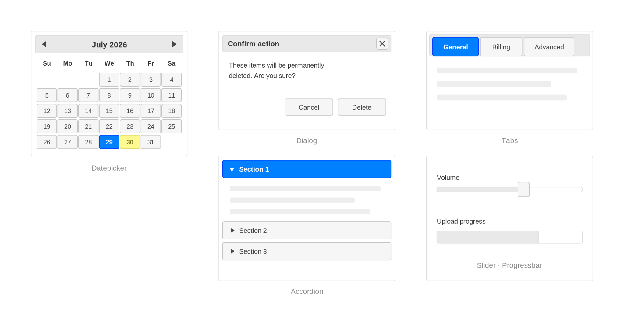
Figure 1: The widgets you’ll recognize.
Is jQuery UI Actually End of Life?
For every release line except the newest, yes. In October 2021 the jQuery maintainers moved jQuery UI to maintenance-only status, announcing 1.13.0 as the project’s final planned release. Plans shifted a little and releases have continued since, but only for security, compatibility and regression work, and only on the newest minor.
There is no published EOL calendar for jQuery UI, so the dates below come from that newest-minor-only policy rather than from announced end-of-life notices.
| Branch | Status | Notes |
|---|---|---|
| 1.14.x | Maintenance, receives fixes | Latest is 1.14.2, released January 2026. No Internet Explorer or Edge Legacy support. |
| 1.13.x | Unsupported since August 2024 | Support ended when 1.14.0 shipped on August 5, 2024. Last release was 1.13.3 in April 2024. |
| 1.12.x | Unsupported since October 2021 | 1.12.1 was the current release from September 2016 until 1.13.0 arrived. |
| 1.11.x | Unsupported since July 2016 | Support ended when 1.12.0 shipped. Last release was 1.11.4 in March 2015. |
| 1.10.x and earlier | Unsupported since June 2014 | 1.10.4 shipped in January 2014 and was superseded by 1.11.0 that June. |
The bottom rows are where this gets uncomfortable. 1.12.1 was the current release for five years and is the version plenty of teams froze on, but a lot of applications never got that far. 1.10.4 shipped in January 2014 and stopped receiving fixes the same year, so anything still running it has gone more than a decade without an upstream security patch. If your app was built before 2014 and nobody has deliberately upgraded the frontend, that is the first thing worth checking.
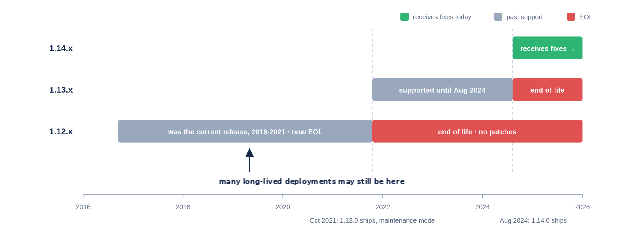
Figure 2: The support gap across release lines.
What jQuery UI EOL Means for Your Applications
An abandoned UI library fails differently from an abandoned server runtime. The vulnerable code runs in your users’ browsers, on pages they interact with every day, and the jQuery UI vulnerabilities discussed below are all cross-site scripting rather than anything server-side.
The CVEs Already on the Books
Four XSS vulnerabilities were fixed in the 1.13 line. Three of them reach all the way back through 1.10.4. The fourth only touches 1.12.0 and newer, because the widget it targets did not exist before that.
CVE-2021-41182 and CVE-2021-41183 allow script injection through the datepicker’s altField option and its *Text options respectively. CVE-2021-41184 does the same through the of option of the .position() utility, which widgets like tooltip and autocomplete use under the hood. All three were fixed in 1.13.0, so a 1.10.4 deployment contains every one of them. The fourth, CVE-2022-31160, is an XSS triggered by refreshing a checkboxradio widget with an HTML-like label, and it was fixed in 1.13.2. That widget arrived in 1.12.0, so the vulnerable code path does not exist in 1.10.4 or 1.11.x. Worth knowing before your next scan report lands, though, because the published advisory marks everything below 1.13.2 as affected without a lower bound, so a scanner will flag it against 1.10.4 anyway.
The timing is worth a look. Three of the four were fixed in 1.13.0 itself, the release that shipped alongside the maintenance-mode announcement, with their advisories published a few weeks later. The fourth landed nine months into maintenance mode. Vulnerabilities did not stop showing up when active development stopped. What changed is how far back the fixes reach.
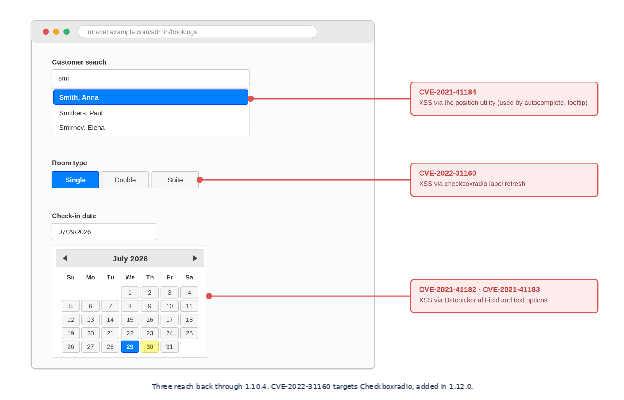
Figure 3: Where the CVEs live in the interface.
What Never Gets Backported
The maintenance policy only covers the newest minor. When the next flaw in datepicker or dialog surfaces, it gets evaluated against 1.14.x, patched there if it warrants a patch, and left alone everywhere else.
The advisory will probably tell you your branch is affected, since jQuery UI advisories name affected ranges like < 1.13.0 and < 1.13.2. What will not happen is a backport. For teams on frozen versions, any future advisory that reaches their branch describes a hole nobody upstream is going to close.
Where Compliance Frameworks Bite
The audit logic is the same for any unmaintained component, but it lands differently depending on which framework governs you. PCI DSS 4.x requires patches for critical vulnerabilities within one month of release, with everything else on risk-based timelines you define, and neither clock is easy to satisfy through patching when no supported fix exists. If your SOC 2 controls include vulnerability management, an unsupported component makes it harder to show that identified risks are genuinely being handled once no upstream fix is available, which is the point at which auditors start asking what your vulnerability management process actually does. HIPAA’s Security Rule requires regulated entities to identify risks to ePHI and reduce them to a reasonable and appropriate level, so known, unfixable XSS in a patient-facing portal becomes part of that analysis whether you want it there or not.
Federal work has moved recently, and the old shorthand is out of date. CISA revoked BOD 22-01 in June 2026 and replaced it with BOD 26-04, which tiers remediation deadlines for federal civilian agencies by asset exposure, KEV status, exploit automation and technical impact, with the worst cases due in as little as three days. FedRAMP is aligning with the same risk-based approach, and its Vulnerability Detection and Response rules become mandatory for cloud service providers on December 7, 2026, replacing the flat 30-day high-severity clock with risk-based evaluation. Product makers get their own version of this under the EU’s Cyber Resilience Act, where reporting obligations for actively exploited vulnerabilities take effect on September 11, 2026, with the full vulnerability-handling requirements following in December 2027.
None of these frameworks turns “legacy jQuery detected” into an automatic finding, since scope, exposure and compensating controls all matter. But scanners flag legacy frontend stacks fast, and under any of these regimes that flag becomes work you have to justify.
How EOL jQuery UI Keeps Old jQuery in Place
jQuery UI’s dependency tree is about as simple as it gets. In the current npm package, jQuery is the only declared runtime dependency, pinned as jquery >=1.12.0 <5.0.0. Older jQuery UI code did carry a component-level dependency on the jQuery Mousewheel plugin inside the spinner widget, which 1.14.2 removed in January 2026, but that was never a second declared dependency. Either way, this is not a component buried inside a runtime binary. jQuery loads in its own script tag, usually the line above jQuery UI’s, and most teams can name their jQuery version faster than their jQuery UI version. The risk here is not hidden. It is coupled.
Start with what is at stake in that visible dependency. CVE-2020-11023, an XSS affecting every jQuery version from 1.0.3 through 3.4.1, entered CISA’s Known Exploited Vulnerabilities catalog in January 2025 after evidence of exploitation in the wild, with a federal remediation deadline of February 13, 2025. Its sibling CVE-2020-11022 covers the same DOM manipulation family, and CVE-2019-11358 adds prototype pollution below 3.4.0. The prototype pollution was fixed in 3.4.0 and both XSS flaws in 3.5.0, so everything here has been patched upstream since 2020.
So why are stacks still running jQuery 1.x or 2.x six years later? For some of them, jQuery UI is part of what makes the move awkward. jQuery UI 1.10.4 shipped in January 2014, more than two years before jQuery 3.0 existed, and the project later described the main focus of 1.13.0 as “improving compatibility with recent jQuery versions”. A release that old cannot have been tested against a jQuery that did not exist yet, so upgrading jQuery underneath a frozen 1.10 deployment is a compatibility exercise rather than a version bump. The jQuery upgrade waits on the jQuery UI upgrade, which waits on a QA window that never quite arrives. An EOL widget library does not hide the jQuery risk. It can help pin it in place.
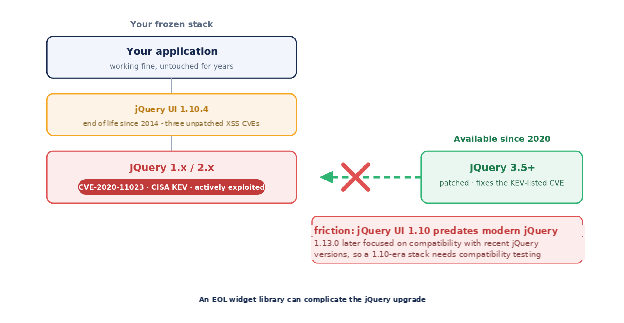
Figure 4: How an EOL widget library can complicate the jQuery upgrade.
Extended support is one way out of that deadlock without forcing either upgrade first, and TuxCare already delivers security patches for selected EOL jQuery releases from 1.8.2 through 3.4.1, so the jQuery layer stays patched exactly where it sits.
Your Options After jQuery UI EOL
Which path fits depends on how much frontend work you can absorb right now. If you need to stay patched without touching a working interface, extended support for the jQuery layer buys the time. If you can schedule a jQuery migration and a real QA pass, upgrading to 1.14.x is the cleanest destination. And if the frontend is due for a rebuild anyway, pulling jQuery UI out as part of that project beats doing the work twice.
Buy Time With Extended Support
TuxCare’s Endless Lifecycle Support for EOL jQuery releases keeps the version you already run patched, and there is a matching ELS package for jQuery UI 1.10.4. Fixes are backported to that release, tested against existing behavior, signed, SLA-backed and delivered through npm, so picking them up is a dependency configuration change rather than a framework migration. TuxCare also covers selected EOL jQuery core releases, so a team on jQuery UI 1.10.4 with a covered jQuery version can address both layers without a framework migration on either side. The public support matrix lists specific releases rather than whole branches, and 1.10.4 is the jQuery UI release currently documented, so check yours against it before planning around it.
TuxCare does this as an OpenJS Foundation Gold member and a strategic partner in the Ecosystem Sustainability Program, the non-exclusive program the Foundation uses to connect its projects with commercial support for versions it no longer maintains. You can also check live vulnerabilities and fixes in the TuxCare CVE Tracker.
The point of extended support is not to keep you on an old release forever. It removes the deadline pressure so the eventual upgrade happens on your schedule and gets done properly.
Upgrade to 1.14.x
Staying on the supported minor is the cleanest position, though for a 1.10-era app the road there is a good deal longer than the version number suggests. 1.14 dropped support for jQuery 1.7 through 1.11, 2.0 through 2.1, and 3.0 through 3.5, which in practice means everything except the latest release in each major jQuery line.
That produces a trap worth naming. jQuery UI 1.14.x is still tested against jQuery 1.12.4 and 2.2.4, so a deployment already on one of those does not need a jQuery upgrade to move to 1.14. It also gains nothing security-wise, because both of those releases sit below 3.5.0 and still carry the KEV-listed CVE. Landing on the supported jQuery UI minor while staying on vulnerable jQuery is entirely possible.
On the jQuery side, 4.0.0 shipped in January 2026, drops Internet Explorer 10 and older while keeping IE 11 for now, and jQuery UI 1.14.2 is tested against it. If you are staying on the 3.x line, a current release such as 3.7.1 is a better target than the minimum version that happens to fix the old CVEs.
1.14 also removes Internet Explorer and Edge Legacy support entirely and disables the old 1.11 API compatibility layer by default, though setting jQuery.uiBackCompat to true restores the 1.13 behavior if you need a softer landing. Coming directly from 1.10.4 you also have the breaking changes from 1.11 and 1.12 to absorb along the way, including the Button API changes and the reworked effects API, and that compatibility layer is built around the 1.11 API rather than full 1.10 behavior. Both matter for exactly the kind of internal enterprise app where jQuery UI survives. And the maintenance treadmill continues after you land, since 1.14 is only supported until the next minor appears.
Migrate Off jQuery UI
The widgets have modern equivalents. Native controls like <input type="date"> cover the simpler cases, and component libraries built for React or Vue, or standards-based web components, cover the rest. If the application is due for a frontend rebuild anyway, folding the jQuery UI removal into that project is the right call. As a standalone response to EOL it is usually the most expensive option on the table, because it means rebuilding and retesting every interactive surface those widgets currently power.
The Risks of Rushing an Upgrade
A jQuery UI upgrade is a user-facing change, which makes rushing it more visible than rushing a backend one. The jQuery 3.x migration can alter behavior that 2010s-era code quietly relied on. Widget markup and theming shifted across versions, so custom ThemeRoller-era CSS needs a review. And verification cannot stop at a unit-test run. It means visual and functional regression testing on every page with a datepicker, dialog, accordion or autocomplete, across every browser your users still rely on.
Teams that compress that into an emergency sprint risk shipping broken layouts and misbehaving forms straight to users, then spending the following weeks on support tickets and hotfixes. The technical debt compounds quietly, because the workarounds added during the rush become the next thing nobody dares touch. Upgrades of user-facing libraries reward planning and punish deadlines.
Secure Legacy Frontends Beyond EOL with TuxCare
TuxCare has spent more than a decade keeping open-source software patched in enterprise production for thousands of organizations, backed by a patching process that pairs automated CVE monitoring and backporting with testing and mandatory expert review. For a frozen frontend, that means the code your business still depends on keeps receiving security fixes without turning a frontend rewrite into an emergency.
Explore ELS for jQuery, or start with the CVE Tracker to see which vulnerabilities already have fixes.