Tech Support
 Documentation
 Login
 Contact Us


Go straight to an AI summary of this blog post instead 


Key Takeaways
- .NET 8 end of life is November 10, 2026 – after this date, Microsoft issues no further security patches or bug fixes.
- EOL means real risk: unpatched vulnerabilities, compliance failures, and ecosystem drift don’t wait for a convenient migration window.
- Upgrading to .NET 10 LTS is the right long-term move, but breaking changes and dependency updates make it more complex than a simple version bump.
- If migration isn’t ready in time, TuxCare ELS keeps .NET 8 patched and compliant until your team can migrate on a realistic schedule.
.NET 8 is approaching its end of life, with support ending in November 2026. After that point, Microsoft will stop shipping security updates, bug fixes, and technical support for the runtime. For many teams, this doesn’t feel like an immediate problem – until it is.
If your organization runs production workloads on .NET 8, that deadline has real consequences – and the window to act is narrowing. Therefore, now is the time to decide what comes next.
This article walks through the .NET lifecycle, what .NET 8 end of life means for your applications, the risks of staying on an unsupported version, and the options available for keeping your systems secure and supported.
.NET Releases Lifecycle Explained
With the release of .NET 5 in 2020, Microsoft unified the platform, bringing .NET Core and the broader .NET ecosystem together under a single name, .NET. Since then, new major releases have been published every year in November.
Each .NET release falls into one of two support tracks:
Long Term Support (LTS)
LTS releases are supported for three years after they come out. Most businesses use these versions in production environments because they are stable and offer support for a longer time. For example, .NET 6, .NET 8, and .NET 10.
Standard Term Support (STS)
STS releases are supported for two years only. They follow the odd-numbered version and are suited for teams that can absorb more frequent update cycle. Examples of STS releases are .NET 5, .NET 7, and .NET 9.
.NET 8 End of Life Date and Support Timeline
.NET 8 was released on November 14, 2023. As an LTS release, it carries three years of support – making its end-of-life date November 10, 2026.
Another detail worth noting is the final six months of any .NET releases are classified as a maintenance period, where only security fixes are provided. So, from around May 2026 onward, Microsoft will only ship security updates for vulnerabilities in .NET 8 – no new features or general bug fixes will be provided.
The table below shows where .NET 8 sits within the broader release timeline:

Note: If you are currently on .NET 8, your next LTS target is .NET 10. Jumping to .NET 9 is not an option as it also reaches end of life in November 2026.
What Happens After .NET 8 Reaches End of Life?
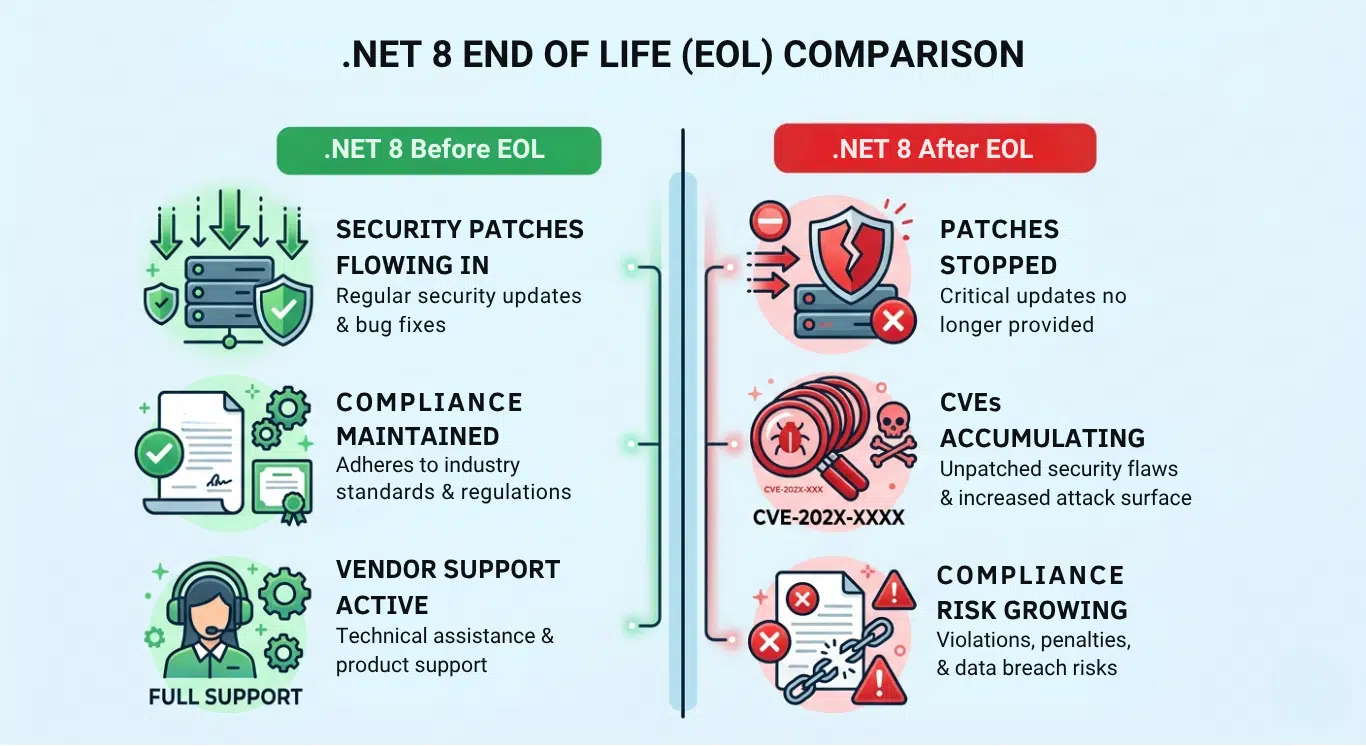
.NET 8 EOL doesn’t mean your applications stop running after the end date. The runtime doesn’t disappear. What stops is Microsoft’s official support – and that gap grows over time in ways that are worth understanding before they become urgent.
No More Security Patches
For any EOL software, the most direct consequence is the loss of security updates from the vendor. Any security vulnerability discovered in .NET 8 after EOL – even if it has a 10.0 critical severity risk score – it will not be fixed by Microsoft. Your applications remain exposed until you either migrate or find alternative patching sources. The longer you stay on an unsupported runtime, the wider that exposure window becomes.
Compliance and Regulatory Risk
Many compliance frameworks – PCI DSS, HIPAA, and ISO 27001 – require that software components remain within their vendor’s supported lifecycle. Running .NET 8 past EOL can trigger audit findings, force remediation timelines, or create liability in the event of a breach. For organizations in regulated industries, this is the most immediate concern that requires action.
Vulnerability Accumulation
Unpatched runtimes don’t stay static – they fall further behind. Each month after .NET 8 end of life, newly disclosed vulnerabilities go unaddressed, and the gap between your environment and a secure baseline widens.
The exploitation pattern is deliberate. As explained in TuxCare’s webinar on .NET Beyond End of Life:
“Attackers strategy is to look at the new patches provided for, say, .NET 8, and if they’re not provided for .NET 6, that’s a perfect opportunity to exploit something new that isn’t covered by Microsoft anymore.”
The same logic applies directly to .NET 8 after November 2026. Attackers cross-reference what gets patched in newer releases against what remains unaddressed in EOL versions – and act on that gap.
Dependency and Ecosystem Drift
The broader .NET ecosystem – NuGet packages, third-party libraries, tooling, and SDKs – will gradually drop .NET 8 support after EOL. This happens incrementally: a library stops testing against .NET 8, then stops publishing compatible builds, then deprecates compatibility entirely. Over time, staying on .NET 8 means accepting that your dependency tree will drift out of alignment with the packages your applications rely on.
Unsupported Hosting and Vendor Environments
Cloud providers, managed hosting platforms, and infrastructure vendors follow Microsoft’s support lifecycle guidance. After .NET 8 EOL, you can expect .NET 8 base images to stop receiving updates, managed runtime environments to phase out .NET 8 options, and vendor support agreements to exclude EOL runtime issues from their scope. This affects not just security posture but operational supportability.
Why Upgrading from .NET 8 Isn’t Always Simple
In the current release cycle, migrating to .NET 10 is the obvious long-term path. But obvious doesn’t mean straightforward. For many organizations, a major version upgrade touches more of the stack than anticipated – and the timeline to do it properly is longer than the calendar suggests.
Breaking Changes Between .NET 8 and .NET 10
Every major .NET release introduces breaking changes. Some are minor behavioral shifts; others involve deprecated APIs, removed functionality, or changed defaults that require code-level intervention. Microsoft publishes breaking change documentation for each release, but working through that list against a real codebase – especially a large or legacy one – takes a lot of time and careful analysis.
Third-Party Dependability
Your applications don’t run on .NET alone. NuGet packages, ORMs, logging frameworks, authentication libraries, and other dependencies all need to support the target version, .NET 10, before you can safely migrate. Some packages update quickly; others may lag by months or are no longer actively maintained. Auditing your full dependency tree for .NET 10 compatibility and finding replacements where needed can add significant effort to the upgrade process.
Testing and QA Overhead
A runtime upgrade requires full validation. Unit tests are not enough – you need integration testing, performance checks, and validation of edge cases that may behave differently. If test coverage is limited, this becomes a manual and time-intensive process. Skipping it increases the risk of issues that only surface in production.
Downtime and Deployment Risk
Sometimes, even well-planned migrations carry deployment risk. Applications that have been stable for years on .NET 8 can behave differently under .NET 10. Blue-green deployments, staged rollouts, and robust rollback plans all help – but they require infrastructure maturity and careful coordination that not every team has in place.
Resource and Organizational Constraints
Migration projects compete for the same engineering capacity as product work. In many organizations, the business case for a runtime upgrade is hard to prioritize against delivery – until something breaks. Add in budget cycles, team bandwidth, and the complexity of coordinating across multiple services or teams, and it’s common for migration timelines to slip well past initial estimates. For organizations running multiple .NET 8 workloads, the effort adds up quickly.
For a deeper analysis of real-world .NET migration challenges, see The Hidden Costs of Framework Migration: Moving from .NET 6 to 8
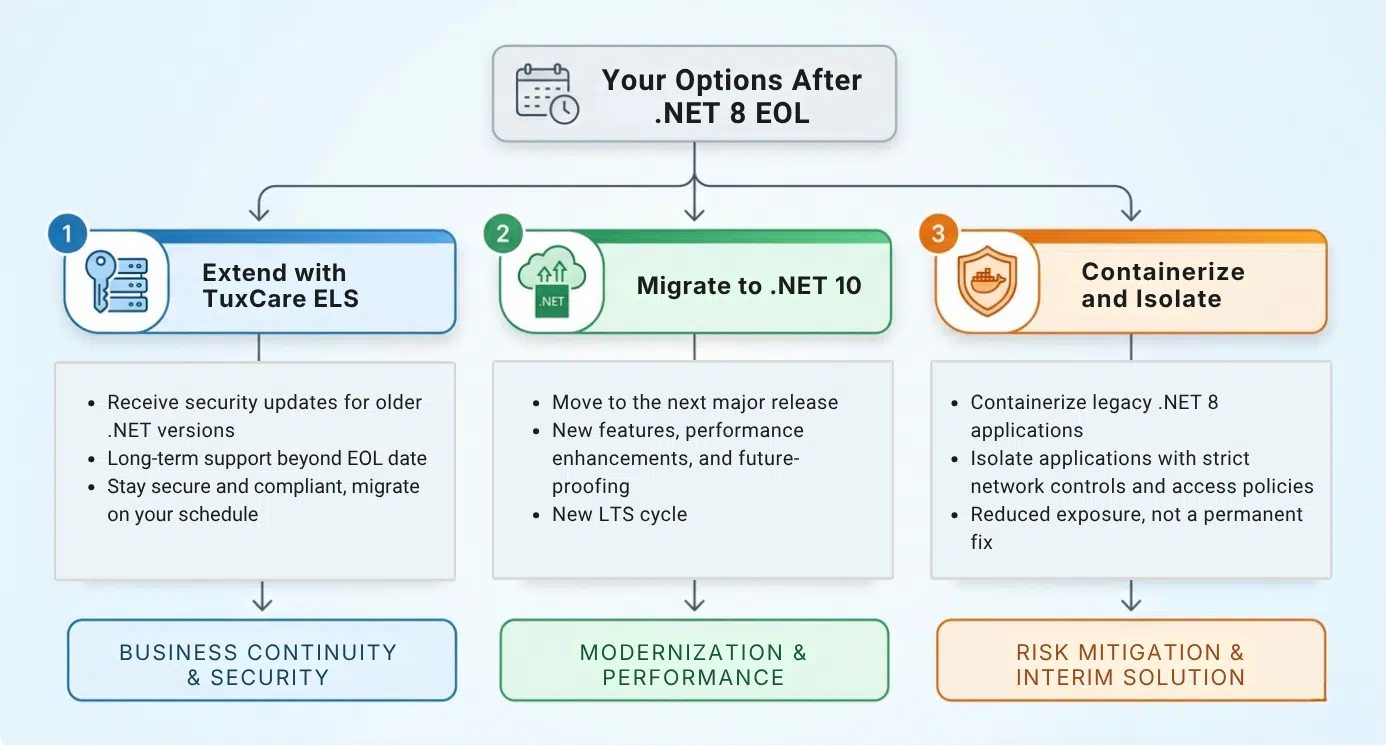
What Are Your Options After .NET 8 EOL?
No single approach fits every organization. The right path depends on your application complexity, compliance requirements, available engineering capacity, and how close you are to the end-of-support date when you start planning. There are three practical options worth evaluating.
Migrate to .NET 10 LTS
The upgrade path Microsoft recommends – and the long-term solution for most teams – is upgrading to .NET 10 LTS. It is supported until November 2028, giving you a stable upgrade target with a predictable support window.
The earlier you start, the more control you have over the timeline. Teams that begin dependency audits, review breaking changes, and build out test coverage well before the November 2026 deadline are far better positioned than those treating the migration as an end-of-year project.
Pro Tip: Don’t rely solely on manual checks for dependency compatibility. Tools like .NET Upgrade Assistant and dotnet-outdated can identify outdated packages, flag potential compatibility issues, and speed up the early stages of your upgrade assessment.
Extend Security Coverage with TuxCare
For organizations that can’t complete a migration before November 10, 2026 – or need more time to do it properly – TuxCare’s Endless Lifecycle Support (ELS) for .NET fills the gap that Microsoft leaves behind.
After .NET 8 reaches EOL, TuxCare continues to deliver security patches for the runtime, keeping your applications protected against newly disclosed CVEs without requiring an immediate migration. Patches are tested, signed, and deployable through TuxCare repositories across both Windows and Linux environments – no changes to your existing infrastructure required.
ELS coverage spans the full .NET component stack:
- .NET Runtime
- ASP.NET Core Runtime
- .NET SDK
- .NET Desktop Runtime (Windows), and
- .NET Installer
Organizations running web APIs, desktop applications, or server-side workloads are covered without needing separate arrangements for individual components.
Pawel Pawlak, Senior Product Manager at TuxCare, summarizes how organizations typically use ELS in practice:
“You can use ELS both as a short-term bridge or as a long-term option. You can plan your migration, test it, ensure that it would be successful, and then execute. You’re not stressed, not in a hurry – you’re still protected, all the regulatory compliance is met.”
TuxCare currently provides ELS for .NET 6, and support for .NET 8 will be available once it reaches EOL in November.
Visit CVE tracker to know about .NET vulnerabilities and available fixes from TuxCare.

Containerize and Isolate EOL Workloads
For applications that are difficult to migrate quickly – legacy codebases, low-priority internal tools, or workloads with complex dependency chains – containerization can serve as a short-term risk mitigation strategy. Running .NET 8 workloads in isolated containers limits their network exposure and reduces the blast radius of a potential exploit.
That said, isolation is not a replacement for patching or upgrading. An unpatched runtime is still an unpatched runtime, regardless of whether it runs in a container. But for teams managing a large portfolio of applications, isolation can help prioritize which workloads need immediate attention and which can follow a longer migration schedule.
.NET 8 End of Life Preparation Checklist
Whether you’re planning to migrate to .NET 10, adopt extended support, or both, preparation should start well before November 10, 2026. The steps below apply regardless of which path you take.
- Audit all applications running on .NET 8: Identify every service, API, and application in your environment that targets .NET 8. Include internal tools and background services – not just customer-facing workloads.
- Classify applications by business criticality: Not all workloads require the same urgency. Prioritize migration or patching efforts based on data sensitivity, regulatory exposure, and operational impact.
- Review breaking changes for .NET 10: Go through the official documentation from Microsoft and identify what API removals, behavioral changes, and deprecated features will require code-level changes before you can migrate.
- Audit third-party dependencies for .NET 10 compatibility: Check all NuGet packages and external libraries your applications depend on. Flag anything that lacks a .NET 10-compatible release or is no longer actively maintained.
- Assess your test coverage: Upgrading without sufficient test coverage increases risk. Identify gaps in unit, integration, and regression testing before migration begins – not during.
- Define a realistic migration timeline: Account for dependency resolution, code changes, testing cycles, staged rollouts, and organizational sign-off.
- Evaluate TuxCare ELS if migration can’t complete before EOL: If your timeline extends past November 2026, TuxCare helps keep your .NET 8 workloads patched and compliant during the transition.
- Communicate timelines to stakeholders early: Migration projects stall when they lack organizational visibility. Get engineering timelines, resource requirements, and risk context in front of decision-makers early.
- Validate in staging before production rollout: Run your migrated applications under realistic load in a staging environment before deploying to production. Don’t skip this step under deadline pressure.
- Document your EOL response plan: Record which applications were migrated, which are covered by ELS, and what your rollback procedures are. This documentation matters for audits and incident response.
Keep Your Applications Safe After .NET 8 EOL
When .NET 8 reaches end of life, security updates stop – but your applications don’t have to become a liability overnight. TuxCare’s Endless Lifecycle Support for .NET picks up where Microsoft leaves off, delivering tested, vendor-grade security patches for end-of-life .NET releases for as long as your organization needs them.
As Michael Canavan, Chief Revenue Officer at TuxCare, put it when the company launched ELS for .NET 6:
“Bringing our open source security expertise into .NET for both Windows and Linux, ELS illustrates our long-term commitment to enabling the use of legacy systems in a secure and compliant manner years past their end of support.”
The same commitment extends to .NET 8. You don’t have to rush a migration before you’re ready, and you don’t have to accept unpatched exposure while your engineering team works through a complex upgrade. TuxCare gives you the time to migrate on your terms – with security coverage and compliance defensibility maintained throughout the transition.
If your organization is running .NET 8 in production and November 2026 is closer than your migration timeline, now is the time to put a plan in place – whether that’s accelerating your upgrade, adopting Endless Lifecycle Support, or a combination of both.