Tech Support
 Documentation
 Login
 Contact Us



Go straight to an AI summary of this blog post instead 


Key Takeaways
- Node.js 18 reached end of life on April 30, 2025, and no longer receives security updates or bug fixes from the Node.js project.
- The project treats every end-of-life release line as affected whenever a security release occurs, so the number of unpatched vulnerabilities in Node.js 18 grows on its schedule, not yours.
- Node.js 24 is the only Active LTS line today. Node.js 22 is already in Maintenance LTS and reaches end of life on April 30, 2027, which makes it a weak migration target.
- TuxCare’s Endless Lifecycle Support keeps Node.js 18 patched against known vulnerabilities while teams plan and test a migration at a realistic pace.
Almost nobody chooses to run an end-of-life runtime. Teams end up there because the upgrade ticket keeps losing to shipping work, and because nothing looks wrong. Node.js 18 reached end of life on April 30, 2025 – more than a year ago – and has received no security patches, bug fixes, or official support from the Node.js project since.
The part that catches teams out is the accounting. The Node.js project’s own position is that end-of-life lines are affected whenever a security release occurs, whether or not anyone re-tests them. Your unpatched surface therefore grows every time the project ships an advisory, on a cadence you do not control.
This guide covers the Node.js 18 EOL timeline, which release you should actually target in 2026 – it is probably not the obvious one – and how to stay patched if the migration cannot land this quarter.
Understanding Node.js 18 End of Life
It helps to know how the Node.js Release Working Group actually structures support. There are three supported phases, and end of life is the status a release line reaches once they are finished.
Current: A new major release stays in the Current line for about six months, which gives library authors time to add support for it. The project’s guidance is that production applications should run Active LTS or Maintenance LTS releases only.
Active LTS: After roughly six months, even-numbered releases are promoted to Active LTS for about 12 months. This phase covers more than emergency fixes: it includes new features, bug fixes, and updates that the Release team has audited and judged appropriate and stable for that line. Odd-numbered lines are never promoted, which is why 23 and 25 went from Current to end of life without an LTS phase at all.
Maintenance: Active LTS is followed by roughly 18 months of Maintenance, narrowed to critical bug fixes and security updates. New features land only rarely, and typically only when they help you migrate to a later line.
That adds up to about 36 months from initial release to end of life, roughly 30 months of it under LTS coverage.
One change worth planning around: this odd/even model only applies through Node.js 26. Starting with Node.js 27, Node.js moves to a single major release per year, and every major will be promoted to LTS after its Current phase. If you are picking a target today, the phase matters more than the version number – a line already in Maintenance is on its way out no matter how recent it looks.
Node.js 18 End of Life: Key Dates
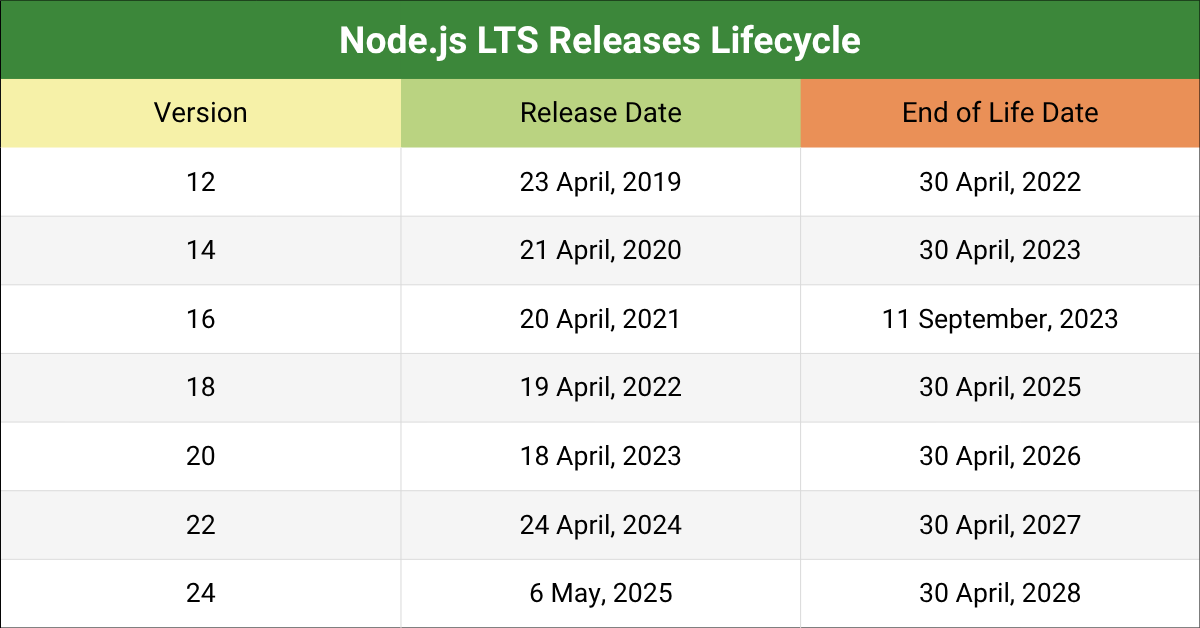
Node.js 18 (codename Hydrogen) was released on April 19, 2022. It entered Active LTS on October 25, 2022, moved into Maintenance on October 18, 2023, and reached end of life on April 30, 2025.
Where to start: Confirm what you are actually running before planning anything, because in most estates it is not one version. Run node -v on each host, then check your Dockerfiles, CI images, and any managed runtime settings in Lambda, App Runner, or your platform of choice.
Risks of Node.js 18 After End of Life
Running Node.js 18 past end of life is not disruptive on day one, which is exactly why systems stay there. Everything keeps running. APIs still respond. Nothing pages anyone.
What changed is that fixes stopped arriving while vulnerabilities kept being found. The risks below compound, and every one of them is cheaper to handle in a planned upgrade window than during an incident.While Node.js 18 was supported, it received security patches alongside every other maintained line. Those releases stopped in April 2025, and the Node.js project will not issue further fixes for it.
Growing CVE Exposure
The project’s stated position is useful ammunition if you need to justify the work internally: end-of-life versions are always affected when a security release occurs. Node.js does not re-test EOL lines, so its advisories list supported versions only – but the vulnerable code paths are still sitting in 18, and no official patch is coming for them.
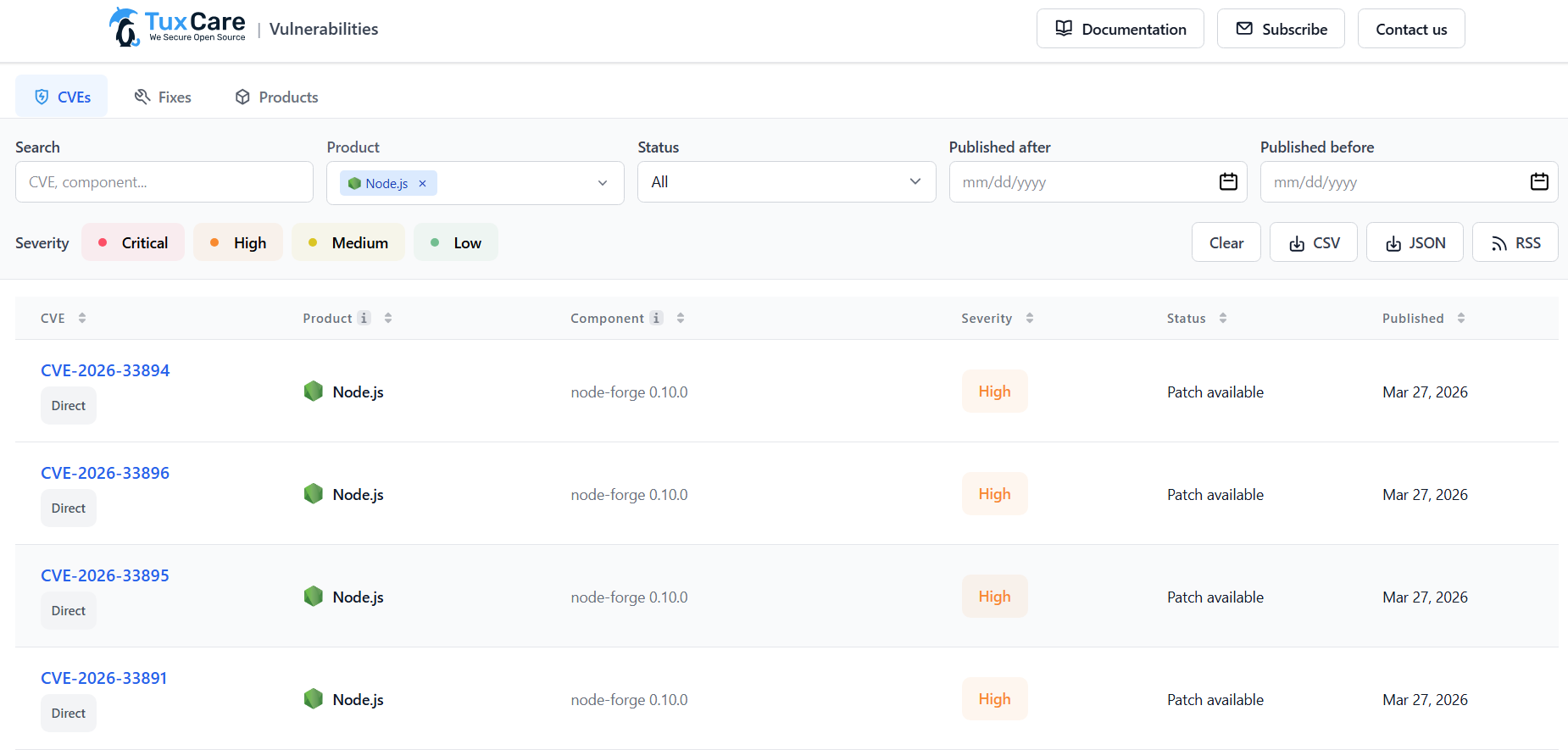
The January 13, 2026 security release is a fair illustration. It fixed eight vulnerabilities across the supported lines, including these four:
- CVE-2025-55131 (High) – a timeout-based race condition leaves Buffer.alloc and typed arrays non-zero-filled, exposing uninitialized memory. Reachable through the vm module with execution timeouts, which matters most where semi-trusted code runs.
- CVE-2025-59465 (High) – a malformed HTTP/2 HEADERS frame carrying invalid HPACK data crashes the process through an unhandled TLS socket error.
- CVE-2025-59466 (Medium) – a “Maximum call stack size exceeded” error becomes uncatchable when async_hooks is active, bypassing process.on(‘uncaughtException’). This reaches further than it first appears: AsyncLocalStorage is built on async_hooks, so Next.js, React Server Components, and most APM agents are in scope.
- CVE-2026-21637 (Medium) – exceptions thrown from TLS PSK or ALPN callbacks bypass error handlers, causing denial of service and a file descriptor leak.
Those fixes shipped in 20.20.0, 22.22.0, 24.13.0, and 25.3.0. There is no 18.x equivalent, and there will not be one.
Note on tooling: The Node.js project maintains the is-my-node-vulnerable package, which compares your installed version against the Node.js Security Database. Run npx is-my-node-vulnerable. Know how it behaves on an EOL runtime, though: instead of listing individual CVEs, it reports that the version is end of life and treats it as vulnerable by default, because EOL lines are not tracked against recent security releases. For per-CVE detail and patch status on the versions TuxCare supports, use the CVE Tracker.
Compliance Failures
An EOL runtime rarely fails an audit on its own. What it does is remove the simplest way to satisfy the vulnerability-management controls in PCI DSS, HIPAA, GDPR, and ISO 27001, which generally expect you to identify known vulnerabilities and remediate them on a defined timeline.
PCI DSS is the most specific about the clock. Requirement 6.3.3 expects critical security patches to be installed within one month of release. When the upstream project has stopped issuing patches for your runtime, you cannot satisfy that by patching, so you are left demonstrating compensating controls instead.
There is also a scanner problem that surprises people. The Node.js project now issues CVEs against end-of-life versions themselves, filed as unsupported when assigned under CWE-1104, use of unmaintained third-party components. Node.js 18 can therefore appear as a finding in tooling like npm audit or Snyk purely for being EOL, separate from any individual bug.
If you are in audit scope: choose your route now – upgrade, commercial patching, or documented compensating controls. All three are defensible. Discovering during fieldwork that you have none of them is not.
Dependency and Ecosystem Breakage
Modern Node.js applications lean on a large dependency tree, and that tree moves without asking. Packages, frameworks, and cloud services drop old runtimes on their own schedules. AWS, for instance, ended support for Node.js 18.x in the AWS Cloud Development Kit on November 30, 2025, covering the CDK CLI, the construct library, and related projects such as JSII, Projen, and CDK8s.
The pattern is predictable. New package releases stop supporting older Node.js lines, so teams pin versions to keep things working, and the pinned tree drifts out of support as well. The longer you stay, the more technical debt accumulates, until routine updates start requiring a runtime upgrade first.
Example: A team running a Node.js 18 API needs to patch a vulnerability in a logging library. The fixed release requires Node.js 20 or later. The runtime upgrade is not scheduled, so they stay on the vulnerable version. The patch exists, and they still cannot apply it.
That is the real shape of EOL risk. It usually arrives through the dependency tree rather than the runtime itself.
Operational Risk and Harder Debugging
After end of life, the Node.js project stops issuing bug fixes and technical support for the line, and community attention follows the supported releases.
That changes incident response in a specific way: you are debugging without upstream help. Hit a genuine runtime bug and there is no backported fix to wait for, no maintainer triage, and steadily less community discussion of a version few people still run. Profilers, debuggers, and APM agents drop old runtimes too, so the tools you would normally reach for may not attach.
Plan for it: if you are staying on 18 for now, assume a longer mean time to resolution on anything runtime-level, and keep a reproducible 18.x debug environment on hand so you are not building one mid-incident.
Your Options Now That Node.js 18 Is End of Life
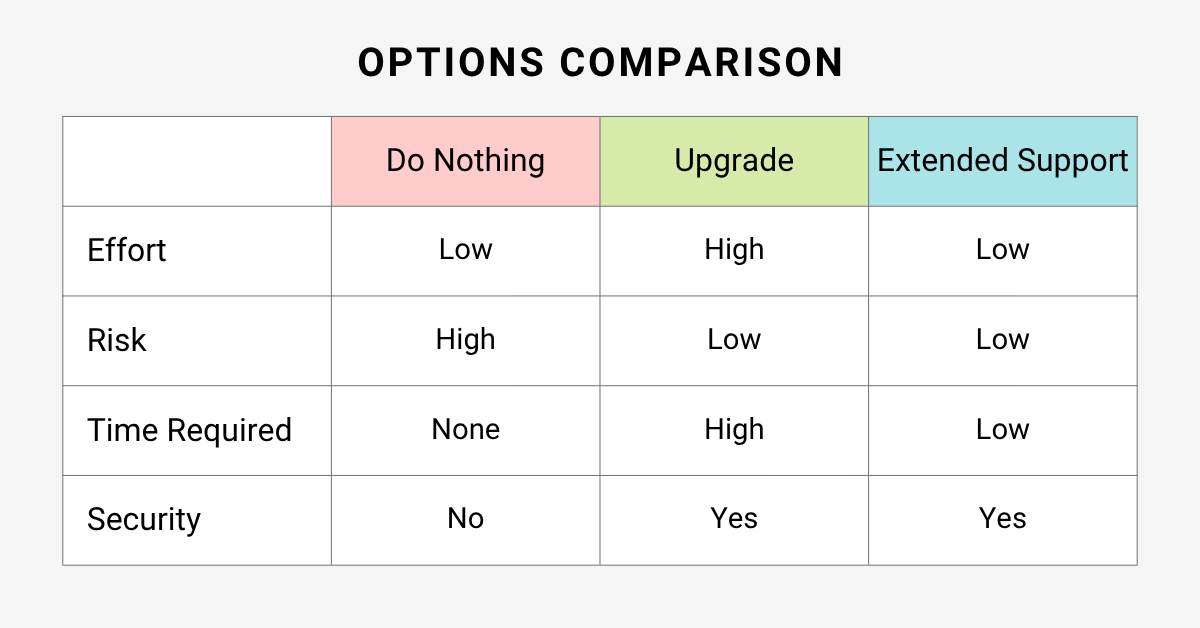
Now that Node.js 18 is no longer supported by the Node.js project, every team owns a decision. Staying put is one of the available answers – it just tends not to get written down anywhere, which is how it turns into a default.
|
|
Do Nothing |
Upgrade to Supported LTS |
Extended Support |
|
Upfront effort |
Low |
High |
Low |
|
Recurring effort |
Monitoring, risk sign-off, audit evidence |
None after cutover |
Low |
|
Security patching |
None |
Official and ongoing |
Ongoing, for covered vulnerabilities |
|
Security risk |
Grows with every release |
Lowest |
Reduced |
|
Technical debt |
Grows |
Cleared |
Still grows |
|
Best when |
Isolated and near decommission |
Capacity exists this quarter |
Upgrade is two or more quarters out |
Do Nothing
Staying put is the cheapest option this quarter and the most expensive one over any longer horizon. When a system is stable and nothing is broken, the pull toward leaving it alone is strong.
It is not automatically the wrong call. A service that is genuinely isolated, handles no regulated data, and has a funded decommission date a quarter or two out may not be worth migrating at all.
What makes it the wrong call is treating it as free. Doing nothing still costs you vulnerability monitoring, risk-acceptance sign-off, audit documentation, and a weaker position when something does go wrong. Those hours are real, and they recur.
Decision point: If the service is internet-facing or in audit scope, this option is off the table. If it is isolated and scheduled for retirement, document the risk acceptance formally and move on to more useful work.
Upgrade to a Supported LTS Version
Upgrading is the only option that ends the problem instead of managing it. As of August 2026, here is what you are choosing between:
- Node.js 24 (Krypton) – Active LTS, end of life April 30, 2028. The default target for most teams.
- Node.js 22 (Jod) – in Maintenance LTS since October 21, 2025, end of life April 30, 2027. Critical bug fixes and security updates only.
- Node.js 26 – currently in the Current line, scheduled for Active LTS promotion in October 2026, with a planned end of life of April 30, 2029.
Note the trap in that list. Node.js 22 looks like the conservative choice, but it is already past Active LTS with under a year of support left, so migrating 18 to 22 means running the same exercise again before April 2027. Unless something in your dependency tree specifically blocks 24, going to 22 is not worth the effort.
Upgrading restores official security support and puts you back on a runtime the wider ecosystem still targets. What it will not do is happen in an afternoon. Going from 18 to 24 crosses two LTS lines and several V8 major versions: native modules need rebuilding against the new ABI, node-gyp builds and prebuilt binaries need checking, and the official Linux builds require a newer glibc than the Node.js 18 builds did – enough to rule out older distributions without a base-image change. Budget for a full test cycle in staging rather than a version bump in CI.
Pro Tip: Skip Node.js 20. It reached end of life on April 30, 2026, so moving there is a lateral step onto another unsupported runtime. If your migration lands after Node.js 26 enters LTS in October 2026, 26 will carry the longest planned support window – weigh that against 24’s longer production track record and broader dependency support. Either way, remember that the project notes its schedule dates are subject to change.
TuxCare’s Endless Lifecycle Support
Not every system can be upgraded on the project’s timetable. Long validation cycles, change-approval processes, certified stacks, and vendor-supplied applications all push the realistic date out by quarters rather than weeks.
With TuxCare’s Endless Lifecycle Support, Node.js 18 continues receiving security patches for covered vulnerabilities after official end of life. Patches are delivered without application code changes, which is what makes the approach workable for teams that cannot re-certify an application right now. TuxCare covers Node.js 12, 14, 16, 18, and 20.
Treat it as a bridge rather than a destination. It addresses the patching and vulnerability-management side of the problem. It does not stop your dependency tree from drifting or your technical debt from growing, and the upgrade still has to happen eventually.
Decision point: If you can realistically ship the upgrade this quarter, upgrade and skip the bridge. If the date is two or more quarters out, or you are in audit scope and cannot patch, bridge the gap and keep the migration funded.
Secure Your Node.js 18 Workloads with TuxCare
Node.js 18 has not changed. Its support position has. The same binary that was a maintained runtime in April 2025 is now the oldest unmaintained component underneath your application, and it picks up newly unpatched vulnerabilities every time the project ships a security release.
The awkward part is that the obvious fix has a wrong answer built into it. Node.js 22 is the intuitive step up from 18 and the one that buys you the least time. Node.js 24 is the right target for most teams, and it is also the more demanding migration. That gap between the easy answer and the correct one is exactly where extended support earns its place.
For organizations that cannot get there immediately, Endless Lifecycle Support for Node.js keeps Node.js 18 workloads patched against known vulnerabilities while the migration is planned and tested properly, without requiring application code changes.
If you are still running Node.js 18, pick a route this quarter: upgrade, bridge, or documented risk acceptance. The only option that gets more expensive the longer you leave it is not choosing.
FAQs About Node.js 18 End of Life
Yes. Node.js 18 continues to run normally after end of life, and nothing stops working on the EOL date itself. What stops is the supply of fixes. The Node.js project no longer issues security patches or bug fixes for the line, so newly disclosed vulnerabilities stay open unless you upgrade or obtain commercial patching.
An unpatched Node.js 18 installation is not a reasonable choice for production in 2026. It has missed every Node.js security release since April 2025, and the project treats EOL lines as affected whenever a security release occurs. Teams that cannot upgrade yet should obtain commercial security patching and treat it as a temporary bridge to migration.
Node.js 24, for most teams. It is the current Active LTS release, supported through April 30, 2028. Node.js 22 is still supported, but only in Maintenance LTS until April 30, 2027, which is rarely enough runway to justify the migration work. Node.js 26 remains a Current release until its scheduled LTS promotion in October 2026. Your dependency tree, native modules, and base images will determine what is actually reachable.
Teams that cannot upgrade on the project’s schedule can use an extended-support provider such as TuxCare to keep receiving security patches for Node.js 18 and reduce exposure during the migration window. That also helps address applicable patching and vulnerability-management requirements while the upgrade is planned, tested, and scheduled properly.