
 Tech Support
 Documentation
 Login
 Contact Us


Go straight to an AI summary of this blog post instead 


- The main differences between community and commercial Linux lie in the levels of support, security assurance, and compliance readiness.
- Community Linux offers freedom, transparency, and zero licensing costs — ideal for organizations seeking flexibility and avoiding vendor lock-in.
- With TuxCare Enterprise Support, community Linux distributions like Rocky Linux and AlmaLinux can match the reliability and compliance of commercial Linux vendors.
Does choosing a community Linux distribution mean sacrificing the enterprise-grade support and security that commercial products like Red Hat Enterprise Linux (RHEL) or SUSE provide?
The truth is that community distributions bring in freedom and cost savings but lack the very essentials of the enterprise world: guaranteed SLAs, compliance-ready builds, and dedicated 24/7 support teams. In contrast, commercial Linux delivers these benefits but at the cost of high subscription fees and potential vendor lock-in.
In this article, we’ll explore community vs commercial Linux distributions, examine the real trade-offs, and see how TuxCare Enterprise Support bridges the gap — turning your community Linux into an enterprise-grade platform ready for business-critical operations.
Understanding Community Linux Distributions
A community Linux distribution is defined by its governance model: it is open-source, maintained primarily by volunteers and non-profit foundations, and often receives infrastructure donations from multiple sponsors. These projects, such as Debian, openSUSE Leap, and the RHEL-compatible successors AlmaLinux and Rocky Linux, are fundamentally built for the community, by the community.
Key Strengths of Community Linux Distro
Zero Licensing Fees: You can freely download, deploy, and scale without per-system costs, drastically lowering the Total Cost of Ownership (TCO).
Transparency and Trust: Since development and decision-making happen in the open, users can audit the code and understand the project’s direction, avoiding the opaque choices of a single vendor.
Freedom and Flexibility: There is no vendor lock-in, meaning users are free to modify the OS, use it indefinitely, and choose their own support providers.
Strong Community Collaboration: Thousands of developers and users contribute to bug fixes, features, and documentation.
Limitations to Consider
However, the “community” label also defines the limits of its direct support. Community projects operate on a best-effort basis meaning:
- There’s no guaranteed Service Level Agreement (SLA) if something breaks in production.
- Security patches and updates rely on volunteer efforts, which may not align with enterprise urgency for zero-day threats.
- Maintaining compliance (FIPS, CIS, STIG, etc.) becomes a purely self-managed process without vendor certifications.
What Commercial Linux Distributions Offer
If community distributions are defined by freedom and transparency, Commercial Linux distributions are defined by assurance and contractual guarantees. The archetypes of this category — most notably Red Hat Enterprise Linux (RHEL), SUSE Linux Enterprise, and Canonical’s Ubuntu Pro — provide a package deal: the operating system plus a comprehensive, legally-binding service contract.
Key Strengths of Commercial Linux Distro
Many organizations pay for commercial Linux mainly to ensure support, compliance, and legal indemnification — not because the technology itself is different.
Guaranteed Vendor Support (SLAs): Commercial vendors offer tiers of support with legally defined Service Level Agreements (SLAs). This means if a core system component fails at 3 AM, there is a contractual guarantee of response and resolution, backed by a dedicated support team.
Certified Security and Compliance: Commercial distros often provide certified builds for regulated environments, ensuring they meet standards like FIPS, CIS Benchmarks, and STIG requirements. This simplifies the audit process, as the vendor guarantees the base operating system’s compliance.
Predictable Maintenance: Companies gain predictable, scheduled patching, and long-term maintenance roadmaps, allowing IT departments to plan their operational cycles with high confidence.
Limitations to Consider
However, the advantages of commercial Linux come at a cost that extends beyond the license fee:
- High Licensing and Subscription Fees: Per-system costs can quickly add up and become prohibitive in large-scale cloud or high-density server deployments.
- Vendor Lock-In: Migrating away from proprietary support agreements and vendor-specific tooling is often complex and highly disruptive, limiting a company’s strategic flexibility.
- Reduced Flexibility: While custom kernel tuning or incorporating third-party tools is technically possible, these configurations may fall outside vendor support. This can limit DevOps flexibility and increase reliance on approved tools.
The Real Trade-Off: Risk and Assurance
When choosing between community vs commercial Linux, most of the time, the debate is not about the software’s quality but rather support and security assurance. After all, both community and commercial distributions often share the same source code base. The main difference is how issues are handled and the speed at which vulnerabilities are fixed once they are discovered.
Some community distributions also offer optional commercial support, blurring the line between community and enterprise Linux. For example, Canonical provides Ubuntu Pro, giving professional support, fast security patches, extended support, and compliance tooling while keeping the community edition free. Similarly, openSUSE shares its codebase with SUSE Linux Enterprise, offering paid support for organizations that need it.
The equation looks like this:
Community Choice (e.g., Rocky Linux/AlmaLinux): Offers freedom and cost savings, but requires organizations to handle their own operational risk with best-effort community support.
Commercial Choice (e.g., RHEL): Provides contractual stability and assurance (SLAs, indemnification), but demands high subscription fees and introduces the risk of vendor lock-in.
For an enterprise, particularly one in a regulated industry like finance, healthcare, or government, the deciding factors are non-negotiable: guaranteed uptime, legally-backed support, and the rapid, predictable deployment of security patches. These elements ensure business continuity and maintain compliance. Without them, the operational and compliance risks can quickly outweigh any upfront savings.
Bridging the Gap: TuxCare Enterprise Support (TES)
After traditional CentOS reached its end of life, many organizations shifted to community-driven successors like AlmaLinux and Rocky Linux. The rise of Rocky Linux and AlmaLinux proved that community-driven operating systems can meet enterprise standards — at least in terms of performance, stability, and compatibility. What most organizations still struggle with, however, is finding the same level of professional support, compliance assurance, and lifecycle continuity that commercial Linux vendors provide.
That’s exactly the gap TuxCare Enterprise Support for Rocky Linux and AlmaLinux fills.
Organizations want the benefits of both worlds: the cost-efficiency of Rocky Linux or AlmaLinux combined with security, compliance-ready builds, and expert support like costly commercial OS vendors offer. TuxCare delivers all the non-negotiable enterprise requirements that were missing from the community-only structure.
1. Essential Support
For organizations that can’t afford downtime, TuxCare provides:
- 24/7 break-and-fix support for package updates, kernel crashes, and OS migration issues.
- A TuxCare-vetted repository of updates with uptime guarantees.
- Endless lifecycle security support for each major distro version.
2. Extended Security Updates
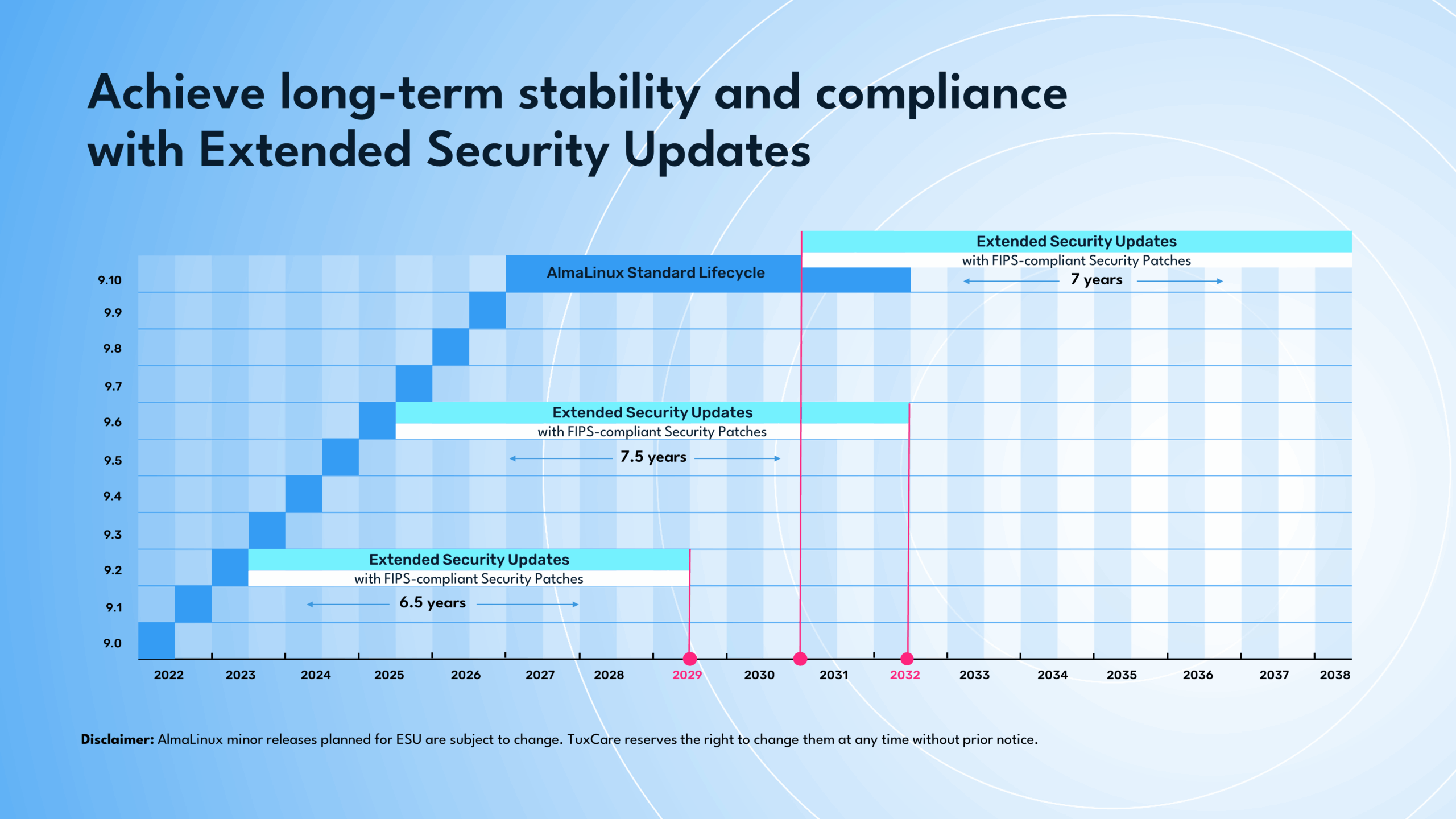
Enterprises that rely on FIPS-validated deployments can extend the life of their AlmaLinux or Rocky Linux systems with:
- Ongoing High and Critical CVE patches for FIPS-certified releases.
- FIPS-compliant patches maintaining cryptographic validation (FIPS 140-3 continuity).
- Re-certification for cryptographic CVEs — much faster than general FIPS certification.
3. Enhanced & Custom Support
When your team needs deep technical expertise, TuxCare offers:
- Pay-as-you-go expert access for system design, migration, and security planning.
- Customized solutions (AlmaLinux packages, Rocky Linux packages, KernelCare rebootless patches, Extended Security Updates, etc.) tailored to your enterprise requirements.
Turn Community Linux into an Enterprise Powerhouse
Choosing between community vs commercial Linux no longer has to be a compromise. Community distributions like Rocky Linux and AlmaLinux offer the flexibility, transparency, and cost savings enterprises desire — but they traditionally lack guaranteed support, compliance readiness, and professional patch management.
With TuxCare Enterprise Support, organizations can bridge that gap. By providing FIPS-compliant security patches, 24×7 expert support, and extended lifecycle coverage, TuxCare empowers IT teams to run community Linux distributions with the same confidence they would expect from commercial vendors — without the high subscription costs or vendor lock-in.
For organizations that require continuous security, pairing Enterprise Support with KernelCare adds rebootless kernel patching, ensuring systems remain secure, compliant, and operational without downtime.

