Tech Support
 Documentation
 Login
 Contact Us


Go straight to an AI summary of this blog post instead 


Key Takeaways
- For fixed versions, Maven queries repositories in order and takes your coordinates from the first that has them.
- A dependency’s own POM can add repositories to your build, and nothing stops it by default.
- A
mirrorOfline locks down the Maven side, but your repository manager still has to keep public repos out of your namespace.
Plenty of enterprise Java shops have a settings.xml nobody has touched in years. It works. Builds resolve, CI is green, nobody opens it. It deserves a look anyway. That file decides where every artifact comes from, and what it encodes is often more permissive than the team realizes. A build can sit one misplaced repository declaration away from resolving an internal coordinate off the public internet. That gap is Maven dependency confusion, and it works differently than in npm and pip. For fixed versions Maven doesn’t compare version numbers. It compares which repository your build asks first.
Why Maven Dependency Confusion Works Differently Than npm and pip
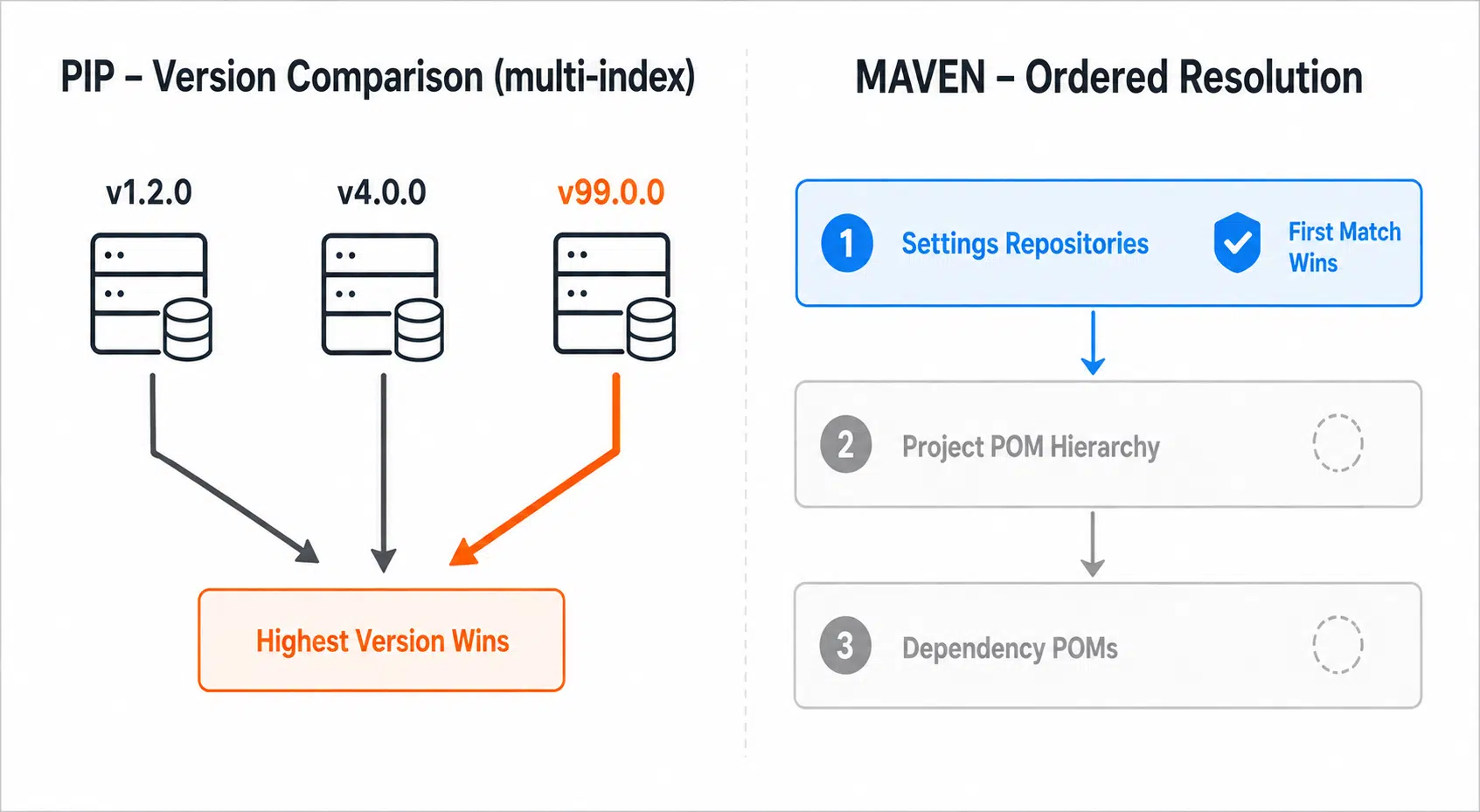
--index-url and --extra-index-url, and then takes the highest version satisfying the requirement across all of them. Publish internal-utils 99.0.0 publicly and it beats an internal package of the same name. npm behaves differently. A package resolves from a single registry, whichever is configured for its scope, or the public one if no scope mapping exists. The npm attack works because the internal package was never scoped to a private registry, so the client only talks to the public one, not because npm aggregates and picks the highest. Maven does not work that way for a fixed version. It resolves the version from the dependency graph first, then hunts for that exact groupId:artifactId:version, the GAV coordinate. Publishing a higher version publicly does nothing on its own, because nothing is asking for it. It queries repositories in the effective repository order, settings first, then the project’s POM hierarchy, then dependency POMs, and takes the first one that has the artifact.
| Resolver | Selection rule | What an attacker needs |
|---|---|---|
| pip | Highest version across every configured index | A higher version number, once both indexes are in scope |
| npm | Registry configured for the package’s scope, public by default | No scope or registry mapping for the internal package, plus a same-name public publish |
| Maven, fixed version | First repository in order that has the exact GAV | Your exact coordinates, plus earlier position |
| Maven, version range | Highest version across aggregated metadata | A higher version number |
| Maven, SNAPSHOT | Metadata maps the base version to a timestamped build, subject to order and update policy | Publish access to a queried repo |
The fixed-version case is the common one, and it’s the one that changes your remediation. Order matters, exact coordinate matching matters, version inflation is irrelevant. If a public repository precedes your internal one and your coordinates exist there, you get the public copy. Maven Central makes the crude version of this hard. Publishing under a namespace means proving control of the matching domain with a DNS TXT record, or of the matching account for io.github style namespaces, so nobody claims com.yourcompany just because you never registered it. The real exposure sits elsewhere: namespaces you don’t control, namespaces whose backing domain quietly lapsed and got picked up, repositories with looser publication rules than Central’s, and every repository a POM in your tree declares. JitPack builds supported Git projects on demand, and a dependency POM can drop it into your repository set without a declaration of your own. Its coordinates follow the Git host and account, so it’s no open field, but it’s a repository you never chose to trust. Version ranges and SNAPSHOTs are where version aggregation does apply. Ranges make Maven merge maven-metadata.xml across repositories and pick the highest, putting version-based hijacking back on the table. SNAPSHOTs carry a related risk, since metadata maps the base version to a timestamped build and any repository in the set can change that mapping. Watch Out: Ranges look like flexibility and behave like an unpinned dependency with cross-repository reach. Pin exact versions and let a repository manager gate upgrades.
What Your settings.xml Is Actually Telling Maven
Several blocks in settings.xml affect resolution or its credentials. <mirrors> redirects requests, <profiles> can add repositories, <activeProfiles> decides which apply, and <servers> supplies authentication. The critical one is <mirrors>, because a mirror with the right pattern overrides every repository declaration everywhere else. That’s the Maven-side half of the fix. The repository manager still has to be told not to serve your internal namespace from public repos, the next section’s job.
<mirrors>
  <mirror>
    <id>internal-repo</id>
    <name>Internal Repository Manager</name>
    <url>https://nexus.example.com/repository/maven-public/</url>
    <mirrorOf>*</mirrorOf>
  </mirror>
</mirrors>
<mirrorOf>*</mirrorOf> means every repository request goes to that URL regardless of what any POM declares. That’s what you want. Here’s what many files contain instead.
| mirrorOf value | Intercepts | Leaves open |
|---|---|---|
central |
Only Maven Central | Every other declared repository |
external:* |
External repositories | localhost and file:// repositories |
*,!jitpack |
Everything except JitPack | JitPack, deliberately |
* |
Everything | Nothing |
Mirroring only central is an easy mistake, because it feels correct. It covers the repository everyone thinks about – and leaves every repository declared in a POM resolving to its own URL. Find out which you have.
mvn help:effective-settingsThat merges global and user settings and prints what Maven is really using, profile activation included. Run it on a CI agent as well as a laptop, since the two can differ.
The Transitive Repository Injection Nobody Configured
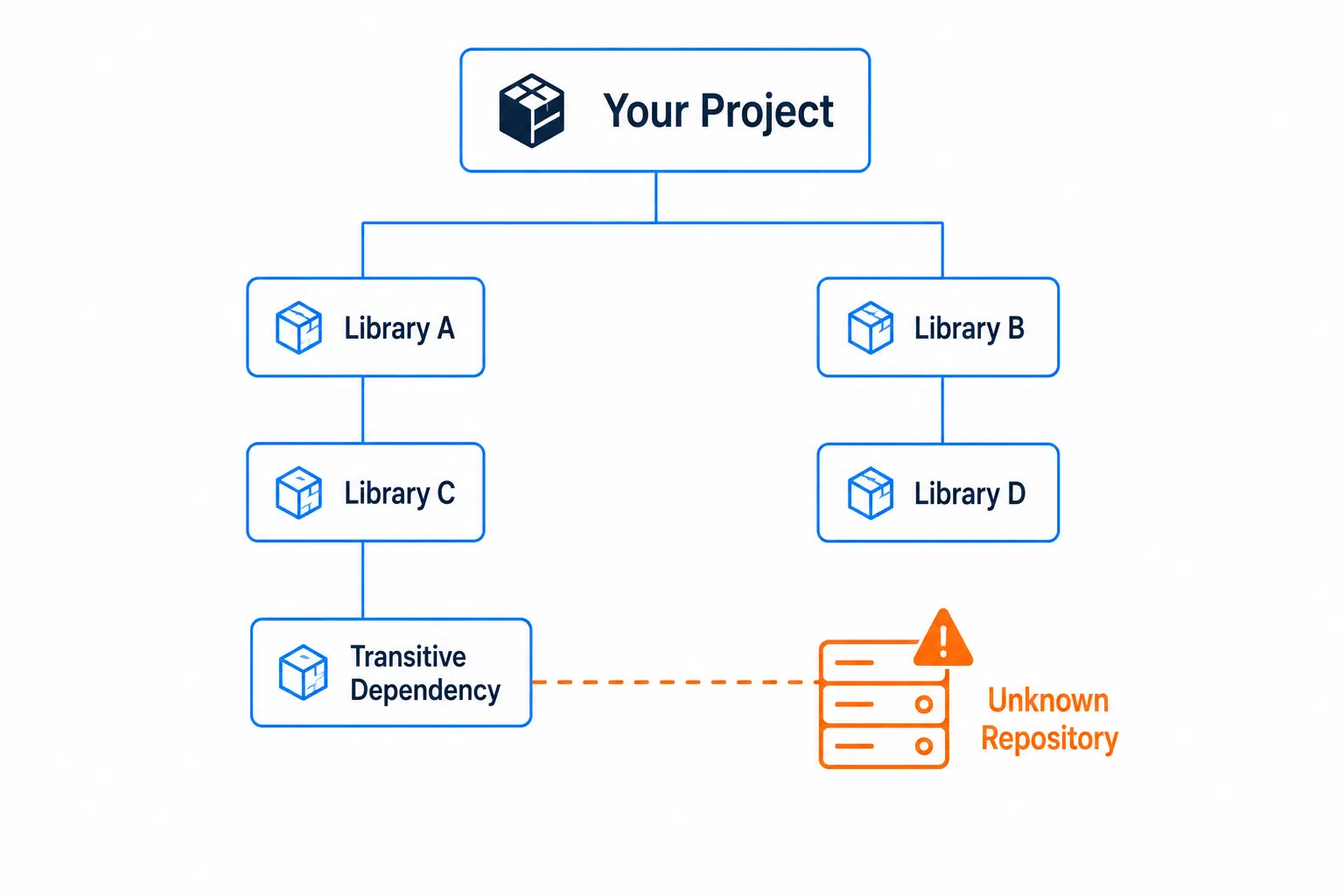
mvn help:effective-pom | grep -A 8 '<repository>'That shows the list your own POM hierarchy produces, parents and profiles included. What it misses is anything a dependency POM contributes, since those repositories join the set at resolve time rather than merging into your POM. For the full picture, watch a real build.
mvn -X dependency:resolve 2>&1 | grep -E 'Using mirror|Repositories \(' | sort -uThe Repositories lines name the set Maven used for dependencies and plugins, and the Using mirror lines show which declarations got redirected. Running this can surface repositories nobody knowingly added. Reality Check: Maven honoring repositories declared by your dependencies is not a vulnerability, and it isn’t going away. It predates anyone thinking about supply chain attacks, and <mirrorOf>*</mirrorOf> is the standard settings-level way to stop those declarations reaching their original URLs. One more wrinkle. <pluginRepositories> is a separate block from <repositories>, and a mirror with * covers both, while repository-specific mirrors typically don’t. Plugins run with full JVM access, making them higher-privilege than anything on your runtime classpath.
Auditing What Your Build Already Cached
The cache is less naive than its reputation suggests. Maven stores artifacts in ~/.m2/repository, and Maven Resolver’s enhanced local repository manager records which remote repository each download came from. Ask for that artifact in a later build where the originating repository isn’t in scope and Resolver treats the cached copy as absent, re-resolving through whatever repositories are in scope now. That tracking is a control and a paper trail. Maven writes that origin data beside each artifact.
find ~/.m2/repository -name '_remote.repositories' \
  -exec grep -L 'internal-repo' {} +
That lists tracking files with no reference to your mirror’s ID. Treat it as coarse triage rather than per-artifact provenance, since one file can cover several artifacts and local installs record an empty origin. An unfamiliar ID means it was resolved under a different repository configuration, worth chasing down. For your most important coordinates, check whether they exist publicly.
curl -s -o /dev/null -w "%{http_code}\n" \
  https://repo.maven.apache.org/maven2/com/yourcompany/billing-core/
A 200 means Central has content at that groupId and artifactId path. If you expected it to be private, find out what’s there and who holds the verified namespace claim. Pro Tip: Put checks like this on a schedule for your important internal coordinates, and aim them at the other public repositories your builds can reach, where namespace rules are looser. Unexpected publication under coordinates you rely on is worth finding first.
Blocking Your Own Coordinates at the Repository Manager
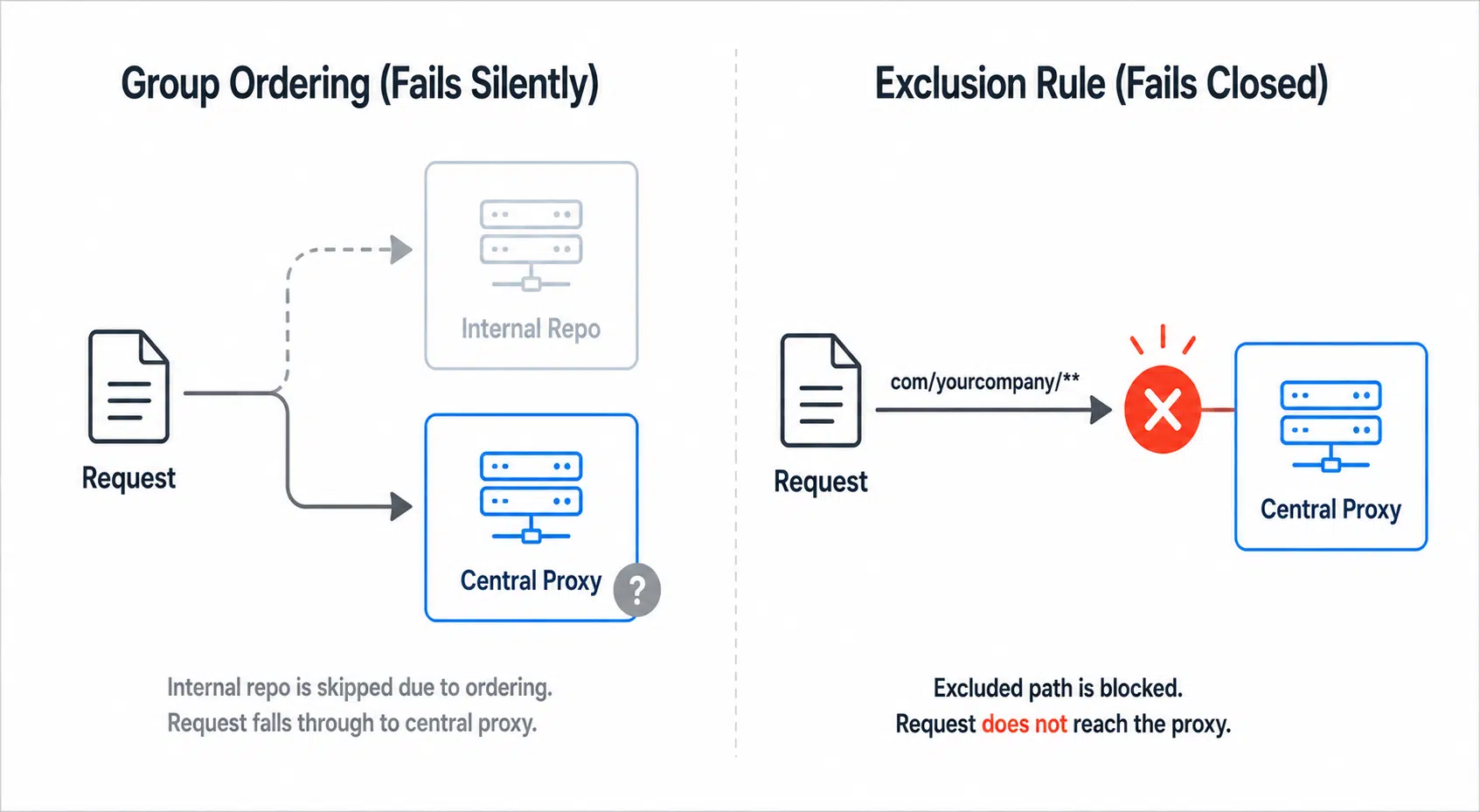
settings.xml routes every request through one URL, but not what that URL does next. A manager serving a group holding both an internal hosted repository and a Central proxy still has to choose. Two configurations matter here. The first is ordering. In Nexus Repository, group members are searched in order and the first match wins, so hosted internal repositories belong ahead of the Central proxy. Artifactory resolves virtual repositories in order too. Internal-first means your coordinates resolve internally even when the same ones exist publicly. The second is an outright block on your own coordinate patterns at the Central proxy. Nexus Repository does that with routing rules, Artifactory with exclude patterns on the remote repository, or better, on the virtual repository aggregating it. Either way, a request for com/yourcompany/** never reaches the public internet. That second control survives mistakes. Ordering depends on configuration staying correct – an explicit block on your namespace fails closed.
| Control | Fails how | Survives a group reorder |
|---|---|---|
mirrorOf set to * |
Closed, builds break loudly | N/A |
| Group ordering, internal first | Open, silently | No |
| Exclusion rule on the Central proxy | Closed, resolution fails | Yes |
| Egress restricted from build agents | Closed, resolution fails | Yes |
The exclusion rule and the egress restriction turn policy into enforcement. Configuration drifts, base images get inherited from another team, and somebody always adds a repository to unblock a Friday release. For artifact traffic, default-deny egress from build agents and allowlist the approved repository manager, which stops Maven reaching arbitrary public repositories. Blocking a single Central hostname doesn’t, since Maven reaches Central under more than one name and dependency POMs can introduce entirely different hosts. Routing and blocking decide where artifacts come from. Neither evaluates whether the artifact is safe. A JAR is a build output, and nothing requires it to match the source repository the project links to. Scanning doesn’t close that gap, since scanners inspect what already landed. Rebuilding packages from verified source in a controlled environment gives you independent provenance instead of trust in an opaque binary, and where the upstream build is reproducible you can compare outputs directly.
Gradle Has Better Primitives for This
Gradle handles repository scoping better than Maven, so use its native features rather than porting Maven habits over. Content filtering restricts which coordinates a repository may serve. Put that configuration in dependencyResolutionManagement in settings.gradle.kts, where the same block can also stop subprojects declaring their own.
// settings.gradle.kts
dependencyResolutionManagement {
  repositoriesMode = RepositoriesMode.FAIL_ON_PROJECT_REPOS
  repositories {
    exclusiveContent {
      forRepository {
        maven { url = uri("https://nexus.example.com/repository/internal/") }
      }
      filter { includeGroupByRegex("com\\.yourcompany(\\..*)?") }
    }
    maven { url = uri("https://nexus.example.com/repository/maven-public/") }
  }
}
exclusiveContent means your namespace resolves only from the internal repository, with nothing else consulted. That’s dependency confusion closed by construction rather than ordering. Note the anchoring on that regex, because a bare com\.yourcompany.* happily matches com.yourcompanyevil, exactly the near-miss it exists to catch. FAIL_ON_PROJECT_REPOS then fails the build if any subproject declares its own, keeping the decision in one file. Maven has no one-line equivalent, though it isn’t defenseless. The Enforcer plugin’s bannedRepositories rule inspects the build session’s repositories and can run as an allowlist. Insider Tip: Combine exclusiveContent with Gradle dependency verification. Filtering decides which repository may serve a coordinate, and verification metadata checks artifacts against expected checksums, and, when enabled, trusted signatures. Together they cover routing and integrity, which no single Maven configuration does. Changing dependencies such as SNAPSHOTs sit outside it, one more reason to pin.
The Gap settings.xml Can’t Close
Everything above closes Maven dependency confusion at the routing layer: the right mirrorOf value, group ordering, exclusion rules, egress controls. None of it answers the next question, whether the artifact is safe once it’s arriving from the right place. That’s what SecureChain is built for. It replaces public Maven Central resolution with a verified, rebuilt-from-source alternative, vetting every component during dependency resolution rather than scanning artifacts after they land. New CVEs get patched continuously, and coverage doesn’t stop at end of life. See what SecureChain for Java covers, or request a demo against your own build.
FAQ
What is Maven dependency confusion?
It’s an attack where a build resolves an internal coordinate from a public repository instead of the internal one. For fixed versions, the exposure comes from the effective repository order, settings then POM hierarchy then dependency POMs, not from version inflation.
Does Maven pick the highest version across repositories?
Not for fixed versions. Maven resolves the version from the dependency graph, then finds that exact coordinate in the first repository that has it. Ranges and SNAPSHOTs do compare across repositories, which is why exact versions are safer.
What should mirrorOf be set to?
Set it to *, which routes every repository request through your repository manager whatever any POM declares. Setting it to central intercepts only Maven Central and leaves repositories declared in project or dependency POMs resolving directly.
Can a dependency add a repository to my build?
Yes. Maven honors repositories declared in a dependency’s POM, so a transitive dependency can add one to your resolution set. A mirror set to * stops Maven contacting them at their original URLs.
How do I check which repositories my Maven build uses?
Run mvn help:effective-settings for merged settings and profile activation, mvn help:effective-pom for the list your POM hierarchy produces, and mvn -X dependency:resolve to see the set a real build used.
Is encrypting settings.xml passwords secure?
Not against anyone who can read the filesystem. Maven 3’s legacy password encryption keeps a master password on disk, recoverable by anyone holding the settings-security file. Maven 4 adds a pluggable dispatcher that can source the master key from an environment variable or a GPG agent instead, though anyone holding that key still decrypts every value in settings.xml. Either way, inject credentials from a real secrets store in CI.