
 Tech Support
 Documentation
 Login
 Contact Us


Go straight to an AI summary of this blog post instead 


Key takeaways
- JavaScript apps often include hundreds of hidden dependencies, both direct and transitive.
- SBOMs give you complete visibility into your codebase, exposing vulnerabilities and ensuring transparency.
- Tools like Syft and CycloneDX make SBOM generation simple, helping you strengthen security and maintain compliance.
Your JavaScript app is a black box of dependencies. Crack open node_modules and you might find a thousand packages you never knew you had, with some as cryptic as UFOs on a radar screen. In an era of escalating supply chain attacks, that’s not just spooky – it’s dangerous.
Enter SBOMs (Software Bill of Materials): your star chart for navigating the galaxy of JavaScript dependencies. In this post, we’ll break down what SBOMs are, why frontend developers can’t ignore them, and how tools like CycloneDX and Syft let you map your ecosystem, integrate security into your workflow, and catch vulnerabilities before they crash-land.
Close Encounters of the JavaScript Kind
When we look at software as a whole, we have various pieces that make it all connect. There are packages, licenses, people, processes, etc., that fit together like a puzzle piece…most of the time.
Software dependencies can feel as strange as a UFO (Unidentified Flying Object) or a UAP (Unidentified Aerial Phenomena): sometimes explainable, often baffling, and always carrying the possibility of a surprise encounter.
There could be outliers within your code that you might know are there, and then in the blink of an eye, your software could be compromised. This is where SBOMs come into the picture.
You can sort of think about it like this: install a package, that package installs another package, and then your mothership and ALL its child ships get destroyed.

This movie pretty much sums it up!
How Many Dependencies Are in Your App?
Take a wild guess: does your app have 20 dependencies? 200? Or a small galaxy’s worth – closer to a thousand?
If you run npm ls in your terminal, you will get a list of dependencies.
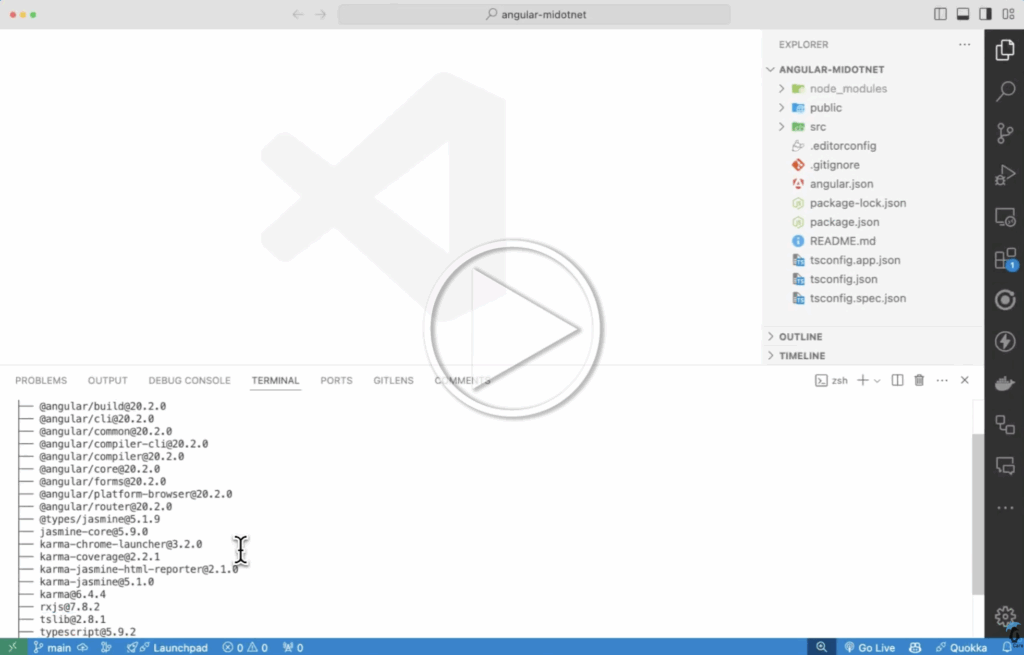
Why not list ALL the dependencies? We can, it might overload the terminal since dependency trees can be large, but it is possible.
Listing dependencies this way will show not just the direct deps, but also the transitive deps.
Two Forms of Dependency
When we look at the dependencies in our project, we have two types we are faced with: one is a direct dependency. The one you can see if you open your package.json file, the direct dependency tree.
For example, next is a direct dependency because you need it to build a Next app.
JSON

"dependencies": {

"react": "^19.0.0",

"react-dom": "^19.0.0",

"next": "15.3.4"

}
Then we have transitive dependencies. These are dependencies of dependencies that you have to dig deep to find. Usually, in a package.json file within the node_modules folder OF a package folder.
In this example, @next/env is a transitive dependency of next.
JSON

"dependencies": {

"@next/env": "15.3.4"

}
What Is an SBOM?
An SBOM is essentially your project’s manifest – a machine-readable inventory that spells out every component, dependency, and relationship. Think of it as the ingredient list for your codebase, or the flight manifest that says exactly who’s on board. An SBOM lists all the dependencies and versions within a project.

Below is an excerpt from Tahir Balarabe on Medium. This explanation sums it up perfectly.
“An SBOM, or Software Bill of Materials, is a detailed, machine-readable list of all components within a piece of software, including dependencies, metadata, and relationships between components.”
You might be asking yourself, “Why do we need an SBOM?” There are plenty of reasons we need an SBOM or SBOMs when we are producing or consuming software. One of which is transparency. We should know what is in our product. Shipping a product or offering an insecure product doesn’t benefit anyone; it will eventually result in issues down the road.
Transparency when it comes to what is in your dependency tree helps to keep you secure and compliant, which are also two very important reasons. Knowing what is in your product is one thing, but being secure and compliant is another.
Types of SBOMs
When we are talking about or coming up with various SBOMs for our software, we have 6 different types. All these types break down to various parts of the SLDC (Software Development Lifecycle).
- Design SBOM
- Source SBOM
- Build SBOM
- Analyzed SBOM
- Deployed SBOM
- Runtime SBOM
For more information on the definitions of these SBOMs, check out the Types of Software Bill of Materials (SBOM) PDF from the CISA (Cybersecurity & Infrastructure Security Agency).
One thing to keep in mind when discussing SBOMs is that it is not a package file or a lock file – it’s more comprehensive. An SBOM also provides a full, standardized list of all the things within your project: components, metadata, etc.
Big Frontend Problem
If you are reading this and have installed anything on the frontend using npm, you have most likely encountered the issue of typing via muscle memory because you’ve done it 100x before. Sometimes you might not be paying attention and just install what you think you need. You may not even copy and paste directly from the vendor site or the npm registry. This brings about a lot of issues; we are talking about Typosquatting.
Typosquatting is also known as URL hijacking. It is a type of attack where an attacker registers a domain(s) with slightly different variations of misspellings to trick users into checking out their site, often malicious. This also carries over into package management. Attackers will also publish malicious packages and misspell them, just like the domains. A developer might accidentally make a typing mistake and install a malicious package instead of the correct one.
An example of this would be the one below:
npm install express vs. npm install expres
You can see that the second version is the incorrect version of express and could potentially be harmful.
Why are SBOMs Important?
There are a few reasons why having an SBOM is extremely important:
- Component Visibility
- Vulnerability Management
- Supply Chain Security
- Collaboration and Patch Management
- Regulatory Compliance
Having visibility into our components is critical, especially when it comes to transitive dependencies. We also want to be able to manage our vulnerabilities based on what we have installed. And don’t overlook the human factor: sharing SBOMs builds client trust, proving that your software supply chain is transparent and secure.
As web and software professionals, if we are creating software that is going to be used by others, we want to make sure we have a solid relationship with our clients. Making sure that SBOMs are available for our clients is critical.
Installing a Tool to Generate an SBOM
There are a few different ways you can install various tools to generate an SBOM. In this post, we are going to use Syft by Anchore. Below are some commands to install Syft on your machine.
The recommended way is to use curl:
curl -sSfL https://get.anchore.io/syft | sudo sh -s -- -b /usr/local/bin
You can also install the package with Brew:
brew install syft
There is also a version for Windows that can be installed via Chocolatey:
choco install syft -y
Microsoft also makes a tool to generate SBOMs using Winget:
winget install Microsoft.SbomTool
Once we have Syft installed, we can move on to generating an SBOM in our project.
SBOM Generation
There are two popular formats to generate an SBOM: SPDX and CycloneDX. In the following examples, we are using SPDX to format our SBOM. We are also generating an SBOM in an Angular project, specifically v19.
Once you are in your project, you run the command below to generate the SBOM. It is machine-readable, but we will fix that with the second command we will run. You will see there are two flags at the end of the command, –source-name and –source-version. Without passing those into the command, the terminal will yell at you. It is just best practice to include them.
syft packages dir:. -o json > sbom.json --source-name "my-js-project" --source-version "1.0"
Now, to generate a version of the SBOM that can be read by a human. You can run a command called jq to pretty-print the SBOM so you can go through and look at what was created.
jq . sbom.json > sbom-pretty.json

When you install new packages, it is a good practice to generate a new SBOM so that the package you install can be documented. Below is a video of installing the Lucide package for Angular and manually regenerating the SBOM to see the new package reflected.

This can also be done using a GitHub Action. When you push to main, dev, or a release branch, it triggers a workflow to generate a new SBOM artifact in JSON format, which is stored in GitHub. It is your choice what to do with that file.
Final Thoughts
An SBOM isn’t optional anymore – it’s a critical part of modern software development. It doesn’t just tell you what’s installed; it gives you a living map of both direct and transitive dependencies. It also aids in vulnerability management and compliance awareness.
Transparency is paramount, and for a lot of organizations an SBOM is a way to demonstrate a commitment to visibility. As part of its Endless Lifecycle Support (ELS) for Applications, for example, TuxCare provides its users with an SBOM automatically – delivering comprehensive details about how each package is built, verified, and distributed. It’s how TuxCare enables developers using its extended patching for end-of-life open-source software products are able to ensure transparency and accountability in their software ecosystems.
So next time you open your project, generate an SBOM, run it through a vulnerability scanner, and see exactly which packages might be harboring known exploits. It’s one of the simplest, smartest ways to level-up your frontend security posture.
Stay on Your End-of-Life Version – Safely
Endless Lifecycle Support (ELS) continues sending security patches for out-of-support open-source tools in your stack – from runtimes and libraries to OSs and applications.