Tech Support
 Documentation
 Login
 Contact Us


Go straight to an AI summary of this blog post instead 


Key Takeaways
- Angular escapes interpolated content, sanitizes untrusted HTML and URL values in template bindings, and handles the client half of CSRF protection by default, but full protection depends on your server issuing and validating the token.
- XSS, CSRF, broken authorization, and unpatched dependencies are the risks that most often affect Angular applications, and most of them arise outside the framework’s default protections.
- A Content Security Policy, Trusted Types, and Subresource Integrity on third-party scripts cover attack surfaces Angular has no visibility into.
- Angular versions 19 and below are past end of life and receive no official security patches; teams that can’t migrate yet need a plan to stay covered.
Angular applications are rarely compromised because of a weakness in the framework itself. They get compromised because a developer reached for bypassSecurityTrustHtml to make a third-party widget render correctly and switched off Angular’s XSS protection for that value. Or because the backend never validated an XSRF token. Or because a dependency three levels down went two years without a patch. That’s the pattern behind most Angular security problems: the framework is solid; the workarounds and the surrounding configuration aren’t.
This guide covers the Angular security practices that close the gap between what the framework protects automatically and what your team has to enforce by hand.
How Angular Handles Security

Before you can secure an Angular app, it helps to know what Angular already does for you. Quite a lot, as it turns out.
By default, Angular treats every value as untrusted. When a value is inserted into the DOM through interpolation or a template binding, Angular escapes or sanitizes it. Interpolated content is always escaped, so {{ }} renders markup as visible text instead of parsing it. Property bindings go through context-aware sanitization, and the rules depend on the context. Angular defines four security contexts – HTML, style, URL, and resource URL – and sanitizes untrusted HTML and URL values. Resource URLs can’t be sanitized, because by definition they load and execute code, so Angular refuses to bind them unless you explicitly mark them as trusted. That behavior blocks the majority of straightforward XSS attempts.
Angular also compiles templates ahead of time by default in CLI applications, which removes the template-injection class of bugs, and its HttpClient ships with client-side XSRF token handling and automatic stripping of XSSI response prefixes.
These protections only work while you stay inside them. Write to the DOM directly through ElementRef, pass a bypassed value into a binding, or let your server skip XSRF validation, and the guarantees stop. The sections below are about the gaps Angular doesn’t fill automatically.
| Reality Check: “Angular is secure by default” is half true. Angular escapes and sanitizes template output and provides client-side helpers for CSRF and XSSI, but it does nothing about leaked tokens, vulnerable npm packages, weak authentication, or an EOL version exposed to public CVEs. The framework protects specific parts of the client-side rendering and HTTP layers, not your whole application. |
Common Angular Security Vulnerabilities
Here’s the uncomfortable truth: most vulnerabilities in Angular applications aren’t flaws in Angular itself. They’re places where a developer stepped outside the framework’s protections, usually to ship a feature faster, without putting an equivalent guard back.
| Vulnerability | How it arises in Angular | What Angular does and doesn’t cover |
| XSS | Untrusted data marked safe with bypassSecurityTrust*, or written straight to the DOM through ElementRef or element.innerHTML | Contextual sanitization applies to template bindings, not to direct DOM writes |
| CSRF | Server never sets or validates the XSRF token | HttpClient sends the token; the server must issue and verify it |
| Vulnerable dependencies | Outdated npm packages or an EOL Angular version | Upstream patches stop at end of life |
| Broken access control | Server-side authorization missing or inconsistent; route guards absent or misconfigured | Client-side guards cannot enforce server-side access control |
| Third-party script injection | External scripts loaded without SRI or CSP controls | Angular doesn’t sandbox third-party code |
Cross-Site Scripting (XSS)
XSS is the vulnerability Angular’s security model is most explicitly designed to prevent. The whole sanitization system exists because injecting untrusted content into the DOM is so reliably exploited – and that also makes Angular’s sanitization the protection developers most often switch off by accident when they reach for a bypass.
The 2024 Synopsys Open Source Security and Risk Analysis Report, which analyzed more than 1,000 commercial codebases, found that eight of its top 10 open source vulnerabilities mapped to CWE-707, the broad “improper neutralization” class covering weaknesses that arise from unsafe handling of untrusted input, including cross-site scripting. Improper input handling isn’t an edge case; it is one of the most reliable sources of serious vulnerabilities across the open source ecosystem.
In Angular applications, XSS usually traces back to one of three things: a DomSanitizer.bypassSecurityTrustHtml() call on data an attacker can influence, content that was incorrectly marked as trusted somewhere upstream, or code that writes to the DOM directly through ElementRef, native browser APIs, or a third-party library operating outside Angular’s control. A plain [innerHTML] binding, by contrast, is sanitized.
The fix isn’t complicated. Don’t pass untrusted data through a bypass, and where you genuinely must render externally supplied HTML, clean it with a well-maintained sanitizer before it reaches the template. Treat every bypassSecurityTrust* call in your codebase as a finding worth a second look.
| Watch Out: Every bypassSecurityTrust* method does exactly what the name says: it turns Angular’s sanitization off for that value. DomSanitizer.sanitize() will not clean a value that has already been marked as trusted, so wrapping a bypass in a sanitize call buys you nothing. One of these on a field an attacker can reach is enough for a stored XSS vulnerability. Grep for them before every release. |
Cross-Site Request Forgery (CSRF)
CSRF in Angular is usually a configuration gap, not a code bug. By default, HttpClient reads the XSRF-TOKEN cookie and sends it back as an X-XSRF-TOKEN header on mutating requests to relative and same-origin URLs. It does not add the header to GET or HEAD requests, which don’t need it, or to cross-origin requests. The client side is handled.
The problem is the other half. Angular can’t set that cookie or validate the returned token for you. If your backend never issues the cookie, or accepts requests with a missing header, the protection is decorative. Angular’s own documentation is blunt about it: failing to configure the server renders the default protection ineffective. This is one of the most common issues in single-page apps – the front end looks protected while the server isn’t checking.
Vulnerable and Outdated Dependencies
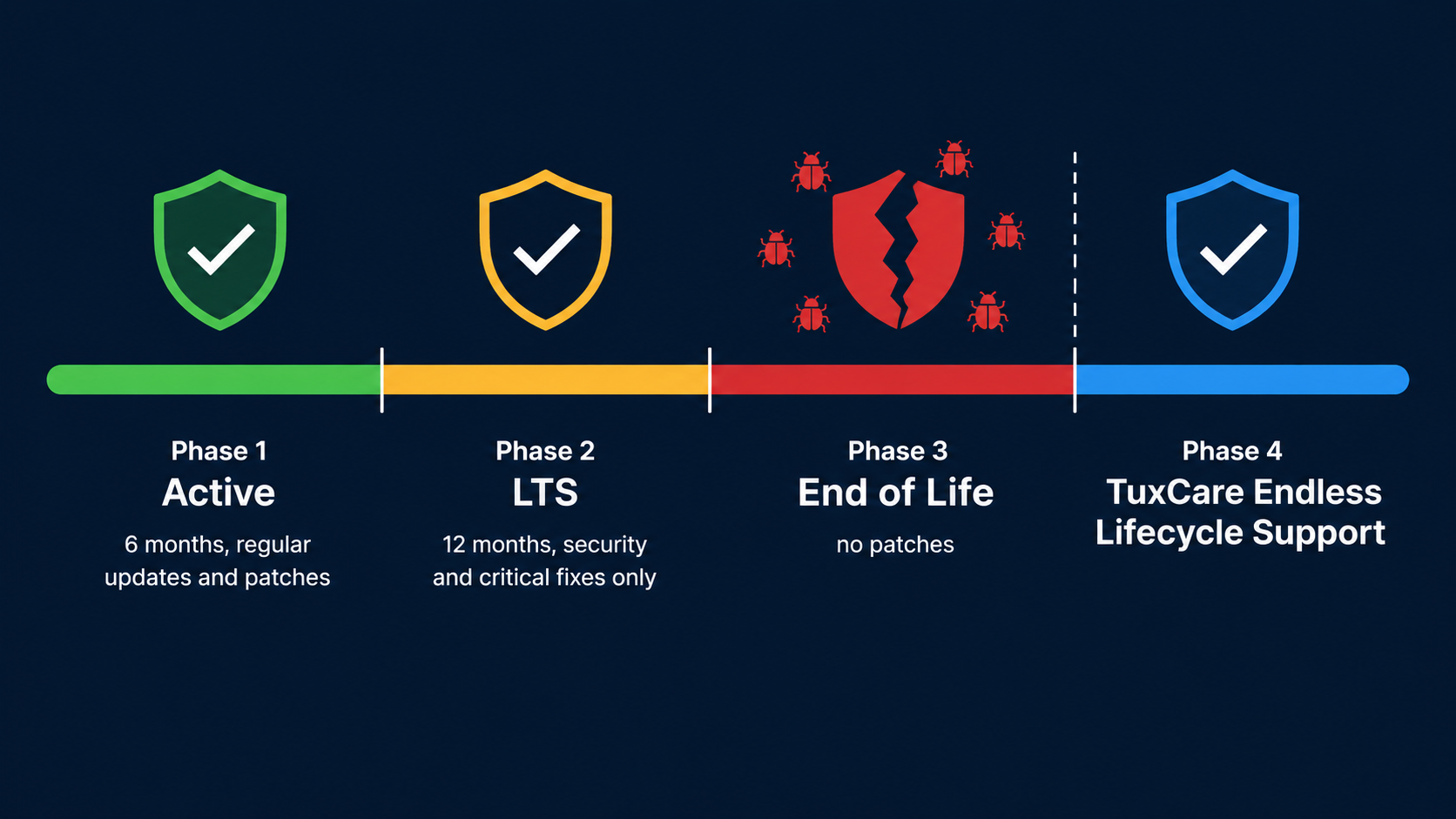
This is the biggest hidden surface and the one teams ignore longest. Your app code might be clean, but your node_modules tree isn’t yours, and a large share of what lands in it arrives as indirect, transitive dependencies that nobody on your team chose.
The 2026 Black Duck Open Source Security and Risk Analysis Report, which audited 947 commercial codebases across 17 industries, puts numbers to what most teams already sense but rarely act on. Among those codebases, 93% contained components with no development activity for at least two years, 92% had components running 10 or more versions behind current releases, and only 7% of components were on the latest available version. Mean vulnerabilities per codebase more than doubled year over year, reaching 581. The jQuery findings are particularly instructive: four of the ten most common CVEs in the audited codebases were jQuery vulnerabilities patched years ago, and between 25% and 28% of codebases still carried at least one of them.
Two clocks are running. The first is your npm dependency tree, which accumulates CVEs whether or not you touch it. The second is Angular itself.
Angular changed its release cadence with version 22. Majors now ship annually and are typically supported for 24 months: 12 months of active support followed by 12 months of LTS, during which only critical fixes and security patches land. Every release up to and including version 21 followed the older six-month cadence and an 18-month window – 6 months active, then 12 months LTS. Either way, support ends.
| Angular version | Status (August 2026) | Active support ends | Security support (LTS) ends |
| 22 | Active | June 2027 | June 2028 |
| 21 | LTS | Ended June 3, 2026 | June 2027 |
| 20 | LTS | Ended November 19, 2025 | November 28, 2026 |
| 19 and below | End of life | – | No official patches |
Dates follow Angular’s published support schedule, which the team offers as approximate guidance and may revise.
Once you’re on an EOL version, it’s no longer eligible for routine upstream security fixes, so any new CVE affecting the framework or its tree stays unpatched unless you upgrade or bring in vendor support. We’ll come back to what to do about that.
Angular Security Best Practices for Dev Teams
1. Trust the Sanitizer, Stop Bypassing It
The highest-value habit is leaving Angular’s sanitization on. Default to interpolation and property binding, which escape and sanitize automatically. A normal [innerHTML] binding is sanitized, so it isn’t unsafe on its own – but use it only when you actually need to render markup, and never combine it with attacker-controlled content and a bypass.
Where you genuinely must render externally supplied HTML, clean it with a well-maintained HTML sanitizer suited to your threat model, and remember that DomSanitizer.sanitize() will not clean a value already wrapped by a bypassSecurityTrust* call. Make bypass calls reviewable: a lint rule or a CI grep that flags every one of them forces a human to justify it. If a security audit finds a bypass on attacker-reachable data, treat it as a release blocker, not a backlog item.
| Pro Tip: Search your codebase for bypassSecurityTrust before every major release. If you find one and can’t explain in one sentence why that specific value is safe, it probably isn’t. |
2. Add a Content Security Policy (CSP)
A Content Security Policy is your second line of defense for XSS that slips past sanitization. CSP restricts which sources and execution patterns the browser will permit, so injected script that doesn’t satisfy the policy won’t run. How much it actually blocks depends on the policy you write: broad origins, ‘unsafe-inline’, or permissive script-loading patterns will let plenty through.
Angular documents a minimum policy for a new application:
| Content-Security-Policy: default-src ‘self’; style-src ‘self’ ‘nonce-randomNonceGoesHere’;
script-src ‘self’ ‘nonce-randomNonceGoesHere’; |
The nonce matters. Angular inserts <style> elements at runtime, and a strict policy without a nonce will block them and break your styling. Generate a fresh, unpredictable nonce for every response and hand it to Angular in one of three supported ways: set autoCsp to true in your workspace configuration, set the ngCspNonce attribute on the root application element, or provide it through the CSP_NONCE injection token. Serve the policy as a response header from your web server or CDN, not as a meta tag. If your HTML is cached at a CDN, generate the nonce at the edge – a nonce baked into a cached response is the same value for every visitor, which defeats the point.
Pair CSP with Trusted Types. Angular strongly recommends running both, because they operate at the DOM level, where they can’t be circumvented through lower-level browser APIs. Applications that call any bypassSecurityTrust* method need the angular#unsafe-bypass policy, and applications with lazy-loaded chunks need angular#bundler.
| Pro Tip: Roll CSP out in report-only mode first with Content-Security-Policy-Report-Only. You’ll get violation reports without breaking the app, which lets you find every inline script, injected style, and third-party origin before you enforce. Teams that skip this step almost always break something in production. |
3. Configure XSRF/CSRF Protection End to End
Don’t assume Angular’s client-side XSRF handling is the whole story. It sends the token; your server has to issue and verify it.
Same-origin API: confirm the backend sets the XSRF-TOKEN cookie per session in a JavaScript-readable cookie and rejects any eligible request whose header is missing or doesn’t match. If your backend uses different names, configure them with withXsrfConfiguration() rather than disabling the interceptor.
Cross-origin API: Angular doesn’t attach the header to cross-origin requests, so the default cookie-based scheme doesn’t apply. Design the protection deliberately across both ends: cookie attributes, credential handling, an explicit list of trusted origins in your CORS configuration, and server-side token or origin validation. CORS on its own is not a CSRF defense.
It’s worth actually pen-testing this path. Web scanners will catch the obvious CSRF gaps, but it’s easy to have the cookie set correctly while validation is silently skipped on a subset of routes.
4. Lock Down Route Guards and Authorization
Angular’s router is powerful, and that’s precisely why authorization mistakes here are so costly – though not always in the way teams assume. Angular doesn’t enforce access control; that’s on you and your backend.
A missing guard exposes client-side views and navigation paths to anyone who knows the URL. It becomes a data breach when the API behind those views also fails to check authorization. Both halves matter, and only one of them is Angular’s.
A few things to get right:
- Every protected route needs a guard, and don’t rely on the UI hiding links to unauthorized sections. Modern Angular uses functional guards – CanActivateFn for navigation and canMatch for route matching – rather than the deprecated class-based interfaces.
- Guards may consult server-derived authentication or permission state, but they must never replace authorization checks on the API. A flag in localStorage that any user can edit is not an access control.
- Use canMatch on lazy-loaded routes so the router won’t match or load the route configuration for unauthorized users.
- Test guards explicitly. It’s common to have a guard that returns true in edge cases when it shouldn’t.
| Watch Out: Lazy loading is not privacy. Route guards run in the browser and control navigation; they can’t stop anyone from fetching a publicly served JavaScript bundle directly or reading it in DevTools. Never put secrets, undisclosed endpoints, or sensitive authorization logic in client-side code, lazy-loaded or not, and enforce authorization on every protected backend request. |
5. Treat Third-Party Scripts as a Threat Surface
Every third-party script you load – analytics, chat widgets, A/B testing tools, ad networks – runs with the same privileges as your own code. Angular’s sanitization protects your templates, but it doesn’t sandbox scripts that load outside them.
This is a practical concern, not a theoretical one. In September 2025, a phishing attack on a single npm maintainer’s account pushed malicious code into 18 widely used packages, including chalk and debug, which together account for billions of weekly downloads. Days later the self-replicating Shai-Hulud worm harvested developer credentials and spread across the registry; GitHub removed more than 500 compromised packages and CISA issued an alert. The 2026 OSSRA adds shape to the pattern: of the malicious packages Black Duck identified across open source ecosystems, 66% were purpose-built to cause harm through tactics like typosquatting and dependency confusion, while 34% were legitimate packages hijacked after they had earned community trust.
A few controls worth implementing:
- Subresource Integrity (SRI) hashes on externally hosted scripts with stable, versioned contents. If the fetched file no longer matches the declared hash, the browser refuses to execute it. SRI also requires the appropriate CORS configuration on the host to work.
- CSP rules that explicitly allowlist third-party origins rather than permitting * or ‘unsafe-inline’.
- Regular audits of which third-party scripts are loaded in production. Marketing and analytics tools accumulate over time and often pull in their own sub-dependencies.
- Self-hosted, pinned copies of third-party libraries where feasible. This removes the CDN from your trust chain, but it also moves the patching responsibility onto your team, so pair it with a process for tracking upstream fixes.
6. Keep Angular and Its Dependencies Patched
Patching is the practice teams defer until it becomes a migration. Run npm audit in CI and actually triage what it finds, rather than dismissing the warnings because there’s no immediate fix path. Treat it as one input rather than a complete assessment: it reports known advisories against the packages declared in your manifests and lockfiles, and the 2026 OSSRA found that 17% of open source components enter codebases outside standard package managers altogether – copy-pasted snippets, vendored code, AI-generated code – where manifest-based scanners never see them.
The same report cites a separate 2025 Black Duck survey in which 65% of responding organizations said they had experienced a software supply chain attack in the previous year. That figure is worth sitting with: supply chain attacks are no longer a tail risk, they’re a mainstream enterprise problem. Across the audited codebases, 87% contained at least one known open source vulnerability and 78% contained at least one high-risk vulnerability.
| npm audit
ng update @angular/core @angular/cli |
Keep Angular within its supported release window, automate dependency PRs with Dependabot or Renovate, and take transitive CVEs seriously even when there’s no direct fix available. A vulnerability can remain exploitable several layers down the dependency tree, so assess whether your application actually reaches the vulnerable code rather than dismissing it for being indirect.
The harder version of this problem is what happens when you can’t upgrade. A major version migration can be expensive, the app is stable, and the business case for a rewrite is hard to make. That’s where the EOL gap opens up.
Tools & Solutions for Angular Security
Securing Angular isn’t a one-time implementation. It’s ongoing patching, vulnerability monitoring, and support coverage. Most teams need more than one tool to cover it.
| Solution | What it covers | Best for |
| Snyk / Dependabot / npm audit | Known advisories affecting dependencies declared in manifests and lockfiles, direct and transitive | Teams shipping actively, CI-integrated |
| CSP, Trusted Types, and ZAP | Runtime XSS hardening and app-layer scanning | Security-focused teams hardening production |
| TuxCare Endless Lifecycle Support (ELS) for OSS | Backported patches for EOL Angular (versions 4 through 19) and its supported dependencies, delivered via npm | Teams stuck on unsupported versions that need audit-ready software without a forced rewrite |
Dependency Scanners (Snyk, Dependabot, npm audit)
Software composition analysis (SCA) tools watch your dependency tree and flag known CVEs, including in packages you never installed directly. Snyk and GitHub’s Dependabot both do this well, and npm audit ships free with npm. Snyk maintains a broad commercial vulnerability database, and Dependabot’s automated PRs lower the friction of staying current. Best for active development teams that want CVE detection wired into CI before code merges.
Runtime Hardening
Dependency scanners catch known issues in packages. They don’t catch a missing Content Security Policy or an exploitable DOM write in your own code. Dynamic application security testing (DAST) tools – including the open-source Zed Attack Proxy, formerly OWASP ZAP and now maintained as ZAP by Checkmarx – test the running app for injection flaws, weak headers, and CSRF gaps. Best for security-conscious teams hardening a production app rather than just auditing packages.
TuxCare’s Endless Lifecycle Support for Angular
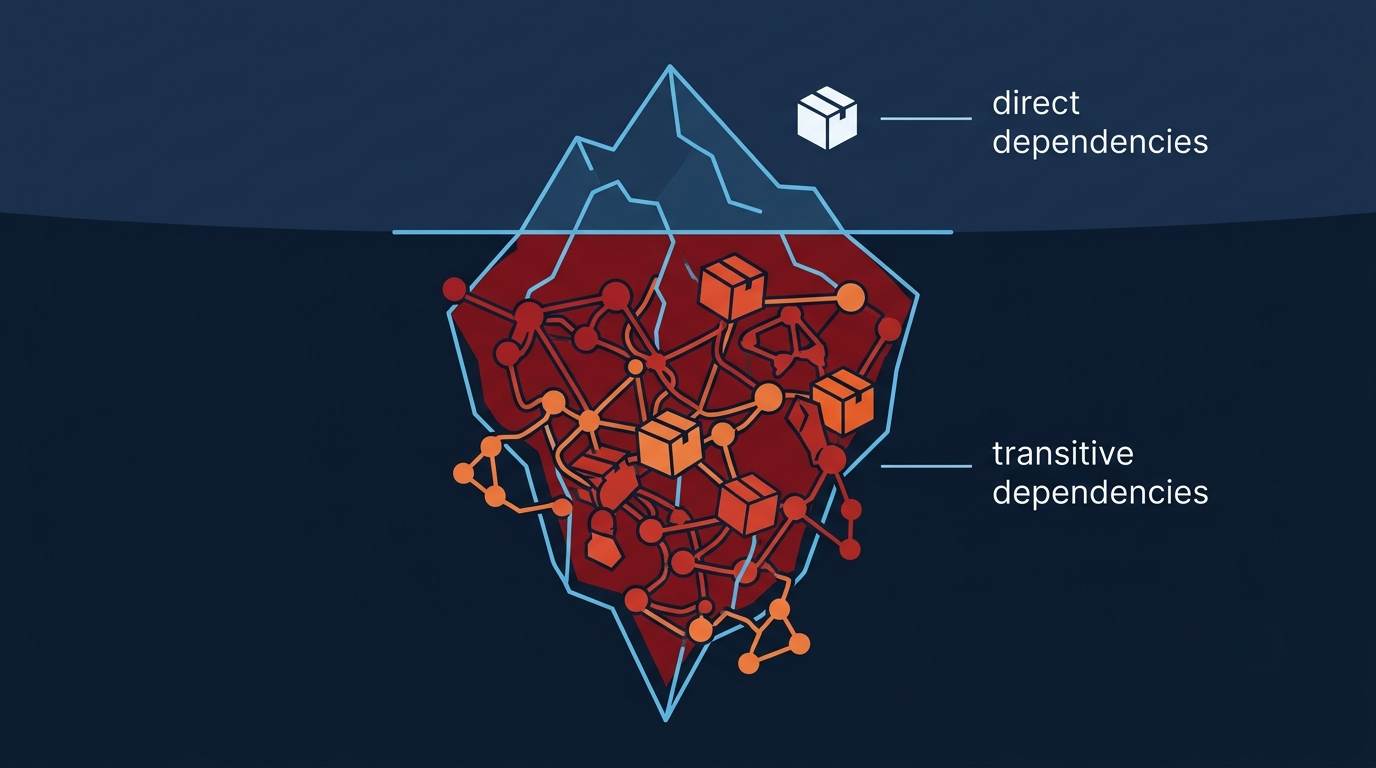
The hardest gap to close is the EOL one. When your Angular version stops receiving fixes and migration isn’t near-term, scanners will keep flagging issues you can’t patch through official channels.
Modern Angular doesn’t remove that problem, it just moves the deadline. Every major release eventually exits support, and once it does, it’s no longer eligible for routine upstream security fixes. TuxCare backports security fixes to unsupported framework versions and the dependencies it covers.
Angular versions 4 through 19 are all past end of life as of mid-2026. If your team is running any of those versions and can’t upgrade on a short timeline, TuxCare’s Endless Lifecycle Support for Angular delivers continued security patches through npm, the same package manager your team is already using. Coverage includes the core Angular packages your app depends on – @angular/core, @angular/platform-browser, @angular/common, @angular/router, @angular/forms, @angular/cli, @angular/compiler, @angular/compiler-cli, and @angular/platform-browser-dynamic – plus their supported dependencies, at no extra cost.
The practical benefit is straightforward: you stay covered while you plan the upgrade on your own timeline, rather than running a rushed migration to unblock a security audit.
Secure Angular with TuxCare
Angular gives you a strong starting point, but it protects specific parts of the client-side application. The rest is on your team: sanitization discipline, CSP and Trusted Types, XSRF configuration on both ends, route authorization backed by server-side checks, third-party script controls, and dependency patching.
The piece most teams underestimate is what happens after an Angular version goes end of life and the official fixes stop. That’s the gap TuxCare’s Endless Lifecycle Support is built to fill
TuxCare covers more than Angular. If your stack includes unsupported versions of other JavaScript frameworks or libraries – React, Vue, AngularJS, jQuery, Next.js, Express, and others – TuxCare has support available for those too. Check current coverage at Endless Lifecycle Support for Libraries and Frameworks.
FAQs
Mostly. Angular escapes interpolated content, sanitizes untrusted HTML and URL values in template bindings, and provides client-side XSRF and XSSI helpers out of the box. It can’t protect against leaked credentials, vulnerable dependencies, missing server-side authorization, or developers bypassing its sanitization.
Run ng version in your project directory. It lists the Angular CLI, core framework, and key package versions, so you can confirm whether you’re inside a supported release window.
Not automatically, but the risk climbs over time. EOL versions are no longer eligible for routine security patches, so a new CVE affecting the framework or its dependency tree stays unfixed upstream until you upgrade or get vendor-backed support. The longer you stay, the greater the chance that a newly disclosed vulnerability affecting your version goes unpatched.
XSS is one of the most common web application vulnerability classes, and in Angular applications it usually traces back to bypassed sanitization, content incorrectly marked as trusted, or direct DOM manipulation that skips the framework entirely.
Angular’s HttpClient handles the client side: reading the XSRF-TOKEN cookie and attaching it as a header on mutating same-origin requests. Full CSRF protection also requires your server to issue that cookie per session and validate the header on every eligible state-changing request. Angular can’t do the server-side half for you.
The two options are migrating to a supported version or getting vendor-backed security patches. If migration isn’t feasible in the near term, TuxCare’s Endless Lifecycle Support for Angular covers Angular versions 4 through 19 with backported security fixes delivered through npm, without requiring a version migration.