Tech Support
 Documentation
 Login
 Contact Us




Go straight to an AI summary of this blog post instead 


Key Takeaways
- OpenJDK 8 is approaching end of life, and some vendors have already ended free support for it.
- Migrating to newer Java LTS versions like Java 17 or 21 is recommended but often involves compatibility and resource challenges.
- TuxCare offers free Endless Lifecycle Support for OpenJDK 8, providing security updates beyond the vendor support duration.
Java 8 end of life (EOL) is a growing concern for businesses and developers who still rely on it for application development. As we approach 2026, understanding the implications of Java 8’s EOL is critical for planning your IT and security strategy.
Java 8 is available in two main variants: OpenJDK vs. Oracle JDK, with Oracle JDK 8 requiring a commercial license for production use, and OpenJDK 8 serving as the free, open-source alternative widely used in Linux environments. While Oracle JDK receives updates only under a paid subscription, OpenJDK is maintained by multiple vendors — each with different support timelines.
In this article, you’ll learn what Java 8 EOL means, how it may affect your systems, and what actions you can take to keep your applications secure and compliant.
Understanding the Java 8 Support Lifecycle
Java’s support model changed significantly after Oracle’s licensing shift in 2018. What was once a universally free platform now depends heavily on vendor-specific timelines.
Here’s how Oracle JDK 8 support evolved across its lifecycle:
- Public Updates ended in January 2019 – no more free patches for security vulnerabilities from Oracle.
- Premier Support ended in March 2022 – critical bug fixes and security updates required a commercial license.
- Extended Support will end in December 2030 – available only with paid Oracle support.
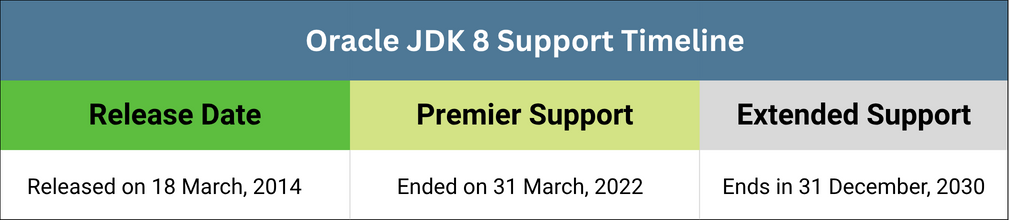
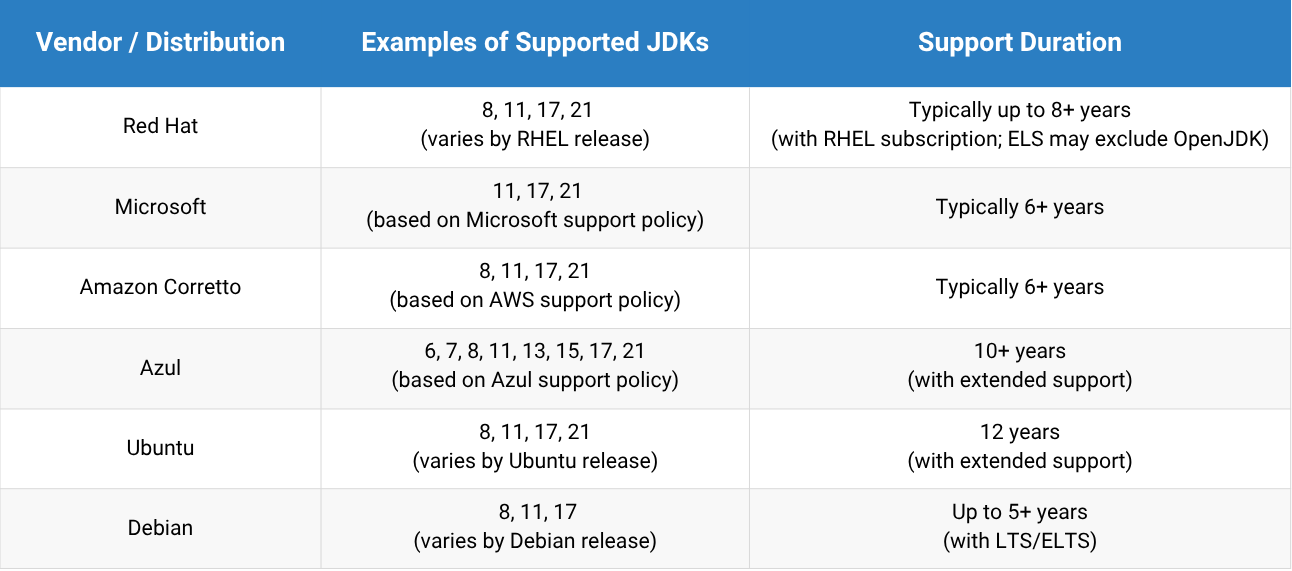
These dates apply only to Oracle JDK 8. If you’re using OpenJDK 8, support depends on the distributor. Vendors like Red Hat, Ubuntu, Amazon Corretto, and Azul provide their own builds with unique support timelines — some offer free updates beyond Oracle’s and extended support under commercial terms. These vendor-specific builds have differing support timelines: the Red Hat build of OpenJDK, for instance, has a different timeline than the Microsoft build of OpenJDK.
Alternatively, providers like TuxCare offer ongoing security patches for OpenJDK releases from any origin, even after the vendor lifecycle ends. Support contracts for these services are typically more affordable than those directly from the original vendor.
Modern Java’s Release and Support Cadence
Since 2017, Java follows a predictable 6-month release cycle, with new versions released every March and September. To support enterprises, every two years an LTS (Long-Term Support) version arrives — such as Java 11, Java 17, Java 21, and the upcoming Java 25. If your systems are utilizing earlier LTS releases, reviewing the operational impact of the OpenJDK 11 EOL timeline can help prevent unpatched vulnerability exposure.
Oracle provides free public updates for an LTS version until one year after the next LTS release. For example, Oracle JDK 17 was free for production use until September 2024 (one year after Java 21’s release). After that, continued Oracle support requires a paid subscription.
This cadence balances fast innovation with enterprise stability. Meanwhile, OpenJDK distributors offer their own OpenJDK builds with varied support durations.
Business and Security Risks of Sticking with Java 8 After EOL
Java 8 may feel stable and familiar, but continuing to use it past EOL introduces serious and escalating risks. These risks aren’t just technical — they directly impact your security posture, compliance obligations, operational efficiency, and ability to stay competitive in a fast-moving software landscape.
Security and Compliance Vulnerabilities
The most immediate threat is unpatched security vulnerabilities. Without vendor updates, Java 8 systems become easy targets for cyberattacks, including ransomware and data breaches. Unsupported software is also a red flag for auditors — violating standards like PCI DSS, HIPAA, and ISO 27001.
These violations can lead to fines, lawsuits, or loss of certifications. In a post-EOL state, maintaining a secure, compliant environment becomes a near-impossible task — especially in Linux-based environments that rely on timely package updates.
Operational and Cost Inefficiencies
Sticking with Java 8 might seem like a way to avoid upgrade costs — but it quickly becomes more expensive. Without vendor support, your team is responsible for resolving bugs, applying workarounds, and managing compatibility issues. That drains developer and sysadmin hours.
Java 8 also lacks the performance optimizations found in newer JDK, meaning your applications consume more CPU and memory, leading to higher infrastructure spend. As technical debt grows, future migrations become more complex and expensive.
Innovation and Competitive Disadvantage
Java has evolved significantly since version 8, with features like var, records, pattern matching, and text blocks improving code clarity and development speed. Meanwhile, popular tools and frameworks — such as Spring Boot 3, JUnit 5, and OpenTelemetry — have dropped Java 8 support entirely. Organizations facing these changes often need guidance on navigating Spring EOL support and ensuring continued stability for their applications.
This creates integration challenges and forces teams into custom workarounds. In cloud-native environments, where efficiency and modernization matter, relying on Java 8 can stall adoption of microservices, CI/CD pipelines, and container-native platforms — putting you at a strategic disadvantage.
Your Options Beyond Java 8 End of Life
With Java 8 reaching end of life, organizations must choose how to maintain application security, performance, and compliance. Here are three practical paths forward:
Upgrade to a New LTS Version
The most future-proof solution is to migrate to a newer Long-Term Support (LTS) release like Java 17 or Java 21. This restores access to critical updates, performance improvements, and modern Java features.
LTS versions provide multi-year support, improving stability and developer productivity. However, migrations often involve code refactoring, dependency upgrades, and thorough testing — which may delay adoption in complex environments.
Switch to a Commercial JDK Vendor
If you’re using an unsupported Java 8 distribution, consider switching to a vendor offering commercial support. Options include:
- Oracle JDK 8 (with subscription)
- Azul Zulu, Amazon Corretto, Red Hat
These vendors provide paid access to Java 8 security patches and bug fixes for extended periods. This option buys you more time while keeping your systems secure — but it requires strict adherence to the vendor’s licensing and support policies.
Extend Java 8 Lifespan with TuxCare
If migration is not immediately feasible, you can keep using your existing OpenJDK 8 workloads securely with TuxCare’s Endless Lifecycle Support for OpenJDK — available at no cost.
TuxCare delivers ongoing security vulnerability fixes for out-of-support OpenJDK versions on Linux systems, helping you maintain compliance and protect critical workloads without the pressure of rushed or costly upgrades.
TuxCare currently supports:
- OpenJDK 1.7.0
- OpenJDK 1.8.0 (Java 8)
- OpenJDK 11
- OpenJDK 17
Migration Challenges with Java 8
While upgrading to a modern LTS Java version like Java 17 or Java 21 offers significant benefits, the transition from Java 8 is rarely straightforward. It often uncovers deep technical and organizational challenges that require careful planning.
Legacy Code Dependencies
Many applications built on Java 8 rely on outdated frameworks, APIs, or libraries that may no longer be compatible with newer JDKs. Refactoring or replacing these components takes time and introduces potential stability risks.
Compatibility Breaks
Changes to core language features, bytecode behavior, and garbage collection across versions can cause runtime errors or require extensive revalidation — especially in large or critical systems.
CI/CD and Tooling Adjustments
Build tools (like Maven or Gradle), container images, and automated pipelines may need reconfiguration to support a newer Java version. This adds complexity to release cycles and DevOps workflows.
Cost and Resource Allocation
Migrations require dedicated engineering time, testing environments, and often outside consultation. For many teams, this competes with product delivery priorities — especially when systems “seem to work fine” on Java 8.
Secure Your Java 8 Applications with TuxCare
Java 8 end of life doesn’t have to disrupt your operations. Whether you’re planning a future upgrade to a newer LTS version or need to maintain critical legacy systems on Java 8, it’s essential to stay protected against emerging vulnerabilities and remain compliant.
TuxCare’s Endless Lifecycle Support (ELS) for OpenJDK delivers the security patches you need — without requiring a disruptive upgrade.
Secure your Java 8 workloads now with free ELS coverage from TuxCare and start planning your next move with confidence.