Tech Support
 Documentation
 Login
 Contact Us


Go straight to an AI summary of this blog post instead 


Key Takeaways
- Compliance automation in Linux environments streamlines evidence collection, monitoring, reporting, and control validation.
- It reduces manual work, human error, and audit fatigue while improving accuracy and response time across frameworks.
- Effective automation requires the right tooling, clear workflows, and ongoing maintenance of rules and policies.
Between GDPR, HIPAA, PCI DSS, and a complex and growing set of global data privacy regulations, the regulatory landscape in 2026 is less a minefield and more a governance gauntlet. For Linux-heavy IT environments, the manual process of tracking, proving, and reporting compliance has become a major bottleneck – slowing operations and increasing risk.
Compliance automation turns this bottleneck into a continuous, proactive process. In this guide, you’ll discover the key benefits of automating compliance, the essential tools for Linux environments (from vulnerability scanning to rebootless patching), and best practices for implementation. Let’s explore how automation makes Linux compliance faster, safer, and more reliable.
What is Compliance Automation?
Compliance automation refers to the use of software and scripted processes to automatically manage, monitor, and enforce the implementation of regulatory standards. Instead of doing the manual work of tracking policies, collecting audit data or doing spot checks, automation ensures your systems are continuously kept in compliance with standards like SOC 2, FIPS 140-3, HIPAA, PCI DSS, and ISO 27001.
It’s a key part of broader Governance, Risk, and Compliance (GRC) frameworks – where governance guides decisions, risk management reduces exposure, and compliance ensures the organization operates within both external regulations and internal policies.
Used across industries like finance, healthcare, government, and SaaS, compliance automation handles repetitive yet critical tasks such as evidence collection, access monitoring, and patch validation. This enables consistent, audit-ready operations while significantly reducing human error and operational drag.
You can also learn more about the different IT compliance tools organizations use to automate controls, monitor compliance, and address security gaps.
Benefits of Compliance Automation
As compliance requirements expand across industries, manual methods can’t keep up. Compliance automation brings efficiency, accuracy, and scalability, helping organizations maintain continuous compliance without draining IT resources.
Enhanced Accuracy and Consistency
Automated tools eliminate the risk of manual errors by applying predefined policies and controls accurately every time. Be it validating access rights or enforcing configuration baselines, automation guarantees compliance standards are met consistently across your systems with no skipped steps or forgotten updates.
Continuous Monitoring and Reporting
Automation enables always-on visibility. Real-time scanning and log collection flag compliance issues even before they become audit findings. With built-in dashboards and reports, you can demonstrate compliance anytime, not just during scheduled reviews.
Faster, Easier Audits
Automated systems store and organize audit data, such as access logs, patch histories, configuration snapshots – so teams can retrieve evidence instantly. What once took days of manual prep can now take a few hours, dramatically reducing audit fatigue and ensuring your organization is always audit-ready.
Lower Risk and Stronger Security
By continuously enforcing security controls, automation helps prevent non-compliance before it occurs. Integrating compliance checks with automated patching ensures vulnerabilities are fixed promptly, reducing the exposure window and maintaining continuity.
Pro Tip: Integrating with solutions like TuxCare’s KernelCare enables automated, rebootless kernel patching. This ensures continuous operation and security updates without disruptive reboots, which is critical for maintaining compliance standards.
Scalability and Cost Efficiency
As organizations expand their operations, maintaining compliance across thousands of endpoints becomes impractical manually. Automation, however, scales effortlessly – extending consistent controls, faster remediation, and unified reporting across all systems with minimal overhead. This frees up specialized security and IT personnel to focus on strategic initiatives rather than repetitive compliance tasks.
How Compliance Automation Works
Compliance automation replaces slow, manual audits with a continuous, evidence-driven workflow. Instead of checking systems once or twice a year, organizations enforce security controls in real time and verify them automatically across their Linux environments. Here’s how the process typically unfolds in modern IT environments.
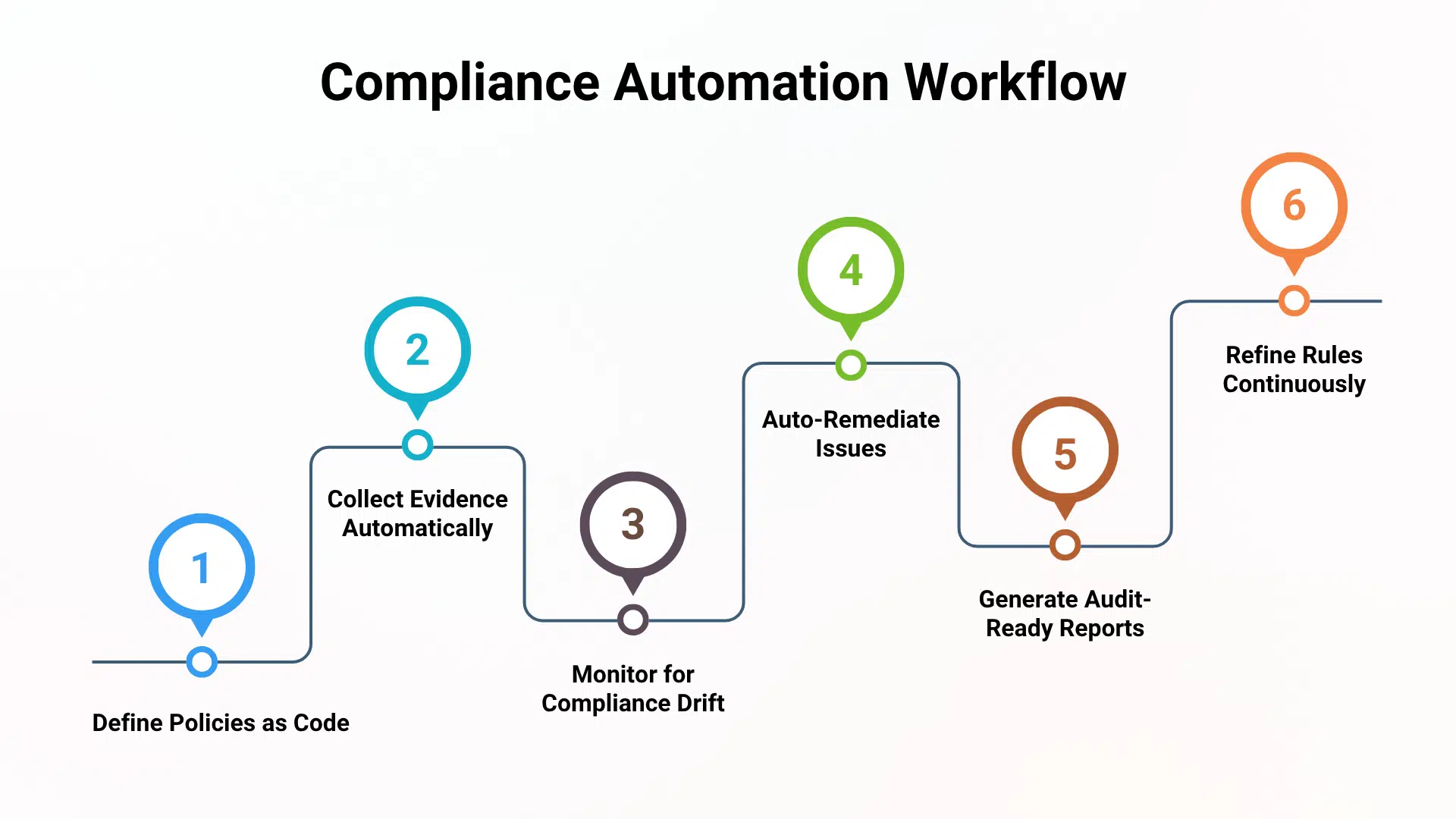
1. Define Controls as Policy-as-Code
The process begins by establishing a clear compliance baseline. Teams identify the required standards – such as FIPS 140-3, CIS Benchmarks, PCI-DSS, or FedRAMP – and convert those requirements into machine-readable policies.
In Linux environments, this often uses tools and formats such as:
- OpenSCAP (XCCDF/OVAL policies)
- CIS or STIG hardening profiles
- InSpec / Ansible Security roles
2. Integrate and Centralize Data Collection
Next, automation tools are connected to every relevant part of the infrastructure – Linux servers, CI/CD systems, cloud workloads, and identity platforms. This unified telemetry provides the evidence needed for continuous validation, including:
- Configuration and system state
- Kernel and package vulnerability status
- Access control and authentication logs
- Patch history and system drift data
3. Monitor for Drift and Prioritize Risk
The automation system continuously evaluates each system against the defined policies. Two factors matter most:
Configuration Drift: Unintentional or unauthorized changes that break compliance (e.g., SSH settings, crypto policies, firewall rules).
Vulnerability Exposure: Unpatched CVEs that violate regulatory requirements for timely remediation.
4. Trigger Automated Remediation
Once deviations are detected, automated workflows take action instead of relying on manual ticketing or multi-week patch cycles.
Common remediations include:
- Re-applying the expected configuration
- Enforcing cryptographic policy baselines
- Automatically patching vulnerable packages or kernels
For Linux environments that require continuous uptime, automated patching must be non-disruptive. This is where TuxCare’s KernelCare is critical: It applies security patches to the running kernel without requiring a reboot, ensuring:
- Continuous compliance
- No downtime
- No maintenance windows
- No interruption to FIPS mode
5. Generate Continuous Attestation & Audit Evidence
Every scan, policy check, and remediation action is automatically recorded. This creates:
- Real-time compliance scores
- Centralized reports for auditors
- Tamper-evident logs tied back to each control
- Evidence-based proof of enforcement
6. Refine Policies & Improve Over Time
The output of the entire system becomes a feedback loop. As regulations change or new risks emerge, teams refine the underlying Policy-as-Code definitions.
Examples include:
- Updating CIS/STIG benchmarks
- Adjusting cryptographic requirements
- Re-prioritizing high-risk Linux packages
- Strengthening kernel-level controls
Essential Tools for Automating Compliance in Linux Environments
Effective compliance automation requires a coordinated stack of tools that handle the full lifecycle: detection, prioritization, remediation, and reporting. Below are the critical tool categories for compliance automation in Linux environments.
1. Continuous Vulnerability Scanning & Risk Prioritization
Detection must be continuous, not scheduled. For Linux environments, the goal is not to list every CVE – it’s to identify which vulnerabilities matter based on exploitability and system context.
2. Automated, Zero-Downtime Patching
Compliance breaks down when critical patches require downtime. High-availability Linux environments cannot afford maintenance windows during audits or regulatory deadlines. KernelCare automates vulnerability patching for the Linux kernel and LibCare automates patching for glibc and OpenSSL without requiring a reboot.
TuxCare supports all major enterprise Linux distributions, ensuring automated patching remains compliant across diverse environments. Check OS compatibility and supported distributions.

3. GRC & Audit Management Platforms
Platforms like Drata, Vanta, and LogicGate serve as the compliance command center. They map controls (e.g., PCI, SOC 2, ISO 27001), collect evidence, and provide auditor-ready reports.
4. Lifecycle Management
Regulated environments cannot rely solely on community support, particularly when dealing with long-term security requirements or FIPS-aligned patching.
TuxCare Enterprise Support for AlmaLinux & Rocky Linux delivers:
- Long-term High and Critical CVE patches
- FIPS-compliant security updates
- Extended lifecycle support
- Expert guidance for regulated Linux deployments
This ensures compliance does not break when a community distribution reaches end-of-life or lacks validated patch streams.
5. Configuration Management & IaC Enforcement
Infrastructure-as-Code tools (Ansible, Puppet, Chef) enforce your security baselines and prevent drift by ensuring every Linux endpoint matches your compliance policy.
These tools anchor the “Policy-as-Code” model – making sure CIS, STIG, and internal hardening requirements are consistently applied across servers, cloud workloads, and CI/CD environments.
Common Challenges with Compliance Automation
Below are the five challenges most enterprises face, why they matter, and how technical teams typically mitigate them.
Fragmented data and visibility gaps
Hybrid infrastructures scatter logs, configs, and package inventory data across cloud services, on-prem systems, and containers. Automation engines relying on incomplete data generate inconsistent findings and unreliable audit evidence.
Impact: Missing insights, contradictory reports, and auditors reverting to manual checks – slowing compliance cycles.
How Teams Respond: They centralize telemetry (log aggregation, config management) and normalize Linux data sources with consistent journald forwarding, package inventory tracking, and baseline enforcement via tools like Ansible or Chef.
Alert fatigue and low signal-to-noise ratio
Policy engines often flood teams with low-impact findings. Over-alerting leads to delayed remediation and important issues buried in noise.
Impact: Analysts waste time triaging false positives while high-risk CVEs (especially kernel-level ones) slip through.
How Teams Respond: They adopt risk-based filtering focused on violations of key controls. In Linux environments, this typically means prioritizing critical kernel vulnerabilities first, as they drive the majority of audit risk.
Outdated Rules Engines and Regulatory Drift
Standards like CIS, STIG, and FIPS evolve frequently. If automation rules don’t track these changes, teams end up proving compliance against outdated baselines.
Impact: Failed audits, emergency rework, and misaligned controls – especially costly for FIPS environments where cryptographic changes require full re-validation.
How Teams Respond: They assign clear ownership for rules maintenance, subscribe to benchmark feeds, and rely on vendor-provided, FIPS-aligned module updates to avoid breaking validated cryptography.
Legacy systems and unsupported environments
End-of-life (EOL) systems, proprietary appliances, and older Linux distributions often lack APIs or agents for automated compliance checks.
Impact: Blind spots in reports and incomplete security assurance, common in enterprises with long hardware lifecycles or outdated CentOS deployments.
How Teams Respond: They use compensating controls, plan phased migration, or rely on services like Endless Lifecycle Support to restore security patch coverage and maintain audit readiness without immediate migrations.
Scaling, Change Management, and Process Misalignment
Many automation initiatives fail because it’s unclear who is responsible – whether IT operations, security, or compliance teams – leading to gaps or conflicts in the automated workflows.
Impact: Partial rollouts, conflicting maintenance windows, disabled automation tools, and governance breakdowns.
How Teams Respond: They define KPIs (patch SLA, compliance scores), clarify roles, and scale automation gradually. Training and runbooks ensure teams understand when automated enforcement applies and when manual overrides are allowed.
Best Practices for Compliance Automation Implementation
Adopting compliance automation requires a strategic, phased approach. You shouldn’t automate everything at once – the goal is to introduce automation in a controlled, measurable, and scalable way that strengthens reliability, reduces audit burden, and supports Linux-heavy infrastructures.
1. Prioritize High-Impact, Repetitive Tasks
Start where automation delivers immediate, visible gains. These are tasks that consume hours, repeat frequently, and introduce human error. Examples include evidence collection, system inventory, package and kernel version tracking, CIS/STIG configuration checks, audit log gathering, patch history collection, and baseline configuration checks
2. Standardize Policy-as-Code and Framework Mapping
Your automation must reflect the compliance frameworks you operate under – FIPS 140-3, PCI DSS, ISO 27001, HIPAA, NIST 800-53, CIS Benchmarks, or internal hardening guides.
Core Principle: Every control should map to a specific automation rule (e.g., “Verify kernel patch level”, “Confirm FIPS-validated crypto modules”, “Check SSH configuration state”).
Outcome: Ensures the system enforces the right rules and produces audit-ready output without manual cleanup.
3. Build a Cross-Functional Automation Team
Compliance automation is not just a tooling decision – it’s an operational shift. IT, security, and compliance teams must be aligned from the beginning.
Compliance/Audit: Define controls and validation criteria.
Security: Ensure rules align with risk priorities and threat models.
IT/Operations: Integrate systems, manage agents/APIs, own remediation, and maintain workflow health.
4. Close the Loop with Automated Remediation
Most organizations automate detection but stop short of automated remediation, leaving a manual gap that breaks continuous compliance.
Goal: Trigger fixes automatically when non-compliance is detected.
Linux Best Practice: Use rebootless, automated patching to eliminate maintenance windows and ensure 24/7 compliance coverage.
5. Set Clear KPIs and Measure Continuously
Decide what success looks like before deploying automation.
High-value KPIs (Key Performance Indicators) include:
- Time saved during audit prep
- Reduction in manual errors
- Patch compliance rate across Linux servers
- Average time-to-remediate (MTTR)
- Percentage of systems meeting baseline configurations
6. Maintain a Dynamic Compliance Rules Engine
Compliance needs evolve constantly. Your automation engine must evolve with it.
Process: Review and update rules, workflows, triggers, and permissions regularly.
Advanced Practice: For high-assurance environments (FIPS 140-3, FedRAMP, PCI DSS), rely on vendors that provide pre-validated modules, security patches, and continuous hardening to maintain compliance without expensive manual updates.
Build a Resilient, Always-Compliant IT Environment with TuxCare
Compliance doesn’t have to slow down critical IT operations. By applying a structured automation strategy – prioritizing Policy-as-Code, continuous monitoring, and automated remediation – you can maintain a Linux environment that is consistently audit-ready, resilient, and scalable.
Ready to eliminate maintenance windows while keeping your systems continuously compliant? TuxCare delivers automated, rebootless patching for kernels, glibc, and OpenSSL, ensuring your Linux servers stay secure and compliant 24/7 – all without disrupting uptime or operations.
Have questions? Ask a TuxCare security expert to find out how KernelCare fits into your security strategy and supports continuous compliance.