Tech Support
 Documentation
 Login
 Contact Us



Go straight to an AI summary of this blog post instead 


Key Takeaways
- npm audit can only compare your tree against advisory data, so a malicious version published an hour ago won’t be flagged.
- Closing that gap takes more than one tool, because behavioral scanners, provenance checks, and screened registries each cover a different piece of it.
- The control that changes the outcome is the one that decides what your build is allowed to resolve in the first place.
npm audit does one job well. It compares your dependency tree against a database of known vulnerabilities and tells you what matches. For anything already documented, that’s useful. For anything nobody has documented yet, audit has nothing to say, and if you install during that window, the code is sitting in your tree before there is an advisory to match it against.
It was never built to spot a malicious package before that threat shows up in the advisory data it checks. Finding an npm audit alternative that actually closes the gap means looking at what decides which versions your build can resolve, not only what gets flagged after the fact.
What npm audit Actually Checks and Where That Stops
npm audit checks your dependency tree against advisory data from the GitHub Advisory Database, which has powered npm’s audit data since 2021. It’s an advisory lookup, not an inspection of package contents or runtime behavior. If a version went up an hour ago and no advisory covers it yet, audit has nothing to compare that version against, so it won’t be flagged.
That’s not a bug. It’s the definition of the tool. The roughly three-hour axios compromise in March 2026 shows what that looks like in practice. Two backdoored versions, 1.14.1 and 0.30.4, went live and spread through installs while the advisory data still said nothing. Once an advisory existed, audit could flag those versions wherever they had landed, including trees where the install had already happened. What it could not do was say anything during the window that mattered.
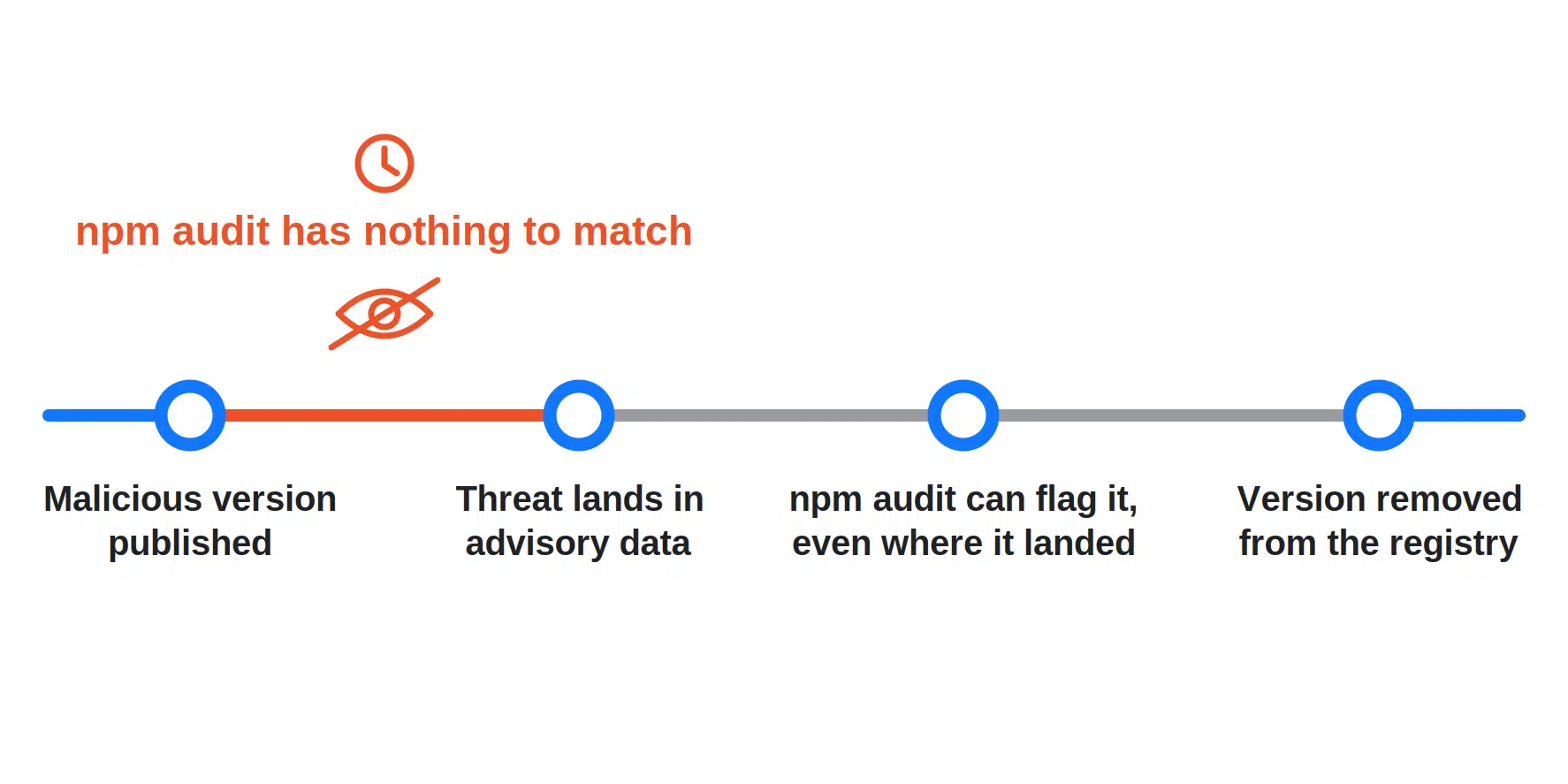
There’s a second, narrower check worth knowing about. Running npm audit signatures verifies the registry signatures of downloaded packages and, where they exist, their provenance attestations. These controls all act at different points in the timeline, which is easier to see side by side.
| Category | What it catches | When it acts |
|---|---|---|
| npm audit | Known vulnerabilities recorded in the advisory data it checks | Once the advisory data covers it |
| Behavioral and static scanners | Suspicious new packages, scripts, obfuscation | After publish, before or after your install |
| Registry signature checks | Missing or invalid signatures that may indicate tampering | When signatures are verified |
| Provenance checks | Whether a package’s claimed source and build workflow match its attestation | When attestations are verified |
| Screened, rebuilt registries | Artifacts that fail source verification or malware screening | Before your build can resolve them |
Behavioral and Static Analysis Tools
Where audit data matches advisory data, behavioral tools inspect the package itself. They look at what changed between versions: a new dependency that showed up for no clear reason, an install script that wasn’t there in the last release, obfuscated code, network calls nobody asked for.
What They Catch That npm audit Can’t
A brand-new package, or a version published minutes ago with no advisory behind it, is one of the cases this tooling is built for. It doesn’t need a CVE to flag a suspicious postinstall script reaching out to an unfamiliar domain, or a diff that drops hundreds of kilobytes of obfuscated code into a caching library with no reason to need it. That’s the core value – catching behavior rather than waiting for someone else to catalog it first.
Where They Still Fall Short
These tools take tuning before the signal is worth acting on, and false positives feed the kind of alert fatigue that ends with somebody muting the channel. They also don’t verify where a package came from, only what it appears to do, so a payload that stays dormant during a scan window can still get through.
Most of them run against what’s already published to the registry too, which means they tell you something is wrong after it has landed there. That’s a real improvement over waiting for advisory data, but it isn’t the same as deciding what your build is allowed to install.
For a broader look at where this category of tooling stops short, see what supply chain tools miss.
Provenance and Signature Verification
Signatures and provenance answer two questions audit doesn’t, which are whether the artifact you downloaded verifies correctly and where it was built.
What npm audit signatures Actually Confirms
npm provenance attestations use Sigstore to link a published artifact to the source repository and build workflow that produced it. Running npm audit signatures checks that a package’s registry signature is valid and, where an attestation exists, that the package carries a valid attestation linking it to the source repository and build workflow recorded in it.
Why a Valid Signature Isn’t a Safety Verdict
These are real, useful checks. An invalid registry signature can point to a tampered artifact, and provenance can expose a package with no build history behind it or an attestation pointing somewhere other than the source you thought you were getting.
What neither does is evaluate whether the code itself is safe. Provenance answers where something came from, not what it does once it’s running. A pipeline that’s been quietly compromised can still produce a build with a completely valid attestation, because the attestation is accurately describing a real build of genuinely malicious code. Treat a clean provenance check as one input to a trust decision, not the finish line.
Registries That Screen Before You Resolve
That brings up the layer most teams assume they already have covered.
Proxy or Mirror versus a Registry That Inspects and Rebuilds
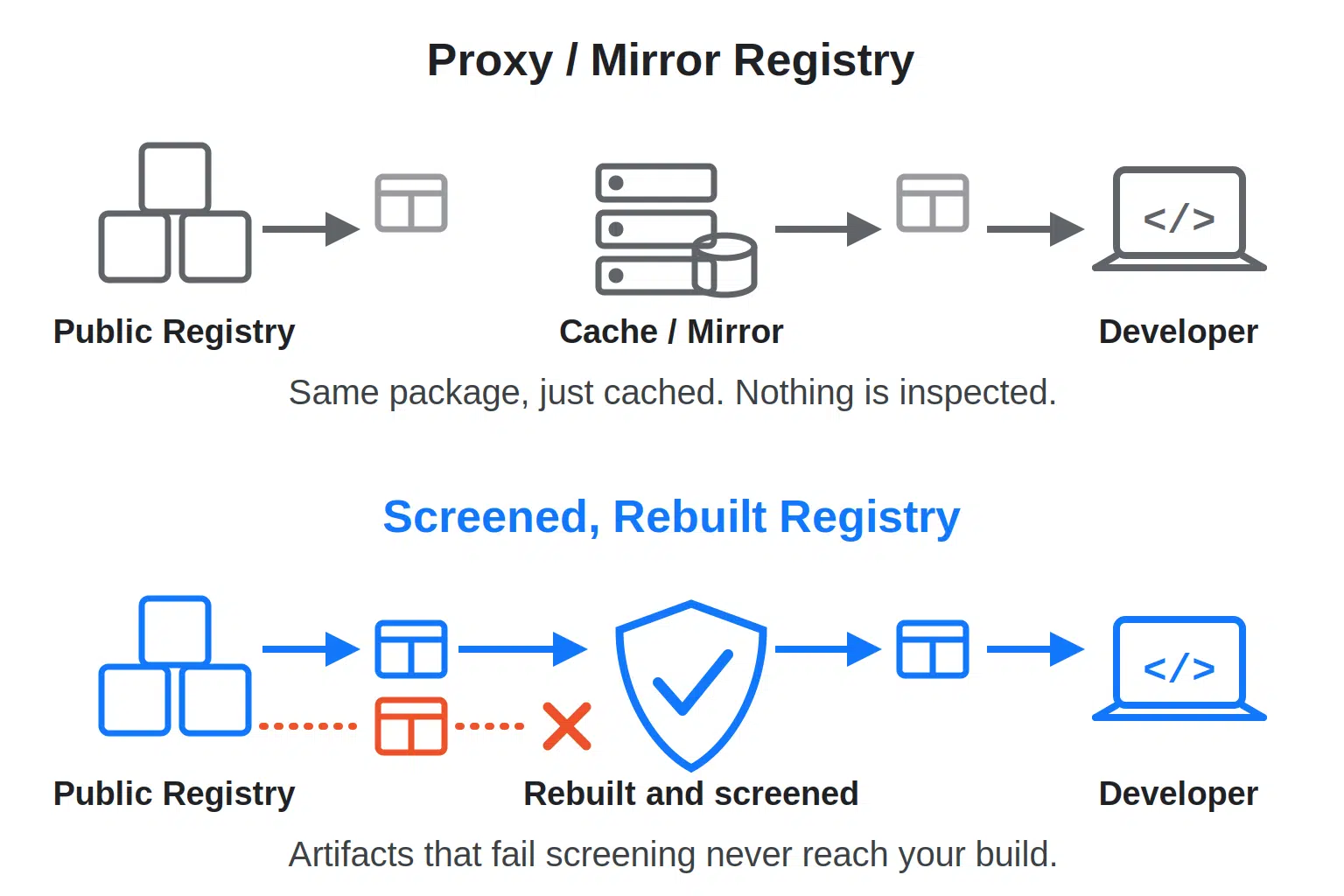
Plenty of teams run a private npm registry as a proxy or mirror in front of the public one, whether that’s Verdaccio with an uplink or a proxy repository configured in Nexus or Artifactory. Those products can do far more than caching, but in that configuration the job is a chokepoint for egress and a single place to say which sources are allowed. Inspection isn’t part of it. If nothing in the path verifies the artifact, a malicious upstream package is still malicious when it gets served from your cache.
The other kind of registry does something with what passes through it, screening the artifact, verifying its source, and in some cases rebuilding it from that source rather than serving whatever the public registry last published. TuxCare’s SecureChain, for instance, rebuilds npm packages from source and screens them before they are available in its registry at all. That’s a materially different guarantee, and it’s the piece that turns controlling where packages come from into controlling what actually gets installed.
What Changes When a Package Is Rebuilt From Source
Rebuilding from source closes a failure mode scanning alone can’t touch, namely a published artifact that doesn’t match what’s actually in the upstream repository. If the version your build resolves is rebuilt from the expected source in a controlled pipeline, a tampered tarball pushed straight to the public registry with a stolen token can’t enter that path, as long as the source itself is still clean. That’s a narrower guarantee than “nothing bad ever happens,” but it’s a real one, and it holds whether or not an advisory ever gets written.
Why Stacking Tools Still Leaves a Timing Gap
Stack all of that together and you’ve covered a lot of ground: npm audit for known vulnerabilities, behavioral scanning for new packages, signature and provenance checks. What none of it changes on its own is which artifacts your package manager is allowed to pull in the first place.
Dependency install scripts have historically run the moment a package installs, often before a scanner has flagged anything and before a human has looked at it. That’s what made the axios attack so effective, since the backdoored releases pulled in a brand-new dependency whose postinstall script ran the dropper. As of npm v12, dependency install scripts are blocked by default unless the project records them in its allowScripts policy, which closes part of that path, though a compromised dependency’s install scripts can still be approved by mistake.
If you haven’t dug into how that trust model works, the mechanics of lifecycle scripts and their current defaults are covered in this walkthrough of installing npm packages safely. Script blocking governs whether a dependency’s install scripts execute after npm has selected and fetched it. It doesn’t decide whether a malicious version can be selected at all.
That’s the distinction worth holding onto. These checks don’t, by themselves, change the package source your build resolves from, and one way to change that is to move the decision to the registry your builds point at.
Closing the Gap Before npm audit Would Ever See It
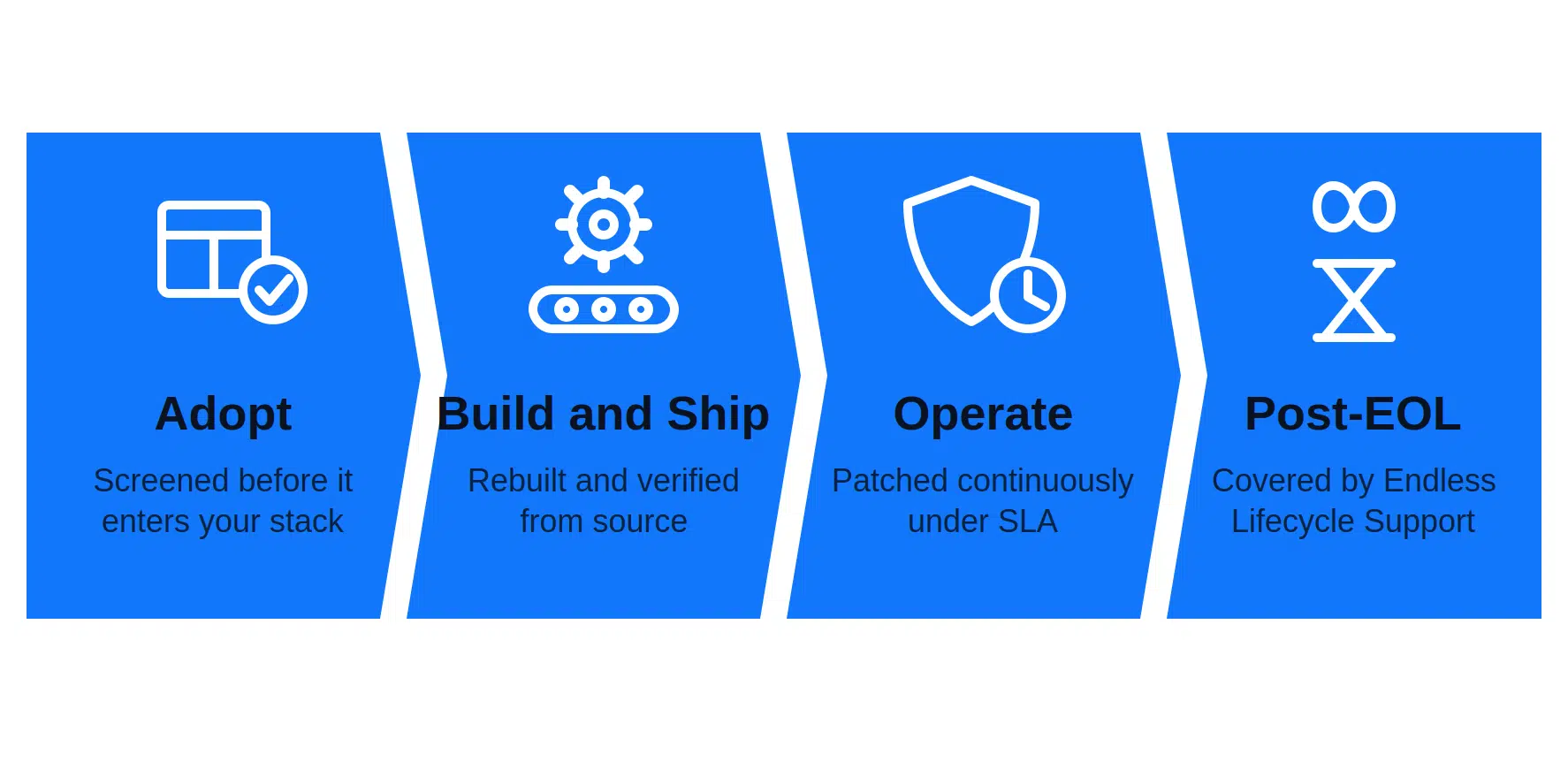
SecureChain isn’t a swap for audit. It’s a different registry for your npm dependencies to resolve from. It replaces the public npm registry with a curated, rebuilt-from-source repository, screening packages before they are available to install, so what your build pulls has already been through source verification and malware screening. For teams that want more than advisory-only detection, that moves the decision upstream, where the advisory gap matters far less.
Coverage runs from adoption through build, operation, and past end of life, with active packages patched under SLA and Endless Lifecycle Support taking over once upstream maintenance stops. Every package carries SLSA Level 3 provenance, an SBOM, and VEX data, with no workflow change required.
For a deeper look at the risk hiding in transitive dependencies, watch the on-demand webinar, or talk to the team about SecureChain.
FAQ
What’s a good npm audit alternative?
Not one you swap in directly. npm audit is still a reasonable way to track known advisories in a tree you’re already resolving from. The stronger options change where the decision happens, screening packages before your build can pull them, which is something advisory matching can’t do by design.
Does npm audit detect malicious packages?
Only what’s in the advisory data it checks. Malware does get advisories, fed into the GitHub Advisory Database by npm’s security team and the OpenSSF malicious-packages project, though GitHub documents Dependabot rather than audit as the alerting path for those. Either way, audit can’t spot a newly published malicious version from its behavior, because it matches against advisory data rather than inspecting the package.
Is npm audit still worth running with a screened registry?
Mostly for visibility. A screened and continuously patched registry changes how much of the remediation work depends on audit, but running it still tells you which known advisories touch what’s already in your tree.
What’s the actual difference between a private registry and a screened registry?
A private registry can be configured as little more than a proxy or mirror that controls where packages come from. A screened registry inspects, and in some cases rebuilds, what actually gets served, which is a different and stronger guarantee.
Does a clean provenance check mean a package is safe to install?
No. Valid provenance ties an artifact to the source and workflow recorded in its attestation. It doesn’t prove that source or workflow was uncompromised, so a validly attested package can still be malicious.