Tech Support
 Documentation
 Login
 Contact Us


Go straight to an AI summary of this blog post instead 


Key Takeaways
- Ubuntu 16.04, with the code name “Xenial Xerus”, reached the end of its supported lifecycle on April 30, 2021.
- Many systems still run the 16.04 version because upgrades are complex and risky for production environments.
- Running an unsupported operating system increases exposure to security vulnerabilities and compliance issues.
Ubuntu 16.04 reached end of life (EOL) in April 2021, which means it no longer receives standard security updates from Canonical. For many IT and DevOps teams, the end date was a turning point. Without access to regular security updates, any machine running this version in production transitioned from a stable asset to a growing security and compliance liability.
This article explains what the Ubuntu 16.04 end-of-life date means, the key lifecycle dates, the critical risks of staying on it, and the practical options available today – whether you plan to upgrade or extend security support while you prepare.
What Ubuntu 16.04 End of Life Means
Ubuntu 16.04 EOL means the end of the standard support lifecycle for that specific version. Each Ubuntu distribution version receives standard support for a limited period of time with options available to extend the security maintenance for LTS versions. Ubuntu Linux operating system is available in two release types: Long-Term Support (LTS) releases and interim releases.
LTS versions, like Ubuntu 16.04, receive five years of free security and maintenance updates from Canonical. Once the five-year period ends, these versions also get additional five years of paid security maintenance through Ubuntu Pro subscription. Canonical releases a LTS version every two years, usually in the month of April.
Ubuntu follows a YY.MM format for version numbering. The first two digits represent the release year and the last two are the month. For example, 16.04, 18.04 (code name Bionic Beaver), 20.04 (code name Focal Fossa).
Interim releases follow a different lifecycle. The new version is published every six months and comes with only nine months of support services. Some recent interim versions, which are now end of life include Ubuntu 23.10, 23.04, and 22.10. Ubuntu 25.10, which was released in October 2025 and has the code name “Questing Quokka,” is the latest supported interim release which will reach its end of life in July 2026.
These releases are specifically designed for users and organizations that need fast access to the latest kernels, languages, and toolchains. LTS versions are preferred for production environments that need a longer support period and greater stability.
Ubuntu 16.04 Lifecycle and EOL Timeline
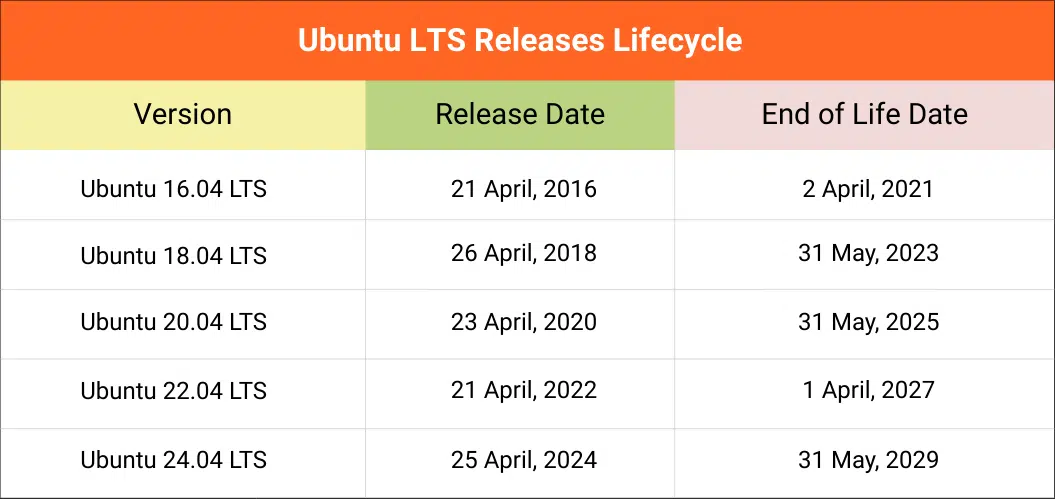
Ubuntu 16.04 LTS (“Xenial Xerus”) was released in April 2016 and followed the standard Long-Term Support lifecycle from Canonical. Like other LTS releases, it received five years of standard security updates before moving into extended support phase.
The table below shows the lifecycle timeline of Ubuntu 16.04 and other newer LTS releases, including both supported versions and those that have already reached end of life.
Risks of Running Ubuntu 16.04 After EOL
Running Ubuntu 16.04 after end of life doesn’t mean the system stops working. The real issue is that it stops getting protection for security vulnerabilities. Over time, this creates security, compliance, and operational risk that grows harder to manage.
Vulnerability Exposure
New Linux vulnerabilities (CVEs) are discovered every week. The Ubuntu security team also releases security fixes for official packages regularly in supported versions. But after support ended, security fixes are no longer issued for Ubuntu 16.04 packages. Attackers are known for targeting older systems where known flaws remain open indefinitely, increasing the chance of compromise.
Compliance and Audit Failures
Most modern security frameworks do not accept unsupported operating systems where security patches are missing. Unless you upgrade to a supported version or find an alternative solution for security updates, you will have problems during security reviews and certification checks even if the system seems stable.
Software Compatibility Breaks
Vendors stop testing their newer versions of software against older operating systems and, after some time, support drops completely. As time passes, you will find that new version of your monitoring tools, security tools, or even drivers refuse to install or update. What starts as a security concern soon turns into an operational one as the environment becomes harder to maintain.
Why Many Organizations Still Run Ubuntu 16.04
Even years after its end of life, Ubuntu 16.04 still runs in production in many environments. In most cases, the reason is not due to negligence but practical constraints around stability, cost, and risk.
Legacy applications depend on it
Many critical applications were built on runtimes that are now deprecated. Upgrading the OS often requires refactoring application code or updating dependencies to work with newer runtime versions such as modern Python or PHP releases. For legacy systems that still work reliably, the engineering cost of a rewrite often exceeds the budget. Because of this, teams often delay upgrades to avoid breaking stable workloads.
Upgrades can introduce downtime and risk
A major version jump (e.g., 16.04 to 22.04) is not a one-click update. It involves changes to the kernel, core libraries, and system components. This requires careful planning, compatibility testing, and rollback mechanisms in place. For systems that must remain highly available, the risk of disruption can outweigh the immediate benefit of upgrading.
Budget and resource limits delay migration
Upgrading infrastructure takes time, testing, and skilled staff. When teams are already managing other priorities, legacy systems often stay in place longer than expected. Extended security maintenance becomes a practical short-term option while migration plans are prepared.
Note: Many applications running on Ubuntu 16.04 depend on older runtime versions such as PHP 7.x or legacy Python environments. Newer Ubuntu releases do not officially support those end-of-life versions officially, which can require code changes or alternative package sources during migration.
Your Options After Ubuntu 16.04 End of Life
Organizations that still run Ubuntu 16.04 generally have two main paths: upgrade to a supported LTS release or continue using extended security support.
Upgrade to a Supported LTS Version
Upgrading to a supported Ubuntu LTS version restores full security coverage and long-term stability that every organization needs. In 2026, multiple Ubuntu LTS releases are available, but their remaining support timelines should be considered to avoid another upgrade in the near future. For example, Ubuntu 22.04 LTS has only one year of standard support remaining, ending in April 2027.
Ubuntu 24.04 LTS features offers the longer support window, with standard support expected through April 2029, making it a common upgrade target for many organizations. The next LTS release, Ubuntu 26.04, is expected in April 2026 and will likely receive standard support through 2031.
|
Release |
End of Life |
|
Ubuntu 22.04 |
April 2027 |
|
Ubuntu 24.04 |
April 2029 |
|
Ubuntu 26.04 (Expected April 2026) |
April 2031 |
Upgrading is ideal when applications are compatible, maintenance windows are available, and the organization is ready to modernize its environment.
You can also read our detailed guide on Ubuntu 22.04 EOL to plan your long-term upgrade roadmap.
Ubuntu Expanded Security Maintenance (ESM)
Canonical provides Expanded Security Maintenance (ESM) for Ubuntu LTS releases through the Ubuntu Pro subscription. ESM extends the security lifecycle of LTS versions by providing additional vulnerability patches for supported packages after the standard support period ends. In most cases, ESM provides up to five additional years of security updates beyond the original LTS lifecycle.
Note: Ubuntu 16.04 entered the Extended Security Maintenance (ESM) phase in April 2021. This extended support period is scheduled to end in April 2026.
TuxCare’s Endless Lifecycle Support (ELS)
Ubuntu ESM is not a standalone solution, but a part of the broader Ubuntu Pro subscription, which includes additional services such as live patching, compliance tools, and security hardening features. Organizations that only require extended security updates will still need to buy the full Ubuntu Pro subscription, which is often expensive.
Alternatively, organizations can utilize a much more affordable solution, TuxCare’s Endless Lifecycle Support (ELS), which provides ongoing vulnerability patches for end-of-life Linux distributions. TuxCare currently supports these end-of-life Ubuntu releases: 16.04, 18.04, and 20.04 with their legacy support add-on. ELS helps organizations keep their legacy systems protected while migration plans move forward. It is useful for environments with strict uptime requirements, legacy applications, or those needing long upgrade timelines.
Organizations that previously relied on ESM for Ubuntu 16.04 can also use TuxCare’s ELS to continue receiving security patches after April 2026. ELS is available for as long as needed and allows teams to plan upgrades at their own pace.
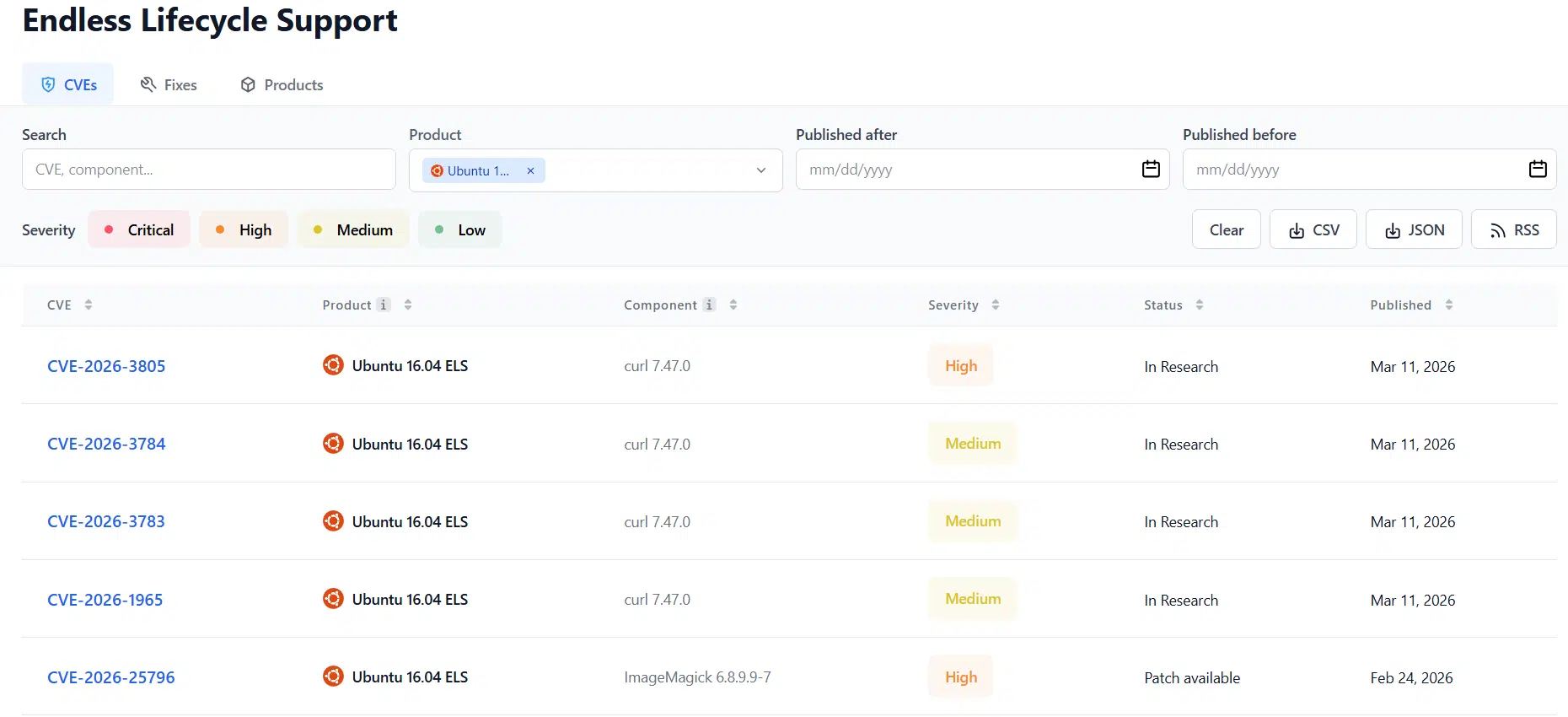
Explore the recent CVEs affecting Ubuntu 16.04 systems and the fixes available through TuxCare’s ELS in our CVE tracker:
Securing Ubuntu 16.04 with TuxCare
Ubuntu 16.04 has been out of standard support for several years, which means organizations must take steps to maintain security and compliance. TuxCare’s Endless Lifecycle Support (ELS) for Ubuntu 16.04 provides ongoing vulnerability patches for critical system packages, helping legacy environments remain protected.
Whether you choose to upgrade to a newer Ubuntu LTS release or extend security coverage with TuxCare, the key is to take action before the risk of unpatched systems grows.
Speak to a TuxCare expert to learn how TuxCare ELS can help secure your Ubuntu 16.04 systems beyond the end of official support.