Tech Support
 Documentation
 Login
 Contact Us


Go straight to an AI summary of this blog post instead 


Key Takeaways
- RHEL 8 enters end of life on May 31, 2029. After that date, Red Hat no longer ships security patches or bug fixes without a paid extended support add-on.
- Running this OS past 2029 without a plan puts you out of compliance with PCI DSS, HIPAA, SOC 2, and most other frameworks that require timely patching.
- Your main options are upgrading to RHEL 9, switching to a compatible distro like AlmaLinux or Rocky, or purchasing extended lifecycle support to buy migration time.
- Third-party extended support – such as TuxCare’s ELS – lets you keep RHEL 8 patched past EOL without an emergency migration, and covers key packages like Linux kernel, OpenJDK, OpenSSL, Python, and more.
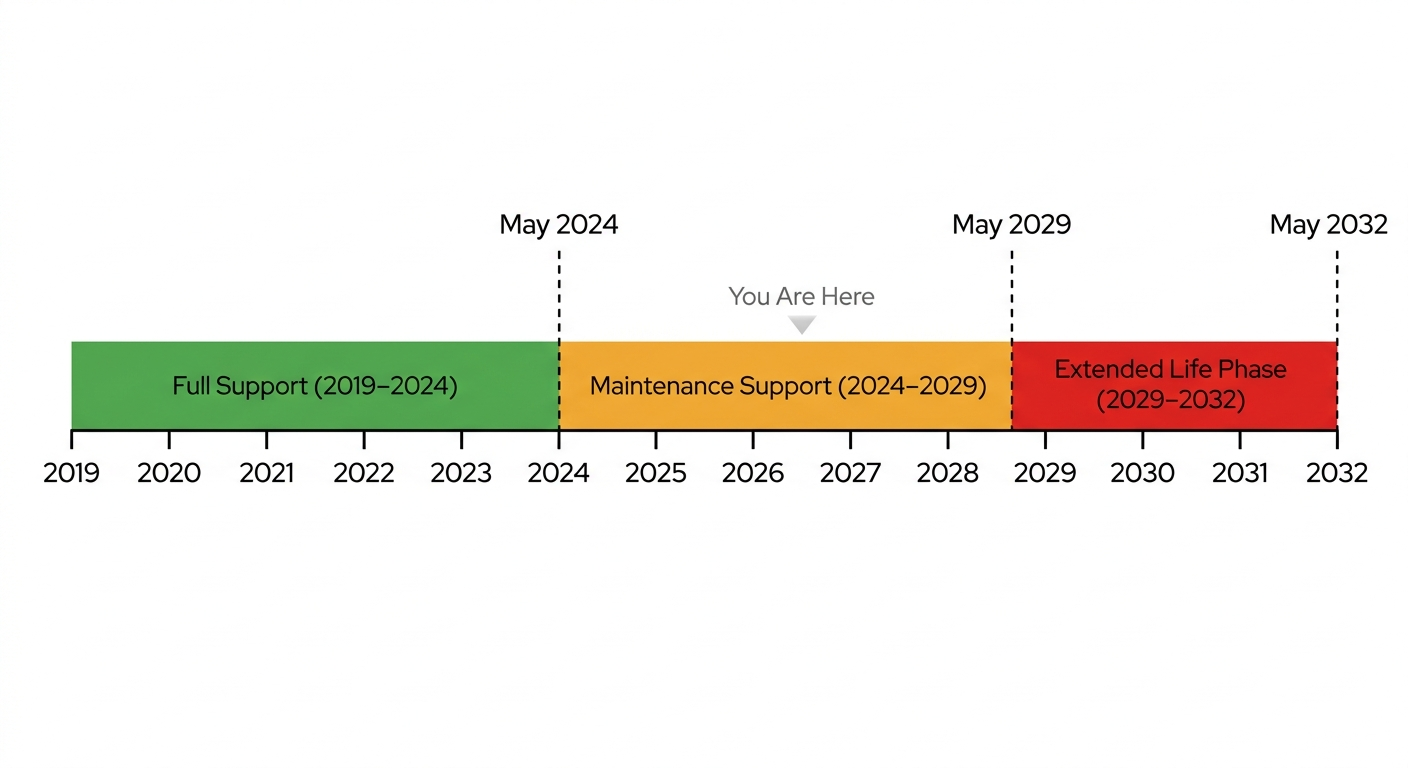
If you’re running RHEL 8 in production, you’ve already passed one milestone: Full Support ended in May 2024. That means you’re in Maintenance Support now, which is quieter but thinner – Red Hat patches the serious CVEs but isn’t doing any new development work on the platform. The next date that matters is May 31, 2029, when RHEL 8 reaches end of life and the patches stop entirely.
This article covers what each lifecycle phase actually means for your systems, what you’re giving up at each transition, the real-world risks of letting 2029 sneak up on you, and the options available – including ones that don’t require a forklift upgrade you haven’t budgeted for.
What Does RHEL 8 End of Life Mean?
End of Life in the Red Hat world isn’t a soft warning or a polite suggestion to consider upgrading. It’s the point where Red Hat stops shipping anything new for that major version. No CVE patches, no bug fixes, no support ticket responses. The version moves into what Red Hat officially calls the Extended Life Phase, where you can still read the documentation and pull existing packages, but nothing new gets built.
It’s worth being precise about what each phase actually delivers, because the differences are significant:
- Full Support Phase: Red Hat ships everything: security errata, urgent and high-priority bug fixes, new hardware enablement, and select software enhancements in minor releases. RHEL 8 was in this phase from May 2019 until May 2024.
- Maintenance Support Phase: Only Critical and Important security advisories (RHSAs) and urgent bug fixes (RHBAs) get shipped. No new hardware support. No feature development. RHEL 8 is here until May 31, 2029.
- Extended Life Phase: Effectively dead from a patching standpoint. You can read documentation and access existing packages, but nothing new arrives unless you’ve paid for the Extended Life Cycle Support add-on.
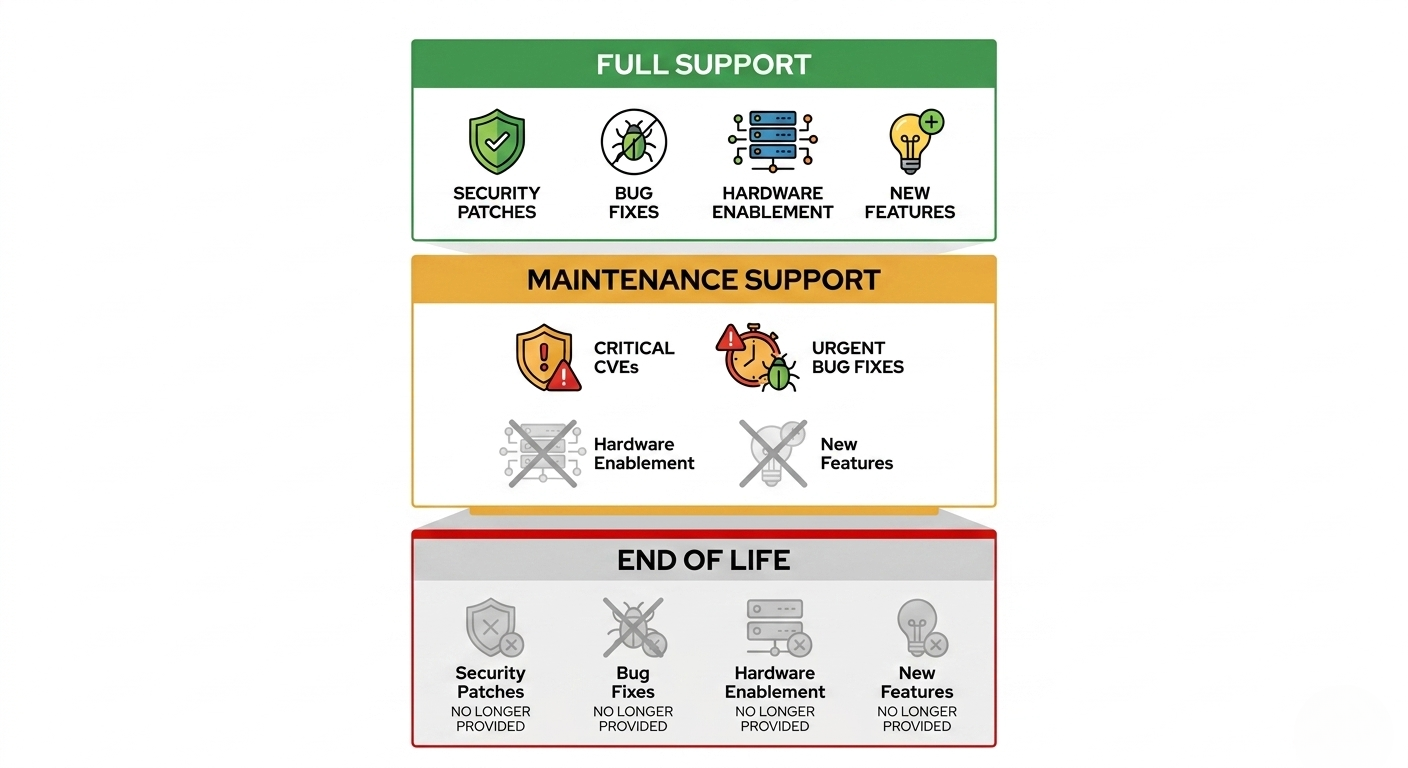
The practical implication: by the time RHEL 8 hits EOL in 2029, your kernel will already be a decade old from a development standpoint, and will have received no new functionality since 2024. That’s a long time for the threat landscape to evolve while your patching stops.
RHEL 8 Support Lifecycle Timeline
Here’s how RHEL 8’s lifecycle compares to its neighbors in Red Hat’s release history. The 10-year window is consistent across modern RHEL versions; what changes is where you currently sit within it.
|
Version |
GA Date |
Full Support |
Maintenance Support |
ELS Add-on Available Until |
|
RHEL 7 |
June 2014 |
August 6, 2019 |
June 30, 2024 |
May 31, 2029 |
|
RHEL 8 |
May 2019 |
May 31, 2024 |
May 31, 2029 |
May 31, 2032 |
|
RHEL 9 |
May 2022 |
May 31, 2027 |
May 31, 2032 |
May 31, 2035 |
|
RHEL 10 |
May 2025 |
May 31, 2030 |
May 31, 2035 |
May 31, 2038 |
If you ran RHEL 7 long enough to feel the pressure of its 2024 deadline, RHEL 8’s 2029 cutoff will feel familiar – the same migration crunch, just pushed five years out. The difference this time is that RHEL 9 has been generally available since 2022, so the upgrade target is stable and well-tested. Most teams have had years of lead time. the gap between the end of Maintenance Support and the end of ELS coverage. The gap between the end of active maintenance and the end of extended support is easy to misread – but whichever framing you use, 2029 arrives whether or not the migration project has a project manager.
Why RHEL Versions Are Retired
Understanding the business logic behind EOL decisions is useful when you’re trying to explain the urgency to stakeholders who see a 2029 deadline and assume there’s time.
Engineering bandwidth has limits
Red Hat maintains each active major version with its own team of kernel maintainers, security analysts, QA pipelines, and support engineers. Every additional supported version multiplies that load. At some point, keeping a decade-old codebase patched against modern threats costs more than the subscription revenue from that version justifies. The math eventually stops working, and Red Hat draws a line.
Security models evolve
The threat landscape in 2019 looks nothing like the threat landscape heading into 2029. Mitigations like tighter kernel hardening, updated cryptographic defaults, and improved SELinux policy generation get built into newer releases and often can’t be cleanly backported to an older kernel base. Eventually, patching old versions to meet current compliance baselines becomes a losing proposition regardless of engineering effort.
You can learn more about how platform evolution impacts your vulnerability stance in our overview of RedHat security lifecycles.
Modern workloads need modern toolchains
Newer language runtimes, container tooling, and cloud-native frameworks increasingly assume a more recent glibc, kernel, and systemd version. RHEL 8 ships glibc 2.28 and kernel 4.18 – still usable for plenty of workloads, but genuinely limiting if you’re working with eBPF, modern container runtimes, or recent Kubernetes releases. Compliance frameworks and audit tooling also tend to assume current platform support when evaluating your environment.
Risks of Staying on RHEL 8 After End of Life
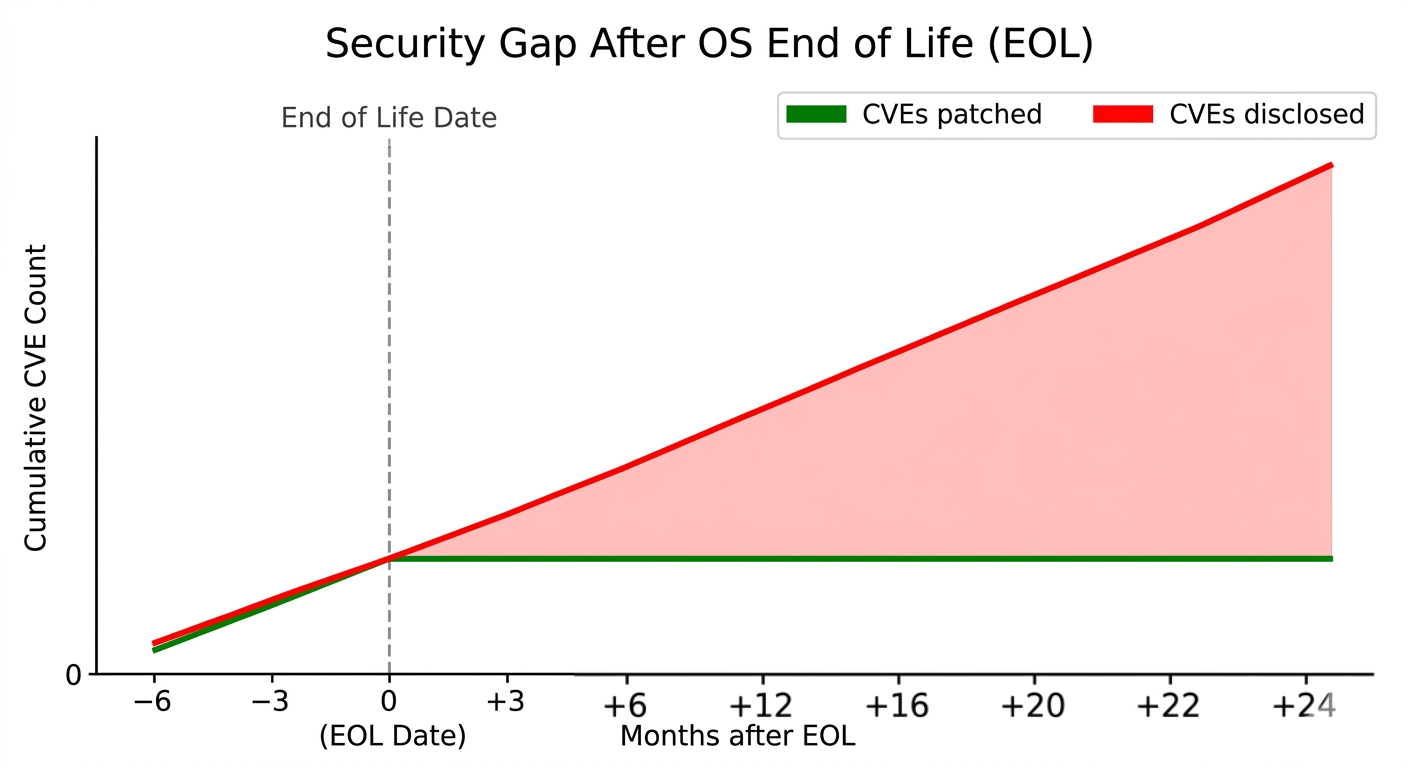
Unpatched CVEs accumulate quickly
Once Red Hat stops issuing RHSAs for RHEL 8, every kernel-level or core-package CVE that gets disclosed becomes a permanent exposure on your systems. No upstream fix is coming. The RHEL 7 post-EOL period is a reasonable proxy: within months of EOL, systems that hadn’t migrated or purchased extended support were sitting on a growing list of known-exploitable vulnerabilities with no remediation path. Vulnerability scanners will surface these immediately, and they won’t have a fix available. Auditors will notice before your team does.
According to TuxCare’s 2025 Enterprise Linux & Open-Source Landscape Report, 40% of surveyed organizations suffered a cybersecurity incident in the past 12 months, and 60% of those were linked to unapplied security patches.
Compliance certifications start failing
PCI DSS, HIPAA, SOC 2 Type II, ISO 27001, FedRAMP – all of them require running software that receives timely security patches. The moment RHEL 8 hits EOL without an extended support arrangement in place, you’re technically out of compliance. That’s not a theoretical problem: a 40-person SaaS company trying to renew a SOC 2 report with unsupported OS versions in scope will spend a lot of time writing compensating controls that auditors usually won’t accept as adequate substitutes for actual patching.
Vendor support for your entire stack erodes
ISVs – database vendors, middleware vendors, security tooling providers – tie their support matrices to the underlying OS lifecycle. When RHEL 8 falls off Red Hat’s supported list, many of those vendors will follow suit. A production incident on an Oracle DB or SAP instance running on an unsupported OS is a particularly bad place to discover your support contract no longer applies.
Cyber insurance gets complicated
Underwriters have gotten more sophisticated about this. Applications for cyber insurance coverage now routinely ask about EOL software in your environment, and policies increasingly include language that voids claims for breaches traced to known-unpatched vulnerabilities. Running outdated software that you knew was EOL is a demonstrable liability exposure that carriers have started pricing or declining accordingly.
The upgrade gets harder the longer you wait
This one doesn’t get enough attention. Every month you remain on RHEL 8 past EOL, the eventual migration gets more expensive. New hires have less familiarity with aging tooling. Config management drifts from anything documented or testable. Hardware refreshes run into driver compatibility walls when newer NIC or storage controller firmware doesn’t have certified RHEL 8 support. The system becomes harder to staff, harder to operate, and harder to migrate – simultaneously.
Options After RHEL 8 End of Life
The right path depends on how much application-layer work an upgrade implies, how much downtime you can tolerate, and whether your team has the headcount to own a migration project right now. There’s no universal answer, but there is a realistic set of options.
Option 1: TuxCare’s Endless Lifecycle Support (ELS)
TuxCare’s Endless Lifecycle Support (ELS) is worth understanding if a clean migration by May 2029 isn’t a certainty. TuxCare already provides ELS for RHEL 7, delivering ongoing vulnerability patches after Red Hat’s maintenance support ended, and the same coverage is expected to extend to RHEL 8 when it reaches EOL. The service is independent of the Red Hat subscription model, meaning you can keep critical RHEL 8 workloads patched and audit-ready while your migration project runs at a sensible pace rather than a forced sprint.
It’s worth knowing what TuxCare’s RHEL ELS actually covers at the package level. The OS-level ELS isn’t just the kernel – it includes commonly used packages like OpenJDK, Python, httpd, OpenSSL, and OpenSSH, so core components of your stack are covered under the same subscription.
Option 2: In-place upgrade to RHEL 9 using Leapp
Red Hat’s Leapp utility handles in-place upgrades from RHEL 8 to RHEL 9, and on a clean, well-maintained system it works well. On a system that’s been running since 2019 with accumulated customizations, third-party repos, and kernel modules nobody fully documented – less so.
The right approach is to run leapp preupgrade first – it surfaces inhibitors before you commit to anything. Budget real time to work through the inhibitors it finds, because there will be some.
Pro Tip: Before running leapp upgrade, check the /var/log/leapp/leapp-report.txt after leapp preupgrade – don’t just scan for “inhibitors.” The “high” severity items that aren’t inhibitors still bite you post-upgrade, especially around third-party kernel modules and custom PAM configurations. Fix those before you commit.
Option 3: Fresh rebuild on RHEL 9 or RHEL 10
For workloads that are container-friendly or managed through infrastructure-as-code, a side-by-side rebuild is often cleaner than an in-place upgrade. You get a fresh baseline, no upgrade artifacts, and a natural opportunity to retire technical debt that’s been accumulating since 2019. Slower per-host, but more reliable at scale.
Option 4: Switch to a RHEL-compatible distribution
AlmaLinux, Rocky Linux, and Oracle Linux are binary-compatible alternatives that run the same packages and are certified for most of the same workloads. AlmaLinux and Rocky are free; Oracle offers a paid support tier. This path works well if your tooling treats the OS as a commodity and you don’t have Red Hat-specific support contract requirements. Verify ISV certifications before committing – not every vendor formally supports the alternatives, and some specifically require RHEL.
Option 5: Red Hat’s own ELS Add-on
Red Hat offers an Extended Life Cycle Support add-on that extends limited security coverage past the May 2029 cliff to May 2032. It’s the obvious choice if you need to stay within the Red Hat ecosystem and have the budget for it. Coverage is meaningfully narrower than Maintenance Support – fewer packages, only the highest-severity CVEs – so it’s a bridge, not a long-term substitute for upgrading.
How to choose:
- If your apps are already certified on RHEL 9 and you have the engineering bandwidth, just use Leapp and get it done. That’s the right answer for most straightforward environments.
- If you’re running anything vendor-locked – Oracle DB, SAP, older middleware that hasn’t been certified on RHEL 9 yet – it’s worth being realistic about timelines early. Enterprise software certification cycles don’t move fast, and a migration that looks straightforward on paper has a way of stretching once you factor in vendor sign-off, testing, and change approval processes. Extended lifecycle support exists precisely for this scenario: it gives you the runway to do it properly rather than under pressure.
- If you’re cost-sensitive and don’t have Red Hat support contract requirements, AlmaLinux or Rocky are genuinely good options. Not a compromise – they’re solid distributions with real community and commercial backing.

Planning Ahead: A Realistic Timeline
EOL deadlines look comfortably distant until they’re not. Teams that started RHEL 7 migrations in early 2024 mostly didn’t make the June 2024 deadline – migration projects almost always take longer than the initial estimate, especially when third-party app certifications are involved.
The teams that hit deadlines treat migration like a real project – with a project manager, a backlog, and someone whose job it is to chase the ISV certification status every two weeks. The teams that miss deadlines are the ones who assigned it to a senior engineer “when they have time.” That engineer does not have time. They never have time. And suddenly it’s March 2029 and someone is reading the Red Hat EOL notice for the first time like it’s breaking news.
A workable approach for RHEL 8 looks something like this:
- 24+ months out: Inventory every RHEL 8 host, application, and ISV dependency. Identify which applications are already certified on RHEL 9 and which ones are blockers.
- 18 months out: Pilot RHEL 9 (or your chosen alternative) on non-production workloads. Run
leapp preupgradeon representative systems and document the inhibitors. - 12 months out: Begin production migrations in waves, starting with the lowest-risk workloads. Decide which systems will stay on RHEL 8 with extended support and budget accordingly.
- 6 months out: Finalize extended support contracts for any holdouts. Confirm compliance documentation with your auditors so there are no surprises.
- Pre-EOL: Every system is either migrated or covered by extended support. Nothing left running unpatched.
If your environment is more than a handful of hosts, you’ll almost certainly encounter the kind of operational complexity that turns simple upgrades into multi-quarter efforts. The sooner you own the project, the less disruptive that complexity becomes.
Stay Secure with TuxCare’s ELS
For most production RHEL 8 environments, the honest scenario looks like this: you start the migration on time, hit a vendor-locked application that isn’t certified on RHEL 9 yet, and need more runway than the original plan allowed. That’s where extended security support stops being optional.
TuxCare keeps your systems patched against vulnerabilities after the RHEL 8 end of life date in May 2029, with experience supporting CentOS, RHEL 7, and a range of other end-of-life Linux distributions. You get the time to migrate properly, without running unpatched in production – and without having to panic-buy a Red Hat extended subscription at the last minute.
For environments where reboots are painful, KernelCare is worth looking at separately – it patches the running kernel without requiring downtime. It’s a different product from ELS, purchased independently, but the two can be used together.