Tech Support
 Documentation
 Login
 Contact Us


Go straight to an AI summary of this blog post instead 


Key Takeaways
- RHEL’s defenses are a strong starting point for Red Hat security, but none of that holds without active patching, audit cycles, and lifecycle discipline.
- Running RHEL 7 or any EOL version without an extended support plan creates audit exposure and compliance failures.
- Live patching lets you apply kernel CVE fixes to running systems without a reboot – TuxCare’s KernelCare does this across all major RHEL versions.
Most teams running Red Hat Enterprise Linux assume their security posture is solid because Red Hat has a strong reputation. The platform ships with SELinux enforcing, signed packages, and a mature vulnerability disclosure process. That reputation is earned.
But it leads to a specific failure mode in Red Hat security: assuming the platform is doing the work when the real work – vulnerability patching, lifecycle planning, audit hygiene – falls on the team running it.
Here’s what that actually looks like in practice. A Linux kernel CVE drops on a Tuesday. The patch is available by Friday. Your next maintenance window is in 18 days. An attacker with knowledge of that CVE now has an 18-day window on your systems. This is not a hypothetical – it’s the routine shape of enterprise Linux security, and it’s why patching cadence matters as much as patch availability.
What Red Hat Security Actually Looks Like
RHEL’s security architecture is layered, which is both its strength and the reason maintaining it requires active work rather than passive trust.
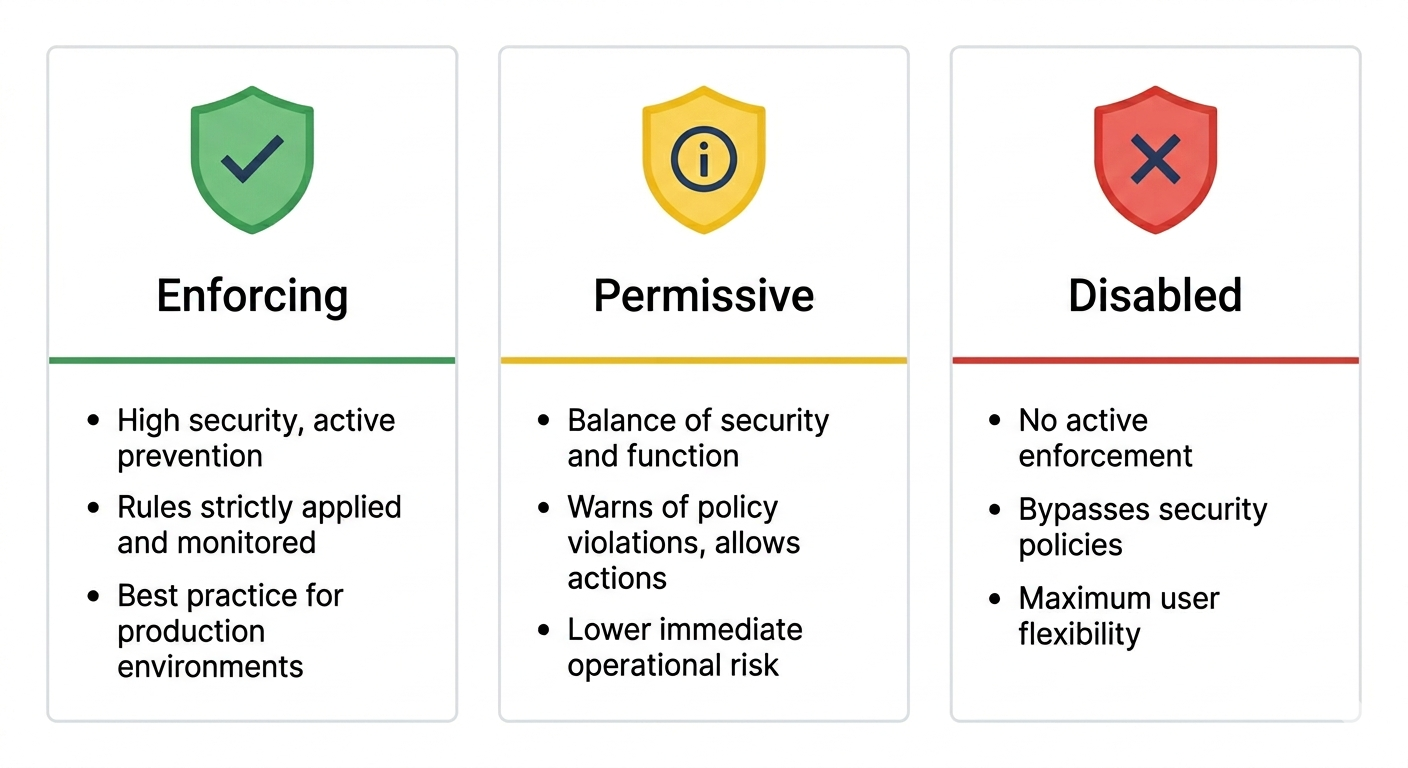
At the kernel level, SELinux enforces mandatory access control – meaning even a compromised process can’t reach outside the policy applied to it. This is meaningful protection when configured correctly and genuinely useless when someone runs setenforce 0 during an incident and never reverses it. Above that, role-based access control handles identity and privilege boundaries. Plus, Red Hat’s signed update infrastructure and its Linux vulnerability tracking feed give you a reliable CVE pipeline and patches you can trust the provenance of.
The catch is that none of this sustains itself. RHEL is secure on day one. Whether it stays that way depends entirely on what your team does afterward. A RHEL 7 system that was properly hardened in 2020 and hasn’t been patched since mid-2024 has years of unpatched kernel and userspace CVEs sitting on it. The original design doesn’t protect against vulnerabilities disclosed after the last patch was applied.
For teams stuck on RHEL 7 past its June 2024 EOL, TuxCare’s Endless Lifecycle Support is one of the only ways to keep getting CVE patches without being forced into a migration that might not be operationally feasible yet.
Why Red Hat Security Matters
RHEL tends to run the boring-but-critical infrastructure. Banks run it for trade settlement. Telcos use it for routing. Hospitals run EHR systems on it. When major airlines and financial institutions list their stacks, RHEL is usually somewhere load-bearing in the middle. Which means the attack surface is large and the blast radius of a breach is significant.
Linux-targeted attacks have grown meaningfully over the past few years. Ransomware groups and state-affiliated threat actors have shifted attention from Windows endpoints toward Linux servers, where the high-value workloads actually live. The 2024 XZ Utils backdoor (CVE-2024-3094) was a near-miss that would have affected a substantial portion of RHEL-derived distributions had it reached a stable release. It was caught. The next one may not be.
Compliance adds a separate layer of urgency. HIPAA, PCI DSS, GDPR, and SOC 2 all share one assumption: you’re running software that still receives vendor security updates. The moment a system hits EOL without an extended support arrangement, that assumption breaks – and auditors notice. “The system runs fine” is not a compliance argument. For a closer look at what this means operationally, see what RHEL 7 EOL means for your business.
Common RHEL Security Risks
The risks below are not theoretical edge cases. They show up repeatedly in incident post-mortems and are worth knowing by name.
Risk #1: Unpatched Kernel CVEs

Kernel patches require reboots, and reboots get deferred. A production database cluster, a telco routing stack, a real-time processing system – all of them have legitimate reasons to avoid unplanned downtime. So patches sit. CVE-2022-0847 (Dirty Pipe) had patches available within days of disclosure; plenty of production systems went months without applying them because no one wanted to schedule the rolling restarts.
CISA recently added CVE-2026-31431 (Copy Fail), a privilege escalation flaw that lets any unprivileged local user obtain root by corrupting the kernel’s in-memory page cache – without touching disk – to its KEV catalog on May 1, 2026, giving federal agencies two weeks to patch. Most enterprise Linux environments can’t move that fast through conventional patch cycles. The flaw requires no remote access on its own, but chained with something as common as stolen SSH credentials or a compromised container process, it becomes a full root compromise.
Risk #2: SELinux Disabled or Misconfigured
When something breaks in production, setenforce 0 is the fastest fix and also the worst one. SELinux in permissive mode logs policy violations but doesn’t block anything, and “we’ll re-enable it after we diagnose the issue” has a way of becoming permanent. Overly broad policy modules are nearly as bad – if a service is granted more capability than it needs, a compromise of that service has broader reach than it should.
Pro Tip: Before disabling SELinux to troubleshoot, switch to permissive mode temporarily with setenforce 0 and check ausearch -m avc -ts recent to pull recent denials. In most cases, the denial log tells you exactly what policy rule to write – and you never have to leave enforcing mode permanently.
Risk #3: EOL Systems Still Running in Production
RHEL 7 reached end of life in June 2024. A meaningful number of organizations still run it – migration is expensive, disruptive, and often lower priority than the thing that’s actually on fire this quarter. Without an extended support service, every kernel and package CVE disclosed after the EOL date is a permanent unpatched exposure. There’s no catch-up path once vendor support ends.
Risk #4: Weak Privilege Boundaries
Service accounts running as root. Sudoers files with blanket NOPASSWD entries. SSH keys that were set up in 2019 and never rotated. These are not sophisticated attack vectors – they’re baseline failures that make the difference between a compromised service and a compromised host.
Risk #5: Unaudited Third-Party Repositories
EPEL, third-party RPM repos, and vendor-supplied package mirrors are often necessary. They’re also supply chain vectors. A team that adds a repository to install one package and never reviews what else is now trusted has expanded their attack surface without a conscious decision to do so.
Red Hat Security Best Practices
The fixes for the risks above are not complicated. The hard part is applying them consistently across large fleets under operational pressure.
Practice #1: Patch on a Real Schedule
The window between patch availability and patch deployment is where exploitation happens. A weekly cadence for package updates and a monthly cadence for kernel updates is a workable floor for most organizations. The decision point is operational:
- If scheduled reboots are feasible – standard patching with
dnf updateplus reboot windows is fine. - If reboots are operationally disruptive – rebootless patching is the only approach that keeps pace with disclosure rates without creating availability risk.
Practice #2: Live Patching for Kernel and Shared Libraries
Live kernel patching applies CVE fixes to a running kernel without requiring a reboot. Red Hat ships kpatch for some kernel branches, but coverage is limited to current supported versions. TuxCare’s KernelCare covers a broader range of RHEL kernel versions, including older and EOL releases.
|
Approach |
Reboot Required |
Coverage |
Best For |
|
Manual patching with reboot |
Yes |
Full |
Dev/test, low-uptime systems |
|
Red Hat kpatch |
No |
Limited kernel branches |
Standard supported RHEL |
|
TuxCare KernelCare |
No |
Broad, including EOL kernels |
High-uptime production, EOL systems |
For a detailed breakdown of how KernelCare and kpatch compare on coverage, supported kernels, and rollback capability, see Comparing KernelCare Enterprise to Red Hat kpatch.
Note: LibCare extends live patching to critical shared libraries like glibc and OpenSSL – components that require restarting dependent services when patched conventionally. Not a full system reboot, but still disruptive enough for anything maintaining persistent connections or session state. Patching a running OpenSSL without restarting the services that use it is not a trivial capability, and it matters for high-uptime environments.
Practice #3: Use CVE Prioritization, Not Just CVE Lists
Raw CVE counts are not actionable. Most environments accumulate hundreds of disclosed vulnerabilities at any given time, and treating them all with equal urgency is how teams burn out without improving their security posture.
Practice #4: Keep SELinux Enforcing
Run in enforcing mode. When something generates a denial, investigate it with ausearch and audit2allow rather than disabling the policy. If a custom rule is genuinely necessary, write a targeted policy module scoped to what the service actually needs. Teams that maintain this discipline often find that SELinux denials are their first signal that something is misbehaving – before any other monitoring catches it.
Practice #5: Audit Privilege Boundaries Regularly
Service accounts should run with the minimum privileges they actually need to function. Sudoers entries should be specific, not catch-alls. SSH keys should be rotated on a defined schedule and key-based authentication should be the only method accepted. Pipe auditd logs somewhere that gets reviewed, and set up AIDE for file integrity monitoring on critical paths.
Pro Tip: Run sudo -l -U <serviceaccount> to audit exactly what privileges a given service account holds. It’s a 30-second check that often reveals NOPASSWD entries or overly broad command grants that accumulated over years of incremental sudoers edits.
Practice #6: Plan for End of Life Before You Hit It
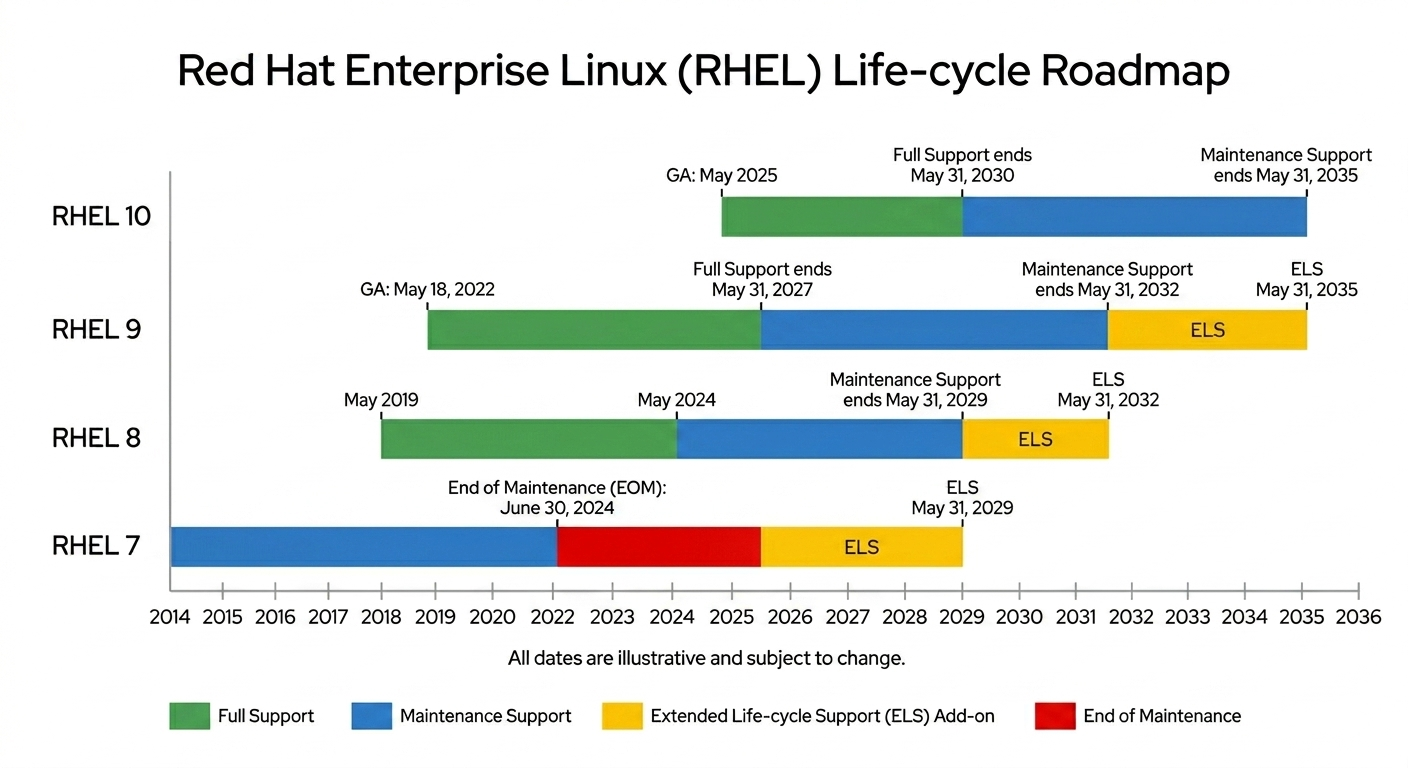
Red Hat publishes lifecycle dates years in advance. The failure pattern is treating migration as a future problem until it becomes a current emergency. Understanding the upcoming milestones for RHEL 8 EOL is critical since Maintenance Support ends in May 2029 – if you have a large RHEL 8 fleet, that clock is already running.
- If migration to RHEL 9 or 10 is feasible before EOL – start planning now. “Start planning three months out” is not enough runway for a real fleet migration.
- If migration isn’t feasible on that timeline – get extended support in place before the cutoff. TuxCare’s Endless Lifecycle Support for RHEL 7 provides ongoing CVE patching well past Red Hat’s own extended support window, which matters if you have legacy application stacks that aren’t moving this fiscal year or next.
4 Tools That Strengthen RHEL Security
A lot of tools claim to improve Linux security. These four actually close gaps that matter in production RHEL environments.
TuxCare
TuxCare addresses the two hardest problems in RHEL security operations: keeping kernel and shared-library CVEs patched without reboots, and continuing to patch systems after Red Hat stops issuing updates for them.
KernelCare applies kernel CVE fixes to running systems across a broad range of RHEL versions, including older and EOL releases. LibCare extends this to shared libraries like glibc and OpenSSL, which also require service restarts when patched conventionally. Together, these two close the reboot-deferral gap that plagues most enterprise Linux patching programs.
The Endless Lifecycle Support (ELS) program is particularly relevant for organizations on RHEL 7. Red Hat’s own extended support covers a limited window after the June 2024 EOL. TuxCare’s offering extends CVE patching beyond that for as long as an organization needs it – which matters when the migration timeline is measured in years rather than quarters.
OpenSCAP
OpenSCAP is the compliance scanner that ships with RHEL. It runs against SCAP-formatted security policies – CIS benchmarks, DISA STIGs, PCI DSS profiles – and produces a detailed report of where your system deviates. The reports require some interpretation and the tool is not glamorous, but it’s the most direct path to a real compliance baseline on a RHEL fleet without spending anything beyond what you’re already paying for.
Red Hat Insights
Insights is Red Hat’s built-in predictive analytics service. It analyzes telemetry from registered systems and surfaces known vulnerabilities, configuration drift, and performance issues. It’s included with most active RHEL subscriptions, which means teams that aren’t using it are leaving something they’ve already paid for unused. The catch is that you have to register systems and actually look at the dashboard – Insights doesn’t do much if no one reviews its findings.
Wazuh
Wazuh is an open-source SIEM and host intrusion detection platform that runs well on RHEL. It handles file integrity monitoring, log analysis, vulnerability detection, and compliance reporting in one stack. For teams that don’t want to operate Splunk or IBM QRadar, Wazuh is a credible alternative – with the tradeoff that you’re now responsible for running and maintaining the SIEM yourself.
Strengthen Red Hat Security with TuxCare
Red Hat ships a solid security foundation. The gap is between what the platform provides on day one and what it takes to maintain that posture across a real fleet, over time, under operational pressure.
The two places that gap shows up most often in Red Hat security are patching cadence – specifically the reboot-deferral problem for kernel and shared-library CVEs – and lifecycle planning, specifically what happens to systems that have hit or are approaching EOL without a migration path ready.
If your team is sitting on a queue of deferred kernel reboots, running RHEL 7 without a support contract, or managing a fleet large enough that conventional patching schedules can’t keep pace with disclosure rates, TuxCare addresses all three. KernelCare and LibCare close the reboot gap. Endless Lifecycle Support extends CVE coverage past EOL.