
 Tech Support
 Documentation
 Login
 Contact Us


Go straight to an AI summary of this blog post instead 


Key Takeaways
- Running an end-of-life Linux distro exposes organizations to security vulnerabilities, compliance gaps, and operational instability.
- TuxCare’s Endless Lifecycle Support (ELS) provides ongoing security patches for end-of-life Linux distributions after vendor support ends.
- AlmaLinux and Rocky Linux minor versions reach EOL every six months. TuxCare Enterprise Support (TES) allows you to stay on specific minor versions securely, avoiding the risks of forced upgrades.
After the Linux distribution reaches end-of-life (EOL), no security patches, bug fixes, or updates are made available by the vendor. At first, nothing seems broken — your servers are still up, applications are running just fine, and operations continue as usual. But underneath, risk starts piling up because every newly discovered vulnerability in the Linux ecosystem becomes a potential attack vector.
Many IT teams recognize these risks but aren’t sure what to do about them. Upgrading isn’t always straightforward, and running an unsupported distro may feel just right in the short term. However, the reality is that “doing nothing” results in even higher costs, both hidden and visible.
In this article, we’ll discuss the risks of using an end-of-life Linux distro — from security exposure to compliance failures — and explore the available options to stay protected and compliant without disrupting your workloads.
What End of Life Means for Linux Distributions
Every embedded Linux distribution has a lifecycle. During active support, you get regular kernel patches, security advisories, and bug fixes from the vendor. Once the support period ends, the distro goes into end-of-life or EOL status and the vendor no longer issues updates or provides official support.
Using end-of-life Linux distro creates three immediate problems for organizations:
- Unpatched vulnerabilities: With no official fixes, any new CVEs discovered in Linux kernel or other software packages remain unpatched.
- No stability fixes: Performance or compatibility bugs affecting workloads will never get fixed.
- Vendor silence: If something breaks, IT teams are on their own for troubleshooting with no official guidance.
Security & Compliance Risks of Running an End-of-Life Linux Distro
What happens if you keep using the Linux distribution after its EOL date? The EOL Linux distributions will likely continue to run as it is, however, it will open doors to security and compliance risks. Once vendors stop releasing updates, any new vulnerabilities that have been discovered after the EOL will remain unaddressed and become a potential exploit on your systems. Attackers actively look for unpatched Linux servers because EOL systems are low-hanging fruit.
Compliance risks are just as serious. Security standards such as PCI DSS, HIPAA, and FedRAMP require systems that are up to date and are regularly patched. If your environment includes unsupported Linux servers, passing an audit becomes nearly impossible. Even if auditors don’t flag it right away, a breach traced back to an EOL system can lead to hefty fines and legal exposure.
Compatibility is another risk that often flies under the radar. As upstream projects and third-party tools move on, they eventually start to drop support for older Linux versions. That means your monitoring agents, backup tools, or container platforms may suddenly stop working correctly. Over time, the “frozen in place” environment becomes harder to integrate with modern infrastructure, slowing down your entire IT operation.
The Hidden Costs of Ignoring Linux End-of-Life
Beyond the obvious security and compliance risks, organizations running end-of-life Linux distributions also face hidden financial, operational, and productivity costs. These costs might not surface right away, but they accumulate over time — slowing down teams, increasing maintenance overhead, and eventually causing disruptive outages.
- Increased IT overhead
Without vendor support, the IT team has to manually track vulnerabilities, test patches, and apply fixes to systems. It is often time-consuming and prone to errors, especially in a complex environment. Even the smallest error during manual patching can result in stability issues or unexpected downtime, which, in turn, increases workload.
- Downtime and lost productivity
Unsupported Linux systems are more likely to suffer from crashes, software conflicts, and security incidents. Every hour of unplanned downtime translates to serious financial loss. A 2014 Gartner study estimated the average cost of IT downtime at $5,600 per minute, with more recent studies putting the figure closer to $9,600 per minute.
- Incident response and recovery costs
If a security breach occurs on an EOL system, remediation costs can escalate quickly. Beyond technical recovery, there is forensic analysis, regulatory reporting, and potential fines. In industries like healthcare or finance, a single EOL-related incident can exceed the cost of proactive support many times over.
According to IBM’s Cost of a Data Breach Report 2025, the global average cost of a data breach is $4.4 million USD — not including the long-term expense of rebuilding customer trust and repairing brand reputation after a publicly announced incident.
- Opportunity cost
Teams managing EOL Linux systems tend to spend more time firefighting instead of innovating. Delayed software updates, slow integration with modern tools, and compatibility issues can prevent the organization from launching new services or scaling up efficiently. Even if your systems look stable at present, the long-term financial and operational risks of staying with an end-of-life Linux distro are substantial.
Options You Have When Your Linux Distro Reaches EOL
Some organizations choose to “run it as is” simply for the sake of avoiding immediate disruption. This is the riskiest decision: security vulnerabilities accumulate; the system will likely fail compliance, and operational instability increases with time. Largely, this means the very thing your servers are aiming to guard against is left open while hoping nothing disastrous occurs.
Here are the available options when your Linux distribution reaches end-of-life or is approaching end of life:
1. Extended support solutions
Extended support prolongs the security lifecycle of Linux distributions by providing patches even after end of life. This can be offered by the distribution vendor or by third-party providers like TuxCare. TuxCare’s Endless Lifecycle Support (ELS) for Linux supports 10 end-of-life distros, including:
- CentOS 6, 7, 8
- CentOS Stream 8
- Oracle Linux 6, 7
- Ubuntu 16.04, 18.04, 20.04
- RHEL 7
TuxCare’s ELS provides a practical and flexible approach for organizations running EOL Linux distributions by protecting systems from security, compliance, and operational risks while allowing teams to plan upgrades on their own timeline.
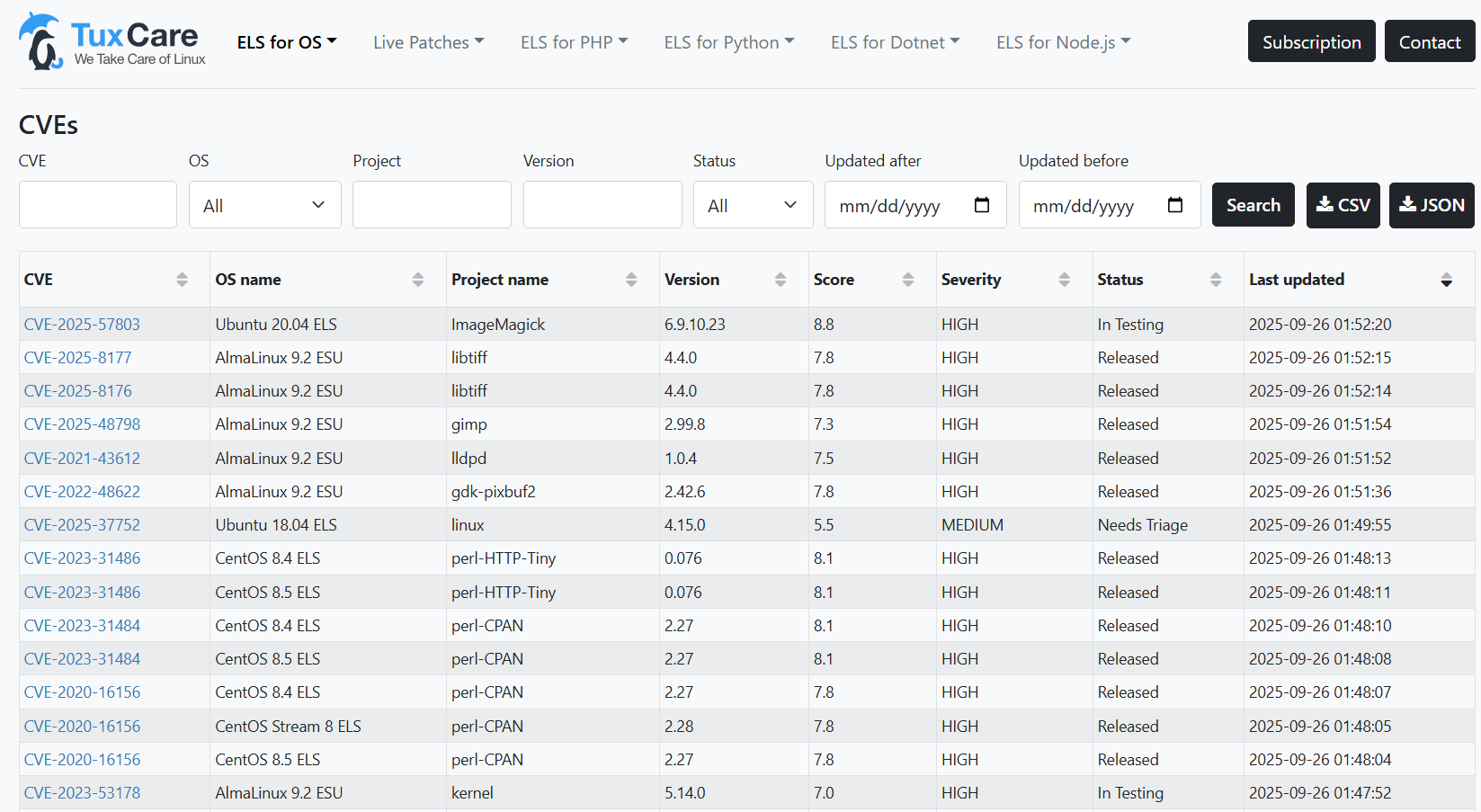
Visit the CVE dashboard to explore the full list of vulnerabilities addressed by Endless Lifecycle Support (ELS).
2. Upgrade to a newer version
This is the most effective solution, as upgrading to a next supported version means you will continue to receive security patches and other updates from the distribution vendor. However, this process can be complex, requiring careful planning, sufficient testing, and time to avoid downtime or compatibility issues. Many organizations delay upgrades due to the testing involved or the need to re-architect applications.
3. Migrate to another distribution
In some cases, there may not be an upgrade path to the next supported release. For example, CentOS 8 reached the end of life on December 31, 2021 and was discontinued, meaning there was no CentOS 9 to upgrade to. Organizations in this situation can consider switching to a different Linux distribution — ideally in the same family for easier compatibility — though this may also require extensive testing and adjustments.
For CentOS Linux, top enterprise alternatives include AlmaLinux and Rocky Linux. Both are RHEL-compatible and offer long-term support and stability that every organization requires.
For guidance, see the CentOS Migration Guide: A Seamless Shift to AlmaLinux, which walks through migrating from CentOS 7 or 8.
Navigating the EOL Lifecycle for AlmaLinux and Rocky Linux
After the discontinuation of traditional CentOS Linux, AlmaLinux and Rocky Linux emerged as the top choices for organizations migrating from CentOS Linux. These distributions gained quick popularity because of their free and open-source nature, RHEL-compatibility, 10-year lifecycle, enterprise-grade stability, and strong community support.
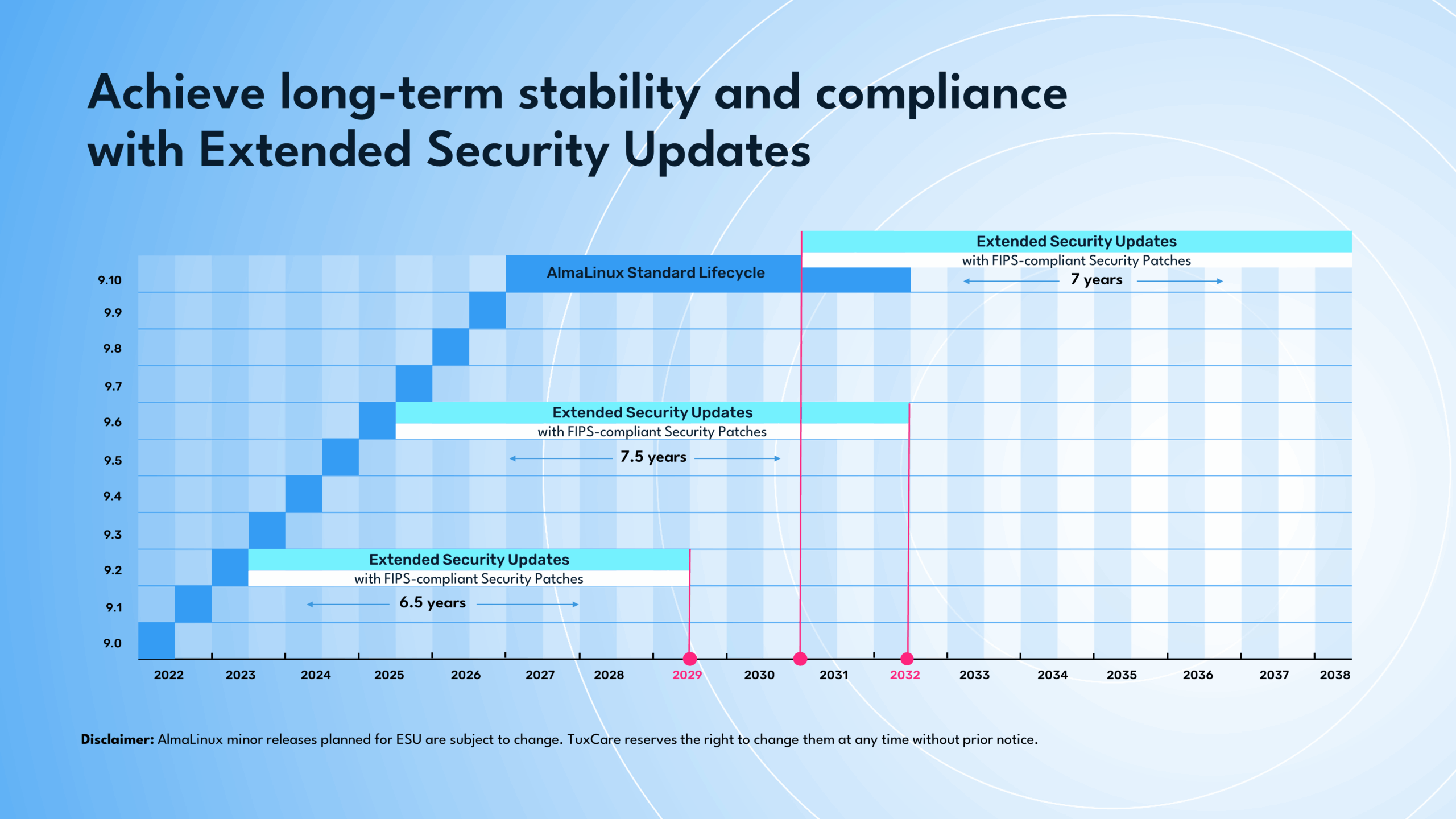
However, unlike RHEL, AlmaLinux and Rocky Linux minor releases typically only have a six-month support window. When a new minor version is released — for example, AlmaLinux OS 9.6 — the previous version (like AlmaLinux OS 9.5) immediately reaches its end-of-life. This short cycle means organizations that want to stay on a specific version for application compatibility, regulatory, or operational reasons quickly find themselves running unsupported systems.
This is where TuxCare Enterprise Support (TES) comes in. TES extends the lifecycle of selected minor releases through Extended Security Updates (ESU), ensuring critical and high-risk vulnerabilities are patched and FIPS-compliant updates remain available. It is currently available for AlmaLinux 9.2, AlmaLinux 9.6, Rocky Linux 9.6, and planned support for 9.10. By opting for ESU, organizations can avoid the pressure of upgrading every six months.
A major advantage of TES is flexibility:
- Organizations can purchase only ESU if they just need extended security coverage for a given minor release.
- Or, they can choose to bundle ESU with Essential Support (vetted repositories, 24/7 break-and-fix support, endless security support for each major version) and Enhanced Support (pay-as-you-go support in 5, 10, and 20-hour bundles).
This approach gives enterprises control over how much support they need, letting them avoid disruptive six-month upgrade cycles while keeping systems secure, stable, and compliant at their own pace.
For complete details, refer to the TuxCare Enterprise Support documentation.
Secure Your End-of-Life Linux with TuxCare Solutions
Whether it’s unpatched critical CVEs, audit failures, or downtime due to compatibility issues, the repercussions of EOL are quite real — and often end up costing more than proactive support.
TuxCare’s Endless Lifecycle Support (ELS) extends updates and security coverage beyond the vendor lifecycle for many Linux distributions.
For Rocky Linux and AlmaLinux, TuxCare Enterprise Support (TES) provides Extended Security Updates, FIPS-compliant patches, and expert-level enterprise support so organizations can remain on their preferred minor version while still being protected and compliant.
Protect your Linux infrastructure today with TuxCare solutions and maintain security, compliance, and peace of mind while planning your upgrades on your own schedule.

