Tech Support
 Documentation
 Login
 Contact Us



Go straight to an AI summary of this blog post instead 


Key Takeaways
- Backporting puts a fix from a newer release into the older version you run, without an upstream upgrade.
- Red Hat fixed Heartbleed in OpenSSL 1.0.1e without changing the upstream version, so version-only scanners flag it anyway.
- Confirm a backport with the distro advisory and package changelog, not the version number.
- When standard support ends, fixes depend on extended support, a maintained fork, or your own team.
Your scanner says the server is running a vulnerable OpenSSL version. Your sysadmin says it was patched last month. Both are looking at the same host and reading the same package, but only one of them is right about the vulnerability. That argument is a backporting problem. A fix from a newer release got applied to the version still running, and the upstream version number never changed. In enterprise Linux environments, chasing down that kind of false alarm can eat more hours than some real vulnerabilities do.
This article covers what backporting is, why the version number stays put after a fix lands, why that trips up version-based scanners, how to verify a fix yourself, and who keeps the backports coming once a release reaches end of life.
What Is Backporting?
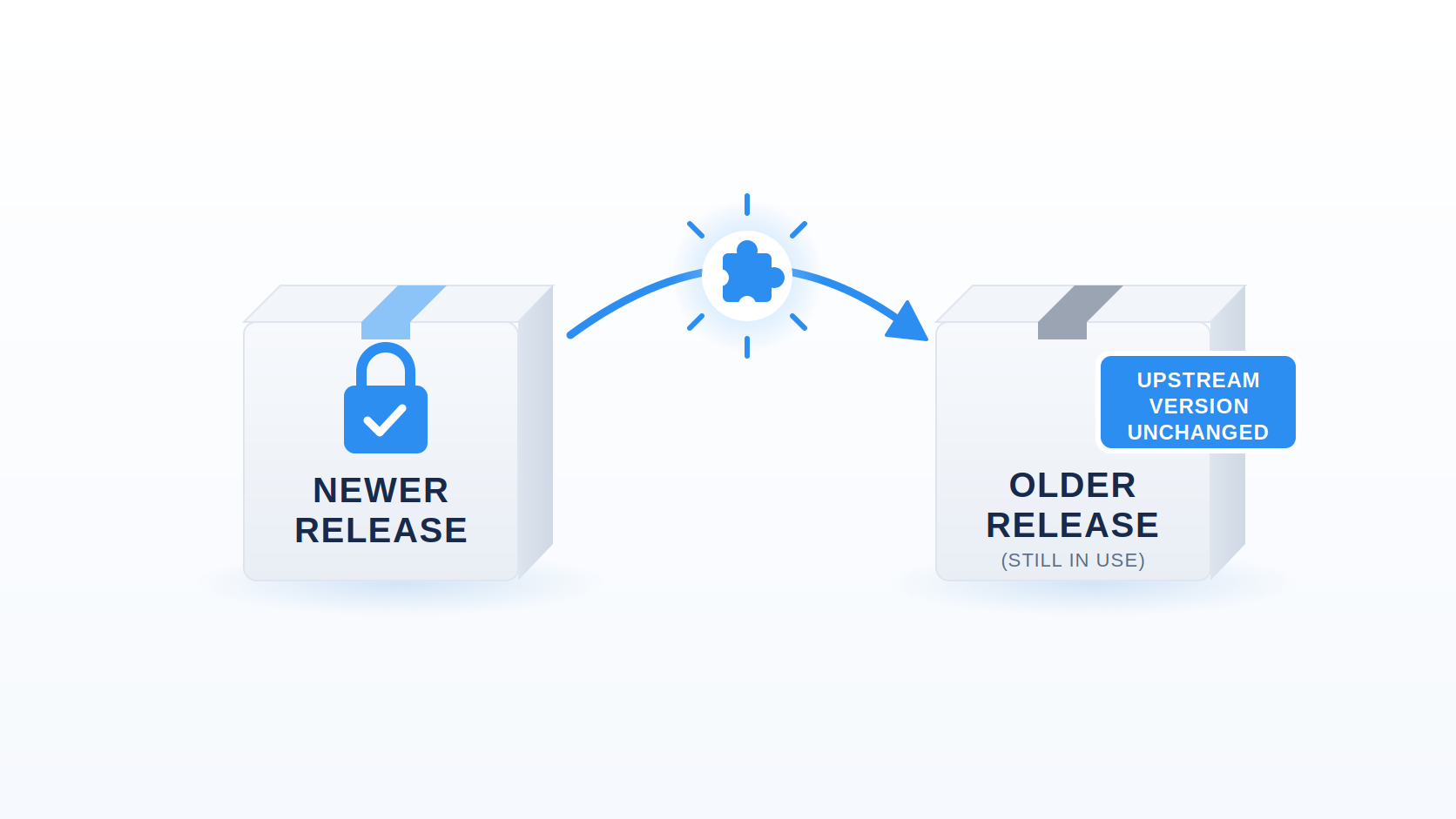
Backporting means taking a fix for a security flaw out of a newer version of a software package and applying it to an older version that’s still deployed. The vulnerability gets fixed without moving to a newer upstream release and dragging in all of its unrelated changes.
What does backport mean in practice, though? Here’s the concrete version. OpenSSL’s maintainers fixed the Heartbleed vulnerability in release 1.0.1g. Red Hat’s customers were running 1.0.1e, and moving them to 1.0.1g would have pulled in every other change made between those releases. So Red Hat backported just the Heartbleed fix to its 1.0.1e codebase and shipped openssl-1.0.1e-16.el6_5.7 under advisory RHSA-2014:0376. Same upstream feature baseline, same behavior outside the patched code path, and no more Heartbleed.
Backporting security fixes this way has been standard practice across most Linux distributions, including RHEL, Ubuntu, Debian, SUSE, and their derivatives, for two decades. Run dnf update on a RHEL host and many of the fixes arriving are backports.
Did You Know: The trailing release field is how you spot a backported build. In openssl-1.0.1e-16.el6_5.7, 1.0.1e is the upstream version, and for a backported update it stays exactly where it is. The 16.el6_5.7 part is the distro’s package release, and it changes whenever the distro ships a revised build.
How Backporting Works
A maintainer identifies the fix upstream, isolates it from everything else that changed, adapts it to a codebase that has drifted, tests for regressions, and ships it through the ordinary update channel with the upstream version number intact.
Keeping that upstream version number is just as deliberate as the fix itself. It signals that the package is still the same release underneath, with its API and general behavior preserved outside the patched code path. Only the distro’s release identifier moves.
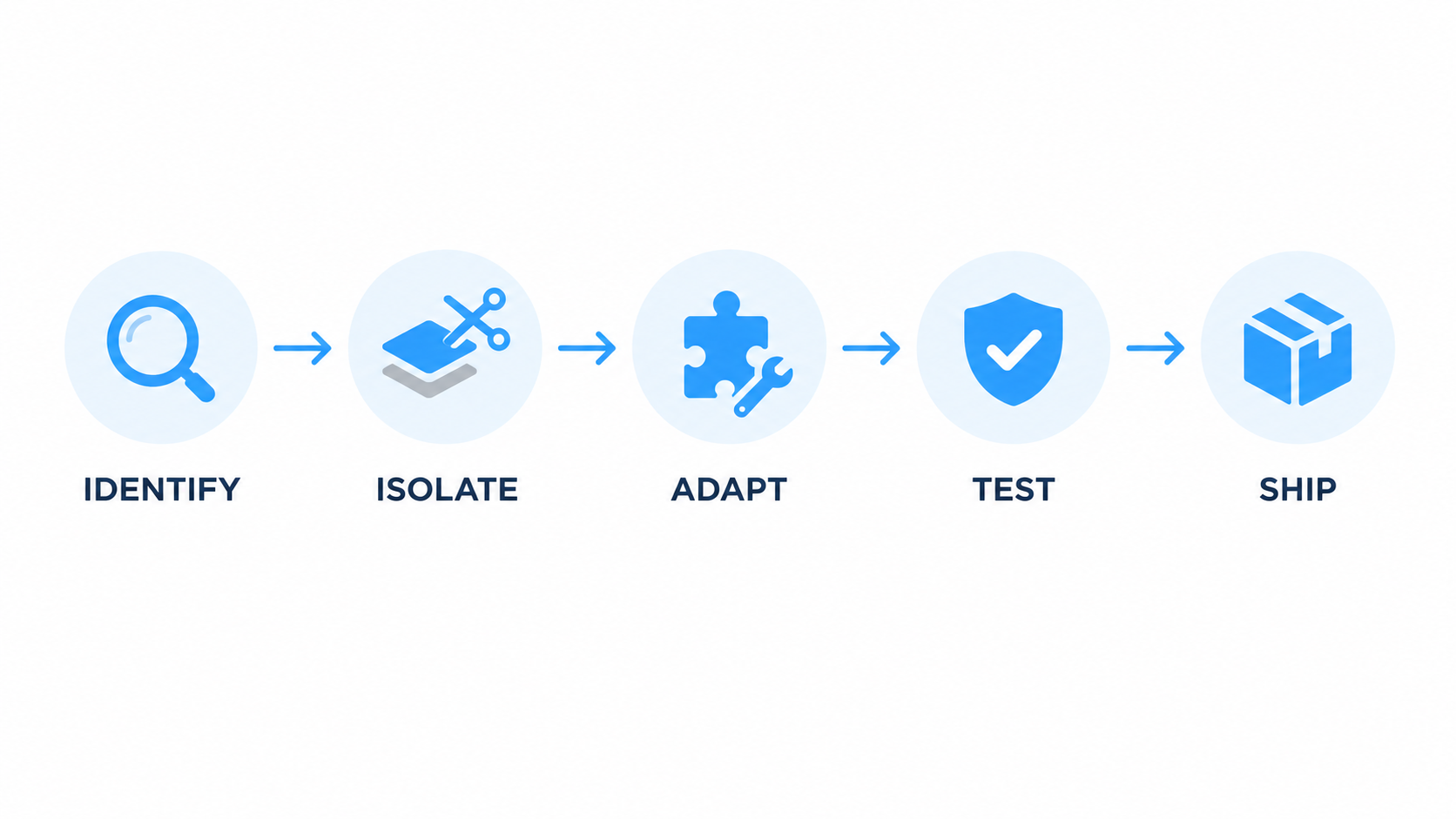
1. Identify the fix upstream
Someone reports a flaw, upstream maintainers write a fix, and it lands in a newer release. The distro’s security team has to pin down the exact change, or set of changes, that closes the flaw, not just the release that contains it.
This is harder than it sounds. Upstream projects don’t always ship a security fix as one clean, isolated commit. It may be spread across three commits, bundled inside a larger refactor, or merged with a vague message before the CVE is public. Security teams watch upstream repositories, mailing lists, and CVE feeds continuously to catch these.
The output of this step is a patch, sometimes stitched together from several commits, plus a clear understanding of exactly which lines close the flaw and why. Everything downstream depends on getting this right – miss half the fix and you ship a package that claims to be patched and isn’t.
2. Isolate it from unrelated changes
The upstream fix arrives tangled up with everything else in that release: new features, refactors, changed defaults, dependency bumps. The maintainer strips all of that away.
What’s left should be the minimum change that closes the flaw, nothing else. That’s the whole value proposition of backporting. You get the security fix without the new configuration syntax that breaks your Ansible role.
Insider Tip: Some distro changelogs name the upstream release or commit that a backported fix came from. When they do, that reference shows where the fix originated, not what’s installed. Your package stays on its original upstream version, and only the distro release number moves. Auditors mix the two up often, so note the difference once in your evidence pack, and you won’t need to explain it five times in the review.
Isolation also takes judgment. Deciding which lines actually belong to the fix means understanding the vulnerability itself, which is a higher bar than applying a patch that was written for the code in front of you.
3. Adapt it to the older codebase
Now the patch gets rewritten to fit. Function signatures differ, data structures have changed shape, and helper functions may not exist yet in the older tree. A fix that touches a function renamed two releases ago can’t be applied verbatim.
The maintainer reimplements the same defensive logic using what the older codebase provides. When the two trees haven’t drifted far, that can be quick work. When they’ve diverged for years, it can mean substantial reimplementation, and sometimes it can’t be done at all, which is one of the real limits covered further down.
A worked example: a self-contained fix that adds a bounds check is usually straightforward to port. A fix that closes a race condition by changing the locking model is much harder, because the older code may not have the lock primitives the fix depends on. The maintainer then has to solve the same security problem another way.
This is why “who maintains your backports” is a real procurement question and not a marketing line. The skill of the team doing this work determines whether your “patched” system is really patched.
4. Test that behavior does not change
The patched package gets built and tested against two criteria: the flaw is closed, and no unintended regressions came along with the fix.
The second half is the harder test. Regression suites, ABI compatibility checks, and integration testing all run here, because the whole point of a backport is that it can go through your normal patch cycle instead of turning into a migration project. Break that promise once and customers stop trusting the update channel.
Enterprise distros put serious effort into ABI compatibility for library packages, so that a backport doesn’t quietly change a symbol a customer’s compiled application depends on. RHEL, for one, publishes explicit API and ABI compatibility commitments for its releases. That discipline is a big part of why long-term support releases stay usable for a decade.
Watch Out: A backport that’s been validated against the flaw hasn’t necessarily been validated against your application. Vendor regression testing covers the package itself. Keep your own smoke tests on the critical path.
5. Ship it with the upstream version unchanged
The package goes out through the normal repository. The upstream version stays exactly as it was, and the distro’s release suffix changes.
openssl-1.0.1e-16.el6_5.4 becomes openssl-1.0.1e-16.el6_5.7. To your package manager, this is a routine update. To a version-based scanner comparing “1.0.1e” against an upstream CVE database that says “fixed in 1.0.1g,” it looks like you did nothing at all.
That mismatch is a deliberate compatibility choice with a known reporting side effect, and it’s one of the most common sources of false positive vulnerability findings in Linux environments.
Backporting vs Upgrading
Both close the flaw. They differ in almost everything else.
| Backporting | Upgrading | |
| What you get | Targeted fixes, without moving to a newer upstream release | The fix plus features, changed defaults, altered APIs |
| Stability impact | Designed to preserve existing behavior | Behavior may change, so testing is required |
| Effort for you | Routine package update | Compatibility testing, config migration, possible code changes |
| Breakage risk | Lower than a major upgrade, but not zero | Moderate to high, depending on version gap |
| Who does the work | Distro or support vendor | Your team |
| How long it holds | Until whoever maintains the backports stops | Until the newly upgraded release reaches its own EOL |
Upgrading can bring broader hardening, safer defaults, and architectural improvements along with the one fix you needed. Backporting gets you the specific fix with as little collateral change as possible. That tradeoff is a big reason long-term support releases favor targeted maintenance over frequent rebases.
The calculus flips when the version gap gets wide enough. A backport chain that has held a package together for eight years is carrying a lot of accumulated divergence, and at some point migrating may be the more practical option. The question is whether you get to choose the timing, and our comparison of end of life vs end of support covers what forces the decision.
Why Scanners Flag Backported Fixes
Some version-based scanners compare the detected package version against upstream CVE fix versions. Your package says 1.0.1e. The database says Heartbleed was fixed in 1.0.1g. The scanner reports you as vulnerable. If that verdict rests on the version string alone, it’s a false positive, because the scanner never accounted for the backported fix. Red Hat’s own security documentation calls out this exact behavior.
Here’s the worked example, end to end.
| What each party sees | Value |
| Your installed package | openssl-1.0.1e-16.el6_5.7 |
| Upstream fix version for CVE-2014-0160 | 1.0.1g |
| Naive scanner verdict | Vulnerable |
| Actual status | Patched via RHSA-2014:0376 |
Verify it yourself, starting with the changelog. Check the installed package for the CVE:
rpm -q –changelog openssl | grep CVE-2014-0160
If the CVE shows up, that’s strong evidence the fix is included, and the distro’s security advisory is where you confirm it. The same check works against an RPM file that isn’t installed yet:
rpm -qp kernel-3.10.0-862.11.6.el7.x86_64.rpm –changelog | grep CVE-2017-12190
On Debian and Ubuntu, the equivalent is the Debian changelog:
zcat /usr/share/doc/openssl/changelog.Debian.gz | grep CVE-2014-0160
Swap in whatever package you’re checking. Most Debian and Ubuntu packages ship this file at /usr/share/doc/<package>/changelog.Debian.gz. Don’t confuse it with changelog.gz, which is normally the upstream changelog. Debian’s own package changes, backports included, are recorded in changelog.Debian.gz. Minimal and container images often strip /usr/share/doc entirely, and in that case apt changelog <package> fetches the changelog from the archive instead.
Check three sources, because they answer different questions. The distro security advisory is the authority on which package build fixes a given CVE, and Red Hat, Canonical, and Debian all publish per-CVE pages listing the exact fixed package versions. The installed package metadata and changelog tell you what’s actually on the host and usually name the CVEs that build addresses, which makes them a fast first check. Machine-readable feeds are for your tooling. Formats such as OVAL and, where a vendor publishes it, VEX or CSAF data let scanners use the distro’s own assessment instead of guessing from a version string. If your scanner supports them, turn them on.
The structural fix is tooling that determines actual patch status instead of trusting upstream version matching alone.TuxCare Radar was built to work alongside your existing scanners for this specific gap. It recognizes distro backports, KernelCare rebootless patches, and ELS updates, so a patched host reports as patched, and it can export the evidence when someone asks for proof.
Pro Tip: Before disputing a finding with an auditor, export the changelog line and the distro advisory URL together. “The CVE is listed in the package changelog and the vendor advisory confirms this build” ends the conversation. “Trust me, it’s backported” does not.
Who Backports Fixes, and for How Long
Three groups typically do this work: upstream projects with supported stable branches, distro security teams, and extended-support vendors. The handoffs between them are where estates get exposed.
Upstream projects typically maintain a small number of supported branches, sometimes including a longer-lived LTS branch, and cherry-pick fixes into those. Once a branch falls outside that support window, they stop.
Distro security teams backport into the versions they ship, for the length of the support window. Current major RHEL releases get ten years across Full Support and Maintenance Support, and Red Hat sells extended coverage beyond that. RHEL 7 is on the older ELS add-on, while RHEL 8.10 and later move to Extended Life Cycle Premium. Ubuntu LTS gets five years of standard security maintenance, up to ten with Ubuntu Pro, and up to 15 with Canonical’s paid Legacy add-on.
Extended-support vendors pick it up after that, and only if you buy it. Sometimes that’s the original vendor’s own paid program, and sometimes it’s a third party.
The dates are concrete, and they’ve already passed for a lot of production systems. Status is current as of September 2026:
| Release | End of standard support | Status now |
| Python 2.7 | 1 January 2020 | No security fixes |
| Ubuntu 16.04 | 30 April 2021 (ESM ended May 2026) | Paid Legacy add-on only, to May 2031 |
| CentOS Linux 8 | 31 December 2021 | No upstream updates |
| PHP 7.4 | 28 November 2022 | No security fixes |
| Ubuntu 18.04 | 31 May 2023 (Ubuntu Pro ESM to May 2028) | ESM only |
| PHP 8.0 | 26 November 2023 | No security fixes |
| CentOS Linux 7 | 30 June 2024 | No upstream updates |
| RHEL 7 | 30 June 2024 (Red Hat ELS to May 2029) | Paid extended support only |
| Ubuntu 20.04 | 31 May 2025 (Ubuntu Pro ESM to May 2030) | ESM only |
| PostgreSQL 13 | 13 November 2025 | No security fixes |
| PHP 8.1 | 31 December 2025 | No security fixes |
Once a release passes that line, fixes stop arriving through the standard update channel. Protection past that point depends on a paid extended-support program, whether from the original vendor or a third party, or on in-house maintenance.
TuxCare’s Endless Lifecycle Support (ELS) covers that stretch. ELS keeps shipping backported security fixes for operating systems, runtimes, language ecosystems, and applications after their standard support ends, through the same package manager already in use.
See the full list of supported technologies. For a closer look at the patching process, this whitepaper walks through it in more depth.
Backporting Challenges and Limits
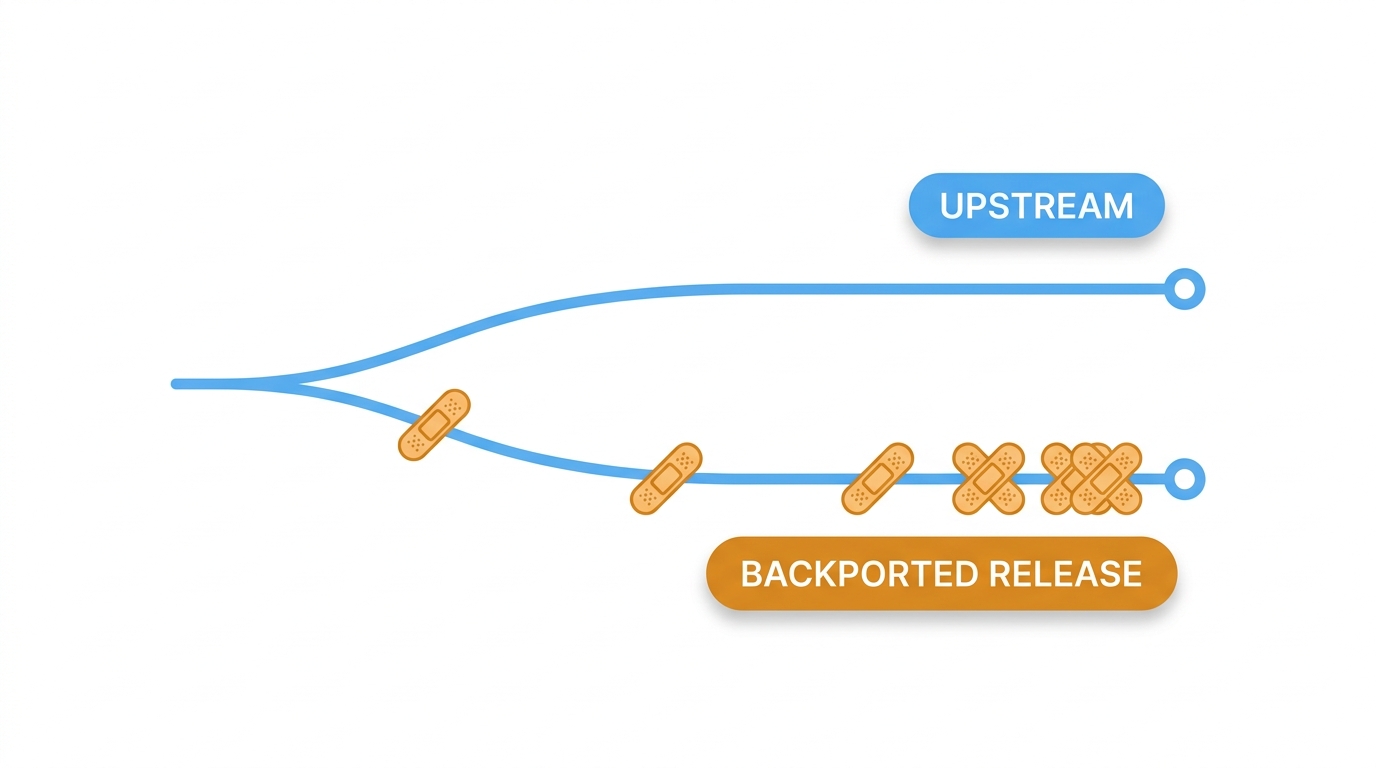
Codebases diverge. Every year that passes, the older tree looks less like the newer one. A patch that applied cleanly in year two can need substantial reimplementation by year seven, so the work gets harder and slower exactly as the code gets older.
Testing gets heavier too. Each new backport has to be validated against a codebase that may already carry years of earlier backports and other downstream changes, and those changes can interact. The more modifications a branch accumulates, the more there is to regression-test.
Some fixes can’t be directly backported at all. When upstream closes a flaw by changing the architecture, say with a new memory model, a redesigned permission system, or a rewritten parser, there may be no self-contained patch to adapt. The vendor’s options are a custom mitigation that achieves the same security outcome by different means, or an honest statement that the flaw isn’t fixable in that branch. Both are legitimate. Silence is not.
And a backport is narrow by definition. It closes the specific flaw. It doesn’t bring the general hardening, the safer defaults, or the removed legacy code paths that a new major version might include. An older release can carry a fix for every CVE its maintainer has addressed and still hold on to legacy code and security limitations that newer releases have since removed or redesigned.
Backporting quality depends entirely on who maintains the patches. That’s a real criterion when choosing a distribution or an extended-support vendor, so ask about backport turnaround times, regression testing practice, and what happens when a fix can’t be ported. Those answers matter more than a feature list, and they feed directly into how you run vulnerability management and set vulnerability prioritization policy.
Keep the Backports Coming After EOL With TuxCare
Backporting only protects you while somebody is still doing it. When standard support ends, fixes stop arriving through the normal update channel unless extended support is in place. The system keeps running and CVEs keep arriving – from that point, protection depends on migration or an extended-support provider.
TuxCare’s Endless Lifecycle Support keeps security patches coming for EOL operating systems, runtimes, language ecosystems, and applications long after standard upstream or vendor support has ended.
See what coverage looks like for your stack, or ask us a question about a specific end-of-life release.
FAQs
Yes. A CVE number identifies the flaw itself, and the distro advisory documents which fix addressed it. Cross-referencing the two confirms your patched package addresses the vulnerability your scanner flagged.
Technically yes, practically rarely. You’d need to isolate the upstream fix, adapt it, rebuild the package, and maintain it through every future update. A locally modified package can also fall outside your vendor’s normal support, so expect to reproduce any issue on the vendor’s own build first. It’s most practical for software your team already maintains and has the testing setup to back.
Yes. Distros routinely backport bug fixes, and enterprise distros like RHEL also backport hardware enablement and selected features during a release’s full support phase. Conservative stable releases keep feature backports rare, because they undercut the stability promise that justifies backporting in the first place.
Check the vendor’s CVE page for the fixed package build, then compare it to what’s installed. To check locally, rpm -q –changelog <package> on RPM systems or the Debian changelog on Debian and Ubuntu will usually list the CVE if that build includes the fix.
No. Backporting is how the fix gets written for an older codebase. Live patching is how a fix gets applied to a running kernel without rebooting the system.