Tech Support
 Documentation
 Login
 Contact Us


Go straight to an AI summary of this blog post instead 


Key Takeaways
- Angular 16 went end-of-life on November 8, 2024, ending all security patches, bug fixes, and official support from the Angular team.
- Running Angular 16 today means unpatched CVEs, decaying third-party library support, and audit findings under SOC 2, HIPAA, and PCI DSS.
- Angular requires migrating one major version at a time toward Angular 20 or 21, though most teams hit third-party library conflicts before they finish.
- If you can’t migrate immediately, third-party extended lifecycle support is the only way to keep receiving security patches for Angular 16.
If you’re reading this in 2026, Angular 16 has been unsupported for over a year and a half. That’s a long time to be on the wrong side of EOL. Every npm install is pulling down dependencies that have stopped testing against v16. Every CVE filed against zone.js, RxJS, or something buried three levels deep in your dependency tree is a vulnerability that Google isn’t backporting a fix for. Angular 16 officially went end-of-life on November 8, 2024, and the gap between then and now keeps compounding – both in terms of security exposure and in how painful the eventual migration is going to be.
This guide lays out what Angular 16 EOL actually means in practice, which risks matter most, and what your real options look like heading into the rest of 2026.

Main Risks of Angular 16 EOL for Your Organization
EOL doesn’t mean your app stops working – it means the Angular team has stopped working on your version. Security patches, bug fixes, breaking-change guidance: all gone. Your app keeps humming along, and the risks pile up quietly in the background. Most of them stay invisible until a CVE lands in your feed or an auditor starts asking uncomfortable questions about your dependency tree.
Risk #1: Unpatched security vulnerabilities
Angular doesn’t get CVEs filed against it all that often, but its attack surface is wider than most teams give it credit for. The framework ships with zone.js, RxJS, the Angular CLI build chain, and a whole constellation of @angular/* packages – any one of which can drag in a vulnerable transitive dependency you’ve never even heard of. According to the 2026 OSSRA report from Black Duck, 87% of audited codebases contained at least one vulnerability, 78% had high-risk vulnerabilities, and the average codebase was carrying 581 vulnerabilities. After EOL, none of those fixes get backported to Angular 16. You’re left with two options: upgrade the offending package (which is frequently blocked by Angular 16 peer-dependency constraints) or sit with the known risk.
See recent vulnerabilities affecting Angular on TuxCare’s CVE tracker.
You can also explore our complete guide on Angular security best practices to strengthen your application’s defenses.
Risk #2: Dependency rot and ecosystem drift
This one tends to blindside teams more than the CVE stuff. Third-party Angular libraries – Angular Material, NgRx, PrimeNG, Akita, every form-builder wrapper your team imported back in 2022 or 2023 – align their support windows with whatever Angular versions are actively maintained. Within about a year of EOL, most of those libraries will have published a major version that quietly drops Angular 16 from their peer-deps list. Now you’re stuck running old library versions that carry their own unpatched vulnerabilities. The 2026 OSSRA report found that 92% of audited codebases contained components ten or more versions behind their latest release – this exact chain of events is how that happens.
From the Trenches: A mid-sized SaaS team doing an Angular 16 migration today will typically run into 8–15 dependency conflicts that weren’t there a year ago. And the fix is rarely just “upgrade Angular.” It’s more like “upgrade Angular and rewrite the chunks of the codebase that were built against the old API surface of three libraries that have since moved on.”

Risk #3: Compliance and audit exposure
If your app falls under SOC 2, HIPAA, ISO 27001, PCI DSS, or basically any compliance framework with a vulnerability management control, running EOL software shows up as a finding. Full stop. Auditors don’t give points for “we have a migration planned” – that doesn’t satisfy a control test. A known vulnerability in your SBOM with no available patch becomes a documented gap in your remediation record. In regulated industries, that gap can hold up contract renewals, complicate M&A due diligence, and get flagged as zombie code liability. The longer Angular 16 sits in your stack, the more of those findings accumulate.
Best Practices After Angular Goes EOL
There’s no universal right answer, and anyone who tells you to “just upgrade” has probably never dealt with a 200,000-line Angular 16 enterprise codebase. What follows applies whether you’re kicking off a migration next sprint or trying to buy some breathing room while you work out the plan.
1. Inventory your real Angular surface area first
Before you touch a tsconfig or run ng update, generate an SBOM for your application and get a real picture of what actually depends on Angular 16. That means core packages, third-party Angular libraries, build tooling, polyfills, and anything across your monorepo that imports from @angular/*. Your security team and your auditors will ask for this first anyway, so you may as well have it ready. Most teams underestimate the scope by about 2x – they say “we use Angular Material and NgRx” and then the SBOM comes back with 40 entries. If you’re stuck in that gap between “we haven’t fully inventoried yet” and “we have a migration plan,” vendor-backed extended lifecycle support – like TuxCare’s Endless Lifecycle Support for Angular – can keep CVE patches flowing while you finish that work.
2. Upgrade one major version at a time
Angular’s official update guidance is explicit about this: one major version at a time, no exceptions. From Angular 16 in 2026, that means going 16 → 17 → 18 → 19 → 20 (or 21, depending on where things are when you start). Trying to skip versions means losing access to the CLI’s automated migration schematics – and then you’re doing a lot of that work by hand.
The command pattern for each hop looks like this:
Step 1: Move from 16 to 17
ng update @angular/core@17 @angular/cli@17

Step 2: Move from 17 to 18
ng update @angular/core@18 @angular/cli@18
Run your full test suite at each step and audit your package.json for peer-dependency warnings before moving on. Commit each major version bump as its own PR – never batch them. If a third-party library breaks at version 18, it’s far easier to debug when you’re not also untangling core framework changes from version 19 at the same time.
3. Track third-party library compatibility before you start
Upgrading Angular core is honestly the straightforward part. What trips teams up is the surrounding ecosystem. Before you do anything else, map out a compatibility matrix for every Angular-dependent package in your package.json:
|
Library |
Current version |
Target Version |
Breaking changes |
|
@angular/material |
16.x |
20.x |
Token renames, theming API |
|
@ngrx/store |
16.x |
20.x |
Signal store migration |
|
@angular/cdk |
16.x |
20.x |
Overlay positioning |
|
ng-bootstrap |
16.x |
19.x+ |
Standalone components |
|
primeng |
16.x |
20.x |
Theming, module structure |
Any critical library that doesn’t support your target Angular version needs a resolution plan before you begin – not something to figure out mid-migration when you’re already committed.
Watch Out: ng update will run without complaint even when there are peer-dependency warnings. It doesn’t stop or block on incompatible third-party libraries. Always read the full output after running it. A “successful” upgrade that shows 12 peer-dependency warnings is a broken app sitting quietly in your pipeline, waiting for the wrong moment to surface.
You can also learn more about what awaits you at the next step in our in-depth Angular 17 EOL guide.
How Extended Support Helps You Stay Secure After EOL
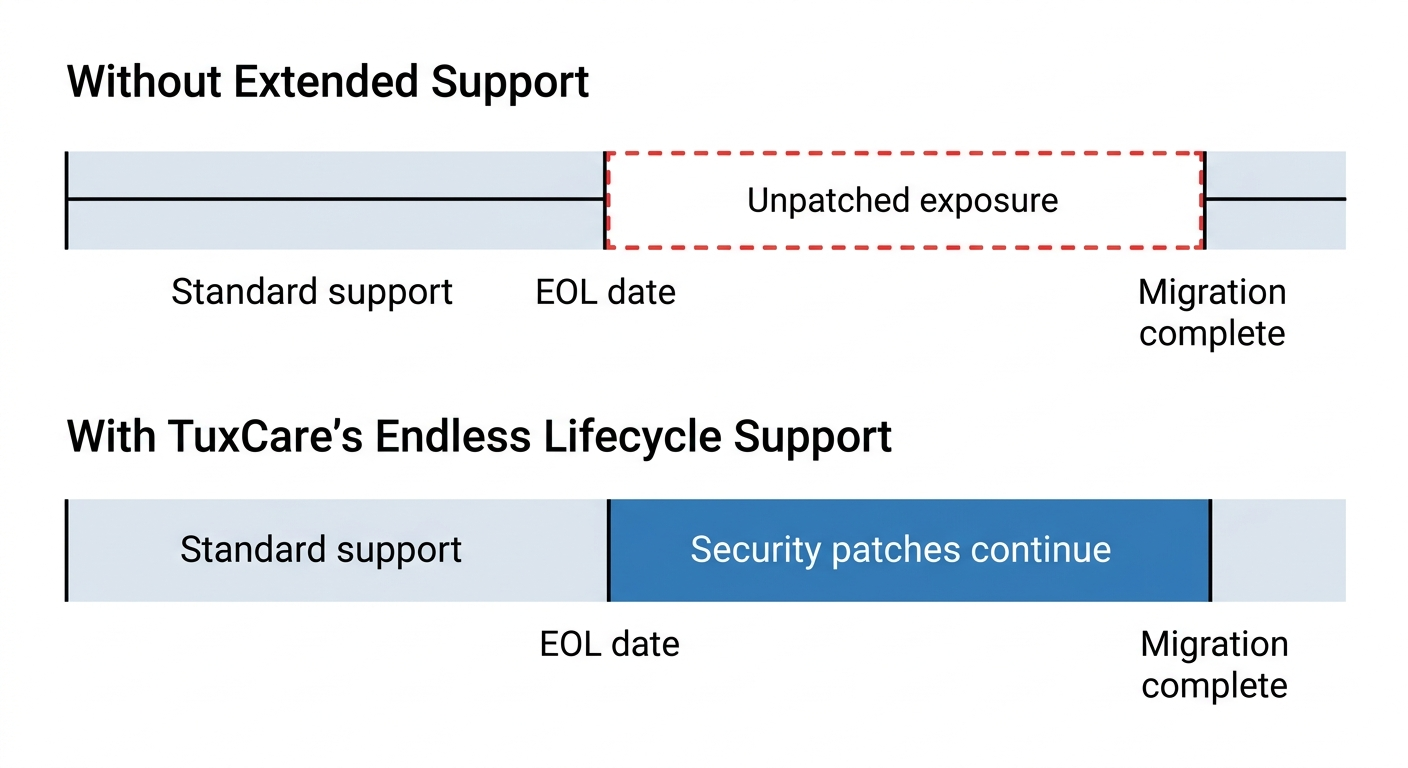
Yes, migration is the right answer long-term. But “long-term” is doing a lot of heavy lifting in that sentence. For plenty of teams, the realistic migration window is somewhere between 6 and 18 months – and CVE exposure doesn’t pause politely while you work through it. Extended lifecycle support bridges that window: you keep getting security patches for Angular 16 while migrating at a pace that actually makes sense for your team.
Reason #1: Continued CVE patching for the version you’re actually running
The pitch is simple: a third-party support vendor backports security fixes to Angular 16 – and to its known-vulnerable peer dependencies – so you’re not stuck choosing between shipping unsafe code and forcing a rushed upgrade every time a CVE lands. This is especially relevant when the Angular team publishes a fix for a currently supported version and there’s no backport coming for 16. Vendors — with TuxCare’s ELS for Angular being one option – are how teams close that exposure window without scrambling.
Reason #2: Compliance coverage during a planned migration
There’s a meaningful difference between “we’re upgrading next quarter” and “we have an active vulnerability management program with vendor-supplied patches for Angular 16.” Auditors accept the latter in a way they simply won’t accept the former. Extended support gives you a documented, auditable patch source for SOC 2, HIPAA, and PCI DSS controls while migration is in progress. It doesn’t replace the migration roadmap – you still need one – but it turns a hard audit finding into a managed risk with actual paper behind it.
Reason #3: Time to do the migration properly
A rushed Angular 16 → 20 migration that nominally ships on time but breaks production for a week is categorically worse than a six-month migration that lands clean and doesn’t wake anyone up at 2 AM. The 2025 Stack Overflow Developer Survey reports Angular at 19.8% adoption among professional developers, with most of that usage concentrated in enterprise codebases – exactly the kind of apps where a four-major-version jump tends to surface state-management bugs, SSR regressions, and build-tool surprises somewhere in the final week of QA. Extended lifecycle support lets the migration run on engineering’s schedule instead of the CVE feed’s.
Reality Check: You’ll hear vendors describe Angular migrations as “seamless” or “mostly automated.” They’re not wrong about the framework itself. The Angular CLI handles the Angular upgrade. What it doesn’t touch is your third-party dependencies, your custom build pipeline, your SSR configuration, your i18n setup, or the 200 tests that pass on ng serve and break on ng build --configuration=production.
Stay Secure Beyond EOL with TuxCare
Angular 16 is past EOL, and the finish line for migration keeps shifting – Angular 20 is supported through November 2026, Angular 21 through May 2027. The gap between “we’ll upgrade soon” and “we’re actually upgraded” is exactly where production risk accumulates. If your team is somewhere in the middle – migration underway, blocked on a library, or simply short on engineering bandwidth to execute a four-major-version jump before auditors start asking questions – that’s the scenario TuxCare’s Endless Lifecycle Support for Angular was designed for.
TuxCare’s ELS covers the core components your app depends on – @angular/core, @angular/common, @angular/router, @angular/forms, @angular/compiler, @angular/cli, @angular/platform-browser, @angular/platform-browser-dynamic, and @angular/compiler-cli – with continued security patches for as long as your organization needs them.
Security patches keep coming, your compliance position stays defensible, and you get to migrate on a timeline that doesn’t require you to cross your fingers every time you push to production.