Tech Support
 Documentation
 Login
 Contact Us


Go straight to an AI summary of this blog post instead 


Key Takeaways
- A CVE identifies a specific publicly disclosed vulnerability; CVSS scores tell you how severe it is.
- CVE patching closes the vulnerability entirely – mitigation only limits exposure.
- Prioritize by exploitability, not just score. CISA’s Known Exploited Vulnerabilities catalog is your fastest signal for what’s actively being weaponized.
- On Linux, kernel patches get delayed because of reboot requirements. Live patching removes that constraint without scheduling downtime.
Your scanner just returned 400 CVEs. Your on-call engineer is already stretched. And your CTO wants to know which ones are actually dangerous – by end of day.
This is CVE patching in practice: messy, context-dependent, and never as clean as the vendor docs suggest.
CVE patching is the process of identifying publicly disclosed cybersecurity vulnerabilities in your software stack and applying the fixes that close them. This article covers the full picture – how CVEs work, how to prioritize intelligently, how to identify what actually needs patching, and what consistently gets in the way of teams doing it well.
What is a CVE?
A CVE – Common Vulnerabilities and Exposures – is a unique identifier assigned to publicly known cybersecurity flaws in software or hardware. The program is managed by the MITRE Corporation and sponsored by the Cybersecurity and Infrastructure Security Agency (CISA). When a researcher or vendor discovers a vulnerability, it gets reviewed and assigned a CVE ID (formatted as CVE-YEAR-NUMBER), which becomes the common reference point across security tools, advisories, and patch notes.
Here’s how it typically flows:
- A vulnerability is discovered by a researcher or vendor.
- It gets reported to MITRE or a CVE Numbering Authority (CNA).
- A CVE ID is assigned and the entry is published in the National Vulnerability Database.
- Vendors and Linux distributions issue patches or advisories referencing that ID.
- Your scanner picks it up – and the clock starts.
CVE vs. CVSS – they’re not the same thing:
|
Term |
What it is |
What it tells you |
|
CVE |
A unique vulnerability identifier |
Which security flaw exists and where |
|
CVSS |
A numeric severity score (0.0–10.0) |
How severe it is in theory |
CVSS scores are calculated in a vacuum. A CVSS 9.8 on a service that’s firewalled off from the internet is a lower operational priority than a CVSS 6.5 on a public-facing API with a known exploit in the wild. Context always wins.
What is CVE Patching?
CVE patching is the act of applying a fix – a software update, package upgrade, or kernel patch – that resolves a specific known vulnerability. Think of it as patch management scoped specifically to security.
It’s also worth separating patching from mitigation, because teams conflate them constantly:
|
Approach |
What it does |
Risk eliminated? |
|
Mitigation |
Limits attack surface or impact (firewall rules, WAF config, feature disable) |
No – vulnerability still exists |
|
Patching |
Removes the vulnerable code path entirely |
Yes – exposure is closed |
Mitigation is a stopgap. Patching CVEs is the resolution. In practice, you’ll often do both – mitigate immediately, then patch on your next scheduled window. But if that window is three months out, you’re not managing risk so much as deferring it and hoping nothing happens in the meantime.
Importance of CVE Patching for Linux Systems
Linux powers the majority of production infrastructure, which gives CVE patching on Linux a different weight than it has on other platforms.
Linux Is a High-Value, High-Density Target
Linux runs most public cloud workloads, containerized applications, and enterprise servers. That concentration makes it an attractive target – attackers optimize for where the density of exposed systems is highest. Kernel-level CVEs are especially dangerous because a successful exploit can hand an attacker full system control, not just application-level access.
The 2021 Polkit pkexec privilege escalation (CVE-2021-4034) is a good example of the stakes. Exploitable on virtually every major Linux distribution, it required no network access – just a local user account and execution. Teams who hadn’t patched discovered the hard way that “no external exposure” doesn’t mean “no risk.”
Reboot Requirements Make Teams Skip Kernel Patches
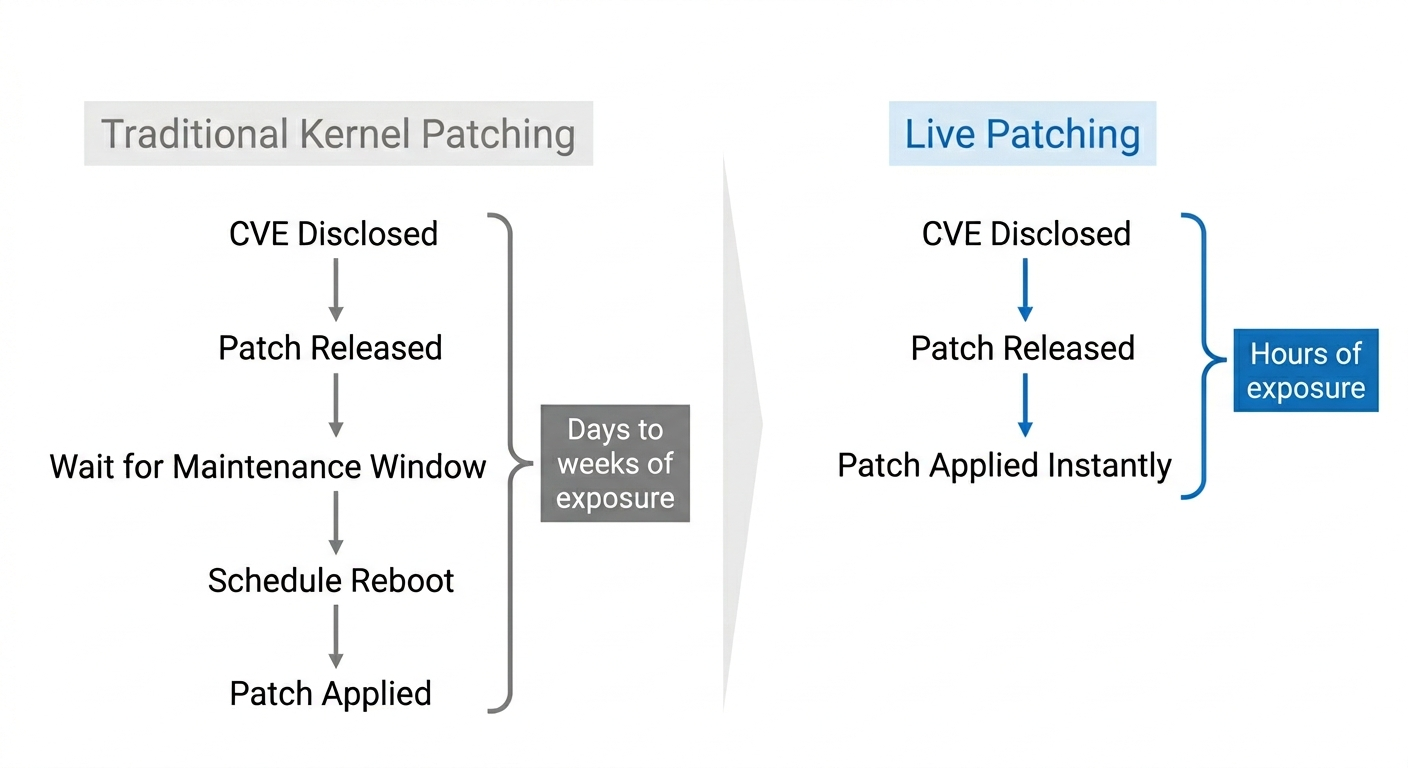
Traditional Linux kernel patching requires a reboot to load the new kernel. In production environments, reboots mean downtime, coordination, and sign-off – so teams defer kernel patches for weeks or months, leaving software vulnerabilities live while the fix sits in a queue.
TuxCare’s State of Enterprise Vulnerability Detection and Patch Management Report found that only 46% of organizations take advantage of live patching – meaning the majority are still dependent on traditional patch cycles that require reboots and maintenance windows. This isn’t negligence – it’s the operational reality of running production systems at scale. Until you solve the reboot problem, kernel patch management has a delay baked right in.
EOL Packages Are Still Running in Production
A significant portion of Linux production environments includes packages past their upstream end-of-life date. When upstream support ends, CVE patches stop too. Teams are then left to backport fixes themselves, engage an extended support vendor, or accept that known vulnerabilities will stay unpatched indefinitely.
CentOS 7 hit EOL in June 2024. A large installed base is still running it in 2026. Many of those systems have open CVEs with no upstream fix coming. The patch-aware approach is what separates teams staying ahead of this from teams learning about their exposure during an incident.
Compliance Frameworks Require Documented Patch Timelines
PCI DSS, HIPAA, SOC 2, and most government security frameworks require demonstrable, timely patching, with some setting explicit timelines – typically critical patches within 30 days and high-severity within 60–90 days.
On Linux environments spanning multiple distributions and dependency stacks, hitting those timelines consistently is harder than it sounds. Failing an audit because a patch was available but not applied is an avoidable problem – and the documentation burden is real.
Step-by-Step CVE Patching Process
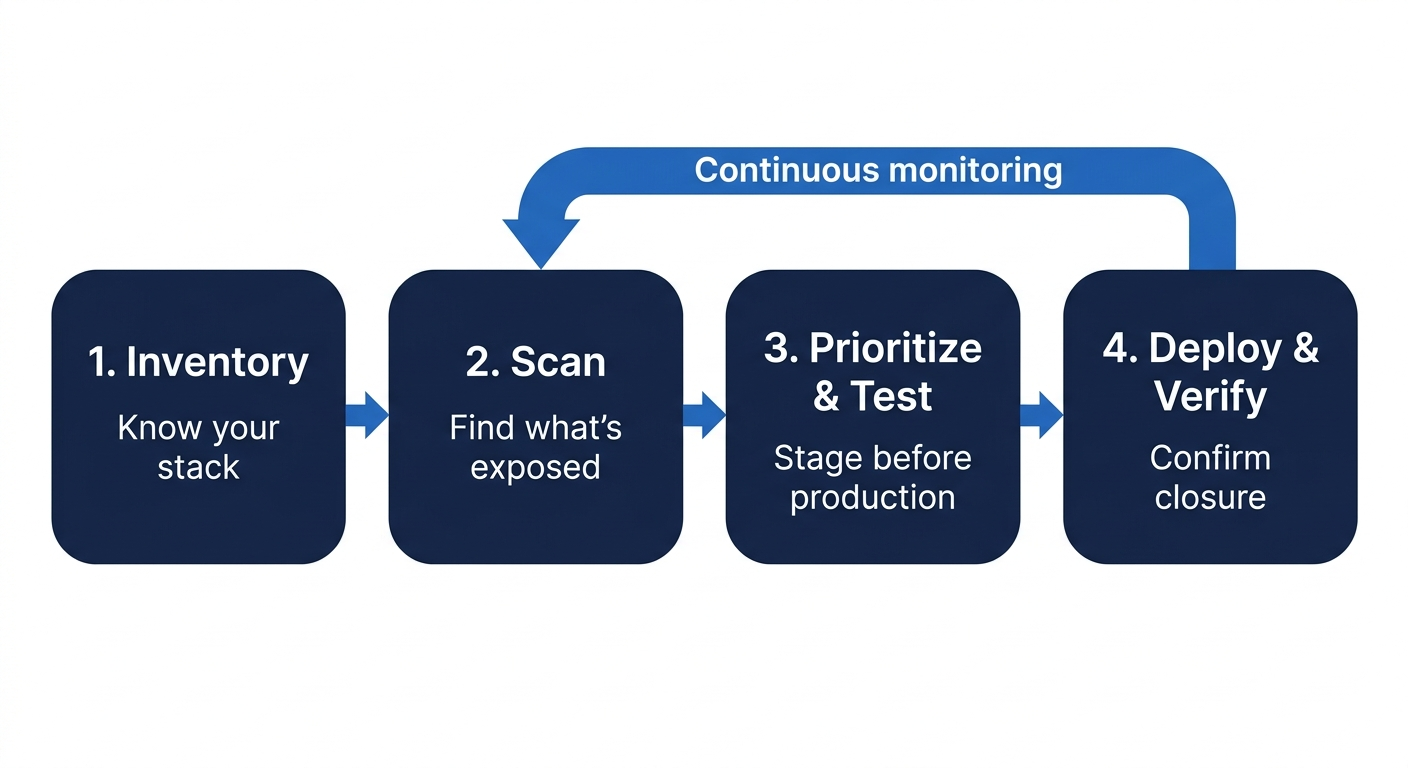
CVE patching isn’t just running dnf update and calling it done. Each step in the process matters, and skipping any of them is where things break in production.
Step 1: Inventory Your Assets and Software Versions
You can’t patch what you don’t know you’re running. Start with a current inventory of your Linux hosts, installed packages, kernel versions, and any third-party components bundled into applications or container images.
This sounds obvious, and security teams still skip it. It’s surprisingly easy to get hit by a vulnerability in a library you didn’t know was deployed – a developer bundles it into a container image, nobody tracks it, and six months later a vulnerability scanner catches it. Your inventory needs to cover:
- Bare metal and VM hosts (by OS and kernel version)
- Container base images and their package layers
- Open-source libraries bundled into applications
- EOL packages that won’t receive upstream patches
Without this baseline, scanner results will always be incomplete.
Step 2: Scan for Affected CVEs
With an inventory in place, run vulnerability scans to match your installed package versions against known vulnerability data. The output is a list of CVEs affecting your stack, usually with CVSS scores and version details.
A few things to watch for: scanners generate false positives, and they don’t always account for distro-specific backporting. A scanner might flag a CVE on RHEL when Red Hat has already backported the fix to an older package version without bumping the version number.
Step 3: Prioritize, Test, and Stage Patches
Not every CVE gets patched today. Rank by exploitability in the wild, CVSS score, and asset exposure – then test in staging before production. This is non-negotiable for kernel patches. A bad kernel update that breaks a production host at 2 A.M. is worse than a deferred patch on a non-public-facing service.
TuxCare’s KernelCare applies Linux kernel patches live – no reboot required – so critical kernel CVE fixes don’t have to wait for a maintenance window. Government agencies have used this to meet strict patch timelines without service interruptions.
For user-space patches, batch by risk tier: critical first, high next, medium after. Document everything – package version before and after, test results, and any exceptions with written justification.
Step 4: Deploy, Verify, and Monitor
Applying the patch isn’t the finish line. After deployment, verify the CVE is actually closed – re-scan, confirm services are behaving normally, and check for unexpected regressions. Then set up monitoring for new CVEs against the same component. A fix for CVE-A doesn’t protect you from CVE-B disclosed the following week.
Track mean time to patch (MTTP) as an operational metric. If your MTTP on critical CVEs is 45 days, that’s a concrete number to work against. If you don’t measure it, you won’t know if you’re improving.
How to Prioritize CVE Patching in 2026
With hundreds of CVEs potentially affecting your environment, treating them all equally is a fast path to alert fatigue – and nothing actually getting patched. These are the criteria that should drive your queue.
1. Active Exploitation in the Wild
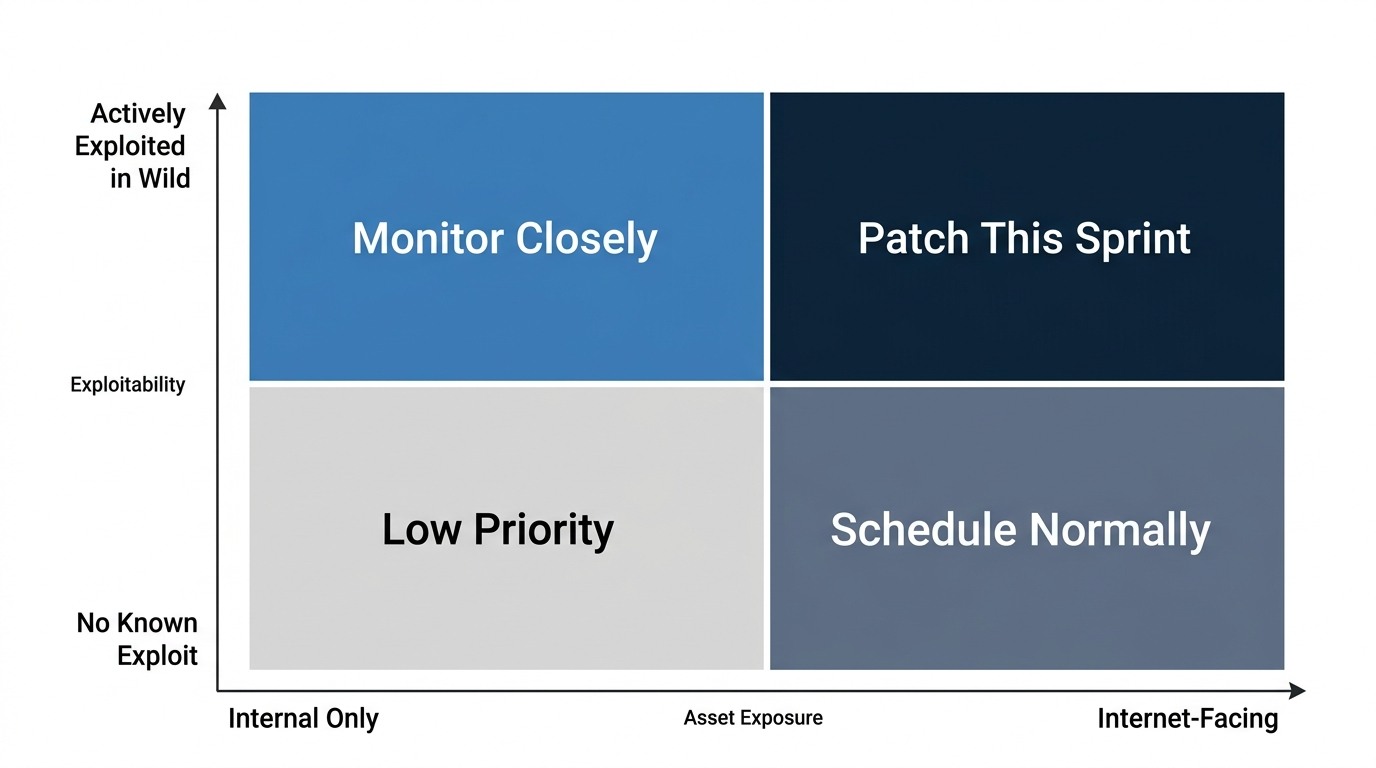
A CVE with a public exploit actively being used by threat actors is categorically more urgent than one sitting in a database with no known exploit code. CISA’s Known Exploited Vulnerabilities (KEV) catalog is the most reliable public signal for this. If a CVE affecting your environment is on that list, it goes to the top of your queue. Full stop.
CVSS was designed to measure severity, not real-world exploitability. A CVSS 7.5 that’s actively being used against Linux SSH configurations is a higher priority than a CVSS 9.1 in a component you don’t expose externally. KEV status is the forcing function that overrides the score.
2. Asset Exposure and Blast Radius
Two systems can run the same vulnerable package, but they’re not the same risk. If one is internet-facing and the other is an internal batch job on an isolated network segment, prioritize accordingly. Map CVEs to asset exposure: Is the affected service reachable from the internet? Does the affected host have access to sensitive data or privileged credentials?
Blast radius matters too. A vulnerability on a shared Kubernetes node host can affect every pod running on it. A vulnerability on a single-tenant application server is contained. Think about lateral movement potential, not just the initial exploit path.
Rule of thumb: CVE on an internet-facing host → patch this sprint. CVE on an internal-only host with no sensitive data access → it can move behind higher-priority items, but don’t let it fall off the queue entirely.
3. CVSS Score – In Context
CVSS scores are a useful baseline for initial triage. Critical (9.0+) and high (7.0–8.9) severity CVEs should get attention first. But always layer in context before locking in priorities. The key question is whether the vulnerability’s attack vector actually exists in your environment. A network-based exploit requires network access. A local privilege escalation requires an attacker who already has a foothold.
A CVSS 9.8 remote code execution in a library you statically link but never expose over the network may be lower operational priority than a CVSS 6.5 authentication bypass sitting in your public API gateway.
4. Compliance Deadlines
If you operate under a compliance framework, patch timelines are hard constraints, not guidelines. Missing the window creates audit findings – and builds up the kind of documented exposure that’s hard to explain after an incident.
Build your patch queue to front-load compliance-deadline CVEs alongside KEV entries. If a CVE is both on the KEV list and subject to a 30-day compliance deadline, it gets patched this week. If your team consistently can’t meet those timelines, that’s the process problem to fix before your next audit cycle.
How to Identify CVEs That Need Patching
Finding which CVEs actually apply to your environment takes more than running a single tool. Here’s what a complete identification approach looks like.
Use Vulnerability Scanners
Scanners like Nessus and OpenSCAP compare your installed software versions against CVE databases and flag matches. They’re fast, reasonably accurate for first-pass identification, and integrate into most CI/CD pipelines. The limitation: false positives are common, particularly around distro-backported patches where the installed version hasn’t changed but the fix has been applied.
Always verify scanner findings against your distro’s official security errata before treating a CVE as unpatched. RHEL, Ubuntu, Debian, and AlmaLinux all maintain their own advisories that reflect backported fixes the scanner may not account for.
Check Distro Security Advisories
Your Linux distribution’s official security advisories are the authoritative source for whether a specific package version in your specific distro is actually vulnerable. Red Hat Security Advisories (RHSA), Ubuntu Security Notices (USN), and Debian Security Advisories (DSA) account for backports that scanner databases often miss.
Pro Tip: TuxCare’s CVE tracker lists CVEs affecting end-of-life Linux distributions that TuxCare provides extended support for, along with patch availability status. If you’re running EOL systems, this is the advisory feed that matters – and you can subscribe to email updates to get notified when new patches land, without manually checking.
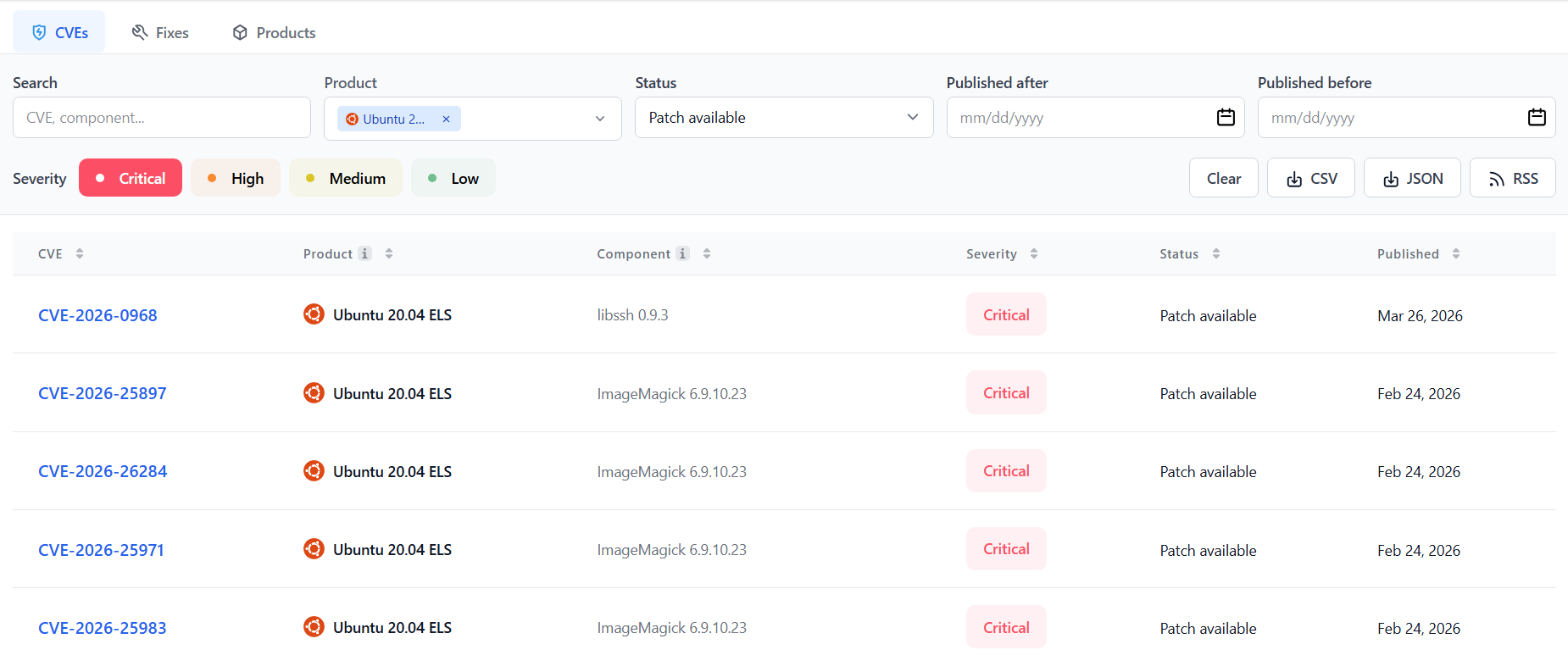
TuxCare CVE Tracker showing filtered view of Critical CVEs with patch availability status for Ubuntu 20.04 EOL
Watch CISA KEV and Threat Intelligence Feeds
The CISA KEV catalog and NIST NVD give you cross-platform CVE data with CVSS scores and exploitation status.
The combination of distro advisories + KEV status + a scanner covers roughly 90% of your accurate CVE picture. The remaining 10% – custom software, unsupported packages, third-party components – requires manual review.
Continuous Monitoring vs. Point-in-Time Scans
A scan you run monthly tells you where you were, not where you are. New CVEs are disclosed daily, and some are weaponized within 24-48 hours of public disclosure. Running scans at least weekly for internet-facing systems – and setting up alerts for new KEV entries – gets your detection window much closer to real-time.
Weekly scanning is a floor, not a ceiling. For high-exposure environments, daily scans plus KEV alert subscriptions is the baseline. The window between disclosure and active exploitation has been narrowing steadily, and your detection cadence needs to reflect that.
Common CVE Patching Challenges
Patching sounds straightforward on paper. Here’s where security teams actually get stuck.
Testing Time vs. Exploitation Window
Every production patch needs testing. But thorough testing takes time – and attackers don’t wait for QA cycles. A realistic patch-to-production timeline for a kernel update in a complex environment can stretch to a week or more, even when the team is actively prioritizing it. Meanwhile, that CVE may have a working public exploit by day two.
There’s no perfect answer to this tension. The practical response: compress testing cycles for critical CVEs by maintaining pre-built test environments, keep rollback capability ready, and use live patching for kernel CVEs so deployment isn’t blocked while testing runs. Virtual patching can also serve as a temporary barrier at the network or WAF layer while a full patch goes through the queue.
EOL Software With No Upstream Patches
When a Linux distribution or package set reaches end of life, upstream patches stop. You’re left with three options: backport fixes yourself (expensive, slow, and easy to get wrong), implement an extended support service, or accept ongoing unpatched CVE exposure.
Teams still running CentOS 7 workloads in 2026 aren’t unusual – and those teams have either migrated, are sitting on unpatched kernel CVEs right now, or have found extended support. TuxCare’s Endless Lifecycle Support (ELS) exists exactly for the third scenario: keeping CVE patches flowing for EOL distributions without forcing an emergency migration. Neither option 1 nor Option 3 are free of cost, but weigh that fact against breach costs.
Patch-Induced Breakage
Patches break things. A library update that closes a CVE can introduce an API incompatibility with a dependent application. A kernel patch can interact badly with a custom driver. A legacy application with years of untouched code is genuinely risky to patch aggressively – not because patching is wrong, but because the application itself is fragile.
Code integrity monitoring helps catch unexpected changes post-patch. Canary deployments and automated regression testing reduce the blast radius of a bad update. But some environments are too brittle to patch safely without refactoring work that predates any individual CVE – and acknowledging that honestly is the first step toward fixing it.
Scale and Coordination Overhead
At scale, CVE patching is a coordination problem as much as a technical one. Who owns the patch decision for a shared library used across five different teams? Who approves a kernel patch that requires change control sign-off? How do you track patch status across 600 Linux hosts without losing CVEs in a spreadsheet that nobody checks?
Without centralized patch management and clear ownership, patches fall through the cracks – not because teams don’t care, but because the process doesn’t have enough structure to handle the volume. This is the category of problem that tooling alone doesn’t solve. It requires deliberate process design alongside it.
CVE Patching Best Practices in 2026
These are the operational habits that separate teams with controlled patch debt from teams who find out about exposure during incident response.
1. Automate Patch Deployment Where You Can
Manual patching at scale is slow, inconsistent, and error-prone. Automated patch management for user-space packages and non-critical system libraries cuts overhead dramatically and improves consistency across your fleet. Automation doesn’t mean fire-and-forget – testing and verification still happen – but it eliminates the manual toil of tracking, downloading, and applying patches host by host.
For kernel patches, live patching automation removes the reboot requirement entirely. OCLC applied this approach and reduced CVE exposure by 90% while eliminating patching-related outages. The biggest win wasn’t speed – it was removing the operational friction that had been causing patches to be deferred in the first place.
2. Centralize Visibility Across Your Fleet
You need a single view of patch status across your entire Linux environment – which hosts are patched, which aren’t, which have documented exceptions. Without centralized patch management, you’re relying on someone remembering to check a spreadsheet that’s already three weeks out of date.
Cloud environments add complexity: autoscaling groups, ephemeral instances, and containerized workloads all require patching strategies that differ from static VM management. Your visibility layer needs to cover all of it.
3. Track Patching Compliance as a Hard Metric
Document everything. Which CVEs were patched, when, by whom, what the before/after versions were, and which patches are in exception status with written justification. This is the evidence required by PCI DSS and similar frameworks – not bureaucracy for its own sake.
If you don’t know your current patch compliance rate for critical CVEs, establish that number first. Set a target – 95% of critical CVEs patched within 30 days – and measure against it monthly. You can’t improve a metric you’re not tracking.
4. Cover the Full Stack, Not Just the Kernel
OS-level patching is necessary but not sufficient. The CVEs that get exploited are often in shared libraries – glibc, OpenSSL – language runtimes, and application dependencies. These run in user-space processes that don’t require reboots to patch, but they absolutely need a patching strategy of their own.
TuxCare’s LibCare live-patches shared user-space libraries – including glibc and OpenSSL – without requiring process restarts. That closes the gap between kernel-level patching and the broader software stack that most patching programs quietly leave unaddressed.
If you’re patching the kernel but ignoring shared libraries, you’re closing one door and leaving another wide open.
Patch CVEs in Real Time Without Reboots With TuxCare
The core issue with CVE patching on Linux isn’t the patching itself – it’s the operational friction that causes teams to delay it. Reboots require maintenance windows. Maintenance windows require coordination. Coordination takes time. And in that time, exposure accumulates.
TuxCare removes that friction. KernelCare applies kernel patches live, without reboots. LibCare patches glibc and OpenSSL without restarting processes.
Check pricing to see what it looks like for your environment, or reach out directly if you want to talk through your specific setup.