
 Tech Support
 Documentation
 Login
 Contact Us



Go straight to an AI summary of this blog post instead 


Key Takeaways
- NIST SP 800-40 Revision 4 treats patching as preventive maintenance, a standard cost of doing business.
- On always-on Linux fleets, reboot windows can stall patches long after the fix is ready.
- CISA’s BOD 26-04 swapped flat KEV deadlines for tiers based on exposure, KEV status, automation, and impact.
- End-of-life systems still need patches, and extended support covers them until you migrate on your schedule.
The patch has been ready for two weeks. Everyone agrees it needs to go out. But the change board doesn’t meet again until Thursday, the only approved maintenance window is the third Saturday, and the cluster that actually needs the fix is the one that can’t go down.
This article walks through the patching lifecycle NIST lays out for enterprise patch management, standard vs. emergency patching, where the traditional approach breaks down, and which tools actually shorten mean time to patch (MTTP).
What Is Enterprise Patch Management
Enterprise patch management is the process of identifying, prioritizing, acquiring, installing, and verifying patches, updates, and upgrades across everything an organization runs. That definition comes from NIST SP 800-40 Revision 4, which frames patching as preventive maintenance and a standard cost of doing business rather than a security chore you get to when things slow down.
The word “enterprise” is doing real work there. Patching one laptop is a task. Patching 8,000 mixed Linux and Windows systems across four data centers, three clouds, and a factory floor is a planning problem, and that’s why NIST’s guide focuses on planning instead of tools. Its full title literally starts with “Guide to Enterprise Patch Management Planning.”
It also helps to separate patch management from a few practices people tend to lump in with it:
| Practice | Question it answers | Output |
| Patch management | Is the fix installed and still installed? | Deployed, verified patches |
| Vulnerability management | What is exposed, how badly, and what do we do about it? | Risk decisions, remediation queue |
| Configuration management | Is the system in its approved state? | Enforced baselines, drift alerts |
| Endpoint management | What is on the device and who controls it? | Inventory, policy, software delivery |
Three more words get used interchangeably, and it’s worth keeping them straight. A patch fixes something in software that’s already installed, an update moves it to a newer release, and an upgrade is usually a bigger jump to a new version. The difference matters when you’re deciding whether a fix needs a quick test, a maintenance window, or a full migration plan.
Key Stages of the Enterprise Patch Management Lifecycle
NIST breaks the patching lifecycle into three broad phases: know about the vulnerability, plan how to respond, then execute that response by preparing, deploying, verifying, and monitoring the fix. For a working patch team, that usually shakes out into five practical stages.
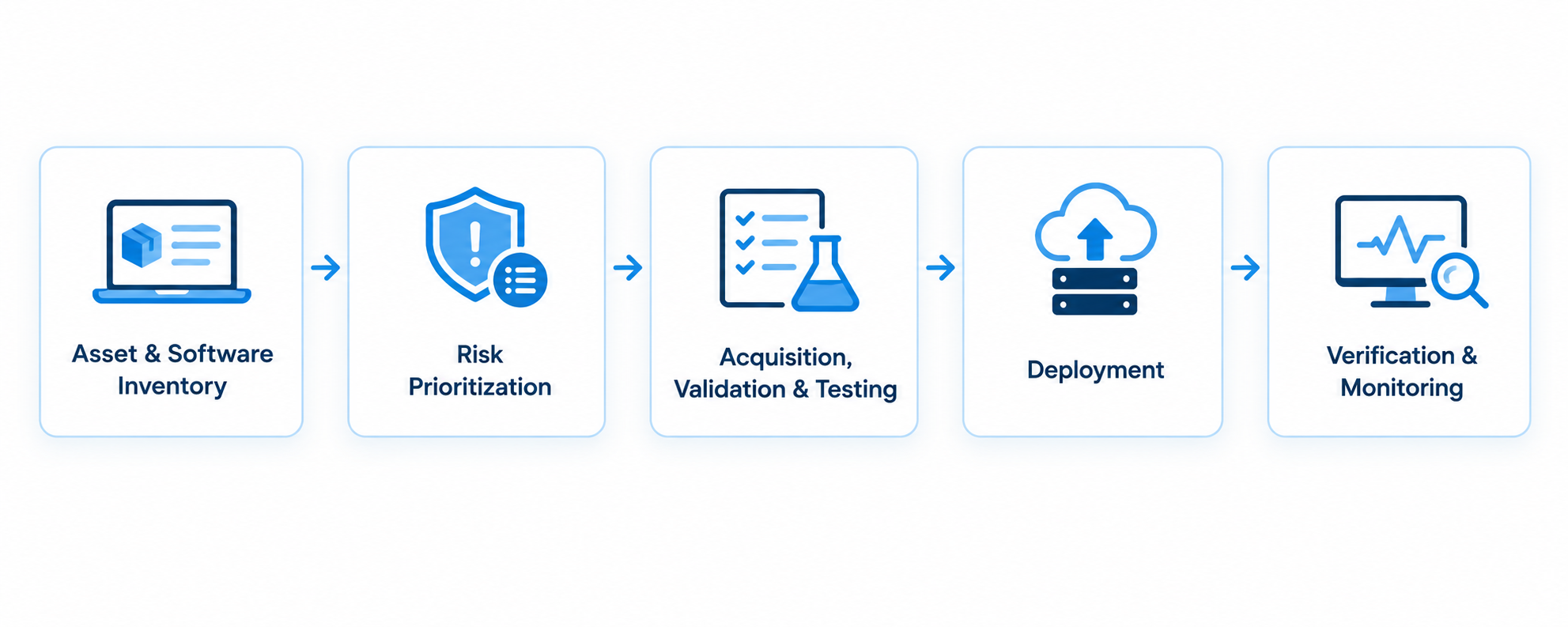
1. Asset and Software Inventory
You can’t patch what you haven’t found. NIST calls for inventories that go all the way down to the packages and libraries each asset runs, well beyond a list of hostnames. It also says the old habit of refreshing inventories monthly or quarterly with a vulnerability scan should be retired, and containers and autoscaling groups show why. They change far too quickly for a periodic snapshot, so discovery has to be automated and close to continuous.
2. Risk Prioritization
A CVSS score alone doesn’t tell you what to fix first. A 9.8 sitting on a system nothing can reach matters less than a lower score that’s actively being exploited on something exposed to the internet. CISA’s Known Exploited Vulnerabilities catalog is one of the most useful free signals for vulnerabilities known to be exploited in the wild, since CISA only adds a CVE once it has evidence of active exploitation. Check it before you sort a queue by severity alone.
3. Acquisition, Validation, and Testing
NIST’s prep work boils down to getting the patch, confirming it’s genuine and untampered, testing it, and scheduling it. Validation is the step that’s easiest to wave through. A patch pulled from a compromised mirror or tampered with in transit can look perfectly legitimate, so signature and checksum checks should run automatically before anything gets installed.
Watch Out: Putting off routine patching makes emergency patching harder later. NIST points out that new patches often depend on older ones being installed first, so a system that’s three cycles behind may have to catch up before an urgent fix will even apply.
4. Deployment
Roll it out to a small group first, then wider rings, then everyone. NIST suggests keeping that canary step even in emergencies, just compressed to somewhere between a few minutes and a few hours. This is often where things slow down. Kernel fixes traditionally need a reboot, updated shared libraries need the processes using them restarted, and either one means a ticket, a scheduled window, and someone coordinating it.
5. Verification and Monitoring
Verifying means checking that the patch actually installed and took effect. Monitoring means checking it’s still there next month, since rebuilding from a stale image or rolling back to an old snapshot can quietly bring the vulnerability back. These are two different jobs, and between them they produce a lot of the evidence an auditor will ask for.
Standard vs. Emergency Patching Procedures
NIST and CISA both work from the same basic idea: not every vulnerability needs the same urgency. NIST’s guide lays out four risk response scenarios (routine patching, emergency patching, emergency mitigation, and unpatchable assets) and asks for every asset to be assigned to a maintenance group with its own plan for each.
Standard Patching
Routine patching runs on a set schedule for each type of asset, with testing, approval, and a fixed window built in. NIST’s advice is to group assets by what they actually need, such as how much downtime they can tolerate, which security controls already protect them, and how bad a compromise would be. The cadences below are examples, not a standard. NIST leaves the actual schedule entirely up to the organization, and yours should follow exposure, vendor guidance, and how much risk you’re willing to carry.
| Asset class | Example cadence | Outage tolerance | Testing depth |
| Internet-facing web and app servers | Every 7–14 days | Rolling, near-zero downtime | Automated smoke and regression |
| Internal application servers | Monthly | Scheduled window | Regression on shared components |
| Databases and stateful clusters | Monthly to quarterly | Strict window, failover required | Full regression |
| End-user laptops | Weekly to monthly | Tolerant | Pilot ring only |
| OT and embedded devices | Vendor-gated, often annual | Very limited | Vendor certification |
| EOL systems under extended support | Vendor patch release cadence | Varies | Vendor-tested backports |
Routine patching tends to fail quietly on the assets that never fit neatly into a window. Kernel updates on systems that run around the clock get pushed back cycle after cycle until skipping them becomes the unofficial policy. Rebootless kernel patching sidesteps that problem instead of negotiating around it, which is why it’s such a common fit for Red Hat Enterprise Linux and other always-on fleets.
Emergency Patching
Emergency patching isn’t a different process. NIST’s guidance is to use the same general approach as routine patching on a much more aggressive schedule, canary group included.
The triggers for going into emergency mode should be written into policy ahead of time. Common ones are a vulnerability landing on CISA’s KEV list, confirmed exploitation in the wild, an internet-facing system with an exploit that can be automated, or an active incident. Kernel bugs, Apache issues, and OpenSSL flaws are classic examples of what ends up on this track.
What changed in 2026: Under BOD 22-01, federal civilian agencies had a default of two weeks to fix anything on the KEV list, or six months if the CVE ID was assigned before 2021. That changed on June 10, 2026, when CISA replaced it with BOD 26-04. Instead of one flat deadline, the new directive weighs four things: whether the asset is publicly exposed, whether the CVE is on the KEV list, whether an attacker could automate the exploit, and how much control a successful exploit gives the attacker, which CISA calls technical impact. The riskiest combinations get three days, and the highest-risk KEV combinations also require forensic triage to check whether the system has already been compromised. Other combinations land at 14 or 60 days, and cases that meet none of the criteria can wait for the next scheduled upgrade. The full directive lays out all 16 combinations.
If there’s no patch available yet, NIST has a separate plan for that too: emergency mitigation, which buys time until a real fix ships.
On always-on systems, reboot approval is one place emergency patching can stall even after the fix has been found and tested. A kernel bug on a clustered database can mean draining traffic off the affected nodes, failing over, restarting, and confirming everything’s healthy again. That sequence often needs sign-off beyond what the normal emergency change process covers. Pre-approving emergency reboot windows for each group of systems helps. Where it’s supported, rebootless patching takes the reboot out of the equation entirely for kernel and library fixes.
Why Traditional Patch Management Falls Short for Enterprises
Traditional patch management assumed you could take a system offline whenever you needed to. Enterprise environments don’t work that way, and three problems keep showing up because of it.
1. The Maintenance Window Never Has Enough Room
Picture a regional insurer running 1,200 RHEL servers with exactly one four-hour window a month to work with. Kernel updates, database patches, firmware, and new application releases all compete for those same four hours, and whatever doesn’t make the cut waits another 30 days. Plug in your own numbers and the question is the same: what gets bumped this month?
The 2026 Verizon DBIR found that the median time to fully resolve critical vulnerabilities rose to 43 days, up from 32 the year before. Verizon counts a vulnerability as critical when it’s on CISA’s KEV list, and only 26% of those were fully remediated, down from 38%. Volume explains some of that, since the median organization had 50% more of them to patch than the year before. Capacity is the other half. In a lot of cases the patch already exists, and the hard part is finding room to test, deploy, and verify it.
2. Some Software Simply Stops Getting Patches
Once a distribution or runtime reaches end of life, the vendor’s security fixes stop, even though new CVEs keep turning up. NIST puts it bluntly: a patch may never be released because the software is at end of life. Anyone still running CentOS 7 knows exactly what that looks like, and so does anyone on RHEL 7 without an extended support contract. The scanner keeps flagging the same CVEs every month, and the fix column just stays empty.
The usual options are migrating off the old version or paying for extended support that keeps patches coming through your normal package manager while you plan the migration on your own timeline.
3. Teams Are Prioritizing With Incomplete Information
Plenty of teams still sort their queue by the CVSS score in a scanner report – and that number has no idea whether something’s actually being exploited, whether the software’s already end of life, or even whether the vulnerable code is still loaded in memory. Sort by it alone and you end up with a queue of thousands of items ranked by a number that doesn’t reflect real risk.
Mandiant’s 2026 M-Trends report found that exploits were the most common initial infection vector for the sixth year running, behind 32% of intrusions. Mandiant also estimated the mean time to exploit at negative seven days, which means exploitation is routinely happening before a patch even ships. A queue built on richer context, like exploitation status, exposure, and what’s really running, turns into something you can act on.
These three problems feed each other. A bad prioritization queue means the wrong things get worked on first. The tiny maintenance window only has room for a fraction of even that flawed queue. And findings on end-of-life systems just sit there month after month, because there’s nothing from the vendor to patch them with. The backlog grows, and because new patches often depend on earlier ones, next month’s window costs more than this month’s did. It’s easy to see how even a well-staffed team ends up with remediation times measured in weeks.
Modern Enterprise Patch Management Best Practices
Most of what follows is about changing how you sequence the work you’re already doing, and each change targets one of the bottlenecks above. The first one usually means adding tooling, since patching a running system without a reboot isn’t something a process change can do on its own.
1. Get the Reboot Off the Critical Path
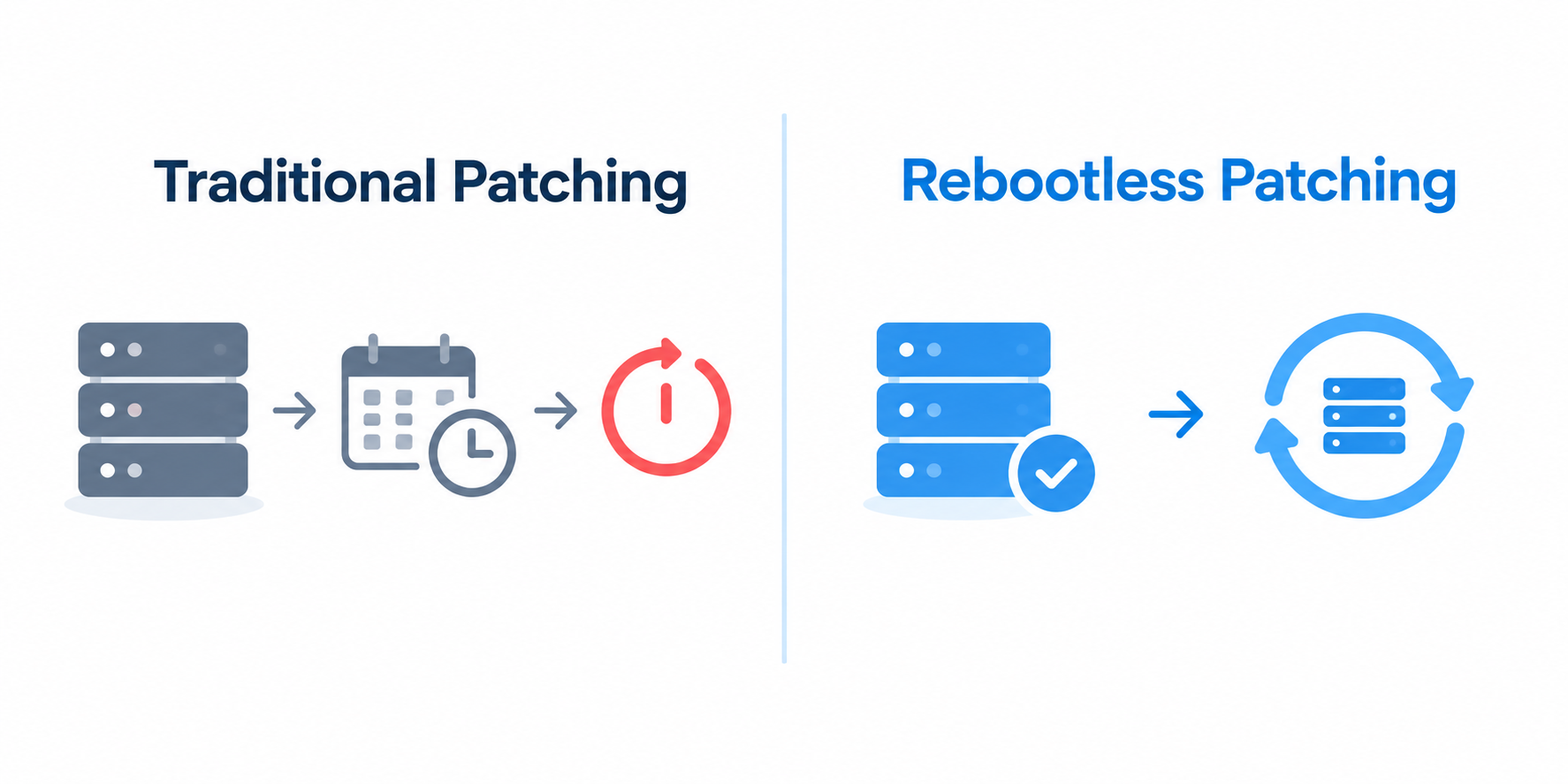
For kernel and library fixes, one of the biggest things you can do for patching speed is break the link between applying the fix and scheduling downtime for it. Rebootless patching (also called live patching) applies the corrected code straight to the running kernel, or to the affected library code in memory, so the fix can go live in minutes instead of waiting for the next Saturday maintenance window.
TuxCare’s KernelCare does this for kernel CVEs across more than 70 Linux distribution versions, and LibCare does the same for glibc and OpenSSL without restarting the services that depend on them. If your estate runs more than one distribution, that breadth matters. The vendors’ own live patching services are generally tied to their own distribution, so a mixed fleet can end up juggling a separate tool for each.
In practice: OCLC runs around ten thousand systems, mostly RHEL with a handful of CentOS machines. After switching to rebootless patching, OCLC reported going from 73 patching-related outages a year down to zero, cutting the hours spent on CVE patching by 72%, and shrinking its exposure window from 115 days to 12.
Before scheduling any reboot, it’s worth checking whether one is actually needed. On RHEL-family systems, this reports whether installed updates, like a new kernel or glibc, mean a full reboot is required:
needs-restarting -r
Debian and Ubuntu signal the same thing with a /run/reboot-required file. One catch: neither check accounts for live patches, so a host that KernelCare has already patched can still get flagged for a reboot. Once you know what really needs a restart, the rest of the workflow is where automation pays off.
2. Automate the Whole Lifecycle
A lot of teams automate the part where the patch actually gets pushed out and leave inventory, validation, and verification as manual steps. That means the one automated piece of the process is often working off stale information from the parts that aren’t. Discovery, signature validation, canary rollout, and checking that the patch actually took effect belong in the same pipeline.
3. Patch Cloud and On-Prem Under the Same Policy
Running two different patching policies for cloud and on-prem tends to produce two different sets of evidence, and that makes audits harder than they need to be. Autoscaling groups are a common blind spot here. An instance spun up from a two-month-old image can be missing two months of security fixes the moment it boots, so you need both a patched base image and ongoing runtime patching to close that gap. The fix is defining maintenance groups that span both environments and holding them to the same prioritization rules, verification requirements, and reporting.
TuxCare’s Enterprise Patch Management Solutions
Everything in the bottlenecks and best practices above points to the same conclusion: the biggest wins come from removing constraints, not scheduling around them. TuxCare’s product line is built around that idea, and each piece covers a different gap from the sections above.
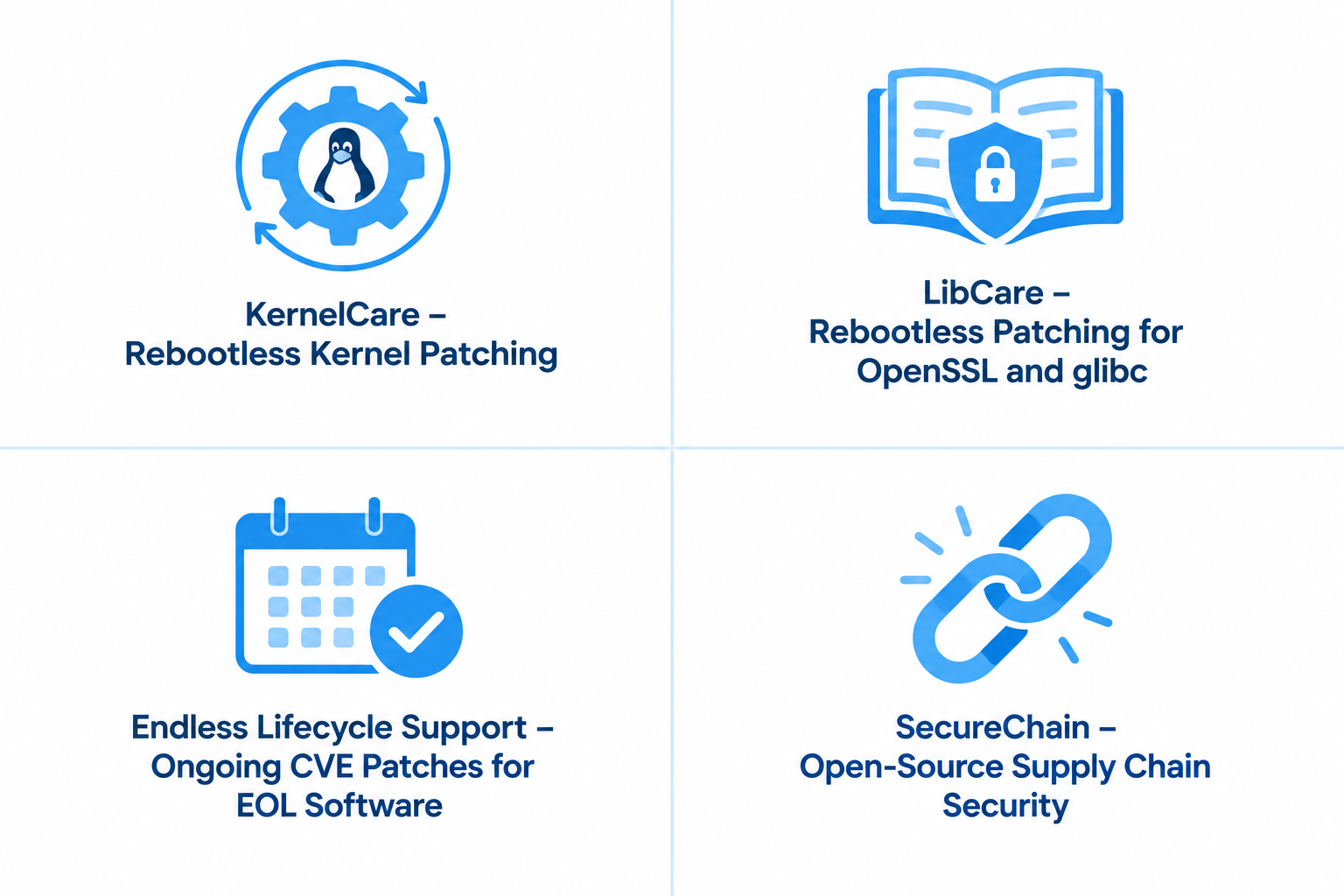
KernelCare handles the deployment bottleneck directly. It automates the deployment of kernel security patches to running systems without a reboot, covering more than 70 distribution versions across RHEL, CentOS, Ubuntu, Debian, Oracle Linux, Amazon Linux, CloudLinux, and others under one agent. That matters most for 24/7 workloads and clustered databases, anywhere getting reboot approval takes longer than applying the patch itself. It’s not built for Windows machines or third-party Windows software, so most mixed estates pair it with a separate tool for that side of the fleet.
LibCare extends the same idea to shared libraries. It patches glibc and OpenSSL inside running processes without restarting whatever depends on them, closing the same kind of reboot gap for userspace code that KernelCare closes at the kernel level.
Endless Lifecycle Support solves the acquisition bottleneck. Once a distribution or runtime hits end of life, there’s no vendor patch left to acquire. ELS keeps security patches coming for end-of-life versions of open source across the entire stack, including Linux operating systems, language runtimes, libraries, and applications, so a team doesn’t have to choose between an unpatched system and a rushed migration.
SecureChain works further upstream, on the open source dependencies a codebase pulls in rather than the OS underneath it. It swaps public registries for a curated repository where packages are rebuilt from source, screened for malware, and patched under SLA as new CVEs emerge, across JavaScript, Python, Java, Go, Rust, and PHP. That’s supply-chain risk OS-level patching never touches.
Put together, these four products close the gaps this article walked through. TuxCare has fixed more than 14,000 vulnerabilities in open source software to date.
Start With the Schedule
A lot of what makes patching hard at scale is operational rather than technical. The fix is ready. The maintenance window isn’t. Once you take the reboot off the critical path, keep EOL systems patched instead of exposed, and prioritize by what’s actually being exploited, the rest of this becomes a lot more manageable.
TuxCare builds each of its tools around removing a specific piece of that scheduling problem, rather than asking you to patch faster with the same workflow you already have.
If you’re still figuring out where your own program has the biggest gap, our guide to Linux patch management is a good place to start. If you already know and just want a quote scoped to your environment, see our pricing page.
FAQs
NIST SP 800-40 Revision 4 is the guide to build around. It covers scope, the four risk response scenarios, and how to group assets into maintenance plans. Pair it with CISA’s KEV catalog and BOD 26-04 for deciding what to prioritize, and NIST SP 1800-31 for implementation guidance.
Vulnerability management is the bigger picture: finding what’s exposed and figuring out what to do about it. Patch management is one specific way of acting on that, applying a fix and confirming it actually took.
It depends on the combination of risk factors, not the KEV listing alone. CISA’s BOD 26-04 looks at exposure, KEV status, whether an attacker can automate the exploit, and how much control it hands over. The highest-risk combinations get three days, others get 14 or 60, and findings that meet none of the criteria can wait for a scheduled upgrade. The directive only applies to federal civilian agencies, though CISA has long urged private companies to prioritize KEV entries as well.
Options include migrating to a supported release, replacing the software, or bringing in a third-party extended support provider. TuxCare, for example, keeps shipping security fixes for end-of-life distributions, runtimes, libraries, and applications through your normal package manager, so the system stays patched, and you have audit evidence to show while you plan the actual migration.
For supported kernels and shared libraries, usually yes. Rebootless patching applies the fix directly to a running system, so supported kernel updates and patches for libraries like glibc or OpenSSL go live without a reboot. Other application, service, and firmware updates may still need a process, a service, or the whole system restarted.
It produces the evidence assessors usually ask for: what’s in your environment, what’s patched and what isn’t, how long fixes are taking, and a record of anything you’ve deliberately deferred. The program NIST SP 800-40r4 describes maps well onto Cybersecurity Framework categories and SP 800-53 controls (NIST SP 1800-31 maps its example solution to both), so that evidence speaks to what auditors are already checking.