Tech Support
 Documentation
 Login
 Contact Us


Go straight to an AI summary of this blog post instead 


Key Takeaways
- Exploiting unpatched vulnerabilities is now the most common way breaches begin, but patching itself introduces risk through downtime, failed updates, and rollback gaps that most teams underestimate.
- Many breaches involving a known vulnerability happen after a fix was already available. The failure is operational, not technical.
- Generic severity scores (CVSS base scores, used without threat or environmental context) are a poor prioritization guide; exploitability and asset exposure matter more for deciding what to fix first.
- rebootless patching removes one of the largest sources of patch delay – the reboot or service restart – so supported fixes can land in hours instead of waiting for the next maintenance window.
Most teams know they should patch faster. What actually slows them down isn’t laziness. It’s the fear that the patch will break something at 2 a.m. on a box nobody fully understands anymore. So the update sits in a queue. That hesitation sits at the core of patch management risk, and it’s the question most teams are trying to answer: how do you close known vulnerabilities without the patch itself becoming the incident?
Patch management risk runs in two directions. There’s the danger of leaving systems unpatched, and there’s the danger that the patching process introduces: failed updates, downtime, rollback gaps. This article breaks down both types, traces what causes them, shows what happens when they’re ignored, and walks through the practical steps and tooling that cut risk on each front.
Understanding Traditional Patch Management Risks
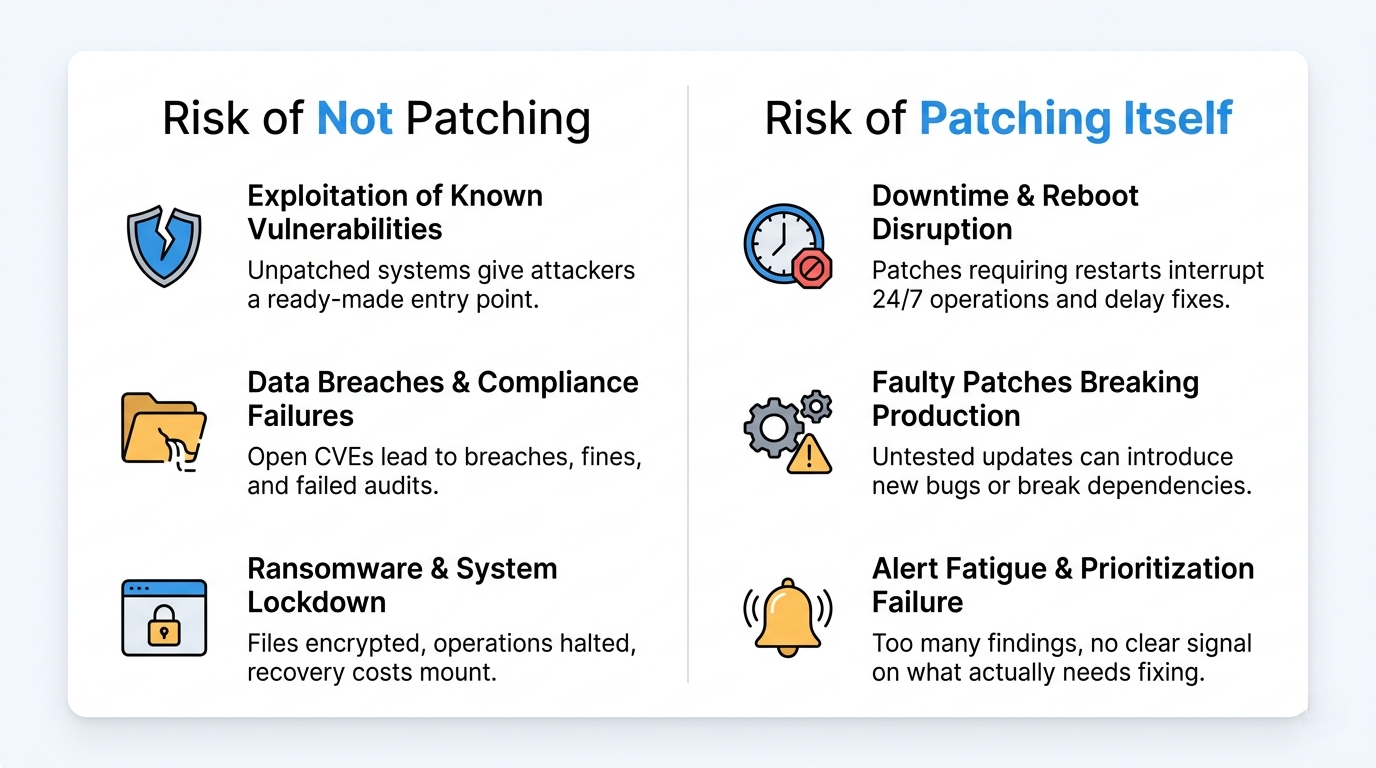
Traditional patch management follows a familiar cycle: scan for missing updates, schedule a window, test if there’s time, deploy, reboot, confirm. It works on paper. In production it leaks risk at every step.
The model assumes you can take systems offline during scheduled maintenance windows. Real infrastructure rarely cooperates. Maintenance windows shrink, 24/7 workloads can’t reboot, and the test environment never quite matches prod. The result is a backlog of “we’ll get to it” patches, which is exactly the condition attackers exploit.
Three structural weaknesses are baked into the conventional approach:
- It’s reboot-dependent. Traditional kernel updates generally require a reboot before the new code runs, and core-library updates require affected services to restart. Either way: downtime, which means delay.
- It’s calendar-driven, not threat-driven. Patch Tuesday and monthly windows don’t care that a CVE came under active exploitation on a Thursday.
- It treats coverage as the goal. Hitting 98% patched looks good on a dashboard while the remaining 2% carries a disproportionate share of the exposure.
Reality Check: A 98% patch compliance rate is not a security metric. It’s a coverage metric. The systems that make up that remaining 2% are rarely random. They’re the legacy boxes, the can’t-reboot servers, the unsupported runtimes – exactly the systems that become attractive targets once they are exposed and known to be vulnerable.
Risks of Not Patching (or Patching Too Slowly)
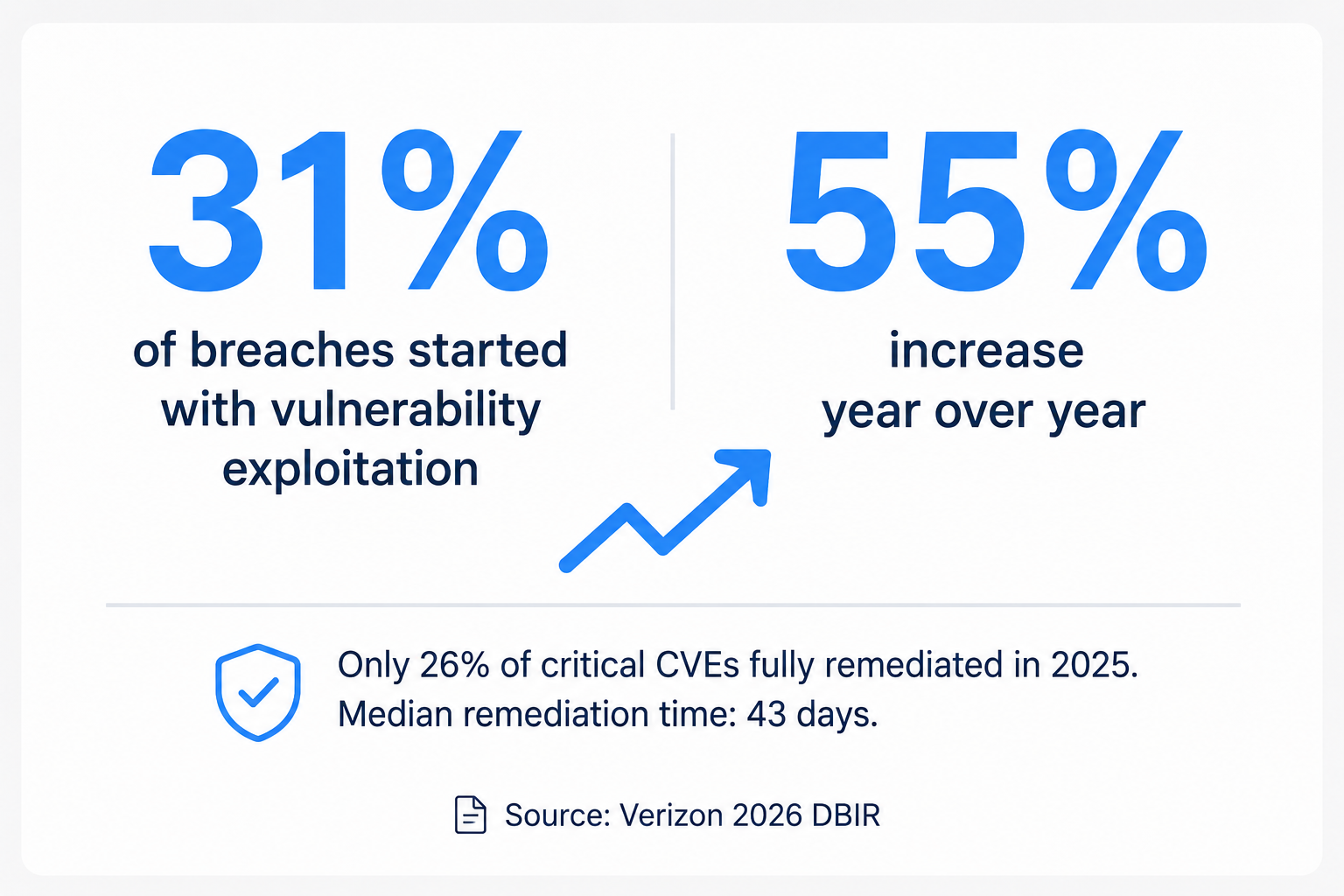
Delayed or absent patching isn’t an IT housekeeping problem. It leaves open what has become the most common route into an organization. The 2026 Verizon DBIR found that exploitation of vulnerabilities is now the most common initial access vector for breaches, accounting for 31% of cases – up from 20% the year before, a 55% year-over-year increase, and the first time in the report’s 19-year history that exploitation has ranked first, ahead of credential abuse and phishing.
The same report found that only 26% of CISA KEV-listed vulnerabilities were fully remediated in 2025, down from 38% the year before, while the median time to full resolution rose from 32 days to 43. Remediation is losing ground to exploitation.
These risks don’t sit in isolation. An unpatched CVE leads to a breach, the breach triggers compliance exposure, and the compliance fallout often ends up costing more than the downtime the team was trying to avoid in the first place.
Exploitation of Known Vulnerabilities
The most direct risk is the simplest: a CVE is public, a patch exists, and you haven’t applied it. Attackers don’t need a zero-day when a known flaw is sitting open. In a 2019 Ponemon Institute survey conducted for ServiceNow, 60% of breach victims said their breach traced to a vulnerability for which a patch was available but not deployed. That survey is dated, but the DBIR remediation figures above suggest the underlying behavior has not changed much since.
For high-profile, readily weaponized vulnerabilities, the window between disclosure and active exploitation has all but closed: exploit code can appear within hours of the advisory. By the time a monthly maintenance window comes around, the vulnerability may have been weaponized for weeks. The CISA Known Exploited Vulnerabilities Catalog exists precisely because attackers concentrate on a predictable set of unpatched, actively exploited flaws.
This is hardest in the kernel and core libraries, where traditional remediation requires a reboot or a restart of affected services – which is exactly why teams defer those patches. TuxCare’s KernelCare applies kernel CVE fixes to supported Linux kernels without taking the host down, which removes the reboot-driven delay that keeps these patches waiting in the queue.
Compliance Failures and Financial Penalties
Security and compliance frameworks place different obligations on vulnerability management. PCI DSS is the most prescriptive: Requirement 6.3.3 calls for critical and high-severity security patches to be installed within one month of release, with other applicable patches on a timeframe the organization defines and can justify. HIPAA and SOC 2 don’t set a universal patch deadline; they require organizations to demonstrate reasonable, risk-based controls and then actually follow the process they documented. In practice, a critical CVE left open past your own stated timeframe is what produces the audit finding.
The cost isn’t only the fine. A failed audit can mean lost contracts, suspended payment processing, and engineering time spent remediating under deadline pressure. IBM’s 2026 Cost of a Data Breach Report puts the global average breach cost at a record $4.99 million, up 12% year over year, and those costs run well past technical cleanup into detection and escalation, notification, legal and regulatory response, and lost business.
Watch Out: Some package-based scanners report a CVE as “remediated” the moment the updated package is installed, before the affected service restarts. In traditional patching workflows, a running process can keep executing the vulnerable code until it is restarted, reloaded, or rebootless patched. The dashboard says green; the memory may say otherwise. Supported live-patching technologies address this by applying fixes to the running kernel, or to vulnerable library code in active processes.
Operational and Reputational Damage
A breach through an unpatched system rarely stays contained to one server. Ransomware spreads laterally, exfiltration runs for days before detection, and recovery consumes the same team that was already too busy to patch.
Then there’s the part no spreadsheet captures: trust. Customers, partners, and regulators all read the same disclosure. “We knew about the vulnerability but hadn’t patched it yet” is among the most damaging sentences a company can be forced to publish.
Risks Within the Patch Management Process Itself
The flip side gets far less attention: the act of patching introduces risk that traditional approaches handle badly. Organizations obsess over patch coverage metrics and miss the process-level failures underneath them.
This is the more nuanced view of patch management risk. Not “did we patch?” but “what did patching cost us, and what did it quietly break?” The risks below are why experienced teams hesitate – and that hesitation loops straight back into the unpatched-system risks above.
Faulty or Untested Patches Breaking Production
A patch is software, and software can introduce regressions. A vendor update can ship a new bug, change a default, or conflict with a dependency you didn’t know you relied on. The damage from a bad patch can rival the vulnerability it was meant to fix.
This is why teams test in staging – except staging rarely mirrors production exactly, and the difference is where surprises live. A patch that’s clean on a fresh test box can fail on a server with three years of accumulated config drift.
From the Trenches: Consider a routine library update pushed straight to prod on a Friday because it “looked minor.” It changes a TLS default, breaks certificate validation against a partner API, and takes down checkout for six hours. The CVE it fixed carried a CVSS base score of 5.3. The outage did immediate, measurable damage; the unexploited flaw did none.
Downtime, Reboots, and Maintenance Windows
Many kernel, core-library, and system-service updates traditionally require a system reboot, or a restart of the affected services, before the new code takes effect. For a 24/7 workload, that restart is the risk. Every reboot is a chance for a service not to come back, a mount to fail, or a config to load wrong.
The scheduling problem makes it worse. Global teams have no shared off-hours, and maintenance windows keep shrinking. So patches get batched, batches get delayed, and the delay reopens the unpatched-system risk. Userspace library patching hits the same wall: updating glibc or OpenSSL conventionally requires restarting affected services linked against them.
This is the gap rebootless patching is built for. Applying fixes to a running kernel or shared library without a restart removes the downtime risk and the delay it causes in one move. TuxCare’s LibCare extends that model to supported shared libraries, including OpenSSL and glibc.
Alert Fatigue and Prioritization Failure
Vulnerability scanners are relentless. A mid-size environment can surface thousands of findings a month, and only a small fraction of them are ever exploited anywhere. When everything is flagged critical, nothing is.
Security teams tune out. They either chase low-risk findings while a genuinely exploitable CVE waits, or they lose the one alert that mattered in the noise. The fix is prioritizing by real-world exploitability rather than raw CVSS scores, which is where exploit-prediction data comes in.
What Happens When Risks Aren’t Addressed?
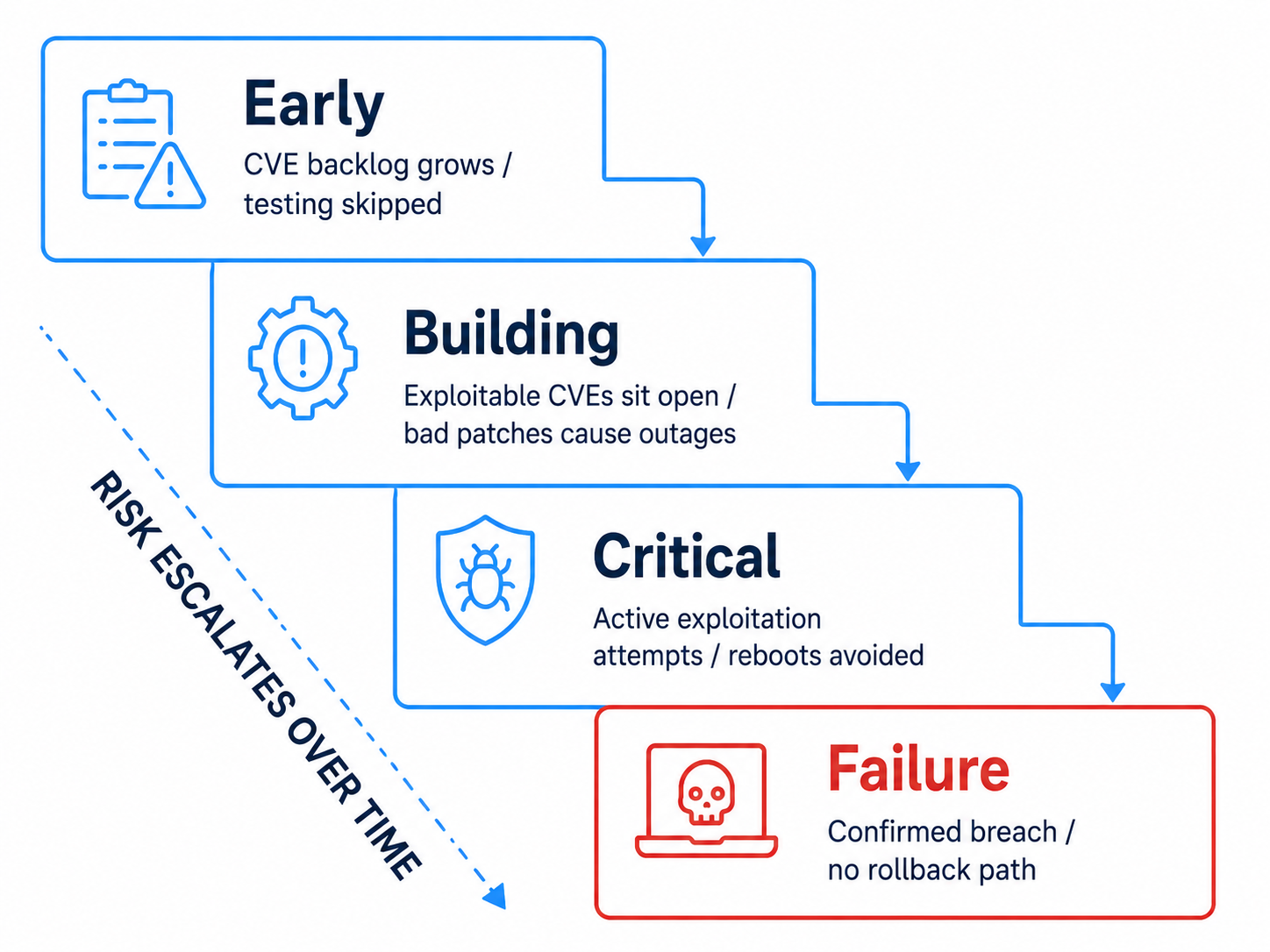
Ignore both sides of patch management risk long enough, and the failure modes stack. The unpatched-system risks and the process risks aren’t separate problems – they feed each other into a slow-building crisis.
Here’s how the two sides escalate when nothing changes:
| Stage | Not-patching side | Process side |
| Early | Backlog of deferred CVEs grows | Teams skip testing to save time |
| Building | Exploitable CVEs sit open for weeks | Bad patches cause occasional outages |
| Critical | Active exploitation, breach attempts | Reboots avoided, fixes stop landing |
| Failure | Confirmed breach, compliance exposure | Production instability, no rollback path |
The endgame is a team that’s both insecure and afraid to patch – patching less because patches keep breaking things, and breaking things more often because the systems carrying that backlog drift further from a known-good state.
How to Reduce Patch Management Risks
Effective patch management means addressing both sides at once: the patching gap and the process-level failures. Fix one and ignore the other, and you’ve just moved the risk around.
It should operate as a system, not a checklist. The steps below build on each other. Test discipline feeds prioritization, prioritization feeds deployment, and removing the reboot requirement makes the whole loop run faster.
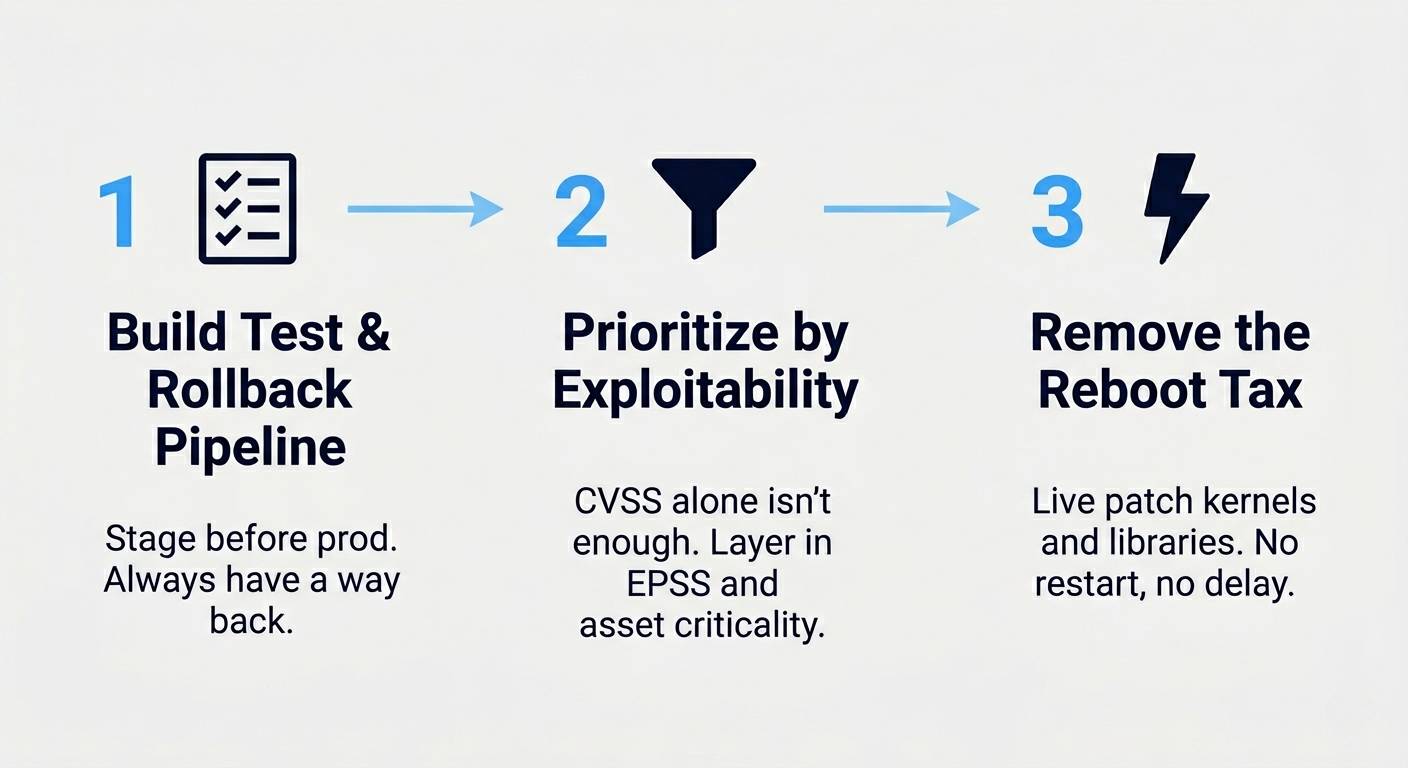
Step 1: Build a Real Test and Rollback Pipeline
Before a patch touches production, it needs a path through a representative environment and a tested, reliable way back. Two things that measurably reduce risk:
- A staging environment that mirrors prod: same OS versions, same major config, same key dependencies. Snapshot-based test systems help here by making repeated tests reproducible.
- An automated rollback: package pinning, filesystem snapshots, or container image versioning, so reverting is one command rather than a forensic exercise.
If a patch passes staging and you have a clean rollback, deploy with confidence. If you can’t roll back cleanly, that isn’t automatically a reason to wait – for an actively exploited CVE, waiting is often the riskier choice. Add compensating controls, deploy to a canary group first, and document the decision before you proceed. A patch you can’t reverse is a bet on a vendor’s QA, and it should be a deliberate one.
Step 2: Prioritize by Exploitability, Not Volume
Stop treating every CVSS 9.8 as equal. A high-severity flaw with no public exploit and no network exposure is lower urgency than a medium-severity one under active attack. Layer three signals to cut the noise:
- Exploit status: is it in the CISA KEV Catalog, or does it carry a high or rapidly rising EPSS score?
- Exposure: is the affected service internet-facing or internal-only?
- Asset criticality: does the box hold regulated data or run revenue-critical paths?
Prioritize the vulnerabilities with the strongest combination of all three. You will still defer some patches – the difference is that you’re choosing which ones, and you can defend the choice.
Step 3: Remove the Reboot Requirement with rebootless patching
For uptime-sensitive systems, the downtime cost of reboots and service restarts is one of the biggest causes of patching delay. Remove that constraint and a meaningful part of the backlog clears on its own. rebootless patching applies supported kernel and library fixes to running systems without a restart, so an available rebootless patch can be deployed in hours instead of waiting for the next maintenance window.
How AI Can Help in Patch Management
AI is useful in patch management for one reason: the discipline is drowning in data, and correlating and classifying large volumes of it at speed is what these systems do well. It doesn’t replace judgment. It reduces the volume of decisions a human has to make.
AI and Risk Identification
AI-assisted tooling correlates CVE feeds, asset inventories, and configuration data faster than any manual review. Instead of a human cross-referencing a new advisory against an asset list, the system flags which of your specific hosts are affected. Given sufficiently complete dependency and runtime data, it can also help surface indirect exposure: a vulnerable library buried several levels deep in a dependency tree, or a service that’s technically patched but still running the old code in memory.
Think of it as an automated early-warning layer that correlates patch releases, vulnerability databases, and threat feeds simultaneously – not because any human couldn’t, but because no human has the bandwidth to do it at that volume without missing something.
AI-Powered Risk Prioritization
This is where AI earns its place. Models trained on exploit data can estimate which CVEs are most likely to be weaponized, scoring findings by probable real-world risk rather than raw severity. That directly attacks the alert-fatigue problem.
Did You Know: EPSS – the Exploit Prediction Scoring System, maintained by FIRST – estimates the probability that exploitation activity involving a published CVE will be observed in the next 30 days. Research by the Cyentia Institute and FIRST found that only around 6% of published CVEs have ever been observed being exploited in the wild, while thousands receive CVSS base scores in the critical range every year. Severity alone routinely points teams at the wrong fixes first.
More advanced platforms can combine exploit prediction with organizational context that a generic severity rating ignores – system configuration, exposure, whether compensating controls already reduce risk, and the business impact of the affected system – provided that data is available and correctly integrated. The result is a prioritized list that reflects your environment rather than a vendor’s generic advisory.
Reporting
AI also cuts the reporting overhead. Auto-generated compliance summaries, patch-status rollups, and audit-ready evidence reduce the manual work that usually falls to whoever’s least busy. The output still needs a human check, but the first draft takes far less effort to produce.
A detailed record of patch management efforts and results gives teams the context to handle recurring issues, and it’s what leadership needs to justify the security budget. AI can produce that record more consistently than a person writing it at 11 p.m. – though the output still has to be validated for omissions and errors of its own.
How to Use AI in Patch Management
Start narrow. AI in patch management works best as a filter and assistant, not an autonomous patching robot turned loose on production. The teams that get value from it apply it to the parts of the workflow that are high-volume and governed by clear, repeatable rules.
A sensible adoption path involves using it for triage first. Let it rank and cluster findings, then have a human approve the priority list. In addition, it requires automating lower-risk, well-tested patch classes with proven rollback, as well as routine userspace updates – not production kernels on day one. Keep a human in the loop for anything irreversible. Production kernels, database engines, anything without a clean revert.
Before you choose a tool, you also need the right groundwork in place. An AI system needs comprehensive information about your environment to make accurate recommendations: a complete asset inventory, current system configurations, documented dependencies, and defined maintenance windows. Feed it a partial picture and you get confident-sounding recommendations built on a partial picture.
Reality Check: “AI-powered” on a patch tool’s marketing page often means a CVE prioritization model and nothing more. That’s useful, but it isn’t autonomy. Ask the vendor exactly which decisions the model makes versus which ones it surfaces to a human – that boundary is where marketing tends to outpace product.
Best Tools for Managing Patch Management Risks
The tooling splits into two camps: point solutions that do one thing (scan, or deploy, or live-patch) and platforms that integrate the workflow end to end. Integration depth matters more than feature count. A scanner that doesn’t connect to your deployment path just generates more alerts to ignore.
The comparison below uses four criteria: primary environment fit, whether the tool can apply fixes without a reboot or service restart, OS coverage, and licensing model. Capabilities and pricing change, so verify against each vendor’s current documentation before you commit.
| Tool | Best for | rebootless patching | Model |
| TuxCare | Linux fleets, EOL systems, 24/7 uptime | Yes (kernel + libraries) | Per-host subscription |
| Automox | Mixed-OS fleets, cloud-first teams | No | Per-endpoint SaaS |
| ManageEngine Patch Manager Plus | Broad third-party app coverage, on-prem or cloud | No | Tiered license |
TuxCare
TuxCare’s differentiator in this comparison is patching without downtime. KernelCare live-patches supported Linux kernels on running hosts, LibCare live-patches supported shared libraries such as glibc and OpenSSL without restarting the services linked against them, and Endless Lifecycle Support keeps EOL distros and end-of-life runtimes receiving CVE fixes after the original vendor stops shipping security updates for those versions. TuxCare publishes coverage across a wide range of enterprise Linux distributions, including RHEL, CentOS, AlmaLinux, Rocky Linux, CloudLinux, Debian, Ubuntu, Amazon Linux, and Oracle Linux – 70+ distro versions in total.
That combination targets both sides of patch management risk. For supported fixes, the reboot or service-restart requirement that drives delay is removed, and the unsupported-systems gap – the can’t-reboot, can’t-upgrade boxes that traditional patching abandons – stays covered. It suits teams running Linux at scale, organizations with workloads governed by uptime SLAs, and environments that must keep systems running past the vendor support window.
Automox
Automox is a cloud-native endpoint platform that handles patching across Windows, macOS, and Linux from a single console, alongside a catalog of several hundred third-party applications. Its advantage is reach: agent-based, cross-platform, and built for distributed fleets without on-prem infrastructure.
It is a strong fit for cloud-first teams and smaller organizations that want one dashboard for mixed endpoints. At the time of publication, Automox does not advertise Linux kernel rebootless patching in its product documentation, so reboot-driven downtime still applies to core Linux updates – but for general endpoint hygiene across a mixed estate, it is well regarded.
ManageEngine Patch Manager Plus
ManageEngine Patch Manager Plus supports Windows, macOS, and Linux endpoints plus more than 1,100 third-party applications, and is available as an on-premises install or a cloud service. Its standout strength is the breadth of that application catalog, which is why it shows up most often in Windows-heavy estates carrying a long tail of third-party software.
It leans traditional: scan, schedule, test, deploy, reboot. The process-level risks covered earlier still apply in full. As with any automated deployment platform, weak testing and approval controls can allow a problematic update to reach production on schedule, so pair it with solid test and rollback discipline.
Best Practices for Deployment
Tooling reduces risk. Deployment discipline is what makes it stick. The practices below separate a patch program that lowers risk from one that just generates activity.
- Phase your rollouts. Deploy to a canary group, watch for regressions, then expand. Never push fleet-wide in one shot.
- Patch by exploitability tier, not by calendar. KEV-listed CVEs jump the queue; routine updates ride the normal window.
- Confirm the fix actually took effect. For code already loaded by a running process or kernel, installing the package isn’t enough – the affected component has to be restarted, rebooted, or rebootless patched.
- Keep an audit trail. Log what was patched, when, and by whom – for compliance and for the post-incident review you hope you never run.
- Decouple urgent from routine. Live-patch the can’t-wait CVEs so the rest of the program can stay on a sane cadence.
Pro Tip: On RHEL-family systems, needs-restarting -r (packaged with dnf-utils) indicates whether installed updates suggest a reboot is needed. Treat it as a signal rather than proof of remediation: it reflects updated packages and running processes, not CVE status. Where a kernel CVE is covered by a successfully loaded rebootless patch, no reboot is required for that specific fix, though the command may still flag other updates that need one.
If your fleet is large and uptime matters, lead with rebootless patching and phase the rest. If you’re Windows-heavy and reboot windows comfortably meet your security and availability requirements, standard phased deployment with tested rollback may be all you need.
Secure Your Systems With TuxCare’s Patch Management
Patch management risk isn’t solved by patching harder. It’s solved by removing the reasons teams delay – the reboots, the downtime, the fear of a bad update breaking production – and by keeping coverage on the systems traditional tooling abandons.
That’s the gap TuxCare closes. Live kernel and library patching means available fixes for supported systems can be applied without a restart. Endless Lifecycle Support keeps EOL distros and runtimes patched long after the vendor stops. The result is fewer open vulnerabilities and fewer patch-driven outages – risk reduced on both sides of the process.
Choosing between staying secure and staying online is exactly the tradeoff TuxCare is built to remove. Talk to us about your environment.
FAQs
Exploitation of a known, unpatched vulnerability. Many breaches involving a known flaw occur after a fix has already become available, which makes the failure operational rather than technical. In Verizon’s 2026 DBIR, vulnerability exploitation accounted for 31% of breaches and ranked as the most common initial access vector, making known, unremediated vulnerabilities one of the most predictable attack paths in enterprise environments.
Yes. A faulty or untested patch can break production, change a default, or introduce a new bug. Patches may also require reboots or service restarts that risk services not returning cleanly, and rushed deployments without a rollback path can cause outages worse than the CVE they fixed.
As fast as your process safely allows – ideally within hours to a few days for actively exploited CVEs. PCI DSS Requirement 6.3.3 sets a one-month ceiling for critical and high-severity patches, and exploit code for high-profile flaws often appears within hours of disclosure. Monthly cycles are usually too slow for vulnerabilities that are actively exploited or directly exposed, regardless of their CVSS base score.
They stop receiving vendor security fixes and become a source of persistent exposure. EOL distros and runtimes keep running but accumulate unpatched vulnerabilities unless the organization migrates, backports its own fixes, or obtains extended support. Services like TuxCare’s Endless Lifecycle Support continue supplying patches for these systems without forcing an immediate migration.
It removes the downtime step. rebootless patching applies supported kernel and library fixes to running systems without a reboot, so an available fix can be deployed in hours instead of waiting for a maintenance window. That removes a major source of delay and shortens the time systems stay exposed.