Tech Support
 Documentation
 Login
 Contact Us


Go straight to an AI summary of this blog post instead 


Key Takeaways
- Cybersecurity automation reduces human error and speeds up tasks like patching, threat detection, and compliance monitoring.
- Automation is essential for scaling Linux and enterprise defenses where manual processes can’t keep up with evolving threats.
- TuxCare’s automated vulnerability management solution, KernelCare Enterprise, enables the deployment of kernel patches without reboots.
Cybersecurity professionals need to be aware of new cloud security threats and take action immediately so that they can minimize the risk of future incidents occurring. Much of this can be achieved with the right automation tools, and forward-thinking organizations have already put many of their cybersecurity workflows on autopilot.
This article explains what cybersecurity automation is, how it works, the benefits and challenges it brings, and how to put it into practice.
What Is Cybersecurity Automation?
Cybersecurity automation is the process of continuous monitoring, patching, and remediating through automation of the various systems to maintain the highest state of readiness, security, and availability.
Security teams must spend their valuable working hours manually performing repetitive, low-value, and often tedious tasks.
These duties include threat hunting, incident response, and forensic analysis. With cybersecurity automation tools, they can automate these repetitive tasks so they can spend more of their valuable human resource hours doing higher-value work.
How Does Cybersecurity Automation Work?
Cybersecurity automation works by integrating monitoring, analysis, and action in one continuous cycle.
Instead of manual checks, the automation platform works with various security tools and responds to alerts based on predefined rules or machine learning insight.
A typical automated workflow looks like this:
Detection: Automation continuously scans logs, endpoints, and network traffic for suspicious activity indicative of security threats.
Analysis: Alerts are enriched with threat intelligence to determine severity and reduce false positives.
Response: Depending on the policy, the system might isolate a device, block traffic, or trigger a patch rollout.
Recovery & Reporting: Automated scripts restore systems or generate compliance-ready reports without waiting for manual input.
According to IBM’s 2025 Cost of a Data Breach Report, organizations using Artificial Intelligence (AI) and automation extensively were able to detect and contain breaches significantly faster — while those that didn’t use AI technologies or automation faced higher costs and longer response times. The study also noted that automation adoption continues to rise, with only 28% of organizations reporting no use of these tools, down from 33% the previous year.
Why Cybersecurity Automation Is Important for Organizations
Many cybersecurity vendors aggregate threats by first gathering as many as they can from all attack vectors and their internal systems as well as external sources.
However, they often gather large amounts of raw, unstructured, and often inaccurate threats, then provide little benefit by neglecting to organize these threats into actionable next steps.
The onus then falls on client organizations to decide how to respond to the threats presented to them, which is oftentimes a significant manual undertaking.
With cybersecurity automation, teams can quickly identify and respond to emerging cyber threat activity more efficiently than they would be able to with manual processes.
Moreover, cybersecurity professionals agree manual defenses no longer combat modern cyber threat activity sufficiently. To stay as safe as possible, organizations must incorporate automation into their security strategies.
Hackers also target victims by using automation attacks. In many cases, the hackers impersonate internal SecOps teams with phishing emails encouraging users to disregard any anti-virus update and only accept patches from their URL.
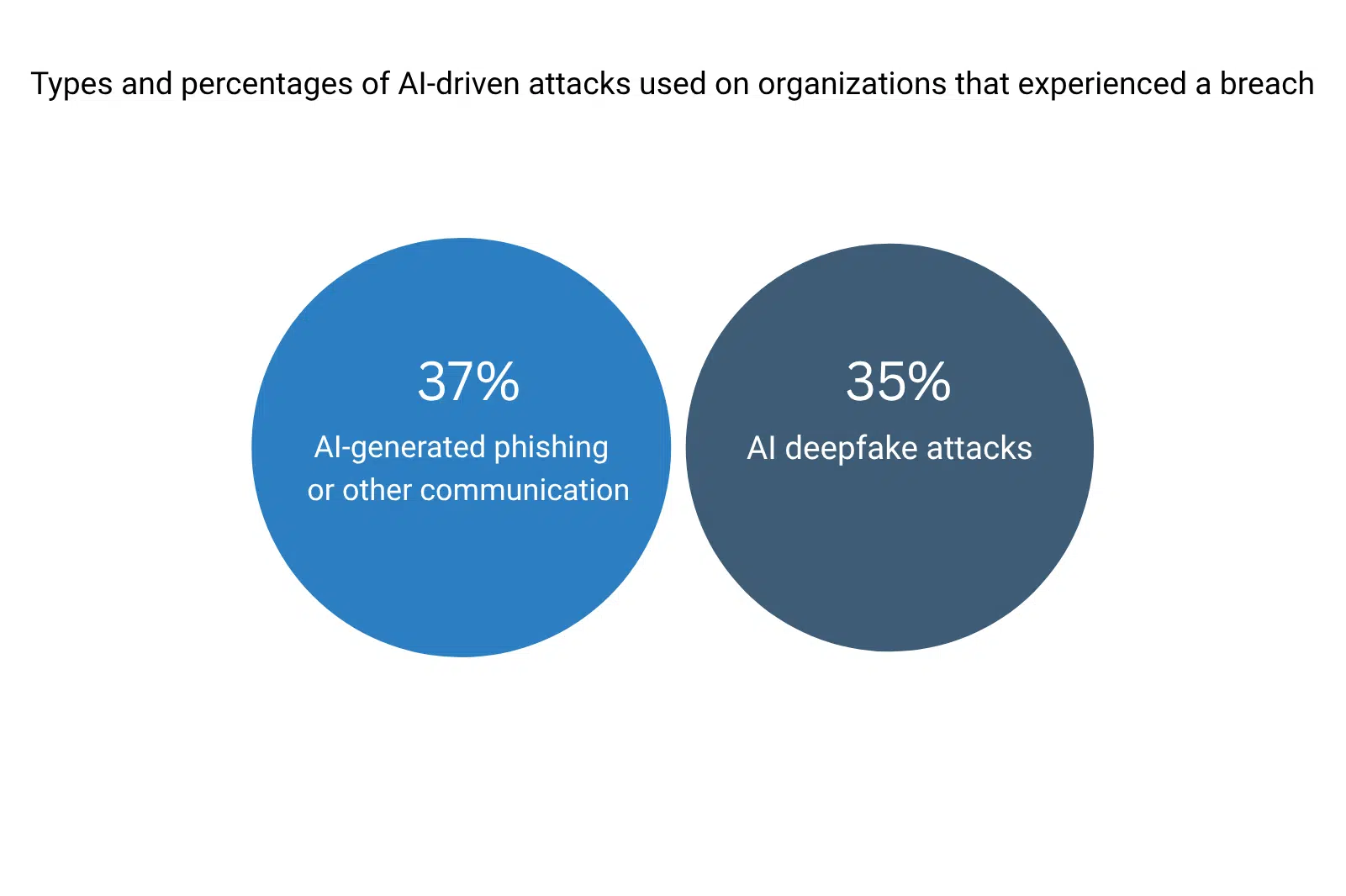
IBM’s 2025 Cost of a Data Breach Report found that 16% of breaches involved attackers using AI — mainly through phishing (37%) and deepfake attacks (35%). As threat actors adopt generative AI to automate and personalize their campaigns, defenders need equally automated tools to match their speed and sophistication.
Key Benefits of Cybersecurity Automation
The value of cybersecurity automation lies not only in efficiency but also in the consistency it brings to defending against complex security challenges. If properly implemented, security automation can aid in preventing successful cyber attacks. Automation tools can speed up the creation of defensive actions without stressing resources, all while staying ahead of the attackers’ plans.
Reduced Human Error
Security fatigue and repetitive work often lead to human errors, which attackers are quick to exploit. Security automation ensures that key tasks — such as vulnerability detection, patch deployment or log analysis — are performed consistently and without oversight gaps. This reduces exposure to avoidable risks and helps maintain a stable security posture, even when security teams are stretched thin.
Pro Tip: In Linux environments, tools like TuxCare’s KernelCare Enterprise automates the deployment of kernel patches in real time without any reboots, thus eliminating downtime — which is the major issue with traditional vulnerability patching. These rebootless patches happen in the background, while systems are running, on all popular Linux distributions.
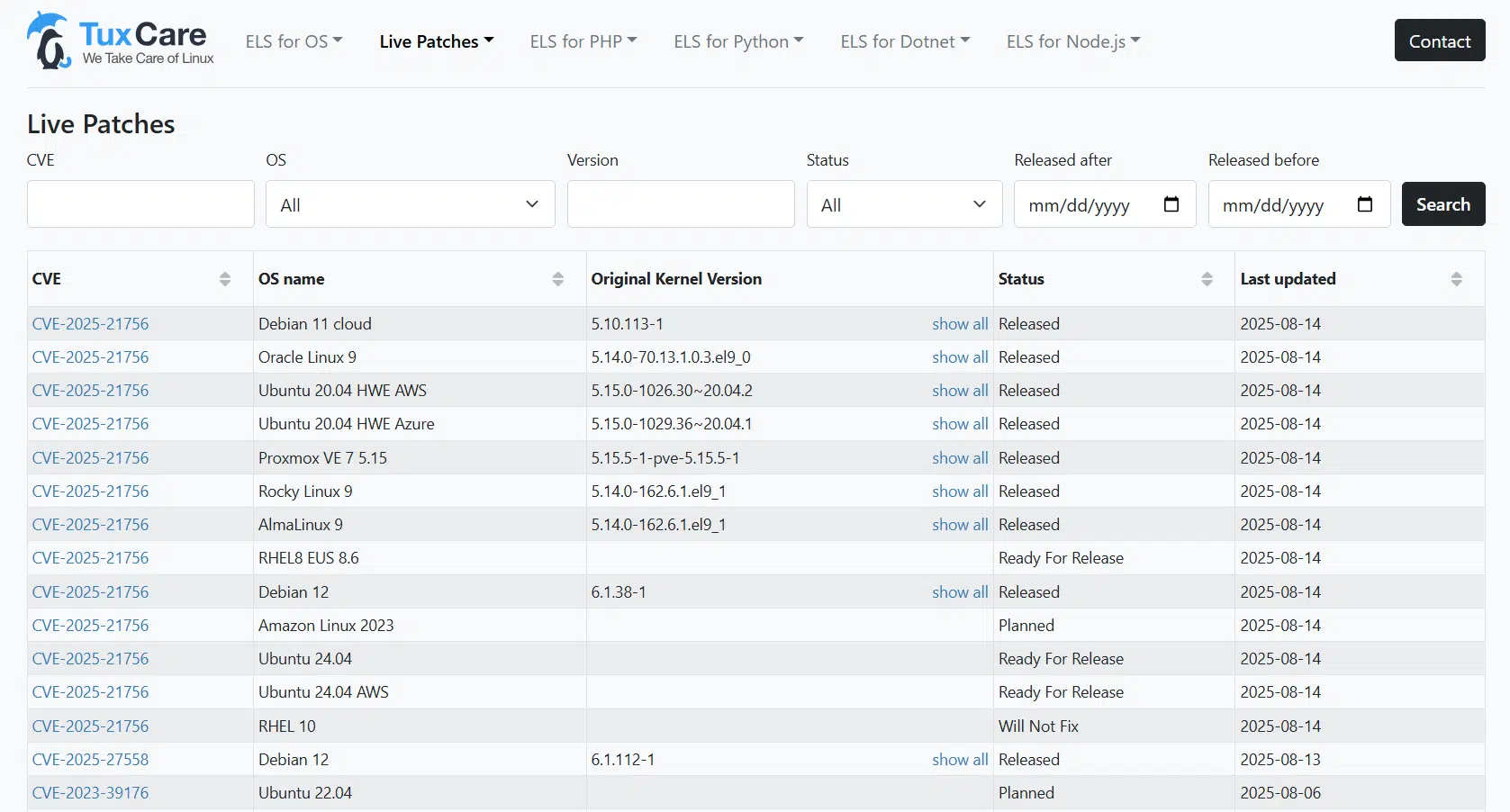
KernelCare CVE tracker showing the latest patched kernel vulnerabilities
Faster Threat Detection and Response
Speed is critical in cybersecurity. With automated tools, you can monitor networks and endpoints on a 24/7 basis and identify suspicious activities immediately. Response workflows, such as isolating an infected device or applying a patch, can be triggered without delay.
Consistent Compliance Monitoring
As any of your team members who deal with compliance management will tell you, meeting compliance requirements can be challenging when reporting relies on manual processes. Compliance automation simplifies this by continuously monitoring systems and generating audit-ready logs. Organizations using automation can reduce 60–80% of manual compliance work, freeing staff for more strategic tasks while minimizing the risk of penalties.
You can also explore the best IT compliance platforms and remediation tools for managing compliance requirements and security gaps.
Scalability of Security Operations
As organizations adopt cloud services, containers, and IoT devices, the attack surface expands exponentially. Security automation enables security processes to scale in parallel — rolling out patches across thousands of servers or applying consistent access policies across hybrid environments — without needing large staff increases.
Better Resource Utilization
With workflow automation handling repetitive security tasks, analysts can focus on higher-value work such as investigating complex incidents or improving threat intelligence. By reducing manual effort, organizations can allocate resources more effectively and strengthen proactive defenses.
Note: Automated detection and response can reduce the number of potential vulnerabilities within an organization’s network infrastructure. However, relying too much on cybersecurity automation or following a poorly-designed automation strategy can be a far greater risk to an organization.
Challenges & Risks of Cybersecurity Automation
With increased efficiency and a “set it and forget it” implementation approach, cybersecurity automation also comes with its own set of new risks to worry about – which organizations should constantly keep their eyes on.
Over-Reliance on Technology
Patching a thousand systems automatically each morning, for example, could cause an internally created cybersecurity attack. If SecOps and DevOps did not perform a QA before releasing the automated patch, they could propagate a self-infected attack on their servers.
Additionally, if security teams assume the system will catch everything, they may ignore blind spots or fail to review automated decisions. Human oversight is still essential to validate outcomes and deal with complex threats that automation cannot solve alone.
False Sense of Security
An automated tool is only as effective as its configuration and the threat intelligence feeds that flow into it. An attacker could slip by completely unnoticed because of an incorrect rule or an outdated detection pattern. For that reason, such systems need regular tuning and constant monitoring. If not done, you can just imagine the sort of false protection mindset an unready organization could develop.
High Upfront Costs and Integration Complexity
Implementing automation requires investments in tools, training of team members, and integration with existing infrastructure. For smaller organizations, the upfront cost and resource requirements can become overwhelming. Poor integration with legacy systems may also create more friction than added value in the short term.
Potential for Automated Errors at Scale
When automation makes a mistake, it can replicate that mistake across thousands of systems instantly. For example, a faulty Linux vulnerability patch applied automatically may lead to downtime or broken applications. This is why careful testing, phased rollouts, and the ability to roll back changes are critical.
Skill Gaps in Managing Automated Systems
Ironically, while security automation reduces the need for manual tasks, it increases the need for skilled professionals who can manage, fine-tune, and audit automated systems. Without the right expertise, organizations may struggle to get the full benefit of their investment.
Cybersecurity Automation Use Cases
Automation isn’t a one-size-fits-all concept — it applies across multiple layers of security operations. From detection to compliance, these are the most common areas where organizations use automation effectively:
|
Use Case |
How Automation Helps |
Example in Practice |
|
Continuously monitors for known vulnerabilities across systems and applications. |
Scanners such as Nessus or OpenVAS run on a schedule and flag newly disclosed CVEs automatically. |
|
|
Applies updates quickly and consistently across all systems, reducing exposure windows. |
TuxCare’s KernelCare Enterprise delivers automated, rebootless patching for Linux distributions. |
|
|
Automates containment steps like isolating compromised endpoints or blocking malicious IPs. |
SOAR platforms trigger predefined workflows during attacks. |
|
|
Log Analysis & Threat Detection |
Filters millions of log entries to identify patterns and anomalies in real time. |
SIEM tools like Splunk streamline log-based threat detection. |
|
Compliance Monitoring |
Ensures ongoing adherence to standards like PCI DSS, HIPAA, or GDPR by enforcing policies. |
Automated reports and alerts flag deviations instantly. |
Pro Tip: Start small with one or two high-impact use cases — like automated patching and vulnerability scanning — before scaling automation across all security workflows. This reduces complexity and builds confidence in the process.
How to Implement Cybersecurity Automation in Your Linux Environment
Linux is the backbone of the modern IT ecosystem — running everything from cloud workloads to critical enterprise applications. Automating security on Linux systems is essential to reduce exposure windows and ease the pressure on IT teams. This step-by-step approach helps organizations build automation without creating new risks:
1. Assess Your Current Security Posture
Start by evaluating how security tasks are currently handled. Which processes are manual, repetitive, or prone to delays? Common gaps in Linux environments include irregular patching cycles, incomplete vulnerability scans, and inconsistent log monitoring. Mapping these weaknesses guides what to automate first.
2. Prioritize High-Impact Areas
Not every security management process needs to be automated at once. Consider applying security automation to those areas that grant the most risk reduction and the most effort. For Linux systems, these are generally vulnerability detection and patch management, since missed updates are a leading cause of breaches.
3. Choose the Right Automation Tools
Select solutions designed to integrate seamlessly with Linux.
4. Integrate with Existing Workflows
Automation works best when it fits into current processes. Connect Linux security automation to your ticketing systems, CI/CD pipelines, and monitoring platforms so that alerts and remediation steps happen without manual intervention.
5. Test and Roll Out Gradually
Introduce automation in phases. Start with non-critical workloads or staging environments, validate results, then expand across production. This phased rollout prevents the risk of widespread disruption if something goes wrong.
6. Maintain Oversight and Continuous Improvement
Automation is not a “set and forget” process. Regularly review configurations, fine-tune detection rules, and monitor audit logs. Human oversight ensures security automation continues to align with both security policies and compliance requirements.
Best Practices for Cybersecurity Automation
Automation delivers the most value when implemented with discipline and oversight. These best practices help organizations maximize security benefits while minimizing risks:
1. Start Small and Scale Gradually
Instead of automating everything at once, begin with high-impact areas such as vulnerability scanning and patching. A phased approach reduces complexity and builds trust in the automation process.
2. Maintain Human Oversight
Automation doesn’t eliminate the need for people. Analysts should review automated decisions, fine-tune configurations, and intervene in edge cases. Human judgment remains critical for complex threats that automation can’t fully handle.
3. Keep Automation Playbooks Updated
Threats evolve quickly, and so should your automation strategies. Regularly review playbooks, detection rules, and patching policies to ensure they reflect the latest attack methods and compliance standards.
4. Test Before Full Deployment
Even with automation, tasks can fail or cause disruption if not rolled out correctly. Therefore, using the staging environment for validation of the automation workflows before applying them to production systems is crucial.
5. Integrate Across Security Tools
Automation is critical in the security orchestration, automation, and response (SOAR) framework. Connect automation with SIEMs, SOAR platforms, and monitoring tools to ensure that alerts, patches, and incident responses are carried out consistently across your environment.
6. Monitor and Audit Automation Regularly
Security automation should be transparent. Keep log events, monitor system performance, and conduct audits to confirm that automated actions are working as intended — especially in compliance-driven industries.
Pro Tip: Consider automation as an ongoing task rather than a set-it-and-forget-it moment. Organizations should continuously refine and adapt automation to match new threats and infrastructure changes.
Automating Linux Patching with TuxCare
With vulnerability patching solutions from TuxCare, leaving your Linux systems exposed for too long is one less automation-related risk you need to worry about. TuxCare’s KernelCare Enterprise enables you to automatically deploy the latest Linux kernel vulnerability patches without reboots, downtime, or manual workflows.
KernelCare protects your Linux systems by rapidly eliminating vulnerabilities without you needing to wait for maintenance windows or downtime. With TuxCare, IT teams can automate taking new patches through staging, testing, and production on all popular Linux distributions, which allows them to apply patches as soon as they become available.
TuxCare also delivers rebootless patches for vulnerabilities in Linux kernels and shared libraries across all popular enterprise distributions.
Have questions? Speak with a TuxCare security expert to learn how to automate Linux patching and maintain continuous security.