Tech Support
 Documentation
 Login
 Contact Us



Go straight to an AI summary of this blog post instead 


Key Takeaways
- The same handful of causes turn up again and again, which means a lot of downtime risk can be anticipated and mitigated.
- Monitoring, redundancy, tested backups and automated patching all reduce how often outages happen and how much they hurt.
- Patching gets deferred more than most teams admit, though tools like KernelCare apply supported kernel fixes without a reboot.
- Pick a realistic uptime target first, then build your process and tooling backward from it.
Every minute your Linux server is down, something downstream breaks. Checkouts fail, alerts stack up and somebody’s pager will not stop going off. The short version of how to prevent server downtime: watch the systems that matter, build in redundancy, patch on a schedule and keep the attack surface small. What follows are the causes that actually recur and the fixes that hold up in production, not the ones that look good on a slide.
Reboots cost real money. They usually get scheduled for off-peak hours, and even then they carry risk. The reboot itself might only take a few minutes, but service startup, cache warming, replication catch-up and health checks can stretch the window well past that. In ITIC’s 2024 Hourly Cost of Downtime Survey, over 90% of mid-size and large enterprises put the cost of a single hour of downtime above $300,000. The encouraging part is that a lot of that exposure is avoidable, and many patch-related reboots can be taken out of the picture entirely.
What is Server Downtime?
Server downtime is any stretch where a server cannot do its job, whether that means serving requests, running workloads or simply being reachable. It comes in two kinds. Planned downtime is the maintenance window you control. Unplanned downtime is the one that wakes you at 2 a.m. The second kind is what most teams worry about, and rightly so.
Planned Downtime
Planned downtime happens when administrators deliberately take systems offline to run maintenance, apply updates, upgrade hardware, migrate workloads or make infrastructure changes. It is usually scheduled for low-traffic periods, but it still lands on users, internal teams and business operations.
Unplanned Downtime
Unplanned downtime is when services go away without warning. Hardware failures, software crashes, security breaches, networking problems, resource exhaustion and operational mistakes are all common starting points. For most organizations this is the harder problem, because it arrives unannounced and usually demands investigation and remediation on the spot.
Note: A server failure does not automatically mean user-visible downtime. If redundancy and failover do their job, requests never notice. Outages show up when a failure has no backup path, when failover is too slow to matter, or when whatever broke affects several components at once. Redundancy is one part of the answer rather than the whole of it, which is worth remembering when you decide where to spend prevention effort.
What Causes Server Downtime?
Despite everything that cloud infrastructure, automation and monitoring have changed, the list of things that take servers down has barely moved. The same technical and operational problems recur across a lot of the outages teams actually see.
| Cause | Common Trigger | Prevention Focus |
| Hardware failure | Disk, PSU or RAM dies | Redundancy, monitoring |
| Misconfiguration and human error | Bad deploy or rule change | Change control, review |
| Unpatched CVEs and attacks | Exploited known vulnerabilities | Patching, hardening |
| OS and software instability | Memory leak, kernel panic | Updates, lifecycle management, extended support |
| Network failure | DNS, routing, expired cert | Redundant paths, cert alerts |
| Resource exhaustion | Traffic spike, full disk, maxed connection pool | Capacity planning, headroom |
Hardware Failure
Disks die, power supplies fail, RAM goes bad, fans give out. Hardware is the most visible cause and the one most teams already plan for. The catch is that a single non-redundant component – one disk or one power feed – can still take the whole box offline by itself.
Misconfiguration and Human Error
A mistyped firewall rule, a bad DNS change, a deploy that skips a health check. Human error sits behind a large share of outages, usually wearing some other costume by the time anyone writes the postmortem. Change control and peer review catch many of these before they reach production, and patch management automation helps for the same reason, because it removes the manual steps where the mistakes get made.
Unpatched Vulnerabilities and Cyberattacks
Unpatched Linux vulnerabilities are an open door. Attackers can start exploiting a known CVE before many organizations have deployed the available fix, and plenty of successful attacks end in downtime, with ransomware and DDoS as the obvious examples.
Staying current on vulnerability patching removes the cheapest entry points on offer. The damage rarely stops at the outage, either, since regulatory exposure, customer loss and reputation hits all outlast the incident itself.
OS and Software Instability
Memory leaks, kernel panics, runaway processes, dependency conflicts. Software rot builds up quietly until a service crashes or the host locks up. End-of-life software makes this harder, because upstream security and bug fixes stop arriving and known issues stay open unless another support path is in place.
Network Failures
DNS outages, routing problems, expired certificates, upstream provider issues. Your server can be in perfect health and still be unreachable. These ones are easy to miss, because the host looks fine on every dashboard you own while users get nothing.
Watch Out: Expired TLS certificates cause more mystery outages than anyone likes to admit. Set cert expiry alerts at 30 days and 7 days out, not the morning it breaks.
Resource Overload
When demand outruns available resources, performance degrades until requests start failing, processes get killed or the service simply stops answering. Cloud infrastructure can be configured to scale dynamically, but somebody still has to make sure capacity matches what the application actually needs. Traffic spikes, retry storms from users hammering a degraded service and a single noisy neighbor on a shared host can all set off a cascade.
What Downtime Costs and What Your SLA Allows
Your uptime target is really a budget for failure. Here is what each tier buys you.
| Uptime SLA | Downtime per year | Downtime per month |
| 99% | 3.65 days | 7.31 hours |
| 99.9% | 8.77 hours | 43.8 minutes |
| 99.99% | 52.6 minutes | 4.38 minutes |
| 99.999% | 5.26 minutes | 26.3 seconds |
Patching carries a downtime bill of its own, and outages are getting more expensive to absorb. Uptime Institute’s 2026 Annual Outage Analysis reports that 57% of operators put their most recent major outage above $100,000, and for the second year running one in five put it above $1 million, even as per-site outage frequency fell for a fifth consecutive year. Fewer outages that each cost more is a bad trade for anyone whose patch process still depends on booking downtime.
How to Schedule Downtime Without Regretting It
Sooner or later you have to schedule downtime, whether for a code deploy, hardware changes, config updates or a server migration. Off-peak hours are the obvious call, but there is more room to tighten things than most teams use.
Start with backups. Make sure they are recent, tested and actually reachable, because finding out mid-rollback that your backup was never validated turns one problem into two. Then check disk headroom and current resource pressure before you begin, since a nearly full filesystem or a box already fighting for memory can turn a routine update into an incident. And test in staging first, even for the small changes. Especially for the small changes, since those are the ones that get waved through.
10 Key Strategies to Prevent Server Downtime
No single fix gets you to high uptime. It is a stack of habits and tooling working together. Everything below holds up under real production load, and it is ordered roughly the way most teams should adopt it.
1. Enable Continuous Monitoring and Early Alerts
You cannot prevent what you cannot see. Continuous monitoring across CPU, memory, disk, network and service-level checks is the foundation the rest of this rests on. The goal is not a wall of dashboards. It is alerts that fire before anyone outside the team notices.
Set thresholds on leading indicators, like a disk trending toward full or memory usage creeping upward, not only on hard failures. If your alerts only go off once something is already down, they are reporting history.
If you are drowning in noise, tighten the thresholds and route by severity. And once you are past a few hundred servers, audit the estate periodically to confirm nothing has quietly fallen out of monitoring, because one unmonitored host is one blind spot that will eventually find you.
Pro Tip: Alert on rate of change, not just absolute values. A disk sitting steadily at 70% may be less urgent than one that jumped from 40% to 70% in an hour, and rate of change catches trouble a static threshold misses.
2. Automate Server Patching
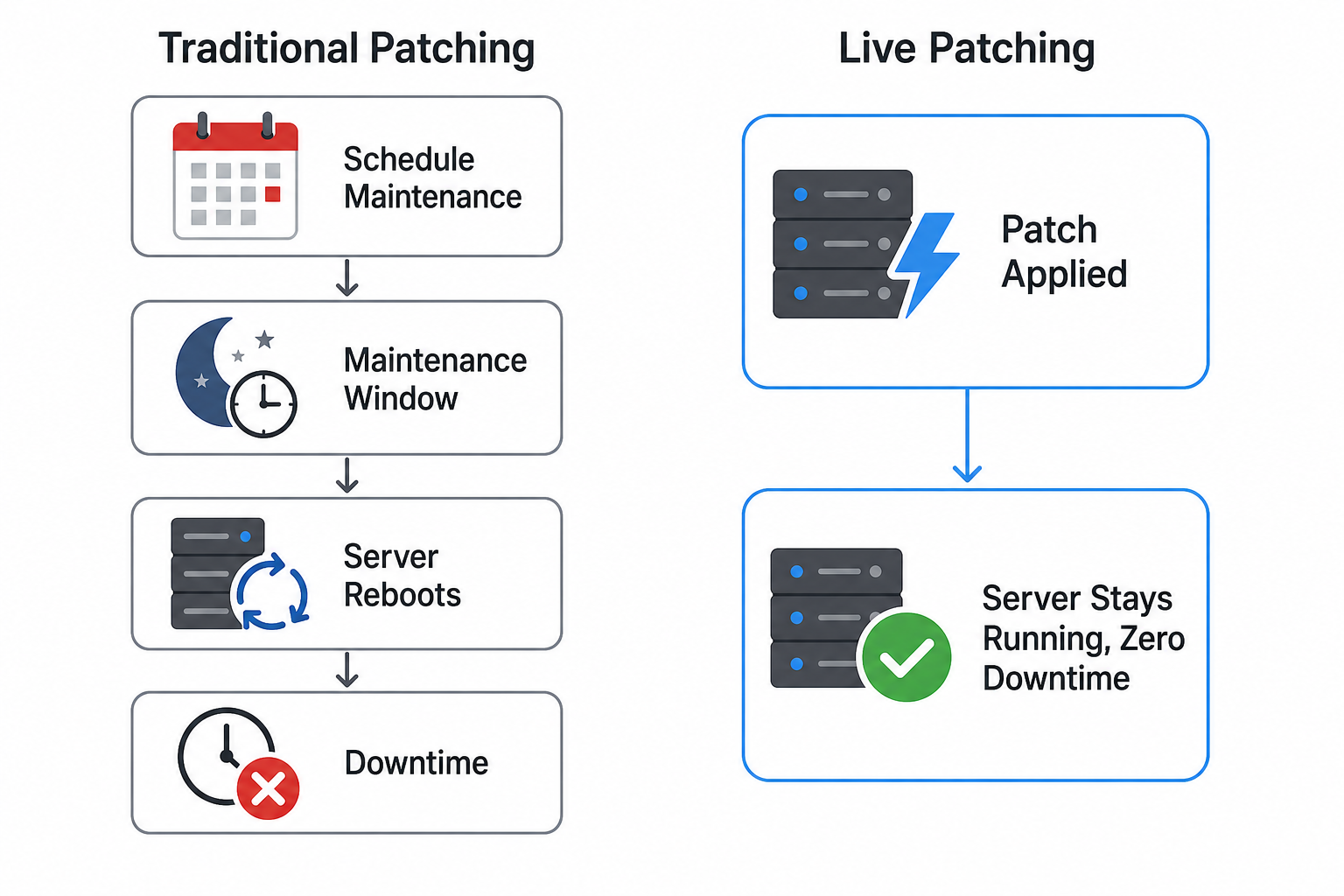
Manual patching gets unmanageable at scale, and kernel updates that need a reboot create planned downtime of their own. That sets up a tension most teams know well: patching quickly and keeping the service available can start pulling in opposite directions, particularly on systems where maintenance windows are hard to come by.
Automating patch deployment gets available CVE fixes onto systems faster and more consistently across a fleet. The bigger win is taking the reboot out of the equation where you can. Live patching (also known as rebootless patching) applies kernel fixes to a running system without restarting it. TuxCare’s KernelCare does this for supported Linux kernels, while LibCare extends the same idea to critical shared libraries such as glibc and OpenSSL.
Delayed patching is a meaningful contributor to outages, and the numbers have gone the wrong way. According to Verizon’s 2026 DBIR, vulnerability exploitation is now the most common initial access vector for breaches at 31%, up from 20% a year earlier and the first time in the report’s 19-year history that it has topped credential abuse. Remediation moved the other way. Only 26% of the CISA Known Exploited Vulnerabilities (KEV) entries found in the environments Verizon studied were fully remediated in 2025, down from 38%, and the median time to full resolution stretched from 32 days to 43. Automation is how you close that gap without paying for it in uptime.
3. Build Redundancy and Failover into the Architecture
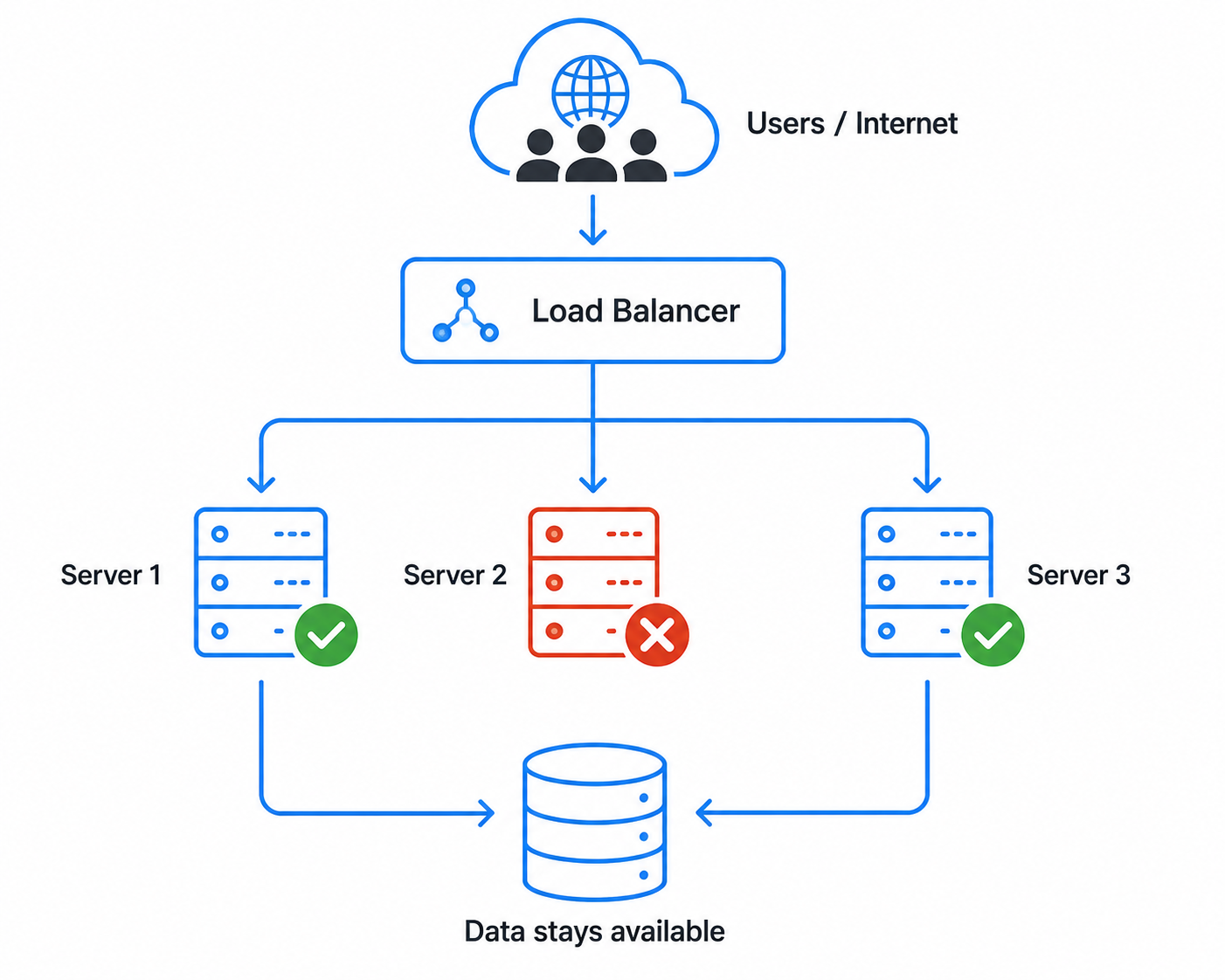
Single points of failure are where uptime goes to die. Redundancy means no one component, whether that is a server, a disk, a power feed or a network path, can take the whole system down by itself.
Load balancers spreading traffic across multiple instances, replicated databases and multi-zone deployments all keep things moving when one piece drops out. Active-active designs can cut the disruption of a failover, though they tend to be more complex and more expensive than active-passive, and a well-built active-passive setup can cut over very quickly too.
Which one you need comes down to your downtime budget and your recovery time target. Databases deserve particular attention, because an application tier with three healthy replicas sitting in front of one unreplicated database is still one bad afternoon from an outage.
4. Run Regular, Tested Backups
Backups are useless until you have restored from one. Plenty of teams find out their backups have been silently failing only at the moment they need them. Run them automatically and often, keep at least one copy offsite or in a separate account, and test restores on a schedule. That last part is the one that gets skipped.
Ransomware goes after backup systems specifically, so immutable or air-gapped copies matter more than they used to.
5. Strengthen Security to Prevent Attack-Driven Outages
A meaningful share of unplanned downtime traces back to an attacker, whether that is a DDoS, ransomware or a compromised service pulled offline for cleanup. Hardening your hosts shrinks the attack surface with least-privilege access, firewall rules, Fail2Ban and switching off services nobody is using.
Good Linux security practices and current patches together remove a lot of the easy opportunities attackers count on. Treat security and uptime as closely connected problems, because a compromised server turns into an availability incident fast. High-impact vulnerabilities in widely exposed software attract exploit attempts quickly after disclosure, so anyone running public-facing servers needs a way to move fast.
6. Plan Server Capacity and Resource Headroom
Outages from resource exhaustion are self-inflicted. A filesystem that fills, a connection pool that maxes out or memory that runs dry can take a service down just as effectively as a dead disk. Track utilization trends, set thresholds per workload rather than reaching for one universal number, and keep enough headroom to absorb both an expected traffic spike and the loss of a node.
Plan for the spikes you already know about, like product launches and seasonal peaks, before they arrive rather than during. If capacity work is permanently on fire, that is a planning problem more than an infrastructure one.
7. Run Routine Audits and Performance Checks
Drift is the quiet one – configs change, certs edge toward expiry, packages fall behind and small problems pile up until one of them becomes an outage. Scheduled audits, meaning config reviews, log analysis and performance baselines, catch these while they are still cheap to fix.
Look at what has changed since the last security audit, not just at what the current state looks like. The point is to surface the slow-building stuff that threshold alerts will not flag until things are already going wrong.
8. Schedule and Stage Maintenance Properly
Badly run maintenance is how a controlled window turns into a longer outage, or an unplanned one. Pick genuinely quiet hours, tell the people who need to know, and have the rollback ready before you touch anything.
Stage changes with canary or blue-green deploys so a bad release meets a fraction of your traffic instead of all of it, and use health checks to gate each step. The goal is to make planned work boring and reversible. A routine update should never graduate into an incident.
9. Train Teams and Document Your Runbooks
Tooling does not help if the person on call does not know the system. A documented runbook covering how to restart a service, where failover is configured and who owns what turns a 2 a.m. scramble into a checklist.
Keep your standard operating procedures, or SOPs, current and run incident drills so the right moves feel familiar before anyone needs them. Documented and rehearsed procedures leave far less room for mistakes than half-remembering under pressure. Onboard new engineers against those docs rather than against tribal knowledge.
10. Test Failover and Run Disaster Recovery Drills
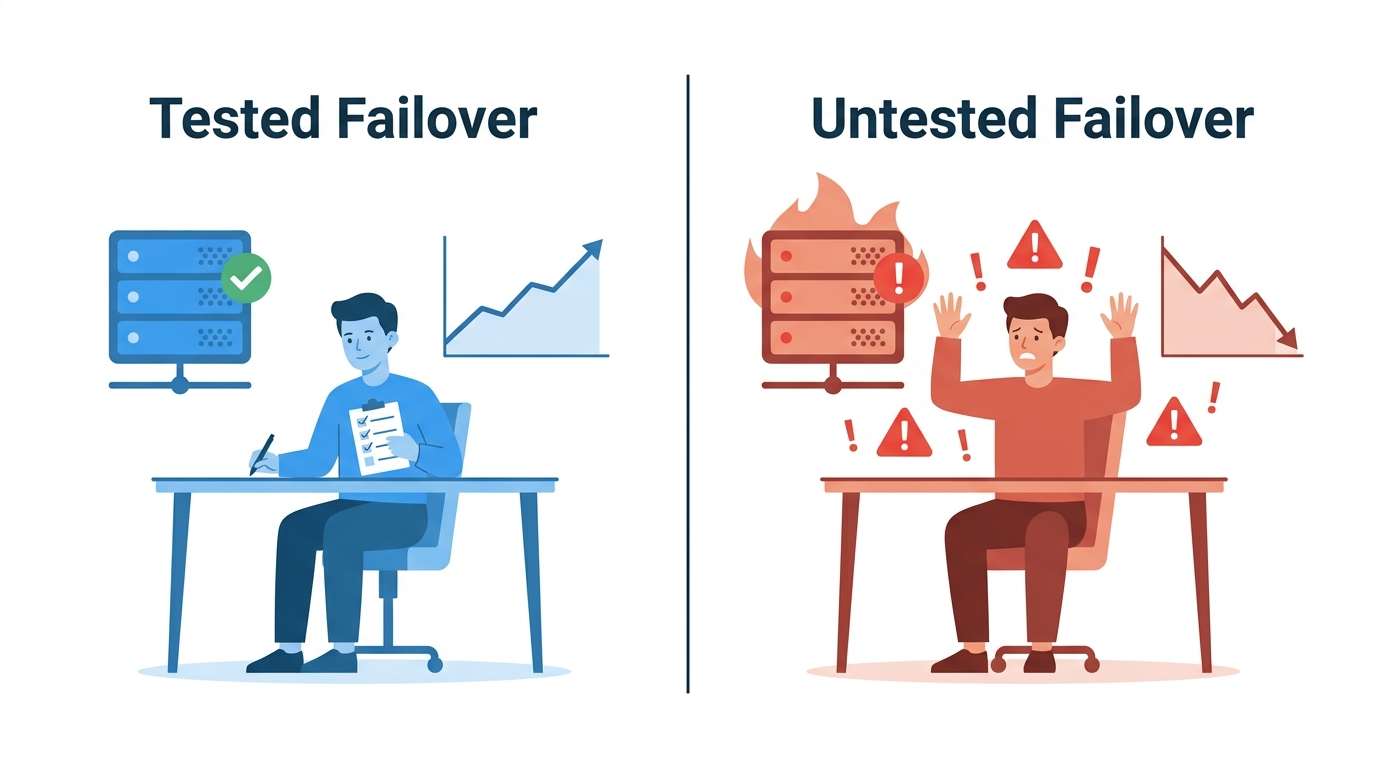
Untested failover is a guess. The only way to know your redundancy works is to break things deliberately. Kill a node, fail the database over, simulate a zone outage, then watch what actually happens. Run DR drills on a schedule and measure real recovery time against your target.
If you have never tested failover, assume it does not work until proven otherwise. Load testing belongs in the same bucket. A load balancer spreads traffic, but you still want to know how the system behaves when two nodes go instead of one. Testing against a degraded cluster tells you whether the remaining capacity can absorb the load, or whether you need more of it.
Why Patching Is the Fix Teams Put Off
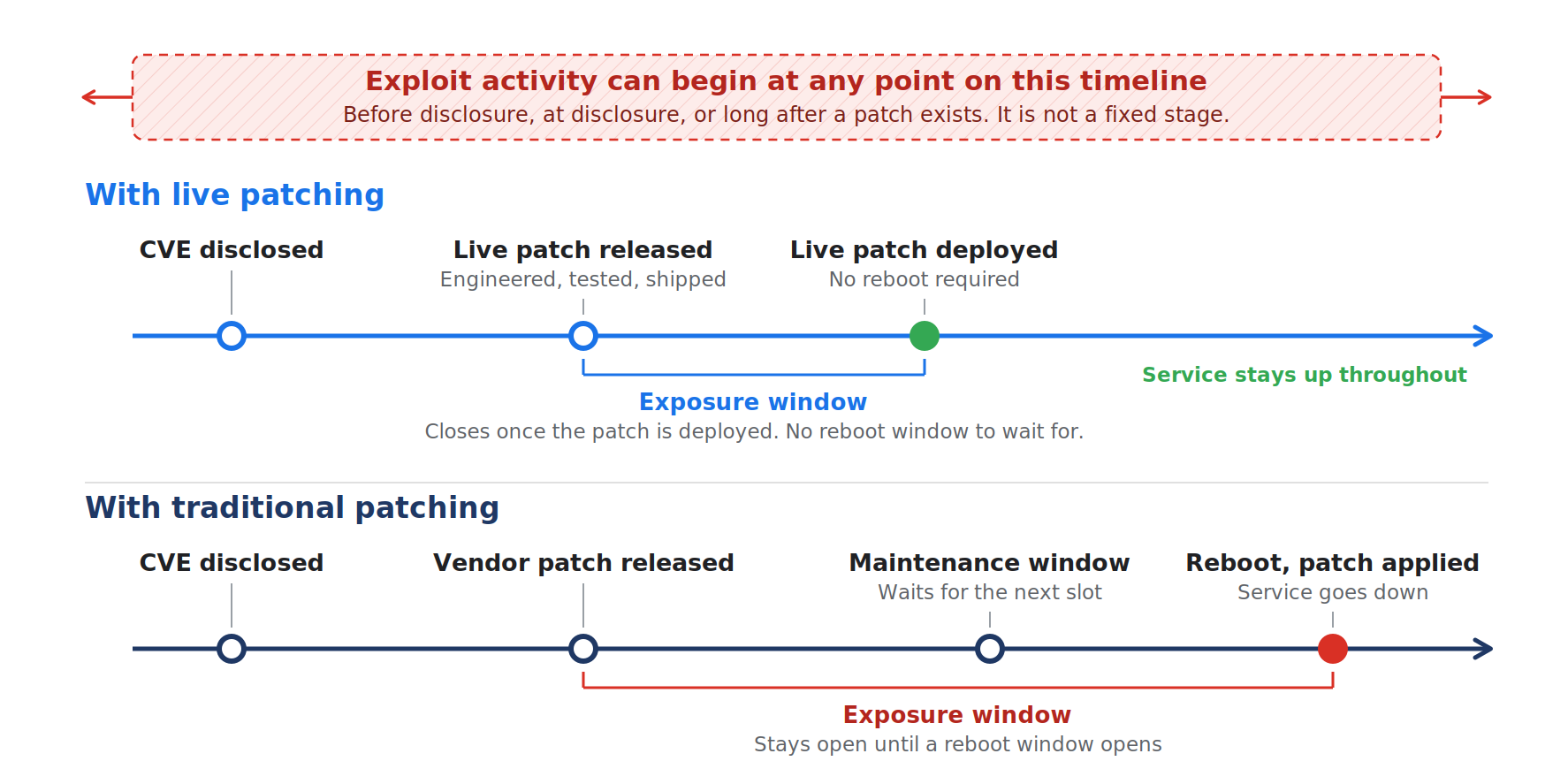
Patching is one of the strategies teams delay most often, and the reason is no mystery. The traditional kernel patch-and-reboot cycle produces the exact downtime everyone is trying to avoid, so patches slide and known CVEs stay open. The same 2026 analysis notes that operators are steadily shifting investment toward automation and control systems to cope with rising complexity, while warning that more automation brings its own classes of problems. Both halves of that are true, which is why the automation worth having is the kind that removes the maintenance window rather than just rescheduling it.
Automated, reboot-free patching changes the shape of that tradeoff. Available fixes for supported kernel CVEs can be applied to running systems with no reboot and no maintenance window to book. Patches roll out consistently across a whole fleet instead of server by server, and the gap between a patch being released and a patch being deployed can shrink from days or weeks down to hours. Linux server security improves without trading away uptime to get there.
See How TuxCare Helps You Prevent Downtime
Preventing downtime comes down to spotting problems early, building in redundancy and closing vulnerabilities before somebody else finds them, all without taking systems offline to get it done. That last part is where most teams get stuck.
TuxCare’s live patching tools apply supported security fixes without requiring a reboot. KernelCare handles supported kernels. LibCare covers critical shared libraries. Between them, supported kernel and critical shared-library fixes can go on without a reboot-driven maintenance window or a disruptive application restart, which means your uptime target and your security posture stop working against each other.
If you want to see how live patching fits your particular setup, our Linux security experts are happy to talk it through.