Tech Support
 Documentation
 Login
 Contact Us


Go straight to an AI summary of this blog post instead 


Key Takeaways
- Cloud security is the controls, policies, and tools that protect data, apps, and infrastructure in the cloud.
- Shared responsibility splits security work between you and the provider, and the split changes by service model.
- In IaaS, the guest operating system and its patching belong to you, not the provider.
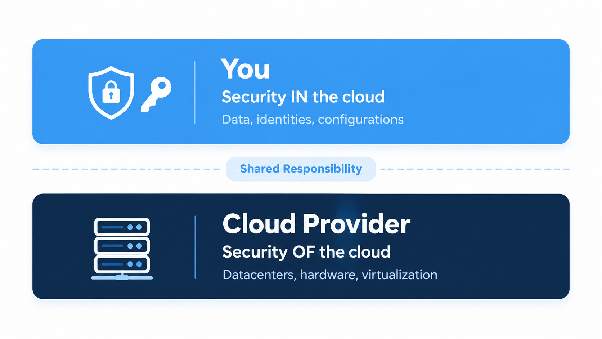
Cloud providers run the datacenters, the hardware, and the virtualization layer your workloads sit on. Above that, it depends on the service model. In IaaS, the guest operating system, user accounts, and stored data all land on your side of the line, and that line moves as you shift toward managed platforms and SaaS.
That moving line is where security gaps tend to open up. It’s easy to assume the provider handles a patching or configuration job that’s really yours.
What Is Cloud Security?
Cloud security is the combination of controls, policies, and tools that protect data, applications, and infrastructure running in cloud environments. It spans identity, network, workload, and data layers, and it applies whether you run virtual machines, managed platforms, or software delivered by a vendor.
You’ll sometimes see “cloud-based security” used for security tools that are themselves delivered from the cloud. Here, the term covers the wider job of protecting what runs in the cloud, right down to the Linux servers carrying a lot of those workloads.
It matters because a single misconfigured setting, an over-permissioned account, or an unpatched server can expose data or take a service offline. Some of those risks stay with you no matter which service model you choose, as the matrix further down shows.
What Is the Shared Responsibility Model in Cloud Security?
The shared responsibility model spells out which security tasks belong to the cloud provider and which belong to you. A common misreading is that the provider secures everything it hosts. In practice, the line shifts with the service model, and it can shift again from one service to the next.
AWS, Microsoft, and Google each frame it a little differently. Microsoft publishes a matrix by service model. AWS separates security “of” the cloud, meaning the provider’s infrastructure, from security “in” the cloud, meaning whatever you put on it. Google goes a step further with what it calls “shared fate,” where the provider takes a more active role in helping customers reach a secure setup. Microsoft itself describes its matrix as illustrative guidance that doesn’t change the terms of your agreement, so treat any of these models as a guide, and check your contract and the documentation for the specific service you run.
How Responsibility Shifts Across IaaS, PaaS, and SaaS
Cloud services fall into three service models: infrastructure as a service (IaaS), platform as a service (PaaS), and software as a service (SaaS). The more of the stack the provider manages, the less you handle directly, though a few responsibilities stay with you in all three. Microsoft’s current matrix, adapted below, shows how the work divides.
| Responsibility area | IaaS | PaaS | SaaS |
| Customer data | You | You | You |
| Configurations and settings | You | You | You |
| Identities and users | You | You | You |
| Client devices | You | You | Shared |
| Applications | You | Shared | Shared |
| Network controls | You | Shared | Provider |
| Operating system | You | Provider | Provider |
| Physical hosts, network, and datacenter | Provider | Provider | Provider |
Source: Microsoft Learn, “Shared responsibility in the cloud.” Adapted: “Customer” and “Microsoft” appear as “You” and “Provider,” the on-premises column is omitted, and the physical hosts, network, and datacenter rows are combined into one.
Microsoft also lists four responsibilities that stay with you regardless of service model: data, endpoints, accounts, and access management. Client devices show up as “Shared” for SaaS because Microsoft can help manage them there, but protecting those endpoints is still your job.
Infrastructure as a Service (IaaS)
With IaaS, you rent compute, storage, and networking, such as Amazon EC2, Azure Virtual Machines, or Google Compute Engine. The provider secures the physical infrastructure and the virtualization layer. You take on the guest operating system (guest OS), installed software, and network configuration.
AWS spells this out plainly. Customers who deploy an EC2 instance are responsible for “management of the guest operating system (including updates and security patches),” along with any software they install and the security group configuration on each instance. AWS also lists patch management as a shared control: AWS patches the infrastructure, and customers patch their guest OS and applications. Microsoft’s matrix agrees for IaaS and puts the operating system with you.
Platform as a Service (PaaS)
Managed platforms such as Azure App Service, Azure Functions, and Azure SQL Database, which Microsoft lists as PaaS, move more of the work to the provider. The provider takes the operating system, runtime, and middleware. Applications and network controls become shared. You keep application configuration, code security, access controls, and the libraries you bundle into your deployment.
Runtime versions also get retired on published schedules, and when that happens, the migration work lands back on you.
Software as a Service (SaaS)
SaaS, such as Microsoft 365 or Dynamics 365, hands the provider nearly all of the stack. Google puts it this way: in SaaS, the provider carries the bulk of the security responsibilities, and you remain responsible for your access controls and the data you choose to store. Microsoft treats client devices as a shared area here. It can offer some device management capabilities, but endpoint protection and compliance remain yours.
What Cloud Providers Are Responsible For
Providers handle the layers closest to the hardware. Microsoft’s documentation breaks its side into a few areas, and AWS draws a similar boundary.
Physical Infrastructure
Datacenter security sits with the provider: facilities, physical access controls, and environmental controls, plus the physical servers that host your workloads.
Network Foundations
Routers, switches, and cabling inside the datacenter are the provider’s to manage. In PaaS, Microsoft provides a baseline of network security, and in SaaS it manages network security. Firewall rules and segmentation for your own instances stay with you in IaaS.
Virtualization and Host Layers
The hypervisor and host operating system belong to the provider too. AWS describes its side of the line as running from the host operating system and virtualization layer down to the physical security of the facilities, which leaves your guest OS outside that work.
Compliance Documentation
AWS, Microsoft, and Google Cloud each publish compliance documentation. AWS says customers can use its control and compliance documentation for their own control evaluation and verification. It also points them to third-party audit attestation documents to work out which controls they inherit and which they still need to implement. Microsoft publishes audit reports through its Service Trust Portal, and Google Cloud offers audit reports and certifications through its Compliance Reports Manager. Some Microsoft and Google resources require you to sign in, and certain materials are shared under confidentiality terms.
What Organizations Are Responsible For
In IaaS, you’re responsible for most of the stack. That starts with patching the guest OS and kernel on every instance, including the ones launched from old images, and extends to the applications you run and the libraries they pull in, even the ones you never picked directly.
You also configure the network. In IaaS, that means security groups, firewall rules, and segmentation. In PaaS, it means application-level network controls. Logging and monitoring are yours to set up as well. On Google Cloud, for example, Data Access audit logs are off by default for every service except a few BigQuery ones, so for most services you won’t have them until you turn them on.
Backup and recovery vary by service. On Amazon EC2, you set up snapshots or backup policies for your volumes yourself, through tools like AWS Backup or Amazon Data Lifecycle Manager. Amazon RDS turns on automated backups by default, but how long they’re kept is your call.
For secure development and deployment practices, see our guide to software security best practices.
Types of Cloud Security Measures
Cloud security frameworks commonly cover domains like the five below.
Identity and Access Management
Roles, policies, service accounts, and federation often decide what a compromised credential can reach. Least privilege, multi-factor authentication on human accounts, and regular rotation (or outright removal) of static keys all narrow that. Service accounts created for one-off tasks deserve a periodic review, and anything no longer needed should go.
Data Protection and Encryption
Classify data by sensitivity first, then decide who holds the keys. Provider-managed keys are simpler to run, while customer-managed keys give you more control over rotation and revocation. Whichever you choose, record which datasets use which.
Network Controls and Segmentation
Security groups, network ACLs, private endpoints, and service perimeters control which systems can talk to each other. Segmentation limits how far one compromised workload can reach, and filtering outbound traffic limits what that workload can call out to.
Workload and Guest OS Patching
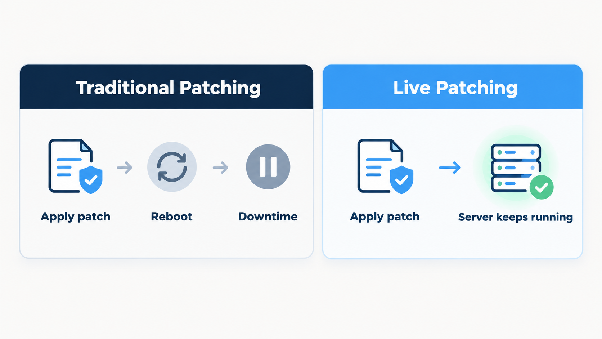
In IaaS, patching is one of the larger recurring jobs you take on. Linux is widely used on cloud and hosting servers, and a kernel update has traditionally meant rebooting the instance. Across a large fleet, finding a maintenance window for each reboot can hold patches back.
The providers do offer tooling here. AWS Systems Manager Patch Manager, Azure automatic VM guest patching, and Google Cloud VM Manager Patch can all automate guest OS patching on your instances. Each can reboot the instance as part of the process, and each has its own scope. Azure’s automatic patching, for example, covers only patches classified as Critical or Security. Either way, the guest OS itself stays on your side of the line in IaaS.
Live patching takes a different route and applies kernel security fixes to a running system. Some distributions and providers offer their own live patching for selected platforms, so a fleet that mixes distributions can end up juggling several tools. KernelCare provides live Linux kernel patching for 70+ Linux distro versions, so you can close kernel vulnerabilities on running cloud and hosting servers without scheduling a reboot.
Logging and Monitoring
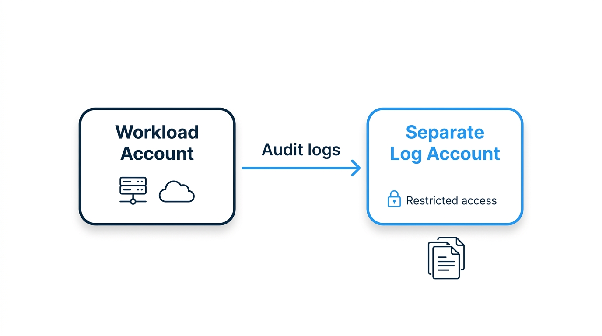
Services such as AWS CloudTrail, Azure Monitor, and Google Cloud Audit Logs record activity in your environment. Sending logs to a separate account or project makes it harder for a compromise of one environment to erase its own audit trail, especially when access to the destination is tightly restricted. Regular security audits help confirm the logs cover what you need.
How Common Cloud Threats Map to Your Responsibilities
Cloud threats tend to follow the shared responsibility line, which makes it easier to see which ones you can do something about. According to Microsoft’s matrix, misconfigured settings and compromised identities sit with you under all three service models. Operating system vulnerabilities sit with you in IaaS and move to the provider in PaaS and SaaS. If you build and ship your own container images and dependencies, they stay yours no matter what platform runs them. Our post on cloud security threats covers each category in depth.
Unpatched and end-of-life systems follow the same rule in IaaS, where the operating system is yours to maintain. A cloud instance can keep running for years on an image built long ago. When its Linux distribution, runtime, or framework reaches end of life, the vendor stops publishing security updates, yet the workload often keeps serving traffic while the migration gets planned. TuxCare’s Endless Lifecycle Support (ELS) delivers security patches for end-of-life Linux distributions, runtimes, frameworks, and applications after their vendors’ standard support ends, which gives you room to migrate on your own timeline.
Common Challenges With Shared Responsibility
The Line Moves With Each Service
In a managed Kubernetes service, the provider operates the control plane, and what happens to the worker nodes depends on the option you pick. On Amazon EKS, AWS takes on more as you move from self-managed nodes to managed node groups to Fargate. Even with managed node groups, you still have to kick off the update to a newer AMI release, and EKS then rolls it out across your nodes. A model built around one service can mislead you on the next, so check each service’s responsibility documentation.
Patching Can Fall Between Teams
If platform engineering owns the account structure, application teams own their deployments, and security owns policy, guest OS patching can land between all three. Name one owner. A useful question for your next review is who patched the kernel on the oldest production instance, and when.
Forgotten Instances Are Easy to Miss
An instance that never made it into your asset inventory won’t show up in your patch reports either. Comparing that inventory with your cloud resource listings and billing data can turn up systems no team claims.
Cloud Security Advice for 2026
Read the responsibility documentation for a new service before you deploy it, not after. Give guest OS and kernel patching a named owner in each IaaS environment. Tighten identity with least privilege, multi-factor authentication, and regular rotation of static credentials, and decide who holds the encryption keys for each dataset (then write it down).
On the operations side, ship logs to a separate account or project and test that alerts reach a person. Plan for systems that will outlive vendor support, including runtimes and base images. And write your incident response workflow before you need it, because the middle of an incident is a bad time to start.
Run Secure Environments With TuxCare
In IaaS, the provider secures the infrastructure and the guest OS on each instance stays with your team. The open source dependencies you build into your own software are yours too, wherever it runs. Endless Lifecycle Support supplies security patches for end-of-life Linux distributions, runtimes, frameworks, and applications, so migration can follow your schedule instead of a vendor’s deadline. SecureChain gives your builds verified, malware-scanned, continuously patched open source packages for JavaScript, Python, Java, Go, Rust, and PHP. And KernelCare applies kernel security patches to running Linux servers without a reboot, so kernel fixes don’t have to wait for a maintenance window.
To see how patching fits into a wider cloud routine, read our guide to cloud patch management.